---
title: Seasonal and market variants of one approved shot
display: 'Seasonal and market *variants* of one approved shot'
nav_title: Variants of one shot
summary:
- "One approved original, many versions: a product shot per season, a restaurant kit in an autumn theme, a game item set and champion for a rival faction, an airport lounge in three looks."
- "Start from the approved original, name what stays fixed (a mask, a keep-list or a keep sentence), change only the rest, and check every version against the original."
- "The tighter the change, the tighter the hold: one zone is masked and composited back to a pixel diff of 0; a whole theme or reskin is checked by an edge overlay."
description: Make seasonal, market and faction variants of approved work, from one masked zone to a full restyle, while the product, silhouettes and architecture stay fixed and every version is checked against the original.
section: playbooks
order: 290
type: playbook
topic: Brand and marketing
level: Build
roles: [marketer, artist, team-lead]
time: { read: 28, do: 100, wait: 20 }
needs: ["Any plan with credits", "One approved shot", "A mask per edit zone (any image editor)", "ImageMagick or a layer-based editor for the composite", "Approved originals: key art, items, a banner, product shots", "Python with OpenCV for the overlay check (optional)", "An approved asset set to reskin (see Make a consistent game icon set)", "One straight, well-lit photo of the room"]
last_verified: 2026-10-16
models_checked: ["GPT Image 2.5 Sunburst", "GPT Image 2.5 Flare", "Reframe", "Minimax H3", "Seedance 2.5", "Nano Banana 2.1", "Room Redesign App"]
hero: playbooks/edit-one-thing-campaign/vireo-entryway-family.webp
related: [edit-images, key-art-and-store-assets, animate-a-still]
pdf: true
run_in: [model_openai-gpt-image-2-5-sunburst, model_scenario-gemini-reframe, model_minimax-h3, model_google-gemini-nano-banana-2-1]
# the use case made, on scenario.com/explorations, and the platform workflows that run it
made_with:
- { slug: edit-one-thing, title: "Edit One Thing" }
- { slug: change-only-x-product, title: "Change Only X: Product" }
run_with:
- { id: wflow_X2nnLaGveeE9spf8EmAwNZbn, name: "Vary Images" }
- { id: wflow_object-eraser, name: "Object Eraser" }
thumb: playbooks/edit-one-thing-campaign/thumb.webp
video: tutorials/edit-one-thing-campaign.mp4
chapters:
- { at: 0, title: "Edit one thing, keep the rest", image: "/media/images/playbooks/edit-one-thing-campaign/ch-01-edit-one-thing-keep-the-rest.webp" }
- { at: 33.5, title: "Mask the zone", image: "/media/images/playbooks/edit-one-thing-campaign/ch-02-mask-the-zone.webp" }
- { at: 43.5, title: "Name only the zone", image: "/media/images/playbooks/edit-one-thing-campaign/ch-03-name-only-the-zone.webp" }
- { at: 64, title: "Composite the base back", image: "/media/images/playbooks/edit-one-thing-campaign/ch-04-composite-the-base-back.webp" }
- { at: 74, title: "The bench: size the stack, keep it in the zone", image: "/media/images/playbooks/edit-one-thing-campaign/ch-05-the-bench-size-the-stack-keep-it-in-the-zone.webp" }
- { at: 89, title: "One theme block, a keep-list per piece", image: "/media/images/playbooks/edit-one-thing-campaign/ch-06-one-theme-block-a-keep-list-per-piece.webp" }
- { at: 120.5, title: "Then animate the approved still", image: "/media/images/playbooks/edit-one-thing-campaign/ch-07-then-animate-the-approved-still.webp" }
- { at: 129, title: "A keep sentence, then \"instead of\"", image: "/media/images/playbooks/edit-one-thing-campaign/ch-08-a-keep-sentence-then-instead-of.webp" }
- { at: 177, title: "A keep-list read from the photo", image: "/media/images/playbooks/edit-one-thing-campaign/ch-09-a-keep-list-read-from-the-photo.webp" }
- { at: 215, title: "Recap", image: "/media/images/playbooks/edit-one-thing-campaign/ch-10-recap.webp" }
steps:
- title: "Mask the zone"
text: "Open the approved base, choose Retouch from its ... menu, and use Draw a mask (lasso) over the window, stepping around the shoe's heel. The run sent this mask to GPT Image 2.5 Sunburst through the Scenario MCP."
- title: "Name only the zone"
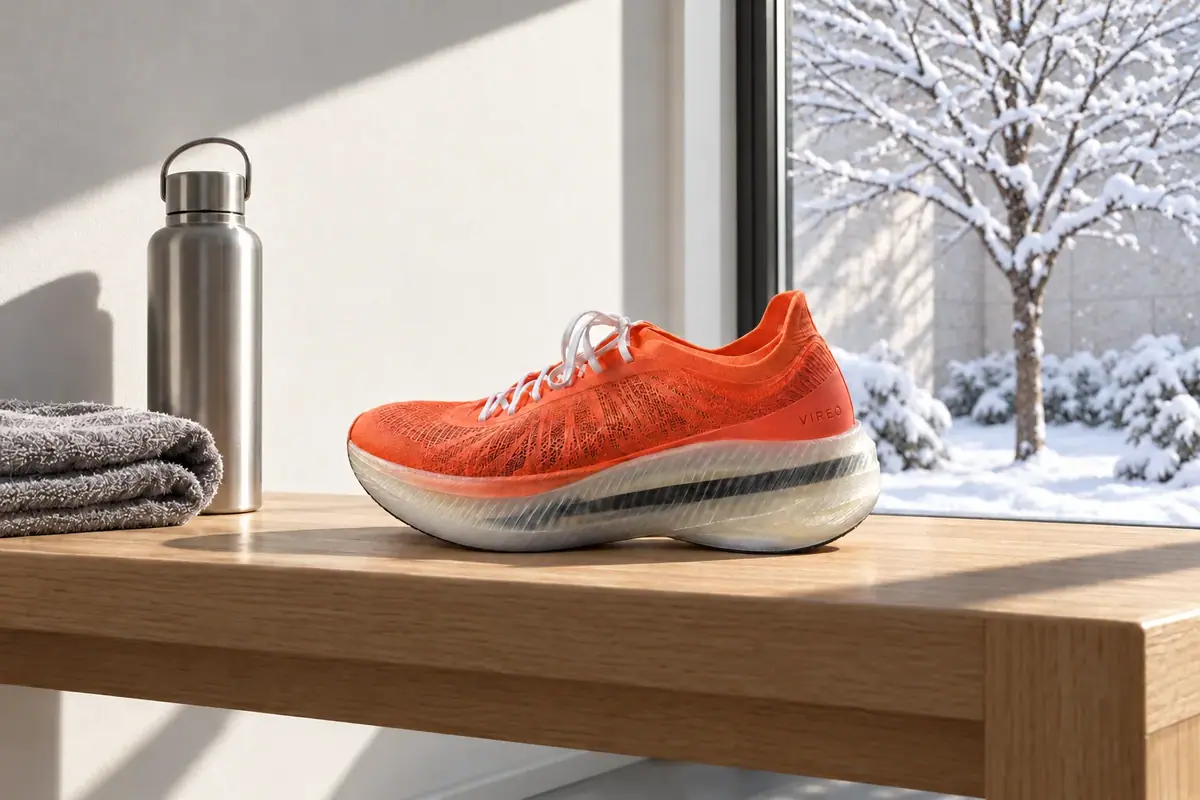
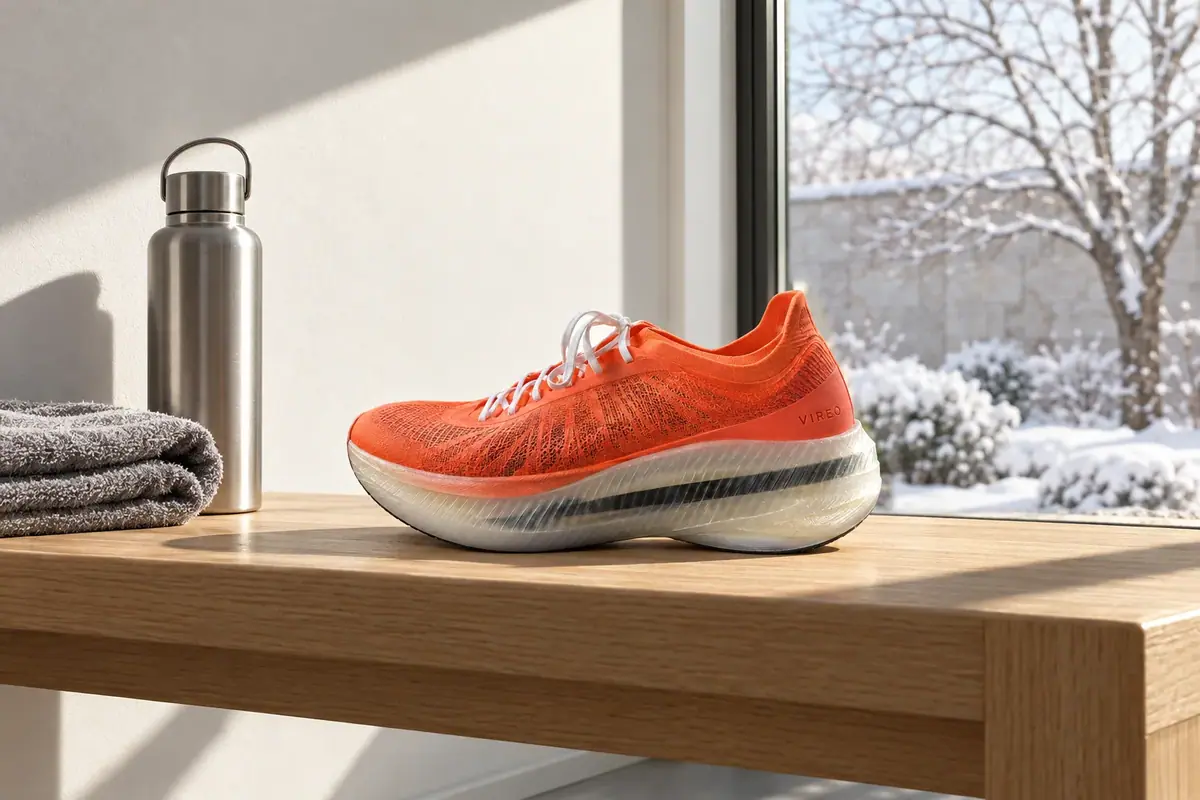
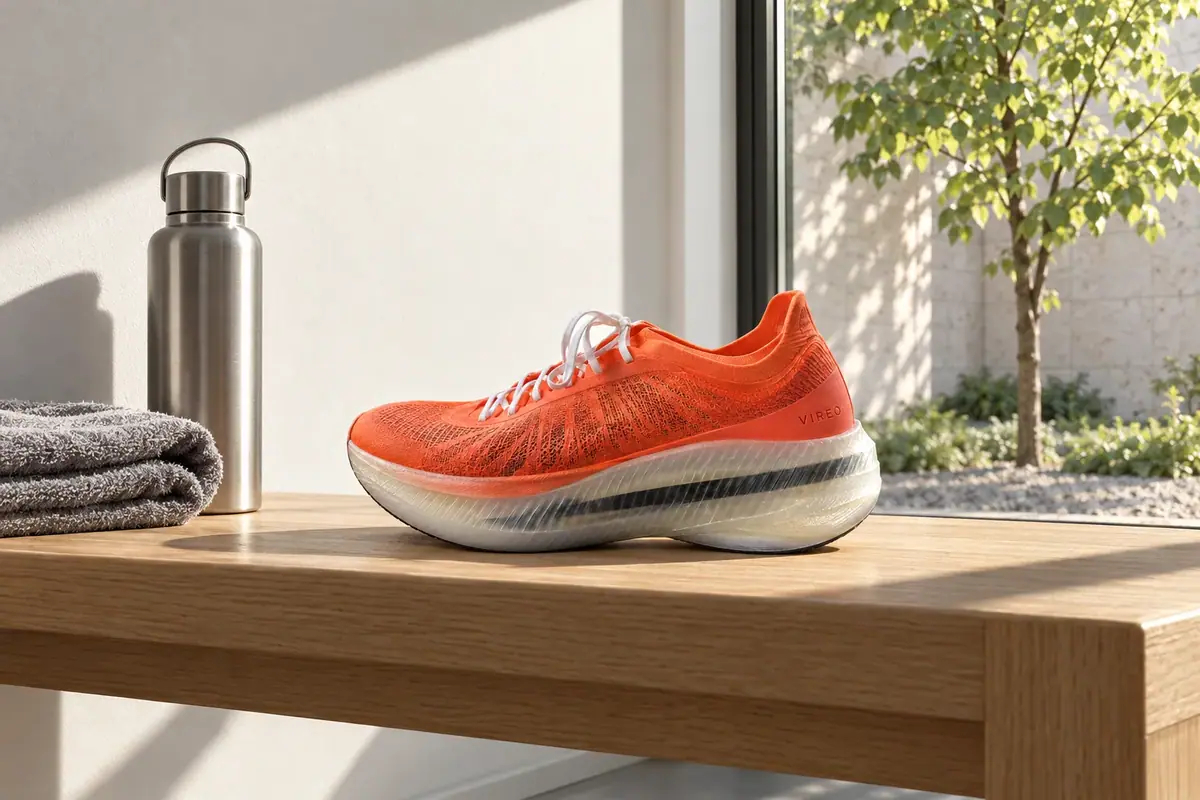
text: "The prompt names only the zone and the light it must match. Autumn, then winter: same mask, same structure."
prompt: |-
Change only the view through the window: the courtyard in autumn, the linden tree with golden and rust-colored leaves, a few fallen leaves on the gravel and on the low plants. Keep the same low morning sunlight from the right and the same soft focus. Everything else stays exactly as it is.
Change only the view through the window: the courtyard in winter, the linden tree bare with fresh snow along its branches, snow covering the gravel and the low plants, a pale winter sky light on the stone wall. Keep the same low morning sunlight from the right and the same soft focus. Everything else stays exactly as it is.
- title: "Composite the base back"
text: "Even with a mask, the model redraws the whole frame and the shoe drifts. So code lays the base back over everything outside the zone, and the difference outside it measures 0."
- title: "The bench: size the stack, keep it in the zone"
text: "The cold-weather version took three tries: a glove cut at the mask edge, then a mark on a glove. The kept prompt says how big the stack is, that it stays inside the zone, and that it carries no marks."
prompt: |-
Change only the folded grey towel and the steel water bottle on the bench: replace them with a folded black knit beanie with a pair of plain black running gloves laid flat on top of it, a small stack that stays entirely inside the area where the towel and bottle were. The gloves and the beanie carry no logos, marks or stripes. Leave a clear strip of bare oak between the stack and the shoe. Same hard morning light and shadows as the rest of the photo. Everything else stays exactly as it is.
- title: "One theme block, a keep-list per piece"
text: "Create › Images › GPT Image 2.5 Sunburst, the key art under Reference Images, Quality medium. Paste the theme block unchanged into every edit, with a keep-list written for each type of piece; check each result by laying the original's edges over it."
prompt: |-
Edit the photograph in the reference image. Keep exactly: the composition and framing, the camera angle, the corner restaurant building with its brick facade, windows, doors and awnings, the red neon EMBER & BUN sign and its flame mark exactly as they are, the people inside and the cyclist in the same places with the same poses, the street, wet sidewalk, trees and distant skyline in the same layout, the same photographic style and lens. Change only the time of day, light, palette and seasonal decorations, for the Lantern Night autumn festival: a blue-hour dusk sky in deep plum and amber, warm light from strings of small round paper lanterns in copper, amber and plum, a few rust and gold maple leaves, a light autumn haze. Lanterns hang in strings along the facade and across the street. No new text, no new signs, no other logos.
- title: "Then animate the approved still"
text: "Create › Videos with the themed key art as First Frame, 5 seconds, the camera locked and the sign unchanged."
- title: "A keep sentence, then \"instead of\""
text: "Attach the original item set as the only reference: without it, the same text invented new objects. A keep sentence holds the same objects in the same places, and every new material is written as \"this instead of that\"."
prompt: |-
Reskin the item set in the reference image for the Tidebound faction, the sea-throne rivals of the Sunforged. Keep exactly the same six objects in the same order and the same positions, with the same silhouettes, sizes and angles, the same dark slate surface, camera and composition, and the small pool of light under each item. Change only materials, palette and motifs: pearl, mother-of-pearl and verdigris bronze instead of burnished bronze and gold; engraved waves and spiral shells instead of suns; coral and aquamarine instead of rubies and crimson cord; a cold bioluminescent teal glow instead of fire and embers. The lantern holds glowing sea water instead of coals, the halberd blade is translucent aquamarine sea glass, and the banners behind become deep teal with a white spiral-shell emblem. Style: painterly champion splash art at the level of the top arena games: confident brushwork, crisp edge control, strong diagonal composition, gold and teal rim light, atmospheric depth, rich armor and cloth detail. No text.
- title: "A keep-list read from the photo"
text: "Create › Images › GPT Image 2.5 Sunburst with the lounge photo under Reference Images. Read the keep-list from the photo element by element, then close the list of what may change in one sentence; a ready-made App wrote its own prompt and changed the bar and camera."
prompt: |-
Restyle the furnishings and decor of this airport lounge photo as a 1960s jet-age lounge: teak and walnut low furniture, tulip-base side tables, tangerine and mustard upholstery, a round cream wool rug, starburst brass pendant lamps over the bar. The architecture is fixed and must stay exactly as in the reference: the same camera position and lens; the tall walnut-paneled wall on the left with the small brushed-brass NORTHVANE wordmark and the short line under it; the floor-to-ceiling glass wall in the center with thin black mullions, three tall bays and one horizontal transom near the top; the night view through the glass of the apron, the runway lights and the tail of the parked aircraft; the dark ceiling with small recessed downlights; the long backlit onyx bar on the right with its warm veined stone front and the back-bar shelf of bottles; the walnut column at the far right; the stone floor; the same warm night lighting. Only furniture, lamps, pendants, bar stools, rugs, plants, colors of movable objects and decor may change. Premium travel advertising photography, warm and calm, realistic materials, straight verticals. No people, no new text, no new signage.
agent_steps:
- title: "Connect the Scenario MCP"
text: "Connect your agent to the Scenario MCP and sign in once at [mcp.scenario.com](https://mcp.scenario.com). Then tell it which Scenario team and project to use for the session, so every output lands there."
- title: "Give the agent the files"
text: "The approved base (the entryway shot, 1536x1024) and one mask per zone: a PNG the size of the base, transparent in the zone and opaque elsewhere, one for the window and one for the bench. The agent uploads them with upload_asset. For the kit, the reskin and the room, give it the approved originals by asset ID."
- title: "Brief the agent: one zone at a time"
text: "The run sent this edit through the Scenario MCP: the base as the reference, the mask, and a prompt that names only the zone. Every version starts from the base, never from a previous edit."
prompt: |-
Edit the approved base three times with GPT Image 2.5 Sunburst (model_openai-gpt-image-2-5-sunburst): referenceImages [the base asset ID], mask set to the zone's mask asset ID, the base's width and height (1536 x 1024), quality high. Start all three from the base with wait: false and collect them with jobs_wait. Quote the cost with a dry run first and wait for my go.
Edit 1, window mask. Prompt, word for word:
Change only the view through the window: the courtyard in autumn, the linden tree with golden and rust-colored leaves, a few fallen leaves on the gravel and on the low plants. Keep the same low morning sunlight from the right and the same soft focus. Everything else stays exactly as it is.
Edit 2, window mask. Prompt, word for word:
Change only the view through the window: the courtyard in winter, the linden tree bare with fresh snow along its branches, snow covering the gravel and the low plants, a pale winter sky light on the stone wall. Keep the same low morning sunlight from the right and the same soft focus. Everything else stays exactly as it is.
Edit 3, bench mask. Prompt, word for word:
Change only the folded grey towel and the steel water bottle on the bench: replace them with a folded black knit beanie with a pair of plain black running gloves laid flat on top of it, a small stack that stays entirely inside the area where the towel and bottle were. The gloves and the beanie carry no logos, marks or stripes. Leave a clear strip of bare oak between the stack and the shoe. Same hard morning light and shadows as the rest of the photo. Everything else stays exactly as it is.
- title: "Composite the base back and measure"
text: "Even with a mask, the model redraws the whole frame and the shoe drifts. A local agent can lay the base back over everything outside the zone and measure the difference, which must be 0. In the run, the bench took three tries: a glove cut at the mask edge, then a mark on a glove."
prompt: |-
Download the three edits. For each, make a keep image from its mask (white where the base stays, black in the zone, a small blur), lay the base over the edit through it, and measure the difference against the base where the keep image is fully white. Report the number for each; it must be 0, on the shoe too. Then show me each zone edge beside the heel. Redo an edit if something crosses the zone edge, the light inside it comes from a different side, or a new prop carries a mark or text.
- title: "Theme a kit with one block"
text: "Pilot the theme on the hardest piece, the key art, on two models and keep the one that holds more of the original. Then run every other piece with the same theme block and its own keep-list, one job each. Accept a piece when the original's edges sit on it wherever nothing was meant to change."
prompt: |-
Edit the key art with GPT Image 2.5 Sunburst (model_openai-gpt-image-2-5-sunburst) and with GPT Image 2.5 Flare (model_openai-gpt-image-2-5-flare), the key art as the only reference, width 1536, height 864, quality medium. Quote the cost with a dry run first and wait for my go.
Prompt, word for word:
Edit the photograph in the reference image. Keep exactly: the composition and framing, the camera angle, the corner restaurant building with its brick facade, windows, doors and awnings, the red neon EMBER & BUN sign and its flame mark exactly as they are, the people inside and the cyclist in the same places with the same poses, the street, wet sidewalk, trees and distant skyline in the same layout, the same photographic style and lens. Change only the time of day, light, palette and seasonal decorations, for the Lantern Night autumn festival: a blue-hour dusk sky in deep plum and amber, warm light from strings of small round paper lanterns in copper, amber and plum, a few rust and gold maple leaves, a light autumn haze. Lanterns hang in strings along the facade and across the street. No new text, no new signs, no other logos.
Draw the original's edges over each result and tell me what share of them each model kept, then wait for my pick before you run the other pieces.
- title: "Reskin a set or restyle a room"
text: "Same method, bigger change: a keep sentence for what stays, and every new material or style written as a change. The item set ran at 2048x1152; the lounge at 2048x1152 too. Overlay each result on its original at 50 percent: double edges mean something moved."
prompt: |-
Two edits with GPT Image 2.5 Sunburst (model_openai-gpt-image-2-5-sunburst), quality high, width 2048, height 1152, each with its original as the only reference. Launch both with wait: false and collect them with one jobs_wait. Quote the cost with a dry run first and wait for my go.
Edit 1, reference: the Sunforged item set. Prompt, word for word:
Reskin the item set in the reference image for the Tidebound faction, the sea-throne rivals of the Sunforged. Keep exactly the same six objects in the same order and the same positions, with the same silhouettes, sizes and angles, the same dark slate surface, camera and composition, and the small pool of light under each item. Change only materials, palette and motifs: pearl, mother-of-pearl and verdigris bronze instead of burnished bronze and gold; engraved waves and spiral shells instead of suns; coral and aquamarine instead of rubies and crimson cord; a cold bioluminescent teal glow instead of fire and embers. The lantern holds glowing sea water instead of coals, the halberd blade is translucent aquamarine sea glass, and the banners behind become deep teal with a white spiral-shell emblem. Style: painterly champion splash art at the level of the top arena games: confident brushwork, crisp edge control, strong diagonal composition, gold and teal rim light, atmospheric depth, rich armor and cloth detail. No text.
Edit 2, reference: the lounge photo. Prompt, word for word:
Restyle the furnishings and decor of this airport lounge photo as a 1960s jet-age lounge: teak and walnut low furniture, tulip-base side tables, tangerine and mustard upholstery, a round cream wool rug, starburst brass pendant lamps over the bar. The architecture is fixed and must stay exactly as in the reference: the same camera position and lens; the tall walnut-paneled wall on the left with the small brushed-brass NORTHVANE wordmark and the short line under it; the floor-to-ceiling glass wall in the center with thin black mullions, three tall bays and one horizontal transom near the top; the night view through the glass of the apron, the runway lights and the tail of the parked aircraft; the dark ceiling with small recessed downlights; the long backlit onyx bar on the right with its warm veined stone front and the back-bar shelf of bottles; the walnut column at the far right; the stone floor; the same warm night lighting. Only furniture, lamps, pendants, bar stools, rugs, plants, colors of movable objects and decor may change. Premium travel advertising photography, warm and calm, realistic materials, straight verticals. No people, no new text, no new signage.
Overlay each result on its original at 50 percent and tell me where you see double edges, a moved object, a changed wall, bar front or column, a different mullion count, a moved camera, new text or people.
- title: "File the versions and report"
text: "Log every version with its base, mask and prompt, so a change in six months is one line to rerun."
prompt: |-
Create a collection for each part (the zone edits, the kit, the reskin, the room) and add the originals, masks and kept versions to it. Report a table of original asset ID to edited asset ID with the model, the prompt used and the measured difference, and the total cost spent.
updated: 2026-10-16
canonical: https://learn.scenario.com/playbooks/edit-one-thing-campaign
---
Last updated: 2026-10-16
# Seasonal and market variants of one approved shot
> Make seasonal, market and faction variants of approved work, from one masked zone to a full restyle, while the product, silhouettes and architecture stay fixed and every version is checked against the original.
In short:
- One approved original, many versions: a product shot per season, a restaurant kit in an autumn theme, a game item set and champion for a rival faction, an airport lounge in three looks.
- Start from the approved original, name what stays fixed (a mask, a keep-list or a keep sentence), change only the rest, and check every version against the original.
- The tighter the change, the tighter the hold: one zone is masked and composited back to a pixel diff of 0; a whole theme or reskin is checked by an edge overlay.
One approved shot, many versions: a new season, a new market or faction, a restyled room. Whatever the variant, the approved original is the base, what stays fixed is named before anything changes, and every version is checked against that base. This page runs the job four times, from the tightest change to the widest: one zone of a product shot (original, autumn courtyard, winter courtyard, a cold-weather bench, every pixel outside the zone identical), one autumn theme across a restaurant's key art, items, banner and a clip, a game faction reskin, and an airport lounge in three looks. For marketing, brand and game teams refreshing approved work per season, promotion or market.
:::note As of October 2026
The models, settings and screens in this article are the ones Scenario offered in October 2026. New models and updates arrive often, so check the app for newer options before you choose.
:::
## The brief
| Part | Base and versions | Fixed | May vary | Accept when |
|---|---|---|---|---|
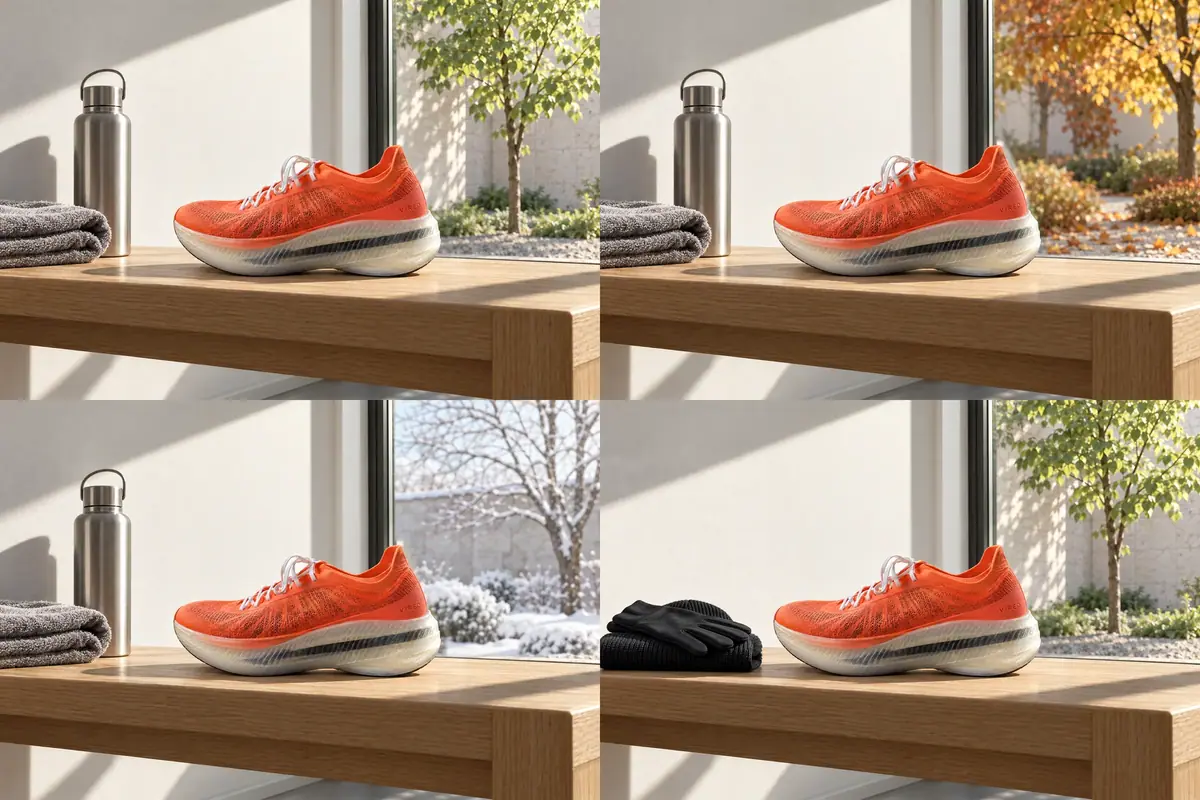
| 1. One zone, per season and promotion | Entryway morning, 1536x1024, approved. Autumn (the courtyard through the window); winter (the courtyard); cold-weather promo (towel and bottle become a beanie and running gloves) | The Vireo Apex and its wordmark, the bench, the wall, the light, the framing; every pixel outside the edit zone | Only the named zone | Zero pixel difference outside the zone; the edit matches the base's light and perspective |
| 2. One season across a kit | A Lantern Night version of every piece, plus banner formats and one short clip. Key art, product shot and banner 16:9; items 1024x1024 transparent; banner also 1:1, 4:5, 9:16; clip 5 s at 720p | Composition, building, sign, people, products, item silhouettes, camera, framing, copy area | Light, palette, seasonal decorations (lanterns, maple leaves, haze), seasonal toppings on items | Laid over its original, each piece keeps its edges; only the theme reads as new |
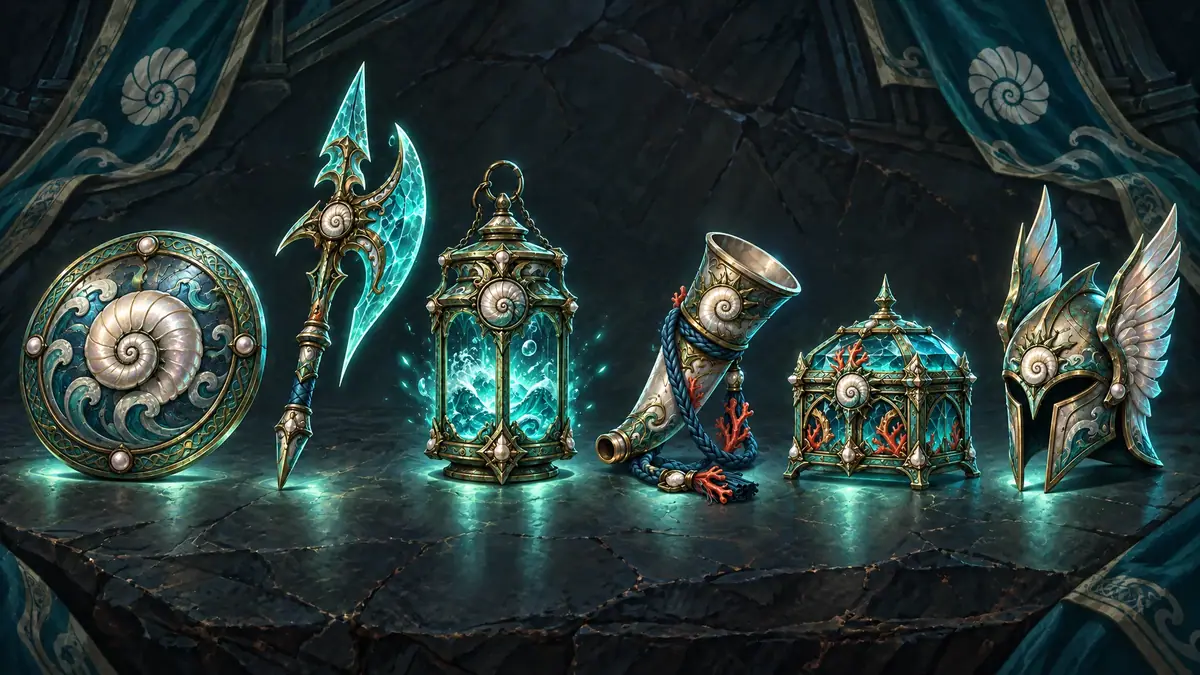
| 3. A faction (or market) reskin | Tidebound versions of the six-item Sunforged set and of the champion Vael. Same size as the originals: 2048x1152 for the item set, 2752x1536 for the splash art | Each object and its silhouette, order, position and angle; the slate table, camera and pools of light. For Vael: face, skin tone, hair, body, pose, halberd shape, composition | Materials, palette and effects only: pearl, mother-of-pearl and verdigris bronze, waves and spiral shells, coral and aquamarine, a cold teal glow | Laid over the original at 50 percent, no double edges; at thumbnail size the player identifies each item and its faction |
| 4. A room restyle | Three restyles of the lounge for a refurbishment pitch and a seasonal campaign, from one wide photo of the lounge at night, eye level, straight verticals | Camera position and lens; walnut-paneled wall with the brass NORTHVANE wordmark; floor-to-ceiling glass wall with black mullions; night view of the apron and the parked aircraft tail; dark ceiling with downlights; backlit onyx bar with its back-bar shelf; walnut column; stone floor | Furniture, lamps, pendants, bar stools, rugs, plants, colors of movable objects, decor; the weather outside for the winter look only | The fixed list matches the photo element by element; verticals stay straight; no new text or signage; no people |
The bases:
- **Part 1:** the entryway scene from [Product lifestyle scenes](https://learn.scenario.com/playbooks/product-lifestyle-scenes.md); the series continues in [Ad variations](https://learn.scenario.com/playbooks/ad-variations-family.md) and [Key art and store assets](https://learn.scenario.com/playbooks/key-art-and-store-assets.md).
- **Part 2:** approved pieces of Ember & Bun, an invented burger chain: the corner restaurant at dusk and the Double Ember product shot, both signed off earlier, and three menu cutouts approved earlier. The evergreen banner is generated in the first run here, from the product shot, and approved before the theme touches it.
- **Part 3:** Cinderthrone is a fantasy battle arena game in painterly splash-art style. Its Sunforged faction has an approved set of six legendary items and a champion, Vael. The rival Tidebound faction needs the same set in its own look. The player must recognize each item and the champion at a glance, so shapes, positions and pose stay put while materials and colors change. The ability icons and the weapon ladder for the same factions are in [Make a consistent game icon set](https://learn.scenario.com/playbooks/game-icon-set.md).
- **Part 4:** the lounge belongs to Northvane, an invented airline.
## Approach
Every variant follows the same rules. Edit the approved original, never a previous variant and never a fresh generation from text. Attach it as the only reference. Name what stays fixed before you name what changes. Check each version against the original, by measurement where you can. What differs between the parts is how tightly the fixed part is held, and that depends on how much of the image the variant touches:
- **One zone changes (Part 1):** mask the zone, edit, then composite the base back. Pixel exact.
- **One theme across every piece (Part 2):** a theme block written once, a keep-list per type of piece, the original's edges laid over each result.
- **New materials on the same objects (Part 3):** a keep sentence and a change sentence written as "X instead of Y", an outline overlay.
- **Most of the image changes, the architecture stays (Part 4):** a keep-list read from the photo, a closed list of what may change, a flip check.
### One zone: mask, edit, composite
:::flow
Masks | One transparent zone per edit |
Masked edit | GPT Image 2.5 Sunburst, only the zone named | image
Composite | ImageMagick, base back over the edit | image
Diff | Zero difference outside the zone |
:::
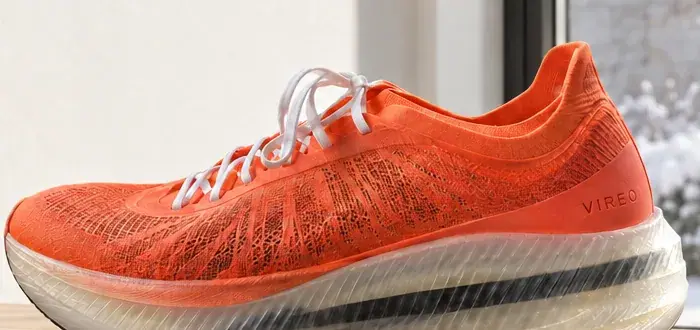
Even with a mask, the model re-renders the whole frame. In this run every raw edit redrew the shoe: laces, knit and wordmark moved slightly (normalized RMSE about 0.05 on the shoe, invisible at thumbnail size). Outside the zone the raw edits differed from the base by about 0.03, with or without a mask. Chain three edits and the product drifts three times.
So mask the zone, edit with a prompt that names only it, then composite the base back over everything else ([Let code own what must be exact](https://learn.scenario.com/browse)). Always edit from the approved base, never from the previous edit.
Models, as of October 2026: GPT Image 2.5 Sunburst at high quality, the mask passed as a separate image. GPT Image 2.5 Flare takes the same mask and costs less; the composite protects the product either way.
In the app: **Retouch** (asset **...** menu, or **Create** > **Retouch**) for a painted mask, **Edit with Prompts** for prompt only ([Edit one thing](https://learn.scenario.com/browse)).
### One theme across a kit
:::flow
Originals | Approved key art, items, banner, product shot | image
Theme block | Palette, light, season details, written once | text
Edit in place | One job per original, keep-list attached | image
Overlay check | Original edges over each themed piece | image
Formats | Banner extended to 1:1, 4:5, 9:16 | image
Clip | Five seconds from the themed key art | video
:::
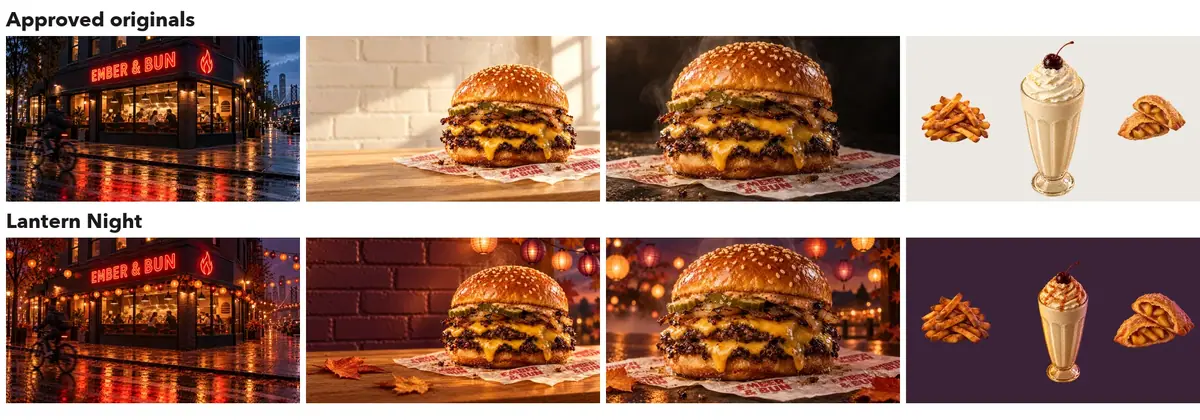
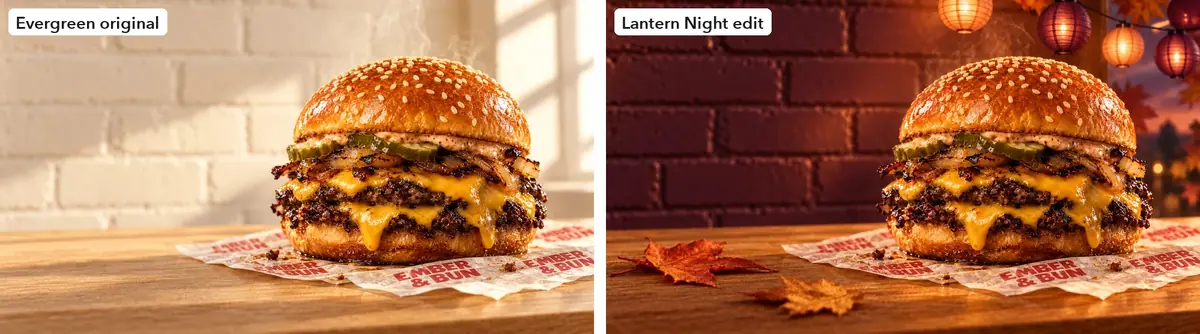
- **Approved originals first.** A theme edits something signed off; pieces generated from text are a new campaign to approve again.
- **One theme block, written once,** pasted unchanged into every edit:
```text
Lantern Night autumn festival: a blue-hour dusk sky in deep plum and amber,
warm light from strings of small round paper lanterns in copper, amber and
plum, a few rust and gold maple leaves, a light autumn haze.
```
- **A keep-list per type of piece.** Scenes keep composition, building, sign and people. Products keep every layer, shape, size and position. Items keep silhouette, angle and fill; their theme is light and a seasonal topping, with no decorations in the cutout.
Models, as of October 2026: GPT Image 2.5 Sunburst at `medium` for edits, Reframe for formats, Minimax H3 for the clip. The runners-up, Flare and Seedance 2.5, are in the captions below.
### A faction reskin: keep and change
:::flow
Originals | Approved set image and splash art | image
Keep and change | One template: keep sentence, change sentence | text
Reskin | GPT Image 2.5 Sunburst or Nano Banana 2.1, one original attached | image
Quality test | Same set at medium |
Outline check | Overlay at 50 percent, then thumbnail size |
:::
- **One original in, one reskin out.** Attach the original as the only reference. A second image, even one meant only for the theme, pulls the result toward it (see Check the result).
- **Split the prompt into "keep" and "change"** ([Write a keep-list](https://learn.scenario.com/browse)). The keep sentence lists what the player uses to recognize the asset; the change sentence touches only materials, palette and effects, each written as "X instead of Y" ([Decide what stays fixed](https://learn.scenario.com/browse)).
- **A set approved as one image can be reskinned as one image.** The six items were approved together and sit too close to crop cleanly, so the set image was the original. For a long icon list (40 inventory icons), run one icon per run.
The item set prompt as run (the Cinderthrone style paragraph is appended to every prompt of this world):
```text
Reskin the item set in the reference image for the Tidebound faction, the
sea-throne rivals of the Sunforged. Keep exactly the same six objects in the
same order and the same positions, with the same silhouettes, sizes and
angles, the same dark slate surface, camera and composition, and the small
pool of light under each item. Change only materials, palette and motifs:
pearl, mother-of-pearl and verdigris bronze instead of burnished bronze and
gold; engraved waves and spiral shells instead of suns; coral and aquamarine
instead of rubies and crimson cord; a cold bioluminescent teal glow instead of
fire and embers. The lantern holds glowing sea water instead of coals, the
halberd blade is translucent aquamarine sea glass, and the banners behind
become deep teal with a white spiral-shell emblem. Style: painterly champion
splash art at the level of the top arena games: confident brushwork, crisp
edge control, strong diagonal composition, gold and teal rim light,
atmospheric depth, rich armor and cloth detail. No text.
```
Models, as of October 2026:
- **Item set:** GPT Image 2.5 Sunburst, the top pick for reference-based edits. It held all six positions.
- **Champion:** Nano Banana 2.1 kept Vael's face and halberd closest. Sunburst made richer armor but redesigned the halberd head.
- **Single-region changes** (only the cord color, only a gem): **Edit with Prompts**. See [Edit one thing](https://learn.scenario.com/browse).
### A room restyle: a keep-list from the photo
:::flow
Room photo | Eye level, straight verticals | image
Keep-list | Every fixed element, read from the photo | text
Restyle | GPT Image 2.5 Sunburst, one look per prompt | image
Check | Flip photo and result, tick the list |
:::
Restyling is an edit where most of the image must stay. Write the fixed list from the photo itself, element by element, and paste it into every prompt ([Decide what stays fixed](https://learn.scenario.com/browse)).
Then close the list of what may change: "Only furniture, lamps, pendants, bar stools, rugs, plants, colors of movable objects and decor may change." A closed list holds better than "keep the architecture", which the model reads loosely.
- **Describe the photo as it is.** The keep-list in this run said "three tall bays" for the glass wall. The photo has four, and all three outputs kept four: the reference won over the text. Count from the photo so the text and the picture agree.
- **Read an App's prompt before trusting it.** The platform **Room Redesign** App is a fast start, but it writes its own prompt. On this brief it turned the onyx bar front into wood, kept the two travelers and reframed the shot.
Models, as of October 2026:
- **Capability:** image to image with one reference.
- **Model used:** GPT Image 2.5 Sunburst at `high` quality, at the photo's size (2048x1152).
- **Alternative tested:** the **Room Redesign** App, rejected for this brief (see the check below).
## Steps
### Part 1: one zone, per season and promotion
:::steps
1. **Draw a mask per zone:** a PNG the size of the base (1536x1024), transparent in the edit zone, opaque elsewhere. The window mask is a polygon that follows the window and steps around the shoe's heel (points 1008,0 1535,0 1535,655 1142,655 1142,612 1108,538 1053,393 1033,360 1008,360). The bench mask is a rectangle over the towel and bottle, from 0,140 to 430,720, with a margin for shadows and a gap before the shoe.
2. **Edit the window: autumn** ([Edit one thing](https://learn.scenario.com/browse)). In the web app, choose **Retouch** from the base image's **...** menu (GPT Image 2.5 Sunburst is preselected) and paint the zone with **Draw a mask** or **Draw a mask (lasso)**; the generate panel has no mask input. This run passed the base, the mask and quality `high` through the Scenario MCP; in a workflow, wire the mask into the Image Generator's **Mask** port. Prompt:
```prompt
Change only the view through the window: the courtyard in autumn, the
linden tree with golden and rust-colored leaves, a few fallen leaves on
the gravel and on the low plants. Keep the same low morning sunlight from
the right and the same soft focus. Everything else stays exactly as it
is.
```
3. **Edit the window: winter.** Same mask, same structure:
```prompt
Change only the view through the window: the courtyard in winter, the
linden tree bare with fresh snow along its branches, snow covering the
gravel and the low plants, a pale winter sky light on the stone wall.
Keep the same low morning sunlight from the right and the same soft
focus. Everything else stays exactly as it is.
```
4. **Edit the bench: cold-weather promo.** Bench mask. The first try used a narrower mask (to x 380) and asked for gloves "laid flat": a glove reached past the mask edge toward the shoe, and the composite cut it in half. The second try, with the wider mask and the stack kept inside the zone, put a chevron mark on a glove. The kept prompt names the size of the stack and rules out marks:
```prompt
Change only the folded grey towel and the steel water bottle on the
bench: replace them with a folded black knit beanie with a pair of plain
black running gloves laid flat on top of it, a small stack that stays
entirely inside the area where the towel and bottle were. The gloves and
the beanie carry no logos, marks or stripes. Leave a clear strip of bare
oak between the stack and the shoe. Same hard morning light and shadows
as the rest of the photo. Everything else stays exactly as it is.
```
5. **Composite the base back** ([Do the exact part in code](https://learn.scenario.com/browse)). Make a "keep" image per mask (white where the base stays, black in the zone, a small blur) and lay the base over the edit through it. With ImageMagick, for the bench:
```text
magick -size 1536x1024 xc:white -fill black \
-draw "rectangle 0,140 430,720" -alpha off -blur 0x6 \
-colorspace gray keep-bench.png
magick edit.png \( base.png keep-bench.png -alpha off \
-compose CopyOpacity -composite \) -compose over -composite final.png
```
For the window, draw the same polygon with `-draw "polygon ..."` and a 4 px blur, so the edge stays tight to the heel. In a layer editor: the base on top of the edit with a soft layer mask.
6. **Diff each final against the base** ([Check by measurement](https://learn.scenario.com/browse)) with `magick compare -metric RMSE`, measured where the keep image is fully white: 0 for all three finals, and 0 on the shoe. Then check the zone edge for a seam, especially beside the heel.
:::
**With the Scenario MCP:** upload the masks with `upload_asset`, then `model_run` on `model_openai-gpt-image-2-5-sunburst` with `referenceImages: [""]`, `mask: ""`, the prompt, the base's `width` and `height`, and `quality: "high"`. Start all variants from the same base with `wait: false`, collect them with `jobs_wait`, and composite each.
### Part 2: one season across a kit
:::steps
1. **Collect the approved originals** in one collection and note each asset ID ([Keep sources as data](https://learn.scenario.com/browse)).
2. **Write the theme block:** palette, light, time of day, season details. Name colors, not moods.
3. **Write a keep-list per type of piece** ([Write a keep-list](https://learn.scenario.com/browse)). For the key art:
```text
Edit the photograph in the reference image. Keep exactly: the composition and
framing, the camera angle, the corner restaurant building with its brick
facade, windows, doors and awnings, the red neon EMBER & BUN sign and its flame
mark exactly as they are, the people inside and the cyclist in the same places
with the same poses, the street, wet sidewalk, trees and distant skyline in the
same layout, the same photographic style and lens. Change only the time of
day, light, palette and seasonal decorations, for the . Lanterns
hang in strings along the facade and across the street. No new text, no new
signs, no other logos.
```
For the items, the change line is the light and one topping: "warm amber light as from small copper paper lanterns on the left, a soft plum rim light on the right, and a light dusting of smoky maple seasoning on the fries. No lanterns or leaves in the image, no shadow, no text."
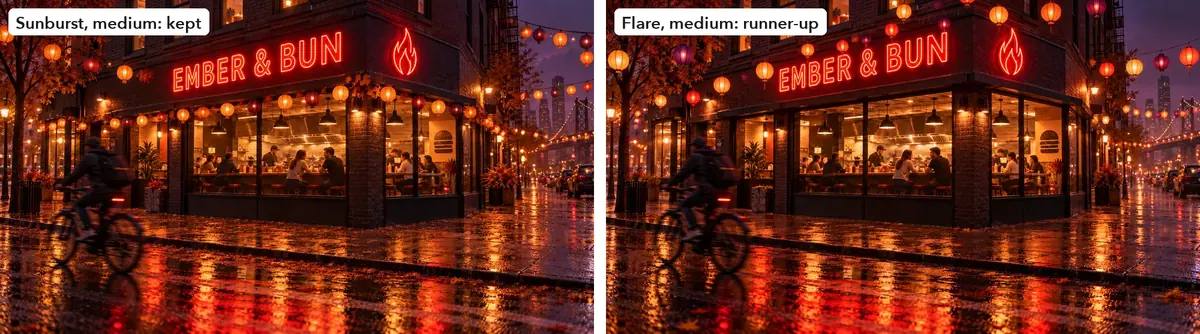
4. **Test the theme on the hardest piece** ([Pilot the hardest case](https://learn.scenario.com/browse)): the key art, with the sign, the people and the most edges. Open **Create**, choose **Images**, add the key art under **Reference Images**. Set **Dimensions** to 16:9 (1536x864) and **Quality** to `medium`.
5. **Run it on two models** ([Run a same-input shoot-out](https://learn.scenario.com/browse)), here Sunburst and Flare. Keep the one that holds more of the original: Sunburst kept 93.2 percent of the edges, Flare 91.0, with more lanterns over the facade.
6. **Edit every other piece, one job each** ([Edit one thing](https://learn.scenario.com/browse)): theme block, matching keep-list, the piece as the only reference, at its own size. Items keep **Background** on `transparent`.
7. **Check that only the theme changed** ([Check by measurement](https://learn.scenario.com/browse)): draw the original's edges over each themed piece, and compare item silhouettes from their alpha channels.
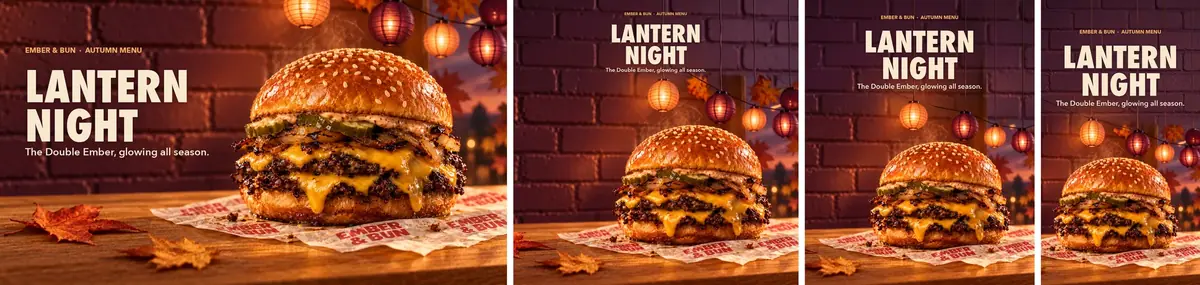
8. **Extend the banner to every format** ([Reframe for every format](https://learn.scenario.com/browse)). Open the themed banner, choose **Expand** (model Reframe), crop to the product side, place it at the bottom and extend upward: the new wall is the copy area.
9. **Pilot the tallest format at 1K first,** a fraction of the 2K price, then run 1:1, 4:5 and 9:16 at 2K. The wider the format, the more of the original wall the crop must keep: the first 1:1 and 4:5 crops started close to the burger, and the lanterns filled the space meant for copy. Starting the crop further left fixed both.
10. **Typeset the copy in code** ([Typeset text, never generate it](https://learn.scenario.com/browse)), sharp and editable on each format.
11. **Animate the approved themed still** ([Animate from a first frame](https://learn.scenario.com/browse)). Open **Create**, choose **Videos**, set the key art as **First Frame**, and under **Settings** set **Duration** to 5 seconds and **Resolution** to the lowest (`768P` on Minimax H3). Test two models before any longer or sharper take.
12. **Conform the clip** ([Conform clips before the edit](https://learn.scenario.com/browse)): 1280x720 at 24 fps, H.264, generated audio removed if the post plays muted.
:::
#### Formats and the clip
The first 9:16 pilot asked to "continue the scene naturally above the image". The model filled the new space with more lanterns, maple-leaf lanterns and an arched window. The fix names where the new space goes and what it must not hold.
```text
Extend the canvas upward only. Above the original image, continue the same
deep plum painted brick wall in soft amber light; the thin cords of the
existing paper lanterns run straight up and out of the top of the frame. Do
not add, repeat or copy any lanterns, leaves, windows or objects in the new
area: it is an empty plum brick wall kept free for copy. No text, no title, no
letters, no labels, no signs, no logos.
```
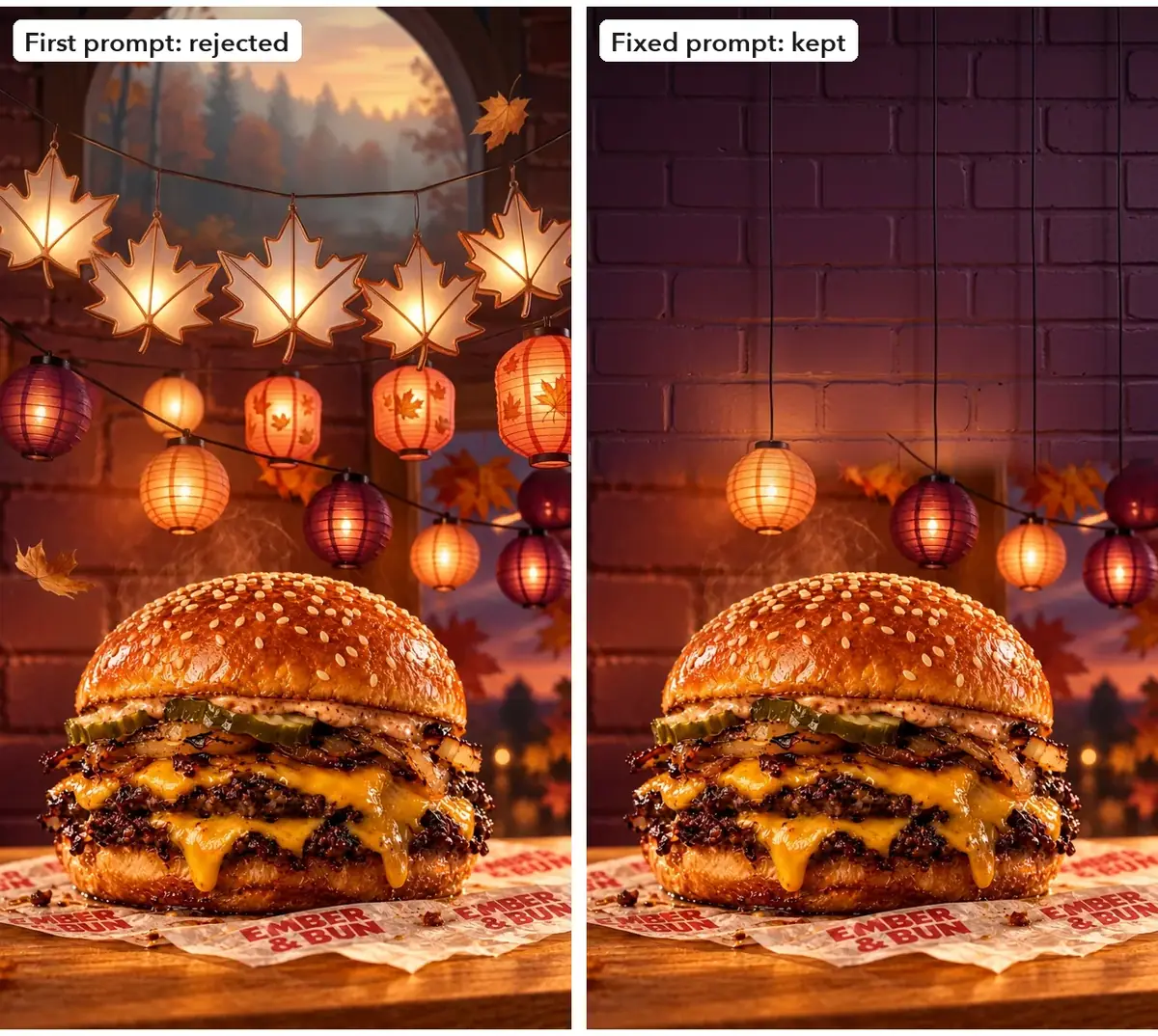
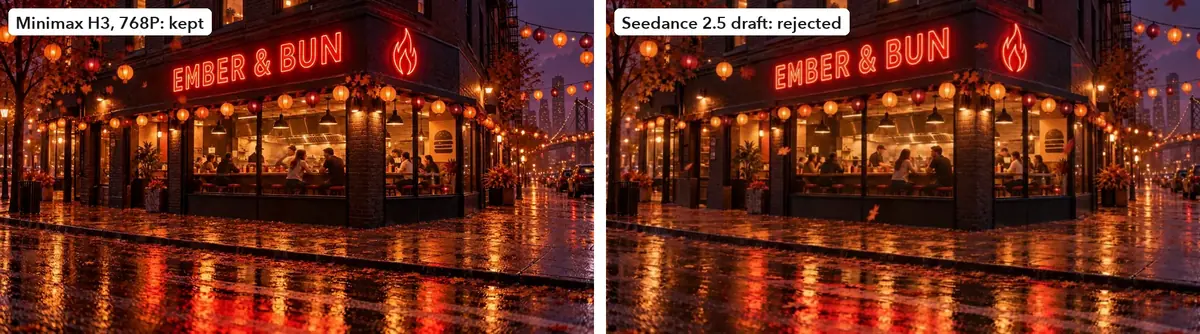
Both clip models got one prompt: locked camera, swaying lanterns, a few drifting leaves, the cyclist riding out, small motions from the guests, and the sign unchanged.
:::video https://ufgc0c9mhl4ueq76.public.blob.vercel-storage.com/academy/42ff5660a2ac1e6a1d51c6c42157d9f82f5a14cb9ee72cde065fdfe3fdd1eb64.mp4
Minimax H3, 5 seconds at 768P, the themed key art as first frame. Conformed to 1280x720, audio removed.
:::
### Part 3: a faction reskin
:::steps
1. **Collect the originals** in one collection. For each, note the dominant materials, colors and effects; they become the "instead of" clauses.
2. **Set up the item set reskin.** Open **Create**, choose **Images**, pick **GPT Image 2.5 Sunburst**. Under **Reference Images**, add the Sunforged set image only. Set **Dimensions** to 16:9 (2048x1152) and **Quality** to `high`.
3. **Fill the template and generate.** Keep sentence: objects, order, positions, silhouettes, table, camera, pools of light. Change sentence: one "instead of" per material, motif and effect, plus one line for each object whose content changes (the lantern's coals, the halberd blade, the banners). Click **Generate**. The price shows on the button before you run.
4. **Reskin the champion the same way.** Reference: Vael's splash art only. Pick **Nano Banana 2.1**, 16:9 at 2K. The keep sentence names her face, skin tone, hair, body proportions, the leap, the halberd's shape and grip, the camera and composition. The change sentence covers armor, tabard, blade, effects and the stained-glass shards.
5. **Test `medium` quality on the set.** Run the item set again at `medium`. Compare both at the size the set ships, then at full size.
6. **Check outlines over the originals** ([Check by measurement](https://learn.scenario.com/browse)). Overlay each reskin on its original at 50 percent opacity. Double edges mean an object moved or changed shape.
:::
The champion prompt as run (style paragraph appended):
```text
Create a Tidebound faction skin of the champion in the reference image. Keep
exactly the same character: her face, skin tone, hair, body proportions, the
leap down from the shattered cathedral arch, the shape and grip of her
halberd, the camera angle and the composition. Change only materials, palette
and effects: armor in pearl and verdigris bronze engraved with waves and
spiral shells instead of burnished bronze with suns; the torn tabard in deep
teal instead of crimson; the halberd blade made of translucent aquamarine sea
glass with water swirling inside instead of molten glass; bioluminescent sea
spray and drifting droplets instead of embers; the stained-glass shards
tinted sea green and pearl.
```
**With the Scenario MCP:** call `model_openai-gpt-image-2-5-sunburst` (or `model_google-gemini-nano-banana-2-1` for a character) with `referenceImages: [original_id]`, the filled template and `wait: false`, once per original; then one `jobs_wait` for all. Keep a table of original id to reskin id.
### Part 4: a room restyle
:::steps
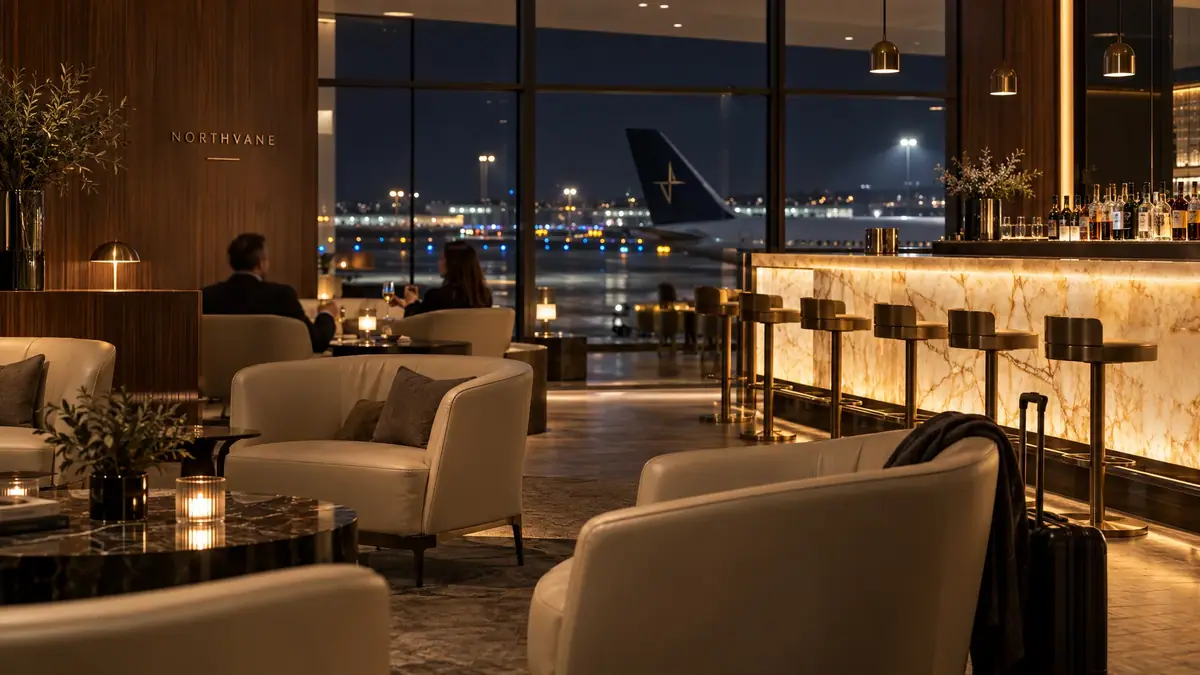
1. **Photograph the room straight.** Eye level, a wide lens without heavy distortion, verticals straight, the main architecture in frame. This lounge photo was generated for the invented airline; with a real room, use your own photo.
2. **Write the keep-list from the photo** ([Write a keep-list](https://learn.scenario.com/browse)). Walk the image left to right and name every fixed element with its visible detail: wall material, signage, glass and mullions, the view, ceiling, bar, column, floor.
3. **Generate the 1960s look.** **Create** > **Images**, **GPT Image 2.5 Sunburst**, the room photo in **Reference Images**, **Dimensions** 2048x1152, **Quality** `high`:
```prompt
Restyle the furnishings and decor of this airport lounge photo as a 1960s
jet-age lounge: teak and walnut low furniture, tulip-base side tables,
tangerine and mustard upholstery, a round cream wool rug, starburst brass
pendant lamps over the bar. The architecture is fixed and must stay
exactly as in the reference: the same camera position and lens; the tall
walnut-paneled wall on the left with the small brushed-brass NORTHVANE
wordmark and the short line under it; the floor-to-ceiling glass wall in
the center with thin black mullions, three tall bays and one horizontal
transom near the top; the night view through the glass of the apron, the
runway lights and the tail of the parked aircraft; the dark ceiling with
small recessed downlights; the long backlit onyx bar on the right with
its warm veined stone front and the back-bar shelf of bottles; the walnut
column at the far right; the stone floor; the same warm night lighting.
Only furniture, lamps, pendants, bar stools, rugs, plants, colors of
movable objects and decor may change. Premium travel advertising
photography, warm and calm, realistic materials, straight verticals. No
people, no new text, no new signage.
```
This is the prompt as run. With your own photo, write the bay count you see.
4. **Generate the minimalist look** ([Batch from a template](https://learn.scenario.com/browse)). Same keep-list; replace the style phrase with: `a calm Japanese-inspired minimalist tea lounge: low pale ash lounge chairs with oat linen cushions, a few long benches, a single gnarled pine bonsai on a stone plinth, paper lantern pendants over the bar, raked-gravel trays, very few objects each given space, muted stone, oat and sage tones`.
5. **Generate the winter look.** This one may change the weather, so the prompt opens differently, drops "the same warm night lighting" and adds "and the weather outside" to the closed list:
```prompt
Dress this airport lounge photo for a snowy winter holiday evening: soft
snow falling outside the glass over the apron, warm string lights draped
along the back-bar shelf, evergreen garlands with brass ornaments on the
bar front edge, a tall decorated fir tree in the left corner by the
walnut wall, plaid wool throws on the armchairs, candle lanterns on the
tables, a tray of hot chocolate mugs on the bar.
[same keep-list]
Only furniture, lamps, pendants, bar stools, rugs, plants, colors of
movable objects, decor and the weather outside may change. [same ending]
```
6. **Check each look against the photo.** Flip between the photo and the result at the same size and tick the keep-list: wordmark position, mullions, aircraft tail, bar front, column, floor, camera.
:::
:::gallery The three kept looks
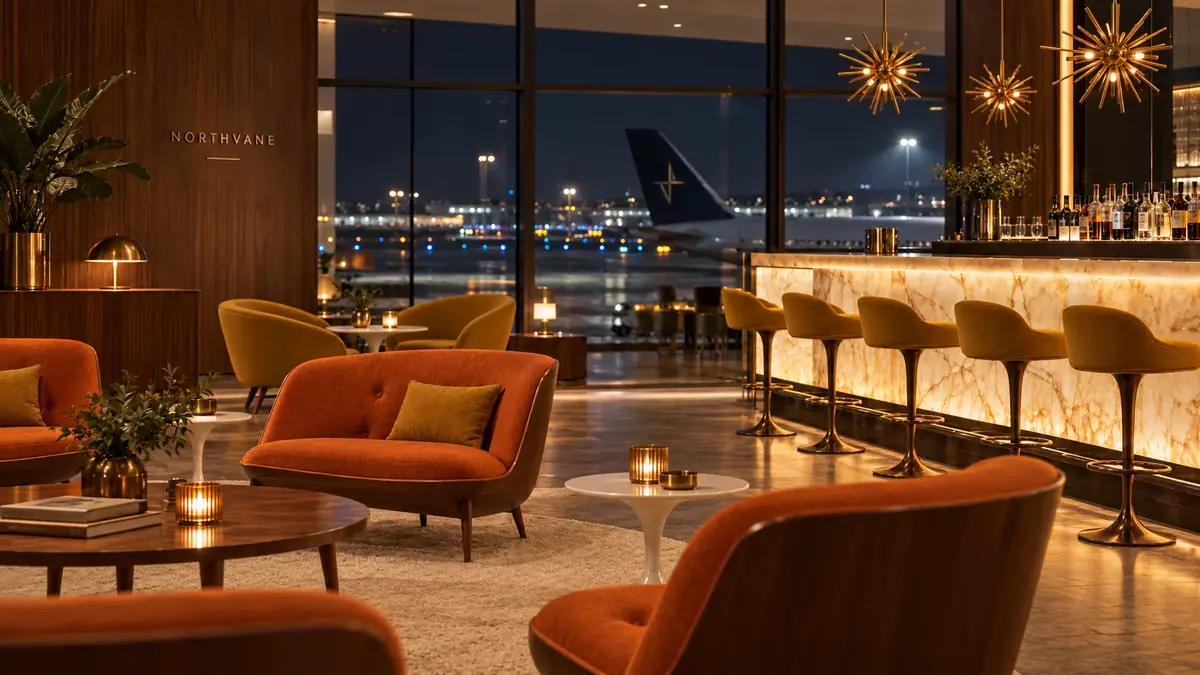
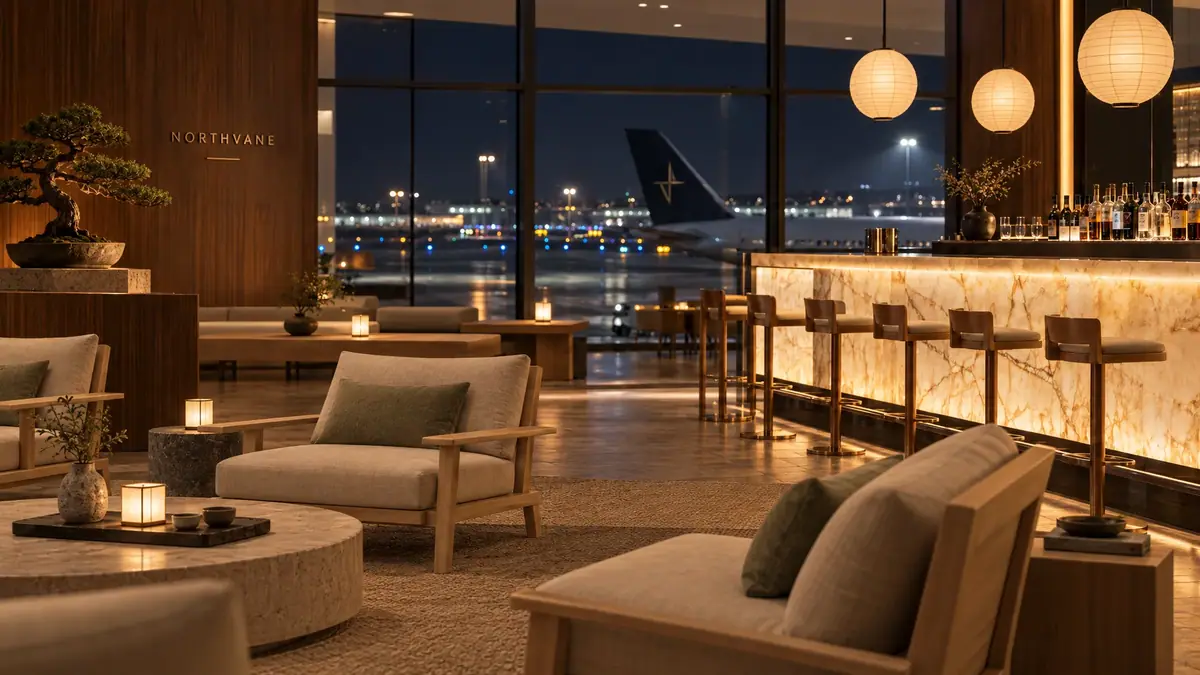
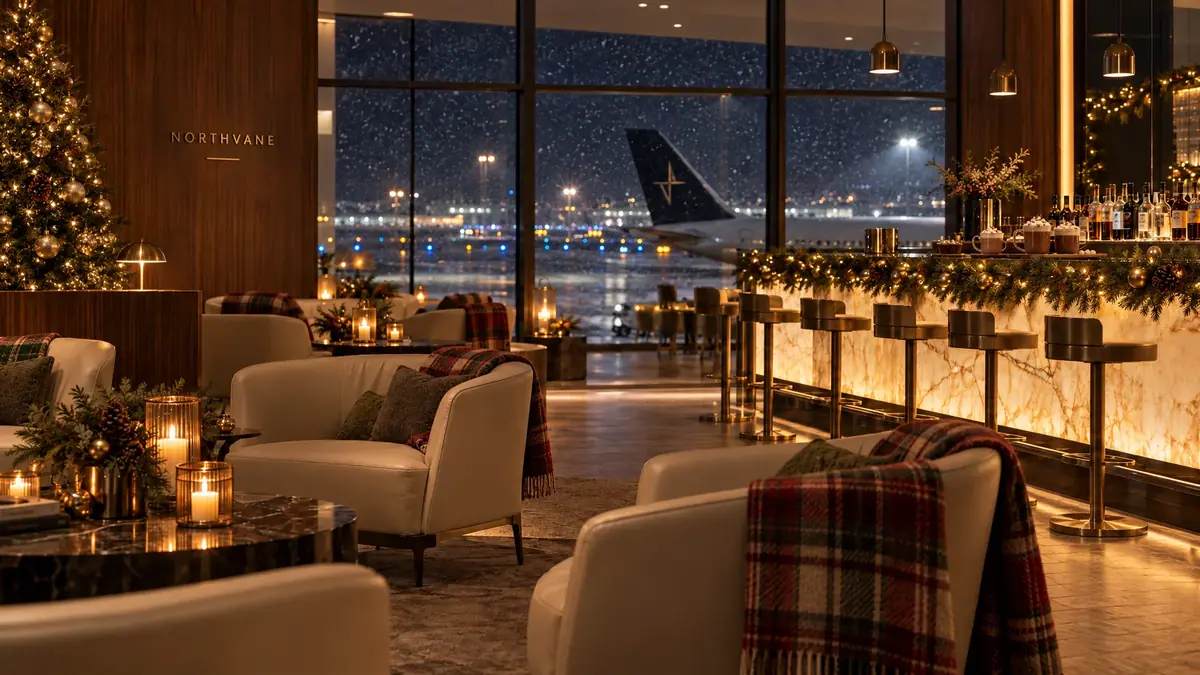
:::
**With the Scenario MCP:** `model_run` on `model_openai-gpt-image-2-5-sunburst` with `referenceImages: [""]`, the prompt, `width: 2048`, `height: 1152` and `quality: "high"`. The three looks can start together with `wait: false`.
The App test was `workflow_run` on `wflow_room-redesign` with the photo as `image1` and the style phrase as `text1`.
## Check the result
### One zone
:::check
**Accept when:** the pixel difference outside the zone is 0 after compositing; the new content matches the light direction, focus and perspective of the base; no seam or halo shows at the zone edge; nothing new crosses the zone edge; new props carry no marks or text.
**Reject when:** the edit removed or moved something you did not name; the light inside the zone comes from a different side; an object is cut where the zone ends; the zone edge shows a hard line; the edit was made from a previous edit instead of the base.
:::
:::compare
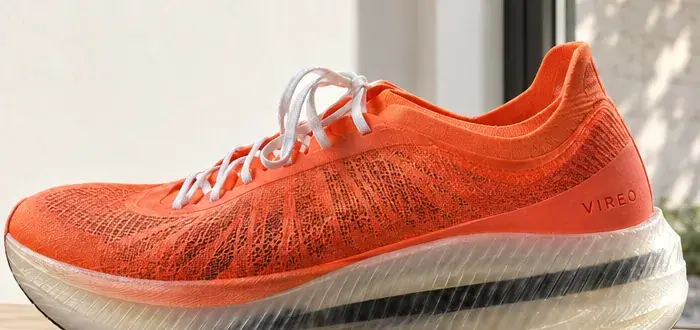
:::
Why mask at all, if the raw edit drifts either way: the composite needs a zone, and the mask tells the model where the change goes. In this run the unmasked prompt "Make it winter: a snowy courtyard outside the window with a bare tree covered in snow." also kept the frame; its shoe was redrawn like the others, with no zone drawn to composite against.
:::compare
:::
:::gallery The four versions
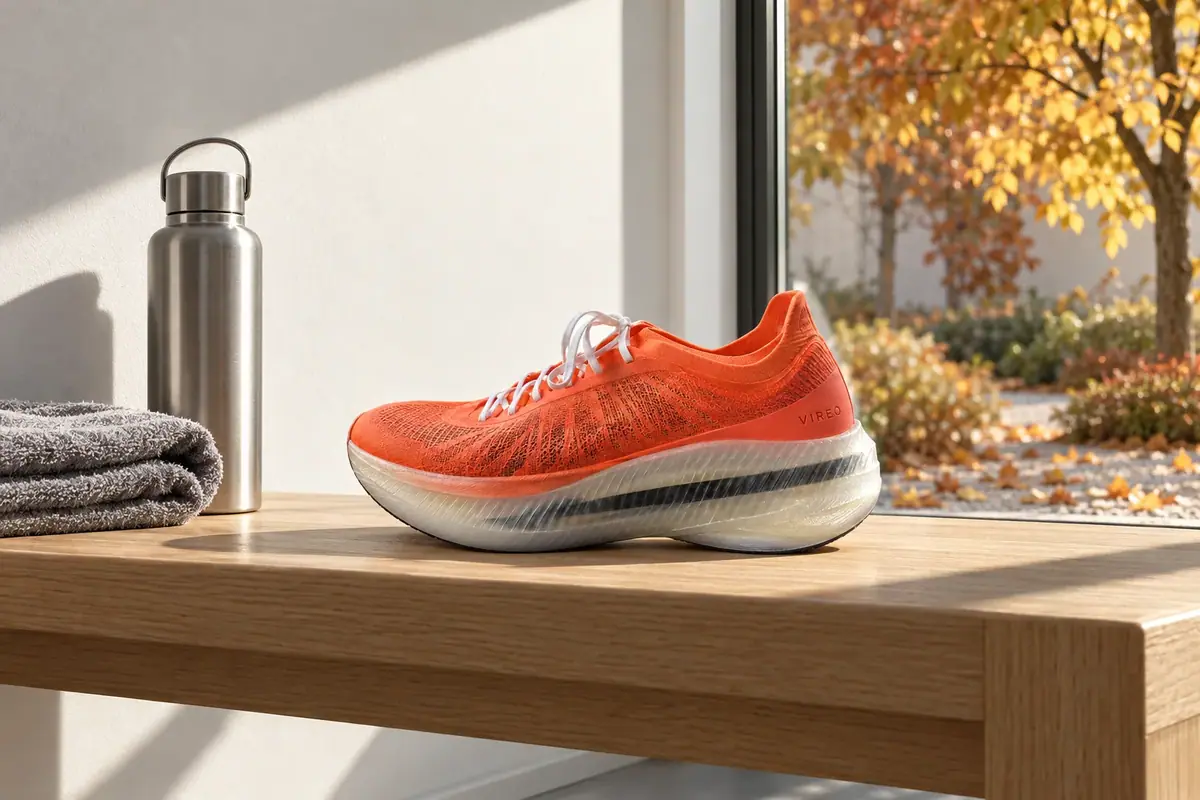

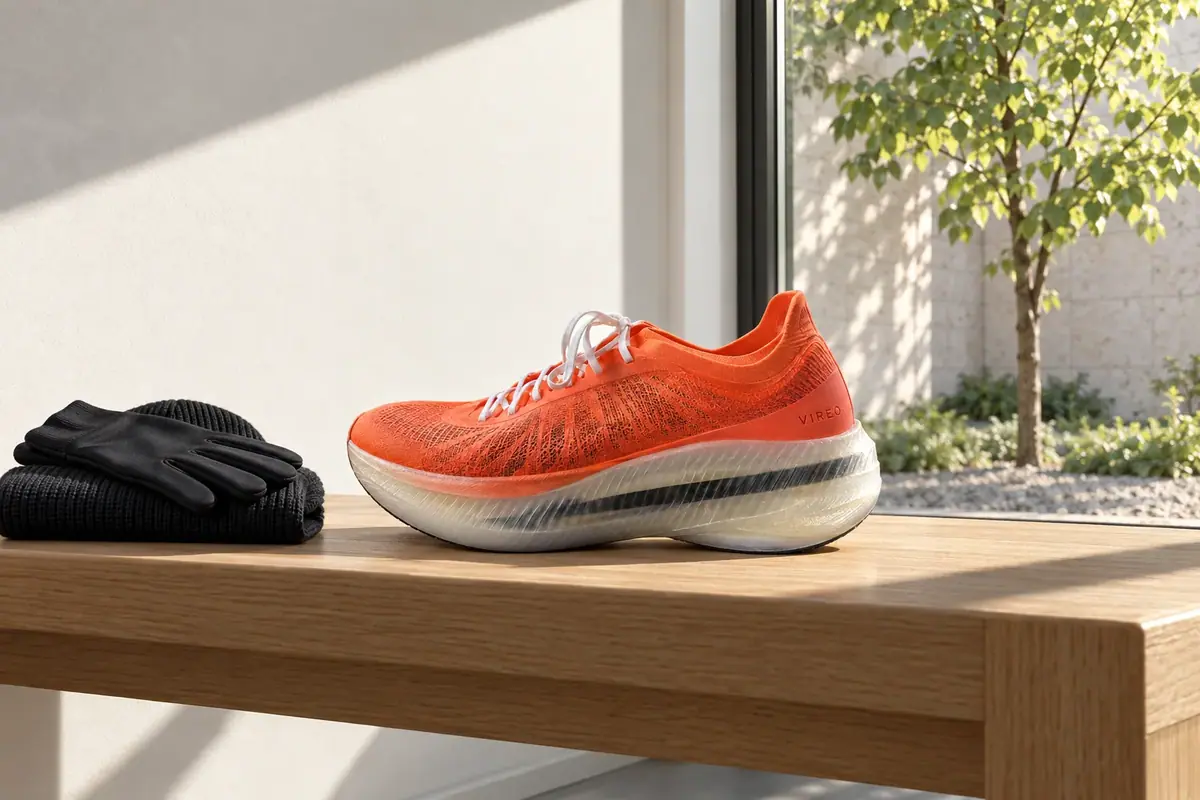
:::
### The kit
:::check
**Accept when:** the original's edges sit on the themed piece wherever nothing was meant to change; item silhouettes overlap their originals; products keep shape, color and position; the copy area is still empty; the clip's camera holds and the sign stays intact.
**Reject when:** the sign, a face or a product shape changes, an item grows or loses a part, the theme covers the copy area, an extension repeats objects or shows a seam, or invented text appears.
:::
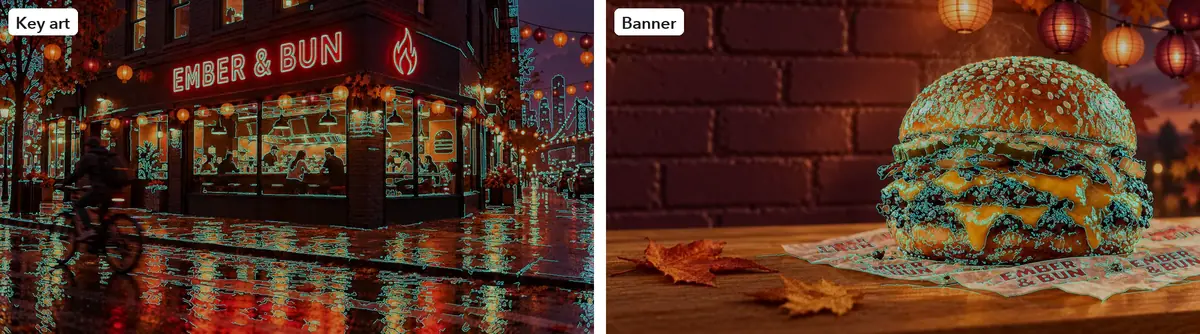
Measured on this run; an edge counts as kept when found within 4 px.
| Piece | Original edges kept |
|---|---|
| Key art | 93.2 percent; 99.7 around the sign, 95.4 around the people; new lanterns and autumn trees make up the rest |
| Store banner | 97.3 overall, 97.2 on the product |
| Product shot | 96.5 overall, 98.0 on the burger; the background was meant to change |
| Items | Silhouette overlap 0.987 to 0.994 (alpha channel, opaque core) |
| Clip | Last frame 92.7 percent of the still's edges: the camera held. The Seedance draft scored 52.3 |
One change passed the numbers without being asked for: the street trees turned rust and gold. The keep-list fixed their place, not their color, and the color is the theme: kept.
### The reskin
:::check
**Accept when:** each object keeps its silhouette, angle and position; the overlay shows no double edges; the faction reads from color and motif at thumbnail size; a character keeps face, skin tone, pose and weapon shape.
**Reject when:** an object changes shape or moves, the scene changes, the character's face or skin tone drifts, the weapon is redesigned, or the faction look depends on a detail too small to see in game.
:::
The item set was accepted on the first run. The 50 percent overlay shows the six objects on top of each other with no double edges; only materials and the banners changed.
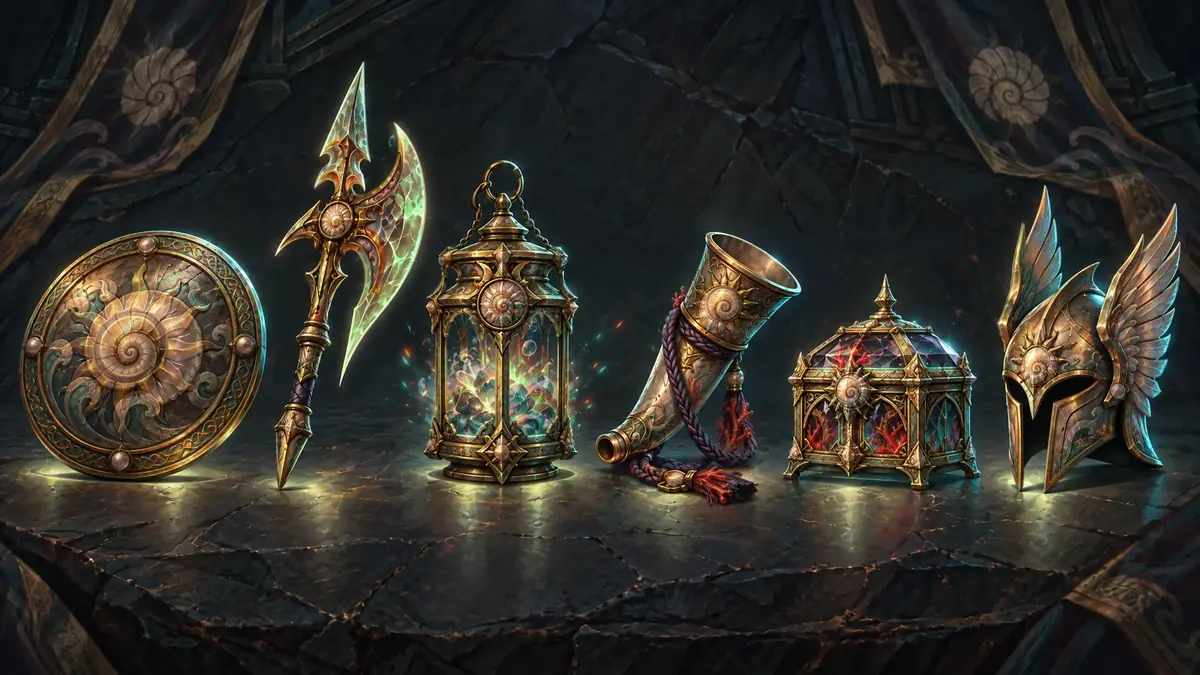
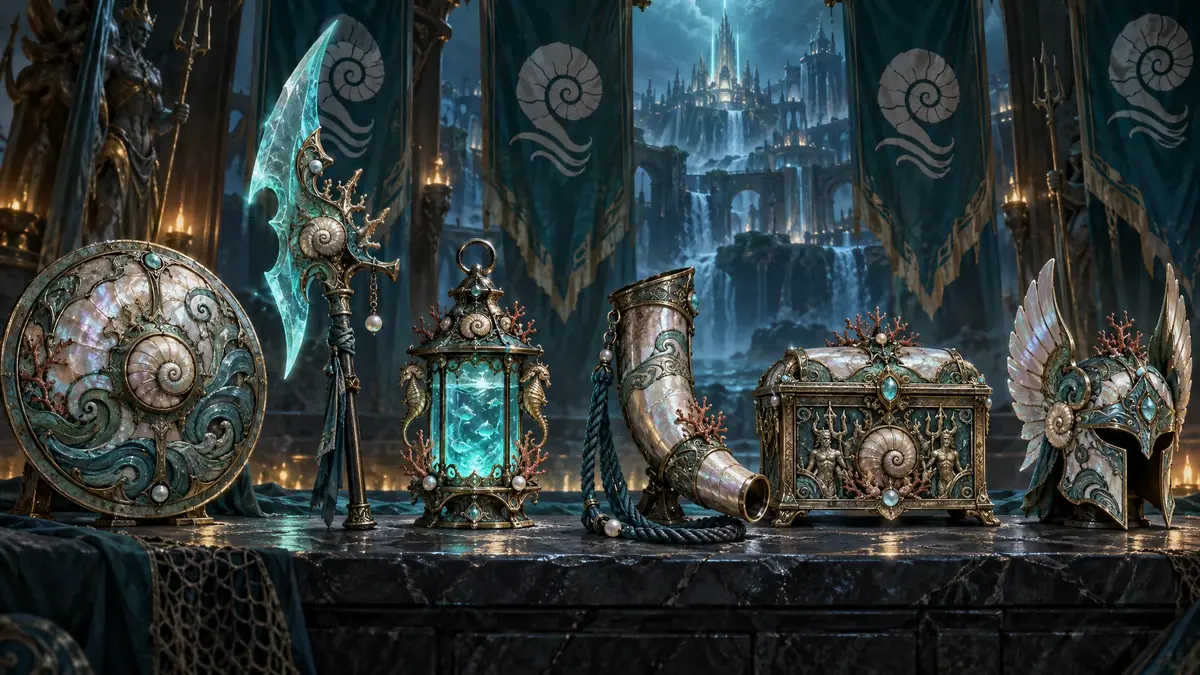
The reference does almost all the work. As a test, the Tidebound set was also generated from the same description with no original attached: six new objects of a different design, on a table in front of a waterfall city. A good illustration of the wrong set.
:::compare
:::
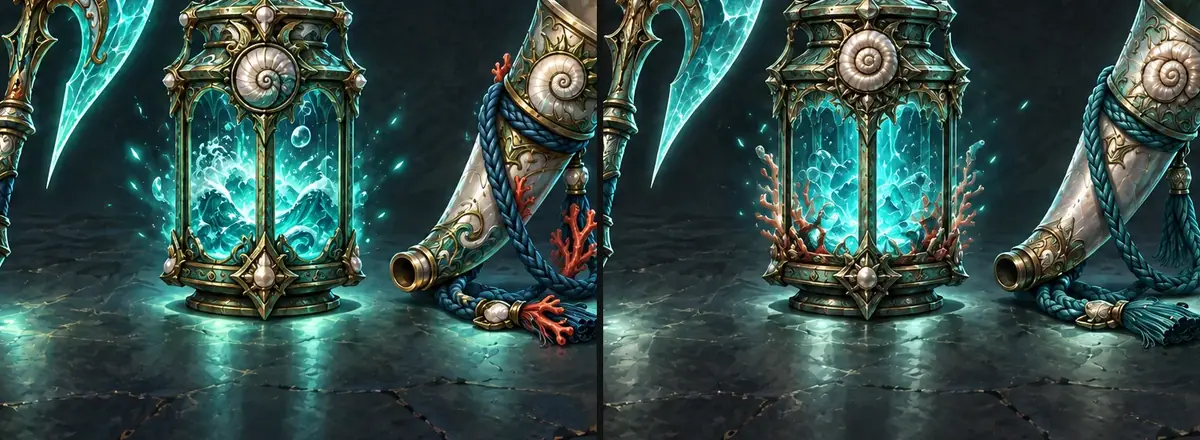
At `medium`, the set cost about a third of `high`. Every silhouette and position held, and at thumbnail size the two runs look the same. At full size, medium changed the inside of the lantern (coral instead of waves) and the horn's cord color. For items that ship small, run them at `medium`; keep `high` for splash art and large store images. See [Control cost](https://learn.scenario.com/browse).
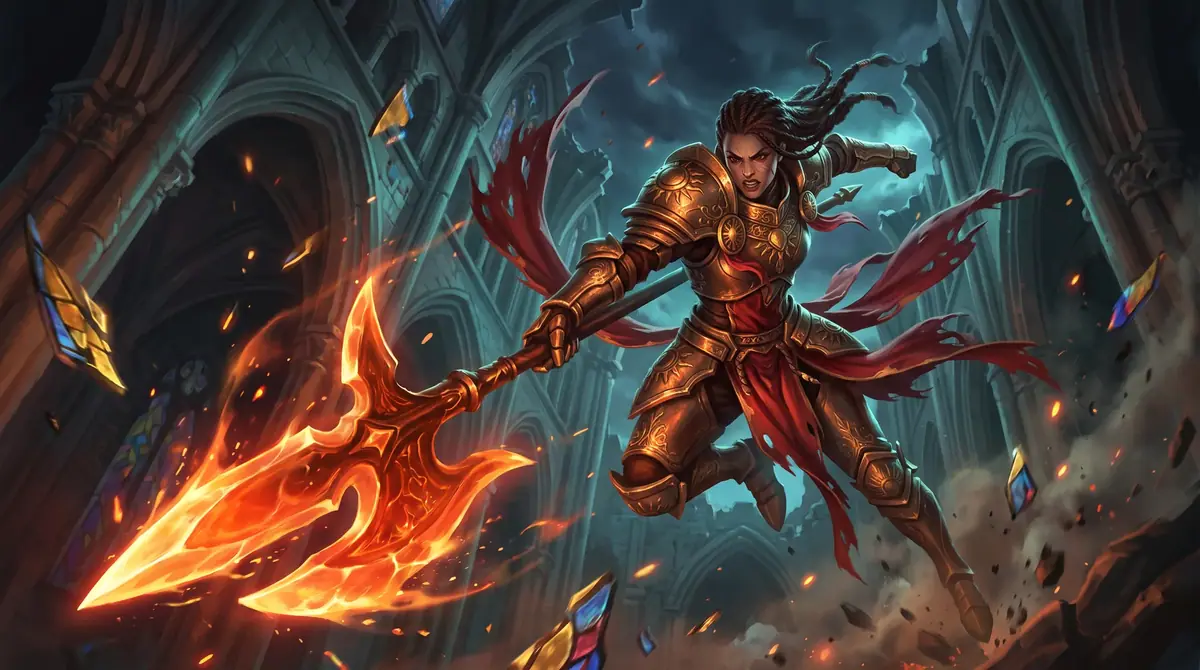
The champion took three runs. With Vael alone as reference, Nano Banana 2.1 kept her face, skin tone, leap and halberd shape, and swapped every material; the armor came out a little darker green-bronze than the brief's pearl, which was accepted for this pass. Sunburst made brighter pearl armor but replaced the halberd head with a new design with a gold spiral guard: runner-up. A third run added Oryn, the Tidebound champion, as a second reference "for the faction's materials only". Her skin turned lighter, her face slimmer, and the background washed out to pale cream: rejected.
:::compare
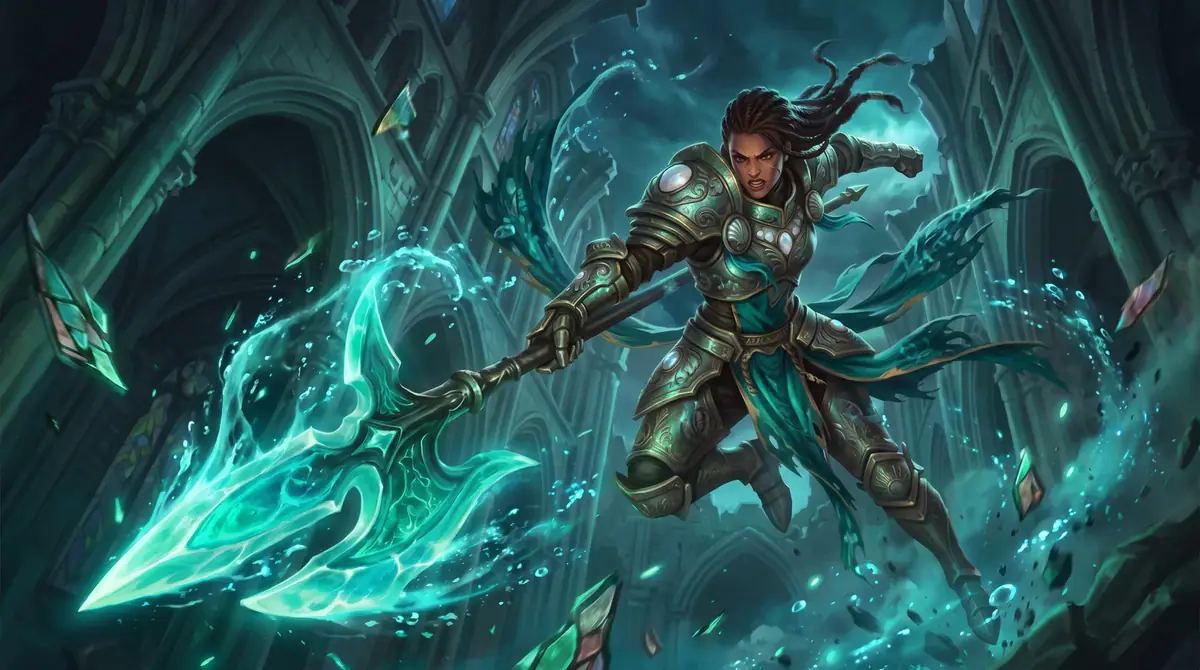
:::
:::gallery The three champion runs

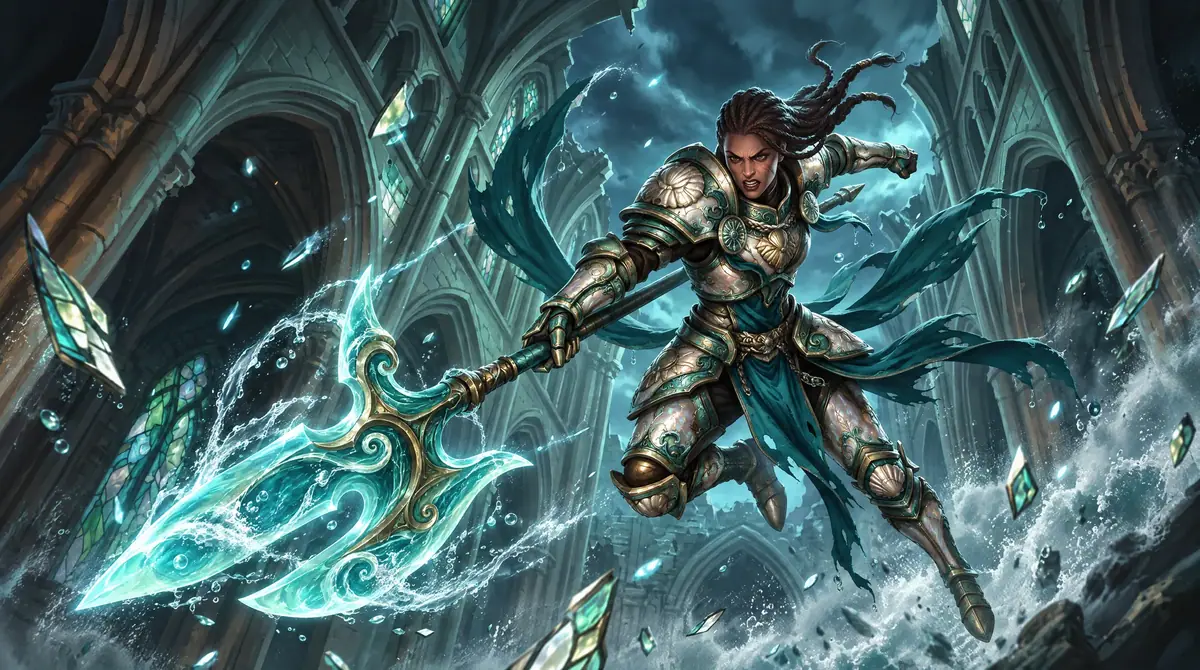
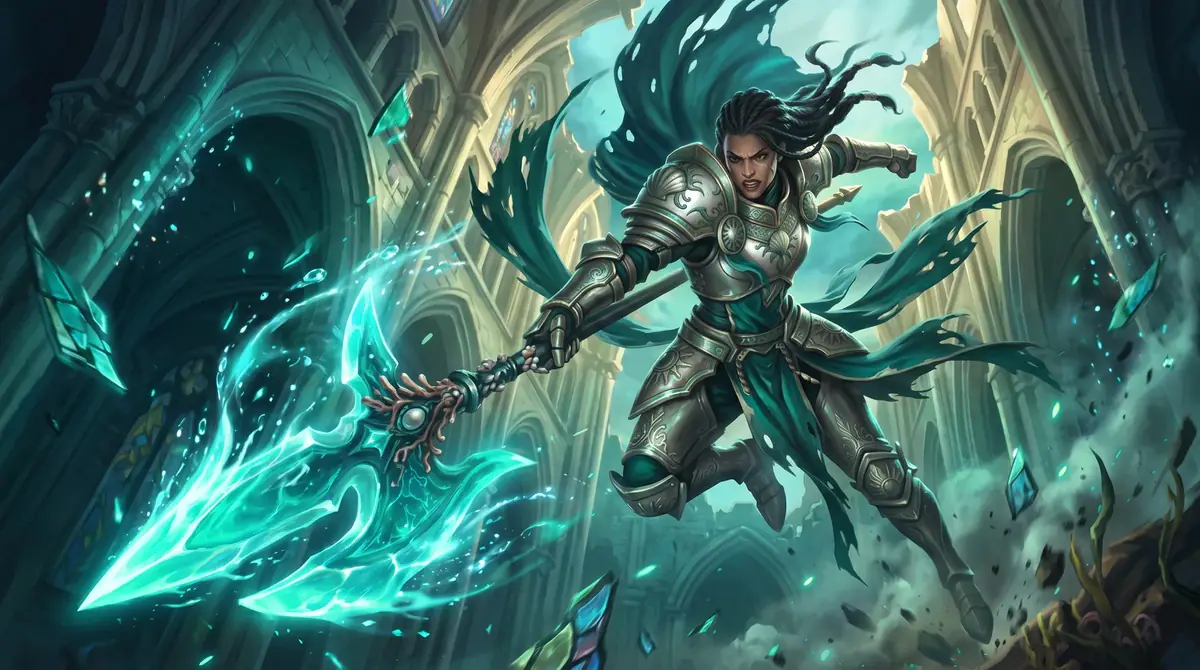
:::
### The room
:::check
**Accept when:** every item of the keep-list matches the photo; the camera did not move (the wordmark sits at the same place); verticals are straight; the new furniture sits on the floor with plausible shadows; no new sign or poster carries text; no people.
**Reject when:** a wall, the bar front or the column changed material; the glass wall lost or gained mullions; the camera moved or the frame got tighter; curtains or panels cover architecture; people from the photo stayed in a campaign image.
:::
:::compare
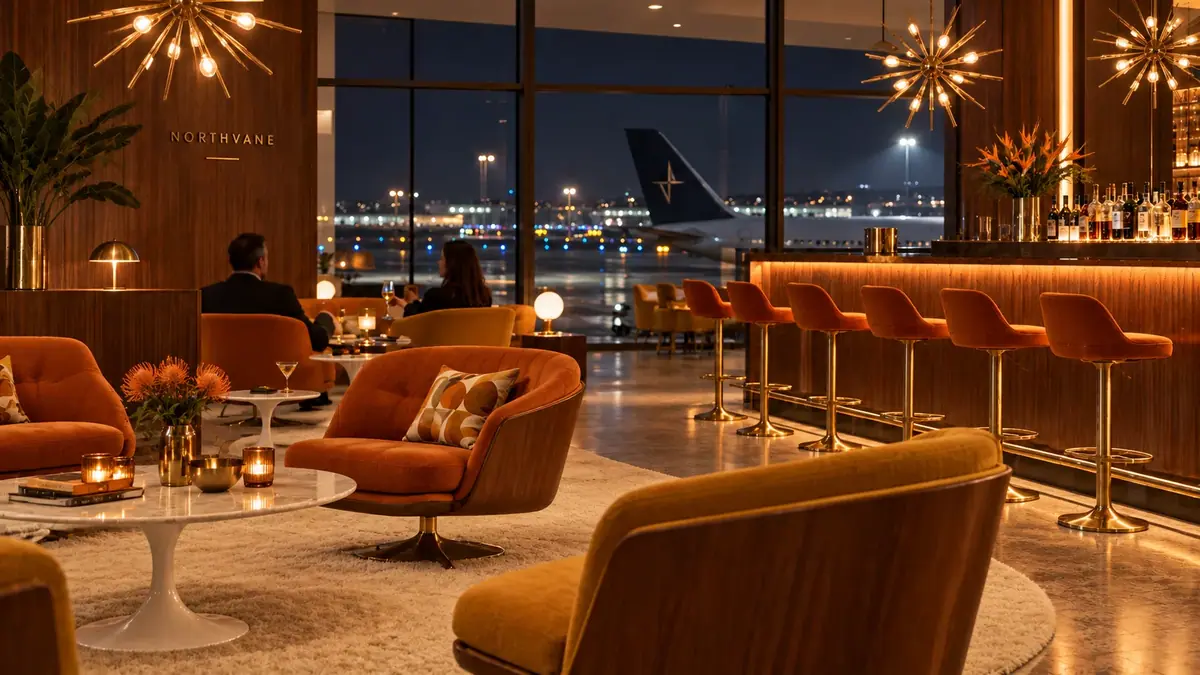

:::
Both images are good 1960s lounges. Only one answers the brief.
The App's output also came back smaller (1672x941 against the photo's 2048x1152). It suits a full redesign where the room may change. For a pitch where the architecture is the constant, write your own prompt or copy the App and edit its template.
:::quiz Check yourself
? Two autumn versions of the entryway shot. They look the same at this size. Which one ships?
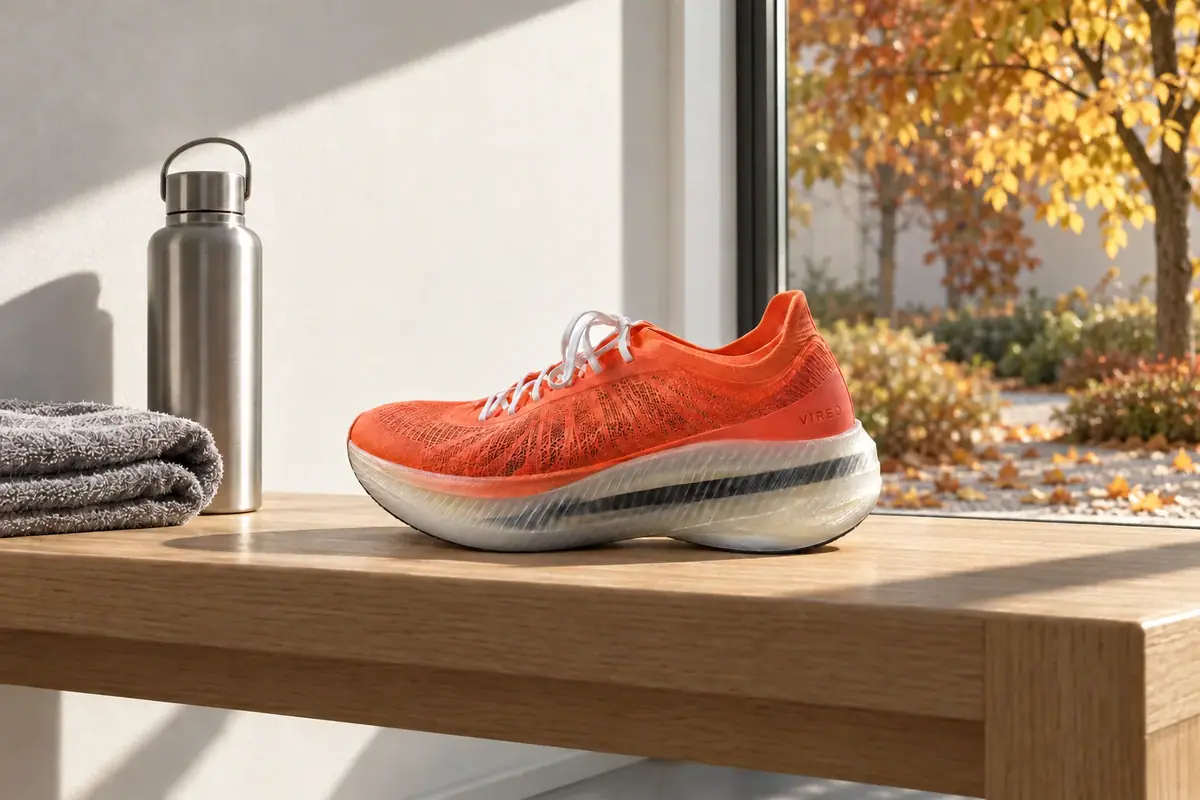

- [ ] Take A: it is the model's own output, so the light in the window and the room match
- [x] Take B: the base was composited back, so the shoe and everything outside the window are the approved pixels
- [ ] Either one: the differences are invisible at thumbnail size
> Take A is the raw masked edit: its shoe was redrawn (RMSE about 0.05 against the base). Take B diffs to 0 outside the window. Invisible at thumbnail size, visible at 1:1 and on every chained version.
? Two 9:16 pilots of the Lantern Night banner. The new wall at the top is the copy area. Which pilot goes to the 2K run?
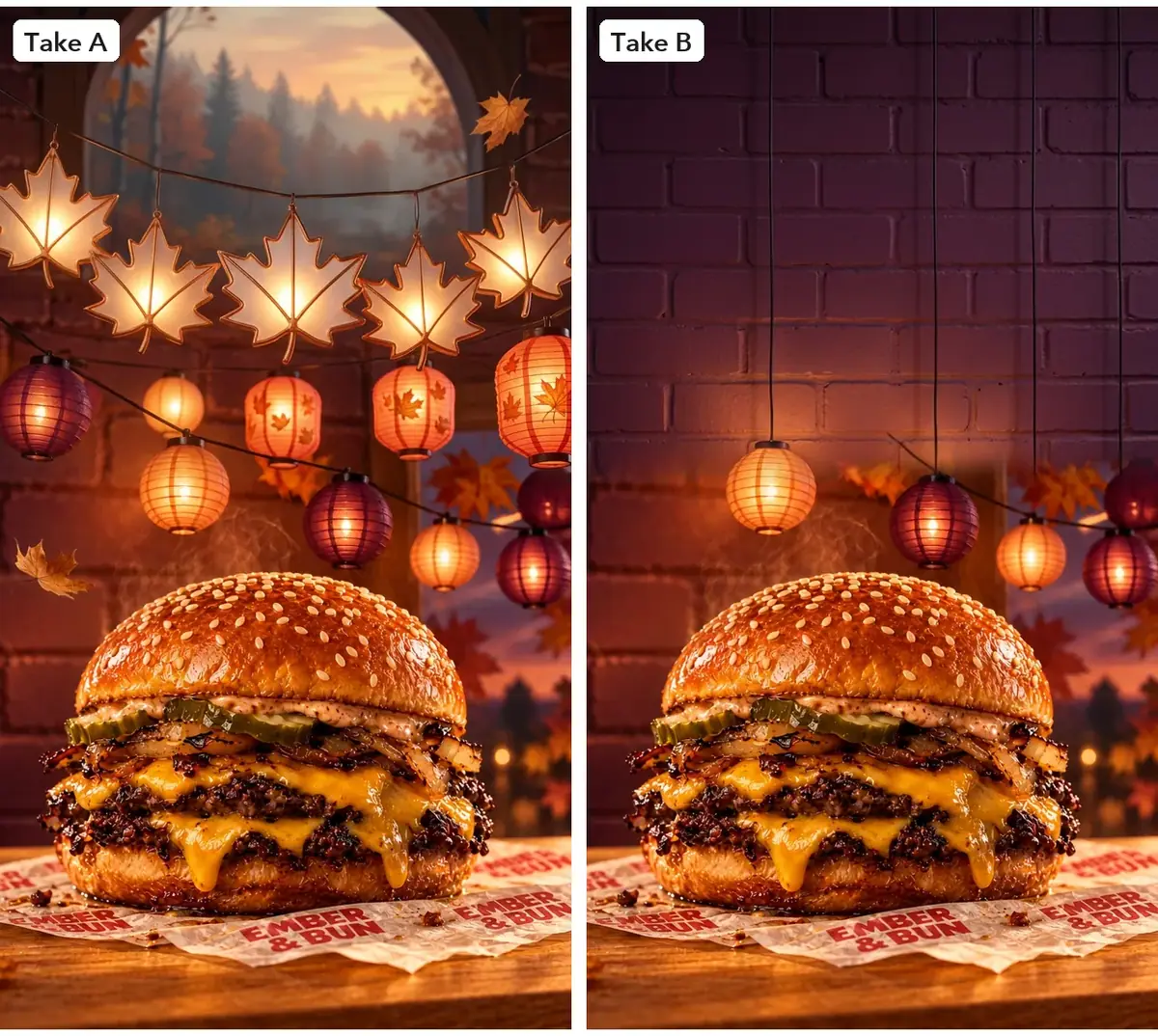
- [ ] Take A: more lanterns make the theme read better at story size
- [ ] Either one: the copy is typeset in code and covers whatever is there
- [x] Take B: the new space is an empty wall, kept free for copy
> An extension that adds or repeats objects in the copy area fails the check. The fixed prompt said where the new space goes and what it must not hold.
? You want the champion's Tidebound skin to borrow the exact armor look of the rival champion. What do you attach?
- [ ] Both champions, so the model sees the target look
- [x] Only the champion being reskinned, with the rival's materials written into the change sentence
- [ ] Only the rival champion, and describe the original in words
> A second reference pulls identity as well as materials. In this run, adding the rival lightened the skin and changed the face. Describe the materials in words and attach one original.
? Two 1960s restyles of the lounge for the refurbishment pitch. Which one answers the brief?


- [ ] Take A: the warmer bar suits the 1960s look better
- [x] Take B: the bar, walls and camera match the photo, and only furniture and decor changed
- [ ] Either one: both are convincing 1960s interiors
> The brief fixes the onyx bar and the camera, and campaign images carry no people. Take A came from an App that writes its own prompt: it changed the bar front, kept the travelers and reframed the shot.
:::
## Make it repeatable
- **Keep the fixed part as data, next to the originals.** A zone library for hero shots: each approved shot with one mask per zone (window, bench, wall art, screen) in one collection. The theme block and keep-lists of a kit, and the keep sentence of a reskin, as text files; the keep sentence stays word for word. One keep-list per space, stored with the room photo in a collection named after the space. A new season, faction or style is then one new prompt, one change sentence or one style phrase.
- **Template the edit prompts** ([Batch from a template](https://learn.scenario.com/browse)): "Change only [zone]: [new content], [where it sits]. [What it must not carry]. Same light. Everything else stays exactly as it is."
- **Style sheet.** Keep a list of approved style phrases (era, palette, three or four signature objects) so restyles stay comparable across rooms.
- **Build it as a workflow** ([Package it as a workflow or skill](https://learn.scenario.com/browse), [Batches, loops and logic](https://learn.scenario.com/workflows/batches-loops-and-logic.md)). In the **Node Editor**:
- **One zone:** two **Image** inputs (`Approved base`, `Zone mask`), a **Text** input (`New content`), a **Prompt Builder** with the template, an **Image Generator** on GPT Image 2.5 Sunburst wired to **Mask**, and an **Approval** node with `Approve only if nothing crosses the zone edge.` Composite outside the workflow, in code or a layer editor.
- **A kit:** an **Image** node with the originals and a **Text** node with the theme block feed a **Loop** with a **Prompt Builder** (keep-list plus theme) and an **Image Generator** on GPT Image 2.5 Sunburst, the original in **Reference Images**. An **Approval** node sits before the formats and the clip, the expensive steps.
- **A reskin batch:** **Image** inputs for the originals and a **Text** input for the theme line; a **Prompt Builder** with the keep sentence fixed; a **Loop** over an **Image Generator** on GPT Image 2.5 Sunburst at medium quality; an **Approval** node.
- **A room:** duplicate the platform App (**...** menu > **Duplicate Workflow**) and edit the prompt template so it carries your keep-list and the closed list of what may change ([Run and share Apps](https://learn.scenario.com/workflows/run-and-share-apps.md)). Or build it fresh: an **Image** input (`Room photo`), a **Text** input (`Keep-list`), a **Text** input (`Style`), a **Prompt Builder**, an **Image Generator** on GPT Image 2.5 Sunburst and an **Approval** node with `Approve only if walls, glass, bar and camera match the photo.`
- **Through the API or the Scenario MCP** (this run's route): one edit per asset ID with `referenceImages: [original]`, wait for all jobs, then the edge check in code ([Run workflows from code and agents](https://learn.scenario.com/workflows/run-workflows-from-code-and-agents.md)).
- **Store the crop per format** with the kit: the next theme reuses the same Reframe settings.
- **Apps to compare,** none run here: **Seasonal Asset Reskin** (under **Workflows**, **Apps**; a source asset plus a season), **Event Promo Generator** and **Multi-Format Ad Generator** (10 ad formats). Run one on two originals and compare outlines with the overlay check before choosing. The **Room Redesign** App was run in Part 4 and rejected for a brief where the architecture is fixed.
- **Log every version** ([Keep sources as data](https://learn.scenario.com/browse)): base, mask, prompt, diff result. A change in six months is one line to rerun.
- **One change at a time for campaigns.** For seasonal dressing of an approved restyle, change only the decor zone with a mask and composite, as in Part 1.
## Runs and time
### Part 1: one zone
| Step | Model | Runs or takes | Kept | Wait |
|---|---|---|---|---|
| Autumn window (masked) | GPT Image 2.5 Sunburst, high | 1 | 1 | about 50 s |
| Winter window (masked) | GPT Image 2.5 Sunburst, high | 1 | 1 | about 40 s |
| Winter, no mask | GPT Image 2.5 Sunburst, high | 1 | 0 (rejected) | about 35 s |
| Beanie and gloves, narrow mask | GPT Image 2.5 Sunburst, high | 1 | 0 (glove cut at the edge) | about 35 s |
| Beanie and gloves, wider mask | GPT Image 2.5 Sunburst, high | 1 | 0 (mark on a glove) | about 35 s |
| Beanie and plain gloves | GPT Image 2.5 Sunburst, high | 1 | 1 | about 35 s |
| Masks, composites and diffs | ImageMagick, local | 8 | 3 | seconds |
Six generations, three kept, about 4 minutes of wait. Every edit costs the same and the app shows the price before you run; masks and composites cost nothing.
### Part 2: the kit
| Step | Model | Runs | Wait |
|---|---|---|---|
| Evergreen store banner (approved original) | GPT Image 2.5 Sunburst, `high`, product shot attached | 1 | 32 s |
| Theme test on the key art | Sunburst and Flare, `medium` | 2 | 23 and 25 s |
| Banner, product shot and 3 items themed | Sunburst, `medium`, original attached | 5 | 20 to 22 s, in parallel |
| 9:16 pilots at 1K (one rejected) | Reframe | 2 | 15 and 16 s |
| Banner at 1:1, 4:5 and 9:16, 2K (first 1:1 and 4:5 crops rejected) | Reframe | 5 | 22 to 36 s, in parallel |
| Clip test (one rejected) | Minimax H3 at 768P, 5 s; Seedance 2.5 draft, 5 s | 2 | 2 min 52 s and 1 min 24 s, in parallel |
Seventeen runs, five rejected or runner-up, about 5 minutes of wait. The clip test is most of the cost, then the 2K formats; themed pieces at `medium` are cheap. The price shows on the **Generate** button before you run ([Control cost](https://learn.scenario.com/browse)).
### Part 3: the reskin
| Step | Model | Runs | Kept | Wait |
|---|---|---|---|---|
| Item set, `high` | GPT Image 2.5 Sunburst, 1 reference | 1 | 1 | about 40 s |
| Item set, `medium` (test) | GPT Image 2.5 Sunburst, 1 reference | 1 | 0 (comparison) | about 30 s |
| Item set from text only (test) | GPT Image 2.5 Sunburst | 1 | 0 (rejected) | about 45 s |
| Champion, Vael only | Nano Banana 2.1, 2K | 1 | 1 | about 30 s |
| Champion, Vael and Oryn (test) | Nano Banana 2.1, 2K | 1 | 0 (rejected) | about 45 s |
| Champion, Vael only | GPT Image 2.5 Sunburst | 1 | 0 (runner-up) | about 55 s |
All six ran in parallel, so the wait was about 1 minute. The three tests are the only runs you can skip. A 40-icon set is 40 runs; at `medium` it costs about a third of `high`. The price shows on the **Generate** button before you run.
### Part 4: the room
| Step | Model | Runs | Wait |
|---|---|---|---|
| Room Redesign App, 1960s (rejected) | Platform App | 1 | about 25 s |
| 1960s, keep-list | GPT Image 2.5 Sunburst, high | 1 | about 50 s |
| Minimalist tea lounge | GPT Image 2.5 Sunburst, high | 1 | about 40 s |
| Winter holidays | GPT Image 2.5 Sunburst, high | 1 | about 40 s |
Four runs started together, so the whole set came back in under a minute. With your own photo, three looks are three runs at about the same price each. The price shows on the **Generate** button before you run.
## Variations
- **Markets:** swap the view, a newspaper or a shop sign behind the product per country, sign text set in code.
- **Promotions:** only a price tag zone or a gift box beside the product.
- **Interiors:** change one wall, its art or the rug with a zone (Part 1); for a full restyle, see Part 4.
- **Fashion:** only the garment color, with a garment mask ([Fashion edits and try-on](https://learn.scenario.com/playbooks/fashion-edits-and-try-on.md)).
- **Another season or a sale:** swap the theme block (snow on the awnings replaces maple leaves) or the change sentence ("autumn: copper and amber, fallen leaves on top edges") and keep the keep sentence word for word.
- **Learning and publishing:** seasonal course badges and lesson banners, the course name typeset.
- **Rarity tiers:** change only material and glow intensity. The **Asset Evolution** App does four tiers in one run; for a full catalog, see [Make a consistent game icon set](https://learn.scenario.com/playbooks/game-icon-set.md).
- **UI kits:** reskin panels and buttons the same way; nine-slice borders still apply if the silhouette holds. See [Game UI kit](https://learn.scenario.com/playbooks/game-ui-kit.md).
- **Buildings:** a winter isometric town; add "same footprint and tile edges" to the keep sentence. See [Isometric tiles and buildings](https://learn.scenario.com/playbooks/isometric-tiles-and-buildings.md).
- **Video:** edit the first frame this way, then animate each version from its composited frame. The same keep and change split restyles a clip while timing and camera stay put ([Restyle footage and keep the motion](https://learn.scenario.com/playbooks/restyle-footage-keep-the-motion.md)).
- **A looping clip:** the themed still as first and last frame ([Animate a still](https://learn.scenario.com/playbooks/animate-a-still.md)).
- **Nearby jobs:** more formats in [Key art and store assets](https://learn.scenario.com/playbooks/key-art-and-store-assets.md).
- **Real estate:** stage an empty room; the keep-list stays the same and the style phrase becomes "furnish this empty room as a ...".
- **Hospitality:** show one hotel room in brand looks for several properties; the keep-list carries the window and the bathroom door.
- **Exteriors:** restyle a facade's paint, planting and signage zones while keeping openings, roofline and camera; set any sign text in code.
- **Film and games set design:** restyle a location photo across eras for a period piece, then use the result as an environment reference.
- **Events:** dress a venue for different events from one empty-hall photo.
## If it breaks
- **Something outside the zone changed.** Expected. Composite the base back; do not try to prompt it away.
- **A new object is cut where the zone ends.** The model drew past the mask. Widen the zone to a natural boundary and say how large the new object is and that it stays inside the zone.
- **A new prop carries a logo or stripes.** Add "plain" and "no logos, marks or stripes" for each prop you name.
- **A visible seam at the zone edge.** Blur the keep mask more, or extend the mask to a natural boundary such as a window frame or the bench edge.
- **The light inside the zone looks wrong.** Say where the light comes from ("the same low morning sunlight from the right") and keep the zone small enough for the model to see the light around it.
- **The edit changed objects all over the frame.** The mask was missing or not applied: re-run with it. If the framing moved, a composite cannot line up.
- **The sign, a face or a pose changes in the key art.** Name the sign, the people and their poses in the keep-list, attach only the original, reject on the overlay check.
- **The theme reaches something that should stay.** Name its color too in the keep-list ("the trees stay green").
- **The extension fills the copy area.** Say "extend upward only" and "do not add, repeat or copy any objects", and start the crop where the original wall is empty.
- **The extension writes a title or labels.** Write the no-text rule in full in the extension prompt; the original's does not carry over.
- **The clip camera drifts.** Write "locked camera, no zoom" first, then try the other model at low resolution.
- **The video has an unwanted soundtrack.** Some models add audio by default: remove it when you conform the clip.
- **An object changes shape or moves.** Make sure the original is attached; then add that object's feature to the keep sentence ("the halberd head with one hooked back spike").
- **The scene changes.** Name the table, camera and background in the keep sentence; the text-only test invented a whole city.
- **The character's face drifts.** Remove every reference except the original; move the theme into words.
- **A weapon or prop is redesigned.** Name its shape in the keep sentence ("the shape and grip of her halberd"), or switch to Nano Banana 2.1, which held the shape in this run.
- **One region needs a different change.** Use **Edit with Prompts** on the reskin for that region alone instead of re-running the whole image.
- **A wall, the bar or a column changes material.** The prompt (or an App template) allows it. Name each fixed surface with its material and close the list of what may change.
- **People from the photo stay.** Add "No people". If they persist, remove them first with an edit, then restyle.
- **The glass or window grid changes.** Describe it with counts and colors ("thin black mullions, four tall bays").
- **The camera moves or the frame tightens.** Add "the same camera position and lens", generate at the photo's size and check a fixed landmark such as the wordmark.
- **Fake signage appears.** Add "No new text, no new signage" and set any real sign in code afterwards.
Source: https://learn.scenario.com/playbooks/edit-one-thing-campaign