About this lesson
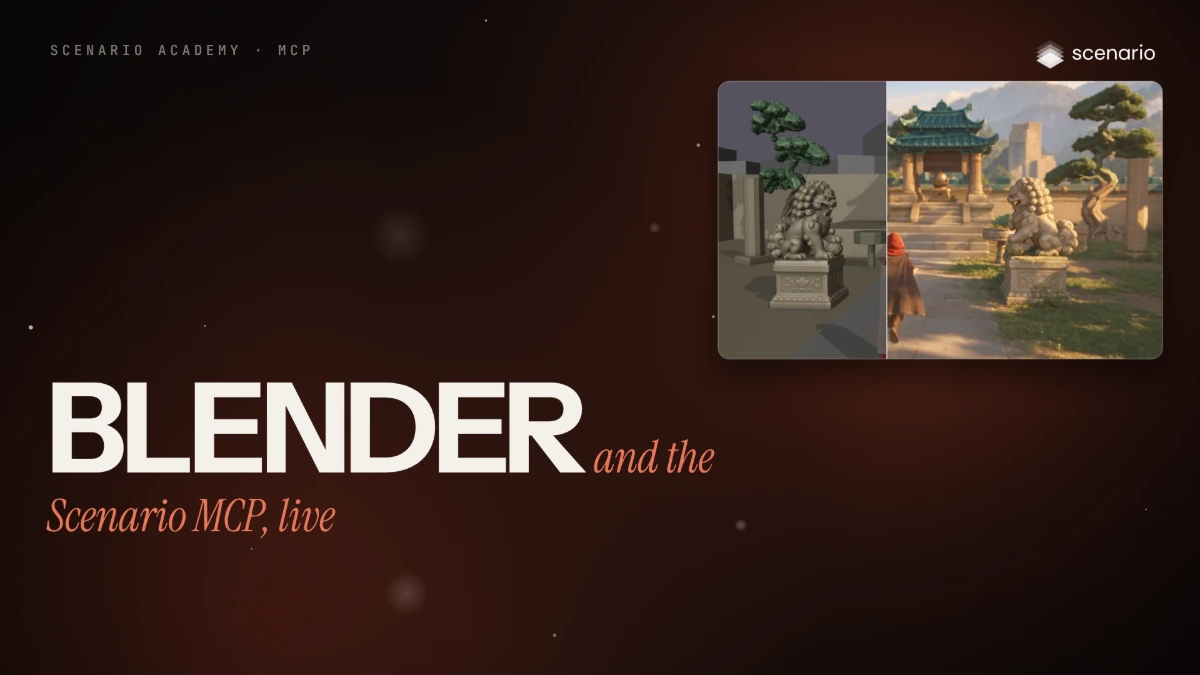
This lesson runs a real project from a chat: Claude, connected to Scenario, writes a Blender script for a grey blockout, then turns its playblast into a finished 15-second film of a traveler reaching a mountain gate. A second example, a sneaker ad, tests when a stand-in should stay a simple block and when it's worth building it as a 3D model. The models and settings in this lesson are as of November 2026.
See moreSee less
- Add two skills to your assistant, Block or Build and the Blender blockout skill, then brief it in plain words.
- Claude writes a Blender script for a grey blockout; its playblast and one finished still become a video with Seedance 2.5.
- Block what moves, build what must look exact: an A/B test on a sneaker ad shows when a 3D model beats a block.
Step by step with an agent, through the Scenario MCP (6 steps)Hide the steps
Connect the Scenario MCP and add the two skills
Connect and sign in at mcp.scenario.com. Then upload the Block or Build skill (from its Exploration) and the Blender blockout skill (from github.com/scenario-labs/skills, skills › dcc › blender) in Customize › Skills.
Brief the blockout
Claude writes the script; run it in Blender 4.5's Scripting tab, check the blockout, then render the playblast with View › Viewport Render Animation.
PromptUse the Blender blockout skill. Write one self-contained script I can paste into Blender 4.5's Scripting tab (only bpy, math and mathutils). The shot: a traveller reaches a mountain gate, 15 s at 24 fps, 1280 x 720, in three shots. Shot 1, 5 s: wide and static, the traveller walks up the path to the gatehouse arch. Shot 2, 5 s: the camera follows behind as they pass through the arch and climb the steps. Shot 3, 5 s: from behind at the top, the valley opens up below. A stone gatehouse with a teal tiled roof, walls on both sides, pines, snowy peaks. The traveller is a red capsule, 1.7 m, no legs. Put the script in one code block.Brief the still and the video
Attach the playblast. Ask for the quote before the video runs: 1080p video costs the most.
PromptUse Block or Build. This playblast is my three-shot blockout of a traveller reaching a mountain gate. First make one finished still of the first frame: a weathered stone gatehouse with a teal tiled roof, pines, snowy peaks, the traveller in a red hooded cloak, golden morning light, cinematic. Then make the 15-second video from that still with Seedance 2.5 at full quality, 1080p, no draft, keeping the three cuts. Tell me which models you pick and why. Brand Studio. Quote the cost with a dry run first and wait for my go.Check the film
Accept when the cuts land at 5 and 10 seconds, there is one traveler on the blockout's path, the walk looks natural and the gate in shot 1 matches the still. Reject a moved cut, a second figure, a sliding traveler or a gate that changes shape; fix the blockout or the still, then run again.
Build what must look exact, then run the A/B
Ask for the sneaker script with the SHOE switch, then the 3D build. Run the script with the block and with the GLB, render the three playblasts, attach them and send the A/B brief.
PromptUse Block or Build. I'm testing stand-ins for a product shot: a sneaker drops onto a plinth and the camera circles it. For the build version, make a concept of the sneaker (green upper, orange sole, three-quarter side view, plain background), then turn it into a 3D model I can import in Blender. Brand Studio. Use Block or Build. These are my sneaker ad playblasts: shot 1 with the block shoe, shot 1 with the 3D model, and the full 15-second ad with the model, made from the concept in Brand Studio. Run the A/B on shot 1: one shared still of its first frame in the concept's look, a stone plinth in a soft-lit studio, then the same Seedance 2.5 video for each, 1080p, no draft. Then make the full ad from the full playblast with the same still. Tell me which models you pick and why. Quote the cost with a dry run first and wait for my go.Report
PromptReport the models you used and why, every asset ID, what each run cost, and anything you changed from my brief.
Step by step in the web app (15 steps)Hide the steps
Get the Block or Build skill
On scenario.com/explorations, open Block or Build and click Skill at the top of the page to download scenario-block-or-build-skill.zip.
Get the Blender blockout skill
On github.com/scenario-labs/skills, open skills › dcc › blender and download the blockout skill (scenario-blender-blockout.zip).
Add both skills
In Claude, Customize › Skills › Add skill › Upload skill, once per ZIP: check the Preview and click Upload.
Ask for the blockout script
In a new chat, give the format first (length, frame rate, resolution, shots), one sentence per shot, and the stand-in with its size.
PromptUse the Blender blockout skill. Write one self-contained script I can paste into Blender 4.5's Scripting tab (only bpy, math and mathutils). The shot: a traveller reaches a mountain gate, 15 s at 24 fps, 1280 x 720, in three shots. Shot 1, 5 s: wide and static, the traveller walks up the path to the gatehouse arch. Shot 2, 5 s: the camera follows behind as they pass through the arch and climb the steps. Shot 3, 5 s: from behind at the top, the valley opens up below. A stone gatehouse with a teal tiled roof, walls on both sides, pines, snowy peaks. The traveller is a red capsule, 1.7 m, no legs. Put the script in one code block.Run the script in Blender
Blender 4.5 › Scripting tab › New, paste the script and click Run Script. It builds its own scene (here BLK_mountain_gate); its first lines are settings you can change and run again.
Check the blockout and render the playblast
In the Layout tab, play the timeline and check the capsule's path and each camera. Then View › Viewport Render Animation renders one grey 15-second MP4.
Ask for the still and the video
In a new chat, attach the playblast (gate_playblast_3shots.mp4). The still describes the look only; the layout comes from the playblast.
PromptUse Block or Build. This playblast is my three-shot blockout of a traveller reaching a mountain gate. First make one finished still of the first frame: a weathered stone gatehouse with a teal tiled roof, pines, snowy peaks, the traveller in a red hooded cloak, golden morning light, cinematic. Then make the 15-second video from that still with Seedance 2.5 at full quality, 1080p, no draft, keeping the three cuts. Tell me which models you pick and why. Brand Studio.Read why Claude chose its models
Here GPT Image 2.5 Sunburst made the still, because it keeps the layout of a reference, and Seedance 2.5 made the 15-second video at 1080p from the playblast and the still.
Check the film
Watch the video against the playblast and the still: cuts at 5 and 10 seconds, one traveler on the blockout's path, a natural walk and the gate matching the still. Fix the blockout or the still, not the prompt words.
Ask for a script with a switch
The SHOE switch at the top is the A/B test: one line to change, so the plinth, cameras and timing stay the same.
PromptUse the Blender blockout skill. Write one self-contained script for Blender 4.5's Scripting tab (only bpy, math and mathutils): a 15-second sneaker ad, 24 fps, 1280 x 720, in three shots. Shot 1, 5 s: the sneaker drops onto a round stone plinth with a small bounce while the camera circles it. Shot 2, 5 s: a low, slow slide along the sole, close up. Shot 3, 5 s: a slow hero turn on the plinth, with empty space on the left for a title. Put a switch at the top: SHOE = "block" (three boxes and a wedge, 0.30 m long, green upper, orange sole) or the path to a GLB, fitted to the block's size and painted in the same two colours. Put the script in one code block.Run it with the block shoe
Run the script with SHOE = "block": three green boxes and a wedge drop onto an orange sole on the plinth.
Build the sneaker in 3D
In a new chat, ask for a concept, then a 3D model. In the film the concept comes from GPT Image and the model from Hitem3D 3.0, an image-to-3D model.
PromptUse Block or Build. I'm testing stand-ins for a product shot: a sneaker drops onto a plinth and the camera circles it. For the build version, make a concept of the sneaker (green upper, orange sole, three-quarter side view, plain background), then turn it into a 3D model I can import in Blender. Brand Studio.Run it with the 3D model
Set SHOE to the path of the downloaded GLB and run the script again. Render a playblast of shot 1 with each shoe, and one of the full ad with the 3D model.
Run the A/B test
Attach the three playblasts (sneaker_block_shot1.mp4, sneaker_build_shot1.mp4, sneaker_ad_build.mp4). Same still, same prompt, same settings: only the stand-in changes.
PromptUse Block or Build. These are my sneaker ad playblasts: shot 1 with the block shoe, shot 1 with the 3D model, and the full 15-second ad with the model, made from the concept in Brand Studio. Run the A/B on shot 1: one shared still of its first frame in the concept's look, a stone plinth in a soft-lit studio, then the same Seedance 2.5 video for each, 1080p, no draft. Then make the full ad from the full playblast with the same still. Tell me which models you pick and why.The finished ad
The full ad comes from the playblast with the 3D model and the same still: the drop, the slide along the sole and the hero turn with space on the left for a title.