See it made
Run it in Scenario
About this use case
One rough sketch taken to a finished isometric building, grown into an upgrade and joined by a second building, plus the ground tiles they stand on. For city-builders, mobile strategy and tactics games, where every building shares one diamond grid, camera corner and light. The models and settings in this use case are as of October 2026.
See moreSee less
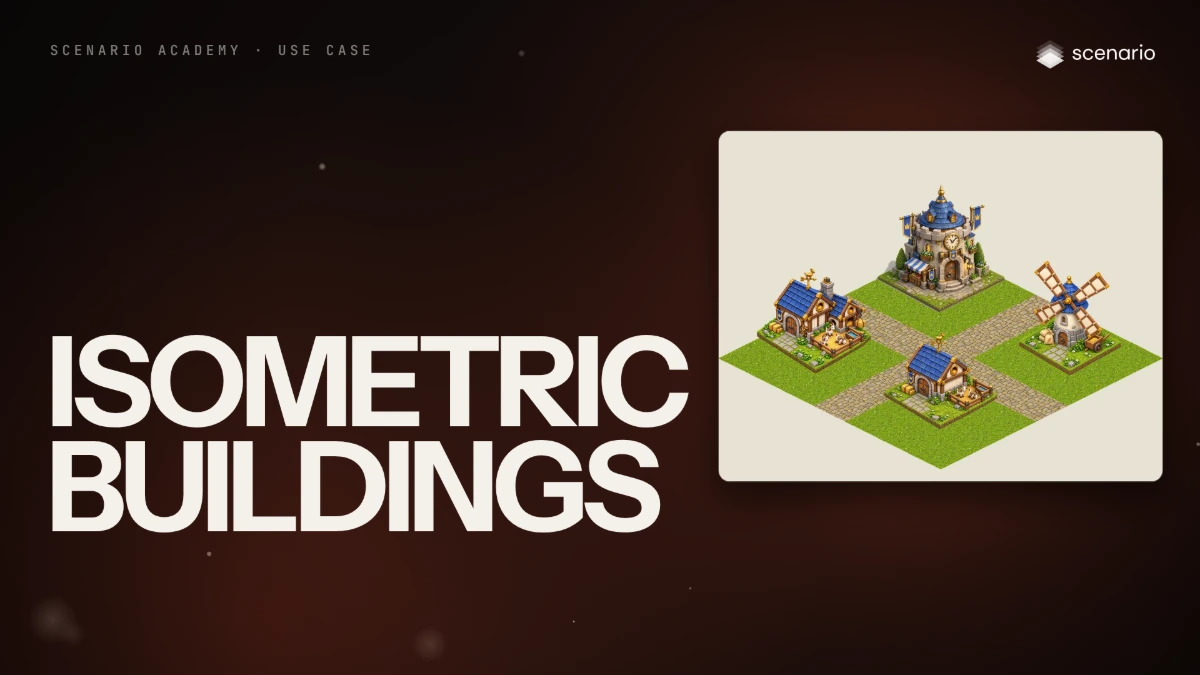
- A starter village block for Pipsqueen, a mobile strategy game: a goat stable in two levels, a windmill and the town hall on grass and cobblestone tiles.
- Let a sketch fix each layout, an approved building fix the style, and code cut the tile geometry.
- Each extra building is one image run and each ground type one texture run; keep Erase Seam on, and measure the projection angle.
Step by step with an agent, through the Scenario MCP (6 steps)Hide the steps
Connect the Scenario MCP
Connect your agent and sign in once at mcp.scenario.com. Then tell it which Scenario team and project to use, so every file lands there.
Give the agent the files
The rough sketch of each building (here the goat stable, then its level 2 with a 2 by 2 footprint drawn in), and the approved town hall as the style anchor. Upload them with upload_asset or give their asset IDs; for each building the sketch goes first and the anchor second.
Brief the agent: the first building
PromptMake the level 1 Goat Stable with GPT Image 2.5 Sunburst (model_openai-gpt-image-2-5-sunburst). referenceImages as an array: the stable sketch first, the town hall second. Square (1:1), quality "high", background "transparent". Quote the cost with a dry run first and wait for my go. Prompt, word for word: Reference 1 is a rough layout sketch: follow its shapes, proportions and placement exactly (a barn on one isometric ground tile, gable roof with the ridge running from front-left to back-right, a big arched double door on the left wall, a round hay-loft window in the right gable, a goat weathervane on the roof ridge, a small fenced pen with a water trough on the right of the tile, two hay bales by the door). Reference 2 is the style anchor of the game: match its chunky stylized 3D look, soft global illumination, tactile materials, warm saturated palette and blue-and-gold accents. Do not copy the building. Game asset: the Goat Stable, level 1, home of Queen Pip's battle goats, for a mobile strategy game. True 2:1 isometric projection, camera from the front corner, light from the top left. Painted timber walls on a rounded stone base, blue slate roof, gold trim, a blue banner with a small gold crown by the door, a chunky gold goat weathervane, a round hay-loft window stuffed with hay. The building sits on one grass diamond tile with a short cobblestone path to the door, tile edges matching the sketch's tile. Single building, centered, transparent background, no cast shadow outside the tile, no text. Style: chunky stylized 3D at the standard of the world's top mobile strategy studios: thick silhouettes, big heads and hands, soft global illumination, tactile materials (painted wood, brushed steel, felt cloth), warm saturated palette, readable at phone size.Upgrades and new buildings from the approved one
The approved building becomes the only reference. Words alone did not change the footprint: the level 2 came back on one tile until the 2 by 2 block was drawn in the sketch.
PromptUse the approved level 1 stable's asset ID as the only reference, same settings. Level 2 prompt, word for word: The reference image is the level 1 Goat Stable of a mobile strategy game. Draw its level 2 upgrade: the same building grown, not replaced. Keep the same 2:1 isometric projection, camera corner, top-left light, scale of doors and windows, chunky stylized 3D look, painted timber walls on a rounded stone base, blue slate roof, gold trim, arched double door, round hay-loft window, blue crown banner and gold goat weathervane. Add a second wing on the right side with a hay loft and a pulley hoist, a taller stone chimney, a larger fenced pen with three goats, and a gold saddle rack by the door. The footprint grows to fill one 2 by 2 block of grass tiles with straight diamond edges. Single building, centered, transparent background, no text. For the windmill, also with the approved stable as the only reference, open the prompt with this, word for word, then describe the windmill: The reference image is a building from the same mobile strategy game: match its 2:1 isometric projection, camera corner, top-left light, scale of doors and windows, chunky stylized 3D look and palette. Do not copy the building, Quote both first and wait for my go.The ground textures
PromptMake the ground with Scenario Texture (model_scenario-texture): the town hall as the reference so the palette matches, 1024 x 1024, with Erase Seam on (read model_schema_get for its parameter name). One surface per run. Grass prompt, word for word: Stylized ground texture for a mobile strategy game: short lush grass with small clover patches and a few tiny white and yellow flowers, soft painted shading, warm saturated palette, viewed straight from above, even lighting. Then, in code, turn each texture into a tile: rotate it 45 degrees, squash it to half height and mask the diamond.Check the set, file and report
Accept when every building follows its sketch, the footprint edges run at the same angle as the tiles, light comes from the top left on every roof, doors are the same height, and tiles repeat with no visible line. Reject a different camera corner, a square footprint, invented letters on a sign or a seam.
PromptMeasure the angle of each footprint's diamond edges against the tiles, and the edge contrast of each texture at the wrap-around against its interior. Tell me which buildings or textures fail and redo only those. Then create a collection for the village block with the buildings and textures, and report the models, every asset ID and the total cost spent.
Step by step in the web app (6 steps)Hide the steps
Sketch first, style anchor second
A model follows shapes far better from a drawing than from words. Create › Images › GPT Image 2.5 Sunburst, Reference Images › Select from Library: the stable sketch first, then the approved town hall for style; Dimensions 1:1, Quality high, Background transparent.
One job per reference
The sketch sets the layout and the town hall sets the look, but not the building. Then the prompt fixes what every building in the set shares: the isometric angle, the camera corner and light from the top left.
PromptReference 1 is a rough layout sketch: follow its shapes, proportions and placement exactly (a barn on one isometric ground tile, gable roof with the ridge running from front-left to back-right, a big arched double door on the left wall, a round hay-loft window in the right gable, a goat weathervane on the roof ridge, a small fenced pen with a water trough on the right of the tile, two hay bales by the door). Reference 2 is the style anchor of the game: match its chunky stylized 3D look, soft global illumination, tactile materials, warm saturated palette and blue-and-gold accents. Do not copy the building. Game asset: the Goat Stable, level 1, home of Queen Pip's battle goats, for a mobile strategy game. True 2:1 isometric projection, camera from the front corner, light from the top left. Painted timber walls on a rounded stone base, blue slate roof, gold trim, a blue banner with a small gold crown by the door, a chunky gold goat weathervane, a round hay-loft window stuffed with hay. The building sits on one grass diamond tile with a short cobblestone path to the door, tile edges matching the sketch's tile. Single building, centered, transparent background, no cast shadow outside the tile, no text. Style: chunky stylized 3D at the standard of the world's top mobile strategy studios: thick silhouettes, big heads and hands, soft global illumination, tactile materials (painted wood, brushed steel, felt cloth), warm saturated palette, readable at phone size.The approved building is the new anchor
Reference Images › Remove All, then attach only the approved level 1 stable, and ask for the same building grown, not replaced. The level 2 came back on one tile instead of the 2 by 2 block asked for: words alone don't change a footprint, so draw it in the sketch.
PromptThe reference image is the level 1 Goat Stable of a mobile strategy game. Draw its level 2 upgrade: the same building grown, not replaced. Keep the same 2:1 isometric projection, camera corner, top-left light, scale of doors and windows, chunky stylized 3D look, painted timber walls on a rounded stone base, blue slate roof, gold trim, arched double door, round hay-loft window, blue crown banner and gold goat weathervane. Add a second wing on the right side with a hay loft and a pulley hoist, a taller stone chimney, a larger fenced pen with three goats, and a gold saddle rack by the door. The footprint grows to fill one 2 by 2 block of grass tiles with straight diamond edges. Single building, centered, transparent background, no text.New buildings, same frame
New buildings work the same way, with one approved building as the only reference. The windmill's prompt opens by asking it to match the reference's projection, camera corner and light and not to copy the building, then describes the windmill.
A tileable texture, Erase Seam on
Create › Textures › Scenario Texture, Reference Images: the town hall, so the colors match. Dimensions 1024x1024 and Erase Seam on, so the texture repeats with no visible line; measured, the edges matched the middle with it on and were almost twice as contrasted without it.
PromptStylized ground texture for a mobile strategy game: short lush grass with small clover patches and a few tiny white and yellow flowers, soft painted shading, warm saturated palette, viewed straight from above, even lighting.Rotate, squash, mask
Code turns the texture into a tile: rotate it 45 degrees, squash it to half height and mask the diamond. The model only paints the surface.
Related