

Voice: narration, cloning and voice change
Turn a script into narration or dialogue, clone a voice or change one with the speaker's consent, clean the source, and check every word with a transcript.
- Guide
- Step 1 Learn
Run it in ScenarioGemini 3.8 Flash TTS
This lesson turns a script into narration, controls how it's performed, trains a voice of your own, and re-voices a take you already have. You'll use ElevenLabs v4 and Gemini 3.8 Flash TTS for speech, Instant Voice Cloning for a trained voice, ElevenLabs Voice Changer to swap the voice on a take, and Gemini 3.5 Transcribe to check every result.
Quick version
- Open Create › Audio, pick a speech model, then a voice in Voice or Public Voice.
- Write only the words in Text, with delivery tags in that model's style: square brackets on ElevenLabs v4, angle brackets on Gemini 3.8 Flash TTS.
- Set Language to the script's language, keep one paragraph per take, and click Generate.
- To train a voice: Create › Train › Clone a voice › Instant Voice Cloning (IVC), with the speaker's written permission and clean samples.
- To re-voice a take: ElevenLabs Voice Changer, a target voice, Generate. Then transcribe every take.
Before you start
A speech model performs every character you type, so "say this sadly" is read aloud. You steer it with three things instead:
| Lever | What it sets |
|---|---|
| The voice you pick | Age, accent and energy, more than anything else |
| Delivery tags, placed right before the words they change | A breath, a sigh, a feeling, a pause, the pace |
| Punctuation and line breaks | The timing |
Two models to start with:
| You need | Model | Notes |
|---|---|---|
| The most expressive read, or your cloned voice | ElevenLabs v4 | Square-bracket tags such as [calm], [whispering], [sighs]; 21 preset voices or a cloned voice; up to 10,000 characters per take |
| Many languages, two speakers in one take | Gemini 3.8 Flash TTS | Angle-bracket tags such as <sigh>, <laugh>, <short pause>; 30 voices, 24 languages; up to 2 speakers; up to 5,000 characters |
| A few lines in a voice from one short clip, without training | Lux TTS, Tada 3B Text to Speech | Take a reference clip |
| Alternatives to compare | Minimax Speech 2.8 HD, Seed Audio 1.0, Qwen Audio 3.0 TTS, ElevenLabs v4 Turbo | Test on your own script |
ElevenLabs v4 Turbo uses the same voices and tags as v4 and runs faster: draft with it, then re-run the final take on v4. The cost of every take shows on the Generate button.
- 1Voicepreset, cloned or changed
- 2Scriptwritten for the ear, tags inline
- 3Takeone paragraph or scene
- 4Checktranscript against the script
Step 1: The same line on two models
Here's the narration from Audio on Scenario on ElevenLabs v4, voice Alice, Stability 0.5. Its tags use square brackets:
[calm] Every evening at six, the keeper climbs the hundred and twelve steps of the lighthouse. [short pause] The lamp is old, the stairs are older, and the cat, as usual, is already at the top.
Audio: lighthouse-narration-elevenlabs-v4-alice.mp3
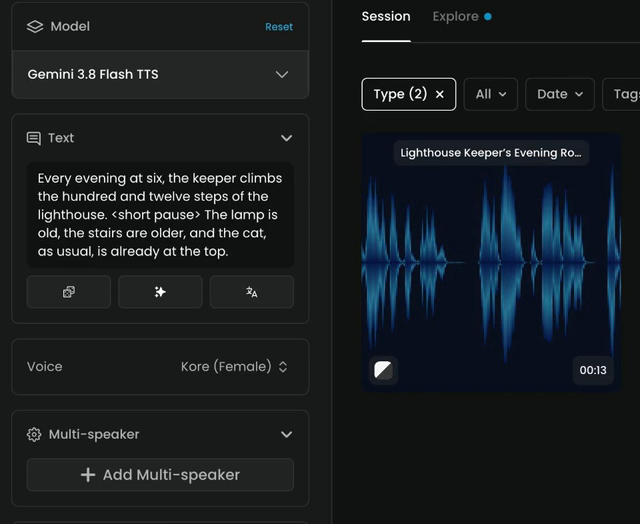
On Gemini 3.8 Flash TTS, the same line uses angle brackets. Pick Gemini 3.8 Flash TTS, set Voice to Kore (Female) and Language to English (US), then generate:
Every evening at six, the keeper climbs the hundred and twelve steps of the lighthouse. <short pause> The lamp is old, the stairs are older, and the cat, as usual, is already at the top.
Audio: lighthouse-narration-gemini-3-8-flash-tts-kore.mp3
The two tag styles aren't interchangeable: a tag the model doesn't know can be read aloud. On Gemini, always set Language to the language of the script. A wrong setting gives an accent or mispronounced words.
Step 2: Write for the ear
- Spell numbers the way they're said: "a hundred and twelve", not "112". The same goes for times and abbreviations: "six p.m.", "Doctor".
- Keep sentences short. Long clauses flatten the read.
- Punctuation is timing. A comma is a breath, a period a stop, a paragraph break a longer pause.
- Respell made-up names phonetically ("Ah-LAY-ah") and keep that spelling in every take.
- One take per paragraph. Short takes are easy to check and redo.
Step 3: A dialogue in one take
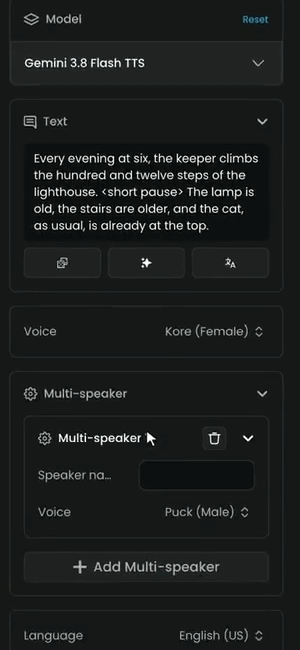
Gemini 3.8 Flash TTS can voice two speakers in one take:
- Open Multi-speaker and click Add Multi-speaker.
- For each speaker, fill in Speaker name and pick a Voice, for example Puck (Male) for the keeper.
- In Text, write each line as the name, a colon, and the text:
Keeper: ...thenCat: ...on the next line.
Step 4: Direct the delivery on ElevenLabs v4
On ElevenLabs v4, tags go further than pauses: a breath or a sigh, a feeling, or the pace of the next words. Place each tag right before the words it changes:
[sighs] The lamp again. [slowly] One more night, and then the keeper rests.
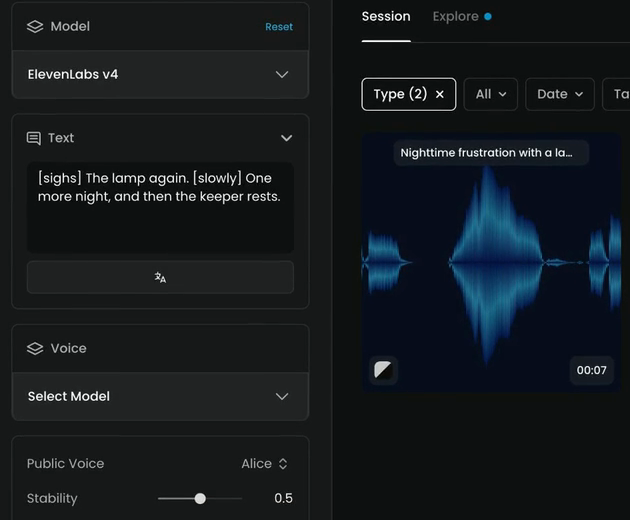
Listen to the take: no tag is read aloud, and the sigh is there. Tags can be single words like [sighs] or [whispering], or short directions.
Stability
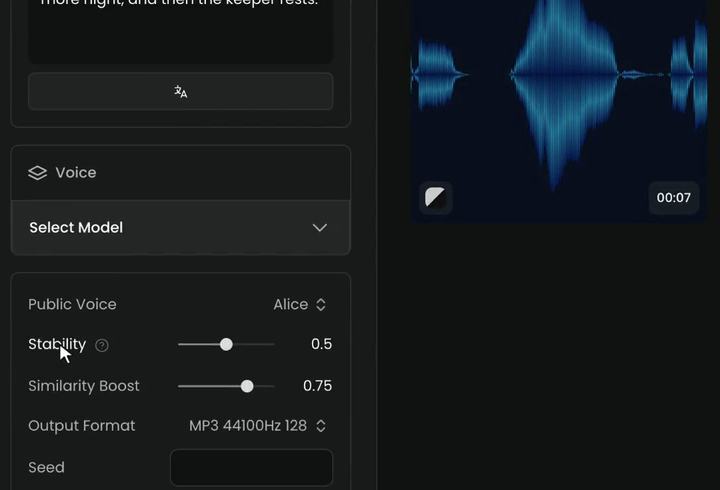
Stability sets how much the read varies:
- Lower is livelier and more emotional, but less predictable from take to take.
- Higher keeps a long narration even.
- 0.5, the default, is a good start.
The other settings:
- Similarity Boost (default 0.75): how closely the take holds to the voice.
- Output Format: MP3 by default; pick WAV when you'll edit and mix.
- Seed: set it to repeat a take exactly.
Exact timing
Speech models don't take timestamps. For narration that must land on a cut, use pause tags, or make one take per line and place each one in your editor.
Step 5: Consent and clean sources
Before any cloning or voice change, you need the speaker's written permission for that use, and you keep it with the project. That includes teammates and hired actors. Never clone a public figure or anyone who hasn't agreed. See Usage restrictions and content policy.
Every voice tool copies what's in the source, including noise: a clone learns background noise as part of the voice. If a recording isn't clean, run ElevenLabs Voice Isolator first. Find it by name in the model menu: it removes noise, music and ambient sound and returns the voice. It can't recover a word the noise covered.
| You have | You want | Use |
|---|---|---|
| Clean recordings of one speaker | That voice for any new script | A trained voice clone, then ElevenLabs v4 |
| A recorded take with the right performance | The same words, timing and emotion in another voice | ElevenLabs Voice Changer |
| A take with noise, echo or music | The voice alone | ElevenLabs Voice Isolator |
Step 6: Train a voice
Voice cloning is a training job, so it needs a Pro, Max or Enterprise plan.
- Open Create › Train and start a training.
- Under Audio, choose Clone a voice, then Instant Voice Cloning (IVC), marked Start here. Click Next.
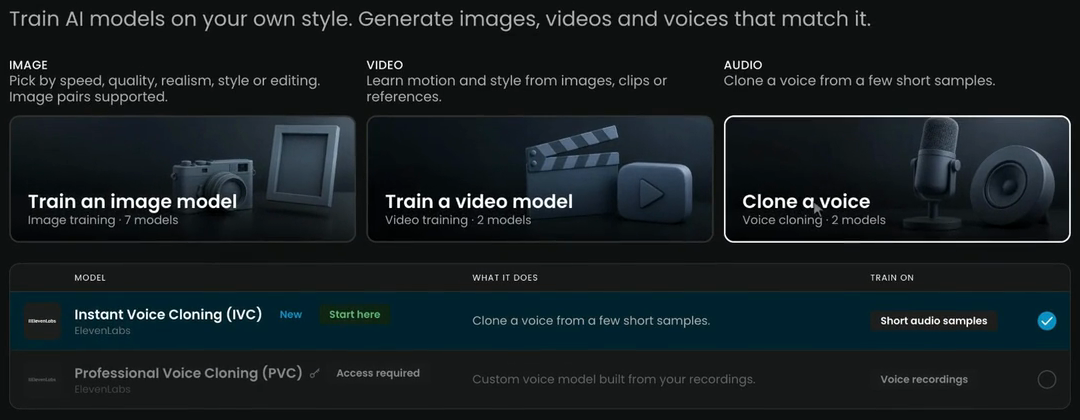
- Upload the samples: at least one minute in total, every sample five seconds or longer. One speaker, no music, natural speech with varied intonation. The upload takes mp3, wav, m4a, ogg or flac, up to 25 files of 10 MB each.
- Name the voice so your team recognizes it, set its language, and train. An instant clone is ready in seconds.
- Test it in ElevenLabs v4 on a neutral sentence, a long paragraph and an emotional line, and transcribe each take.
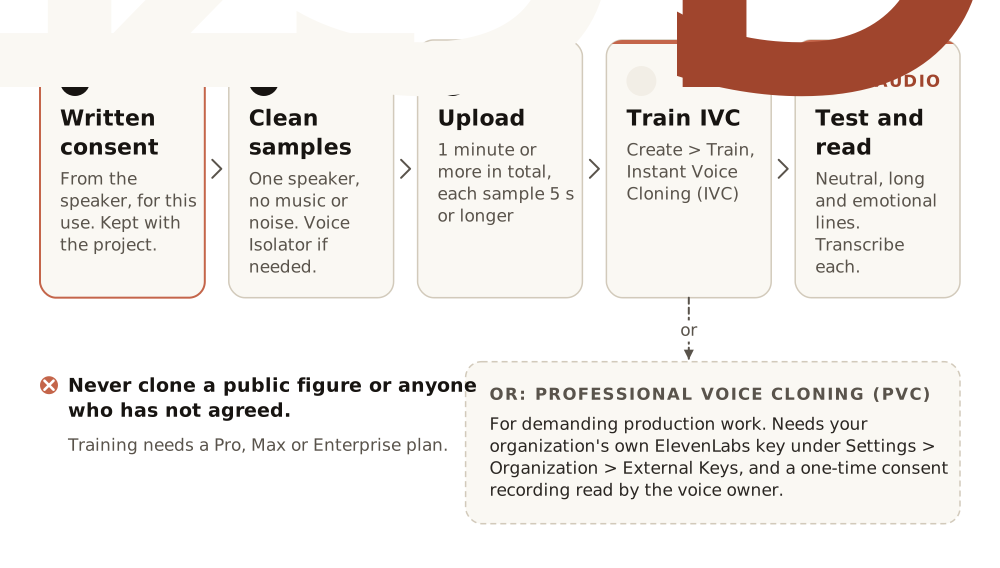
Professional Voice Cloning (PVC) shows Access required. It's for demanding production work, and needs your organization's own ElevenLabs API key under Settings › Organization › External Keys and a one-time consent recording read by the voice owner.
Step 7: Re-voice a take
To keep a performance but change who speaks, use ElevenLabs Voice Changer. It keeps the words, timing and emotion.
- Pick ElevenLabs Voice Changer in the model menu.
- Under Audio, add the take (under 5 minutes). Here, the ElevenLabs v4 narration.
- Choose the target: a Public Voice such as George, or your own clone under Voice.
- Click Generate.
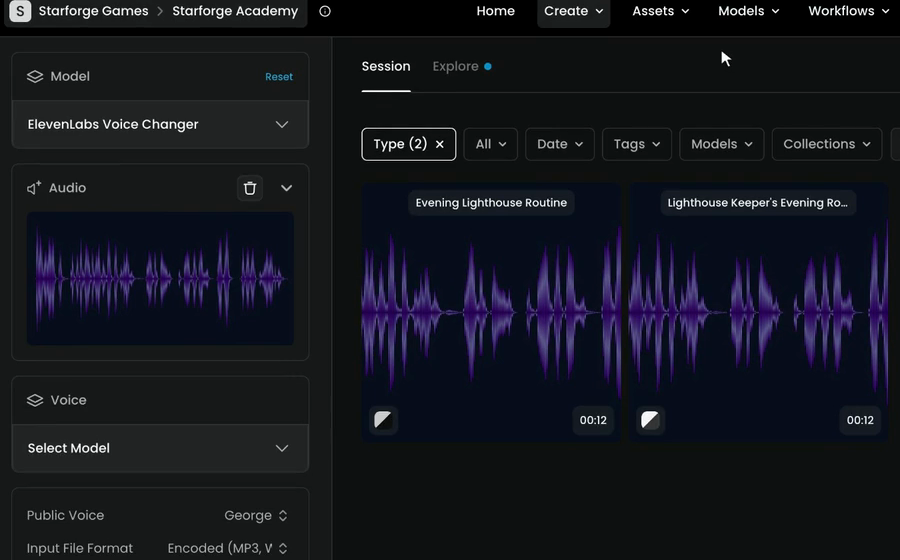
The re-voiced take has the same length and pacing as the source:
Audio: lighthouse-narration-voice-changer-george.mp3
Its other settings include Input File Format, Remove Background Noise, Stability, Similarity Boost, Style Exaggeration and Speaker Boost.
Step 8: Transcribe it
Transcribe a changed voice like any narration: Create › Text › Gemini 3.5 Transcribe, add the take under Audio, Generate, and read the transcript against the script.
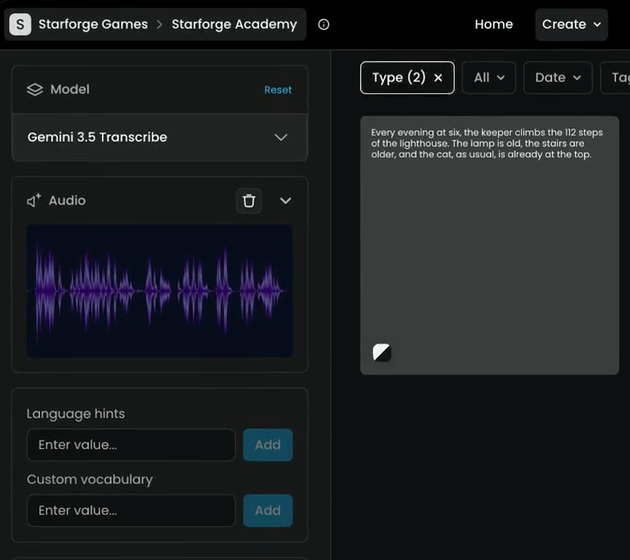
Here every word matches; numbers come back as digits. Voice changes can soften a sound, though. In one of our tests, "lighthouse" came back as "night house". You only catch that by reading. If it happens, raise Stability, or re-voice just that sentence.
the transcript matches the script word for word, names sound the same in every take, no tag is read aloud, a cloned or changed voice stays the same voice across a long paragraph, and the pace leaves room for the picture.
a word is missing, added or changed (as in "night house"), a number is read the wrong way, a tag is spoken, the voice drifts mid-take, noise comes through as part of the voice, or the last word is cut off.
Common problems
| What you see | What to do |
|---|---|
| The model reads your instructions aloud | Move them into tags, or remove them and choose a different voice |
| A tag is spoken | It's the wrong tag style for that model (square or angle brackets), or a tag the model doesn't know |
| An accent or wrong pronunciation on Gemini | Set Language to the language of the script |
| A word is mispronounced or changed | Respell it phonetically, raise Stability, and redo only that sentence |
| The voice drifts over a long take | Raise Stability, or split the script into shorter takes |
| The narration doesn't land on the cut | Use pause tags, or one take per line placed in your editor |
| The clone sounds noisy, muffled or like two people | Fix the samples: isolate the voice, cut other speakers, train again |
| A sample is refused | It's shorter than 5 seconds, or the total is under 1 minute |
| The job failed or is stuck | See Failed or stuck jobs |
What's next
Next, Sound for video makes effects from a description and sound timed to a locked clip. To go further with transcripts and subtitles, see Transcribe and subtitle.