About this lesson
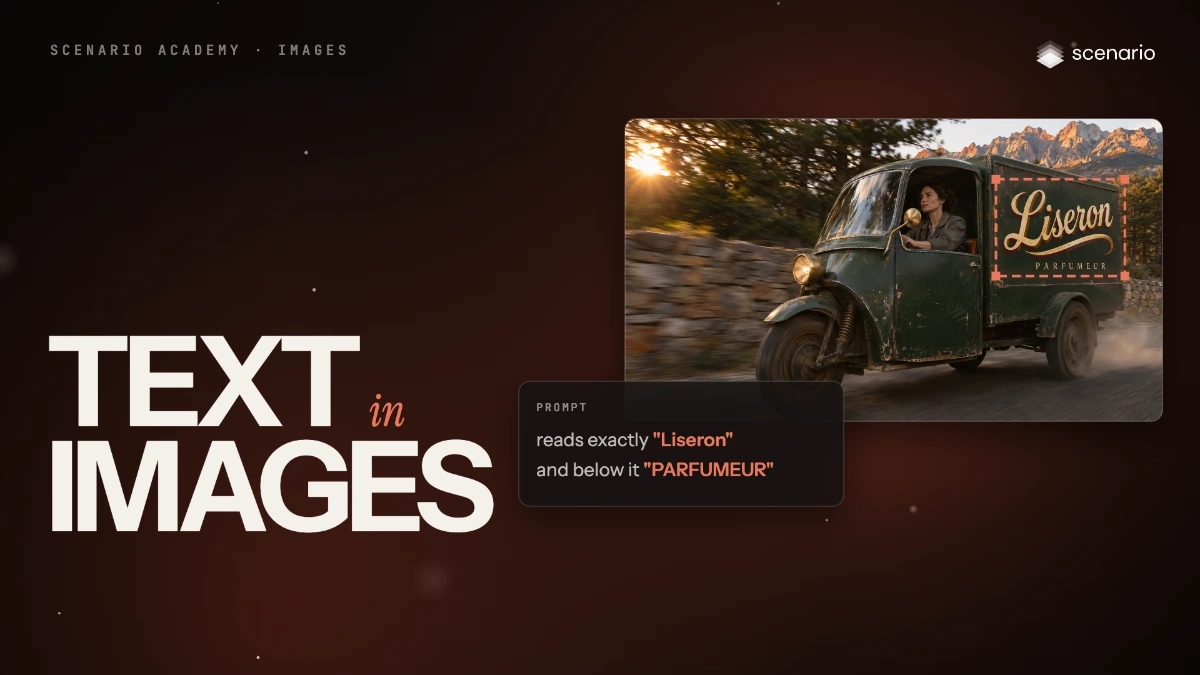
The best image models now spell short text right most of the time. In this lesson, GPT Image 2.6 Sunburst paints a perfumer's name on the side of a delivery cart from the prompt alone. Then, with a logo that already exists, it paints that exact logo onto a cart with no lettering, using reference images. The models and prices in this lesson are as of November 2026.
See moreSee less
- GPT Image 2.6 Sunburst spells a short name right most of the time: put each piece of text in quotes after "reads exactly", then read every letter.
- Already have the exact text, like a logo? Add it as a reference image and ask the model to paint it on your existing image.
- Let code set legal lines, prices, translations and text in video.
Step by step with an agent, through the Scenario MCP (6 steps)Hide the steps
Connect the Scenario MCP
Connect your agent and sign in once at mcp.scenario.com. Then tell it which Scenario team and project to use, so every file lands there.
Give the agent the files
Nothing for the first route: the text is in the prompt. For the logo route, the cart with no lettering and the logo; upload them with upload_asset or give their asset IDs, cart first.
Brief the agent: text in the prompt
The article shows only the lettering part of the prompt; write your own scene first and keep the lettering part word for word at the end.
PromptUse GPT Image 2.6 Sunburst (model_openai-gpt-image-2-6-sunburst) and read its parameters with model_schema_get. Width 2048, height 1152, quality high, one image. No reference. Quote the cost with a dry run first and wait for my go. The prompt is my scene description, then this ending, word for word: Scene: [a tracking shot of a green delivery cart with a box on the back on a mountain road at golden hour, and its driver] Ending: On the side of the box, hand-painted lettering in a bold ivory brush script with a long swash, a burgundy shadow and a gold inline reads exactly "Liseron", and the small spaced capitals below it read exactly "PARFUMEUR", with no other text anywhere: no road signs, no number plate, no markingsBrief the agent: your logo as a reference
PromptSame model and settings, output PNG. referenceImages is an array with the cart first and the logo second. Quote the cost with a dry run first and wait for my go. Prompt, word for word: Paint the logo from image 2 on the side panel of the cart in image 1, as hand-painted sign-writing that follows the panel's angle. Keep every letter, the swash and the colours of the logo exactly as in image 2. Keep everything else in image 1 exactly the same. No other text.Check and redo
Accept when every word reads exactly as in the prompt or the logo, letter for letter with the same case, the lettering follows the surface, and there is no other text anywhere. Reject a missing, doubled or swapped letter, a changed case, invented text on signs or plates, or a changed logo.
PromptCrop the lettering of each result at full size and show it next to the text I asked for and next to the logo. Spell out what you read, letter by letter, and list any other text in the image. Redo a failed take once with the same prompt; if it fails again, tell me so I can shorten the text.File the results and report
PromptCreate a collection called "Cart lettering" with the kept results and the logo. Report each asset ID with its model and the total cost spent.
Step by step in the web app (6 steps)Hide the steps
Pick the model and describe the scene
Create › Images, Model › GPT Image 2.6 Sunburst. In Prompt, describe the scene first: the kind of image, the setting, the light and the subject.
Write the text exactly
End the prompt with the lettering: each piece of text in quotes after "reads exactly", how it looks and where it sits, then "no other text" with the places stray text could appear.
PromptOn the side of the box, hand-painted lettering in a bold ivory brush script with a long swash, a burgundy shadow and a gold inline reads exactly "Liseron", and the small spaced capitals below it read exactly "PARFUMEUR", with no other text anywhere: no road signs, no number plate, no markingsGenerate and read every letter
Click Generate, then zoom in and read each word letter by letter, with the same capitals and punctuation, and check there is no other text.
Add your image and your logo as references
Reference Images: image 1 is the cart without lettering, image 2 the logo, in that order, since the prompt names them by number.
Ask for the logo, keep the rest
Keep GPT Image 2.6 Sunburst, Image Count 1, Width 2048, Height 1152, Output Format PNG, Quality High, and click Generate.
PromptPaint the logo from image 2 on the side panel of the cart in image 1, as hand-painted sign-writing that follows the panel's angle. Keep every letter, the swash and the colours of the logo exactly as in image 2. Keep everything else in image 1 exactly the same. No other text.Check the logo letter for letter
Compare the result with the logo itself: letter shapes, swash, colors and spacing. Then check the driver, the road and the light in image 1 didn't change.
Related