See it made
Run it in Scenario
About this use case
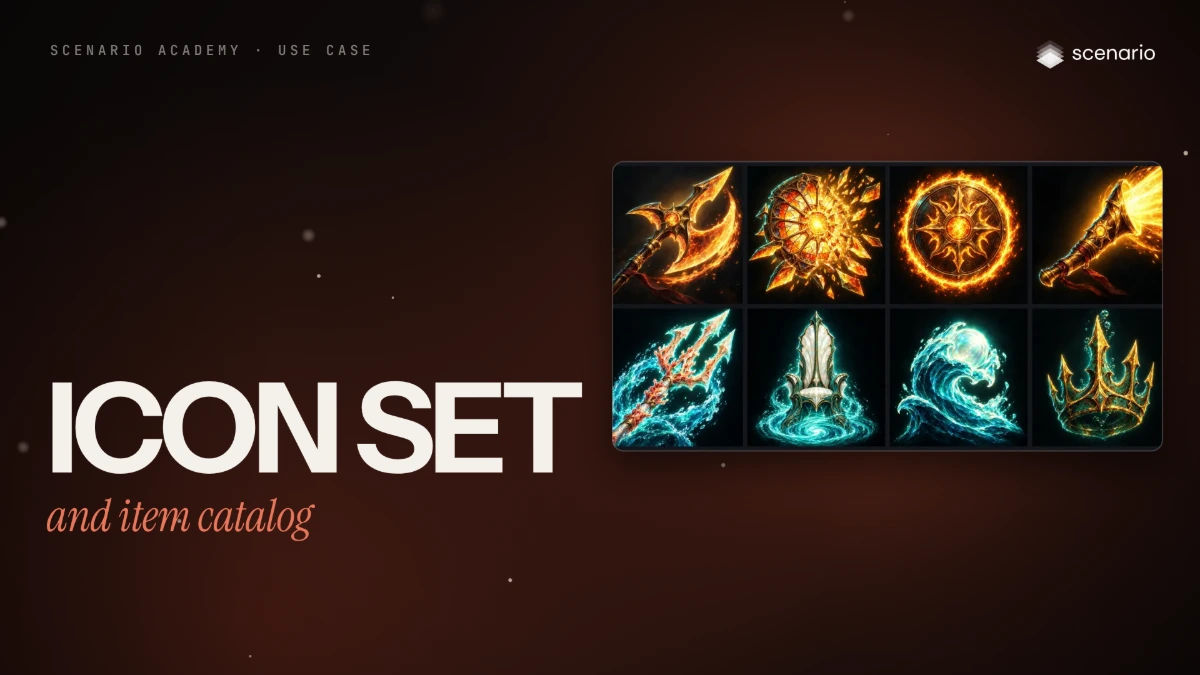
Icons for Cinderthrone, a fantasy battle arena game in painterly splash-art style, in two parts. Part 1 makes eight ability icons for the action bar: four for the fire-and-gold Sunforged faction, four for the sea-born Tidebound, with no odd one out in brushwork, light or how much of the square the subject fills. Part 2 turns a list file into an inventory catalog that grows for months: eight weapons with common, rare and epic tiers, and five chromas (color variants) of a cosmetic halberd. Both start from one approved "style anchor". The models and settings in this use case are as of October 2026.
See moreSee less
- Eight ability icons for Cinderthrone's two rival factions, then eight inventory weapons with tiers and five chromas of one halberd, each set from one approved style anchor.
- Approve the anchor at full size and at 32 px, then generate every other icon or item with it attached and only one line changed; tiers and chromas are edits of an approved cell.
- Check the set at 64 px, 32 px, in grey and on the slot color before you accept it: the weak icon only shows there, and it is redone alone.
Step by step with an agent, through the Scenario MCP (7 steps)Hide the steps
Connect the Scenario MCP
Connect your agent and sign in once at mcp.scenario.com. Then tell it which Scenario team and project to use, so every file lands there.
Give the agent the files
For the ability bar, the list of abilities with one line each and its glow color (gold for Sunforged, teal for Tidebound). For a catalog, items.csv with one row per item and the template saved as template.txt. A local agent reads both from your folder.
Brief the agent: the anchor
Every other icon copies the anchor, so it is the one to get right. The first takes painted the halberd over a burning city and became a smear at 32 pixels; this prompt dropped the scenery.
PromptMake the style anchor of the ability bar with GPT Image 2.5 Sunburst (model_openai-gpt-image-2-5-sunburst): two images, square (1:1), quality "high", background "opaque" (the game draws the frame on top). Quote the cost with a dry run first and wait for my go. Prompt, word for word: Ability icon for a fantasy battle arena game: Sunbrand, the Ember Warden's halberd strike. One large halberd head of molten glass, seen whole, angled diagonally from lower left to upper right, its edge trailing a short crescent of fire. The halberd head fills most of the square and reads as one bold silhouette at 32 pixels. Plain dark background: deep charcoal with a soft warm glow behind the blade and a vignette toward the corners; no scenery, no buildings, no banners. Strong value contrast between the blade and the background. Square, full bleed, no frame, no border, no text, no letters. Style: painterly champion splash art at the level of the top arena games: confident brushwork, crisp edge control, strong diagonal composition, gold and teal rim light, atmospheric depth, rich armor and cloth detail. No text. Show me both takes at full size, at 64 pixels and at 32 pixels.Brief the agent: the other seven
PromptUse the approved anchor for the other seven abilities with GPT Image 2.5 Flare (model_openai-gpt-image-2-5-flare): referenceImages set to [the anchor's asset ID], one image each, background "opaque", quality "high". Keep the template below word for word; change only the ability line and the glow color, nothing else. Start all seven with wait: false and collect them with one jobs_wait. Quote the total first and wait for my go. The template filled in for the Coral Trident, word for word: The reference image is the approved style anchor of this ability icon set: match its painterly brushwork, edge control, plain dark background with a soft glow behind the subject, vignette, value contrast, gold and teal rim light, and how much of the square the subject fills. Do not copy its object. Ability icon for a fantasy battle arena game: Coral Trident, a trident of pale coral and light thrusting diagonally upward through sea spray. One bold silhouette that reads at 32 pixels, glow in bioluminescent teal. Square, full bleed, no frame, no border, no scenery, no text, no letters.Check the bar at 64, 32 and in grey
Accept when brushwork, glow and value contrast match across the bar, each subject is one bold shape that fills most of the square, and each icon reads at 32 pixels and in grey, the way it looks on cooldown. Reject scenery, a second subject, a cropped shape, an icon that melts into the background in grey, or two icons with one silhouette at 32 pixels.
PromptLay the eight icons out in a row at 64 pixels, at 32 pixels and in greyscale, and show me the sheet. Tell me which icons fail and why. For a failing icon, rewrite only its ability line and rerun only that job.A catalog with tiers
For a catalog that grows for months, one template and one approved longsword anchor, run on GPT Image 2.5 Sunburst for every cell: on transparent cells, Flare reversed the diagonal and Nano Banana 2.1 painted a background.
PromptMake the catalog anchor with GPT Image 2.5 Sunburst (model_openai-gpt-image-2-5-sunburst), 1024 x 1024, background "transparent". Prompt, word for word: Game inventory icon of a forged iron longsword with a leather-wrapped grip, a plain crossguard and a round sun-disc pommel, laid diagonally from lower left to upper right. Single object, centered, three-quarter view, filling about 80 percent of the square. Painterly fantasy game item art: confident brushwork, crisp edge control, gold and teal rim light, rich material detail, warm key light from the top left. Transparent background, no frame, no cast shadow, no text. When I approve it, read items.csv and run one job per row with the approved anchor in referenceImages, 1024 x 1024, quality "medium", background "transparent", one image, with wait: false, then one jobs_wait. The prompt is template.txt with {item} replaced by the row's item: Game inventory icon of {item}. Match the reference icon exactly in style: same painterly fantasy rendering, brushwork, edge control, gold and teal rim light, warm top-left key light, palette saturation, three-quarter view, the same diagonal placement from lower left to upper right and the same fill of the square (about 80 percent). Draw only the new object, not the sword. Transparent background, no frame, no cast shadow, no text. For the rare tier of the longsword, use the approved longsword as the only reference and this prompt, word for word: Upgrade the game icon in the reference image to its rare tier. Keep exactly the same object, silhouette, three-quarter angle, diagonal placement, painterly rendering, top-left light and fill of the square. Change only materials and glow: polished silver steel instead of iron, small inset blue sapphires, a faint cool blue glow along the edges. Transparent background, no frame, no cast shadow, no text. Quote one row first and wait for my go before the batch.File the set and report
PromptCheck that every catalog cell has clean transparency with no haze, reads at 32 pixels on the slot color, and that each tier overlays its base cell with only the materials and glow changed. Then create one collection for the ability bar and one for the catalog, add the kept icons, and write a receipt per row: item id, job ID, asset ID and cost. Report the models used, which cells you redid and the total cost spent.
Step by step in the web app (7 steps)Hide the steps
One icon first: the anchor
Every other icon copies the style anchor, so it's the one to get right. Create › Images › GPT Image 2.5 Sunburst, Image Count 2, Dimensions 1:1, Quality high, Background opaque, because the game draws the frame on top.
One bold subject, plain background
Ask for one bold subject seen whole on a plain dark background, and say it must read at 32 pixels. The first takes painted the halberd over a burning city and became a smear at 32 pixels, so the retake dropped the scenery.
PromptAbility icon for a fantasy battle arena game: Sunbrand, the Ember Warden's halberd strike. One large halberd head of molten glass, seen whole, angled diagonally from lower left to upper right, its edge trailing a short crescent of fire. The halberd head fills most of the square and reads as one bold silhouette at 32 pixels. Plain dark background: deep charcoal with a soft warm glow behind the blade and a vignette toward the corners; no scenery, no buildings, no banners. Strong value contrast between the blade and the background. Square, full bleed, no frame, no border, no text, no letters. Style: painterly champion splash art at the level of the top arena games: confident brushwork, crisp edge control, strong diagonal composition, gold and teal rim light, atmospheric depth, rich armor and cloth detail. No text.Attach the anchor
For the other seven, switch to GPT Image 2.5 Flare, Image Count 1, same settings. Reference Images › Select from Library › the approved anchor.
Change one line, nothing else
The template stays the same; only the ability line and the glow color change, gold for Sunforged, teal for Tidebound. "Do not copy its object" stops it cloning the halberd. This is the template filled in for the Coral Trident.
PromptThe reference image is the approved style anchor of this ability icon set: match its painterly brushwork, edge control, plain dark background with a soft glow behind the subject, vignette, value contrast, gold and teal rim light, and how much of the square the subject fills. Do not copy its object. Ability icon for a fantasy battle arena game: Coral Trident, a trident of pale coral and light thrusting diagonally upward through sea spray. One bold silhouette that reads at 32 pixels, glow in bioluminescent teal. Square, full bleed, no frame, no border, no scenery, no text, no letters.64 px, 32 px and cooldown grey
Lay the set out the way players see it: at 64 pixels, at 32 and in grey, the way an ability looks on cooldown. When one icon fails small, rewrite only its line and run only that job again.
A list, one template, one anchor
For a catalog that grows for months, keep the item list in a file and run one job per row with the same template and one approved longsword as the anchor. Sunburst won the anchor shoot-out on transparent backgrounds: Flare reversed the angle and Nano Banana painted a background.
Tiers and chromas are edits
Images, Reference Images: the approved common longsword. Keep the same object and silhouette and change only the materials and glow; this is the template filled in for the rare tier.
PromptUpgrade the game icon in the reference image to its rare tier. Keep exactly the same object, silhouette, three-quarter angle, diagonal placement, painterly rendering, top-left light and fill of the square. Change only materials and glow: polished silver steel instead of iron, small inset blue sapphires, a faint cool blue glow along the edges. Transparent background, no frame, no cast shadow, no text.
Related