

Generate music
Write a music prompt, set the length, choose instrumental or lyrics, and check the take before it goes under a picture or a voice.
- Guide
- Step 1 Learn
Run it in ScenarioMinimax Music 3.0 Google Lyria 3.5
On this page11 sections
- Before you start
- Step 1: Pick the music model
- Step 2: Describe the track, in order
- Step 3: Set the length and the instrumental switch
- Step 4: Check the length and the ending
- Step 5: Check that it has no words
- Step 6: More control, with sections
- Step 7: A song with lyrics
- Settings explained
- Common problems
- What's next
This lesson is for music you can drop into an edit: a title cue, a bed under narration, a loop, or a song with lyrics. You'll make a 20-second instrumental title cue with ElevenLabs Music v2.5, check its length and that it has no words, then see the models for sections and songs: ElevenLabs Music Advanced v2.5, Minimax Music 3.0 and Google Lyria 3.5.
Quick version
- Decide three things: instrumental or vocals, exact or rough length, and where the music sits.
- Open Create › Audio and pick ElevenLabs Music v2.5 for an instrumental with an exact length.
- In Music Description, describe the track in order: genre and mood, tempo, instruments, structure, ending, vocals.
- Set Duration (s) and turn on Instrumental, then click Generate.
- Check the length on the take's card, then transcribe it: a clean instrumental has no speech.
Before you start
Decide three things before you write a word of the prompt:
- Instrumental or vocals. Under narration or dialogue, almost always instrumental. A song with words needs a model that takes lyrics.
- Exact or rough length. A cue that ends on a cut needs an exact length, set in the model. A background bed can run long and be trimmed.
- Where it sits. Under a voice, keep the arrangement sparse and out of the voice's range. As a title or a sting, it can carry the moment.
Then pick the model for the job:
| You need | Model | What it gives you |
|---|---|---|
| An instrumental with an exact length | ElevenLabs Music v2.5 | Duration (s) from 3 to 600 seconds and an Instrumental switch |
| A track built section by section | ElevenLabs Music Advanced v2.5 | Song sections, each with its own description, duration and styles |
| More of a take you like | ElevenLabs Music Extend v2.5 | Keeps the parts you want and generates new ones around them |
| A song with lyrics | Minimax Music 3.0 | A Lyrics field with section tags, a Style prompt, an Instrumental switch; songs of 1 to 5 minutes |
| A song in one prompt, with image references | Google Lyria 3.5 | One Prompt with sections and their times, up to 10 reference images, MP3 output |
| An instrumental, as an alternative | Sonilo V1.1 - Text to Music | Instrumental only |
- 1Briefmood, tempo, length, placement
- 2Promptgenre, BPM, instruments, ending
- 3Takeduration set, instrumental on
- 4Checklength, ending, transcribe
Step 1: Pick the music model
Open Create › Audio, click the model name, then View all models. Tick Audio under Output and Music under Capabilities: the list shows the music models. Pick ElevenLabs Music v2.5 and click Use this model.
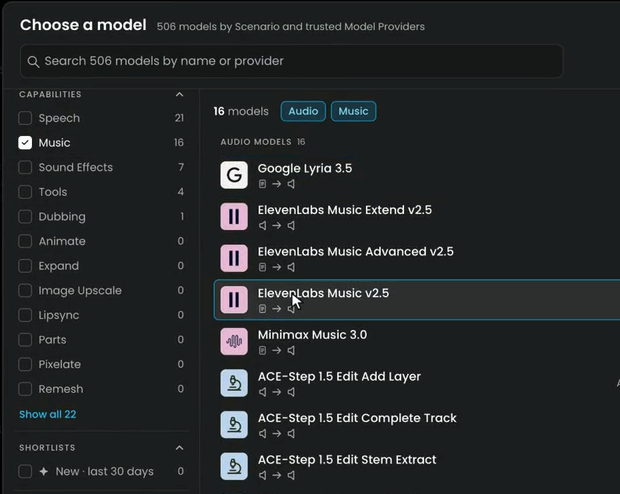
You can also type the model's name in the search box at the top of the model menu.
Step 2: Describe the track, in order
The brief: a 20-second title cue for an animated short about a lighthouse and its cat, ending on a clean chord so the edit can cut on it.
The main field is now called Music Description. Describe the track in this order:
- Genre and mood: "Short warm orchestral title cue".
- Tempo in BPM, and the key if it matters: "90 BPM, D major". A number lets the editor cut on the beat.
- Two to four lead instruments: pizzicato strings, glockenspiel, clarinet.
- The structure: an opening, a melody, a swell at the midpoint.
- The ending: a clean final chord, no fade, so the edit can cut on it.
- Vocals: here, none.
Short warm orchestral title cue for an animated short about a lighthouse and its cat. 90 BPM, D major. Pizzicato strings and glockenspiel open for two bars, then a gentle clarinet melody over soft strings, a small swell at the midpoint, and a clean final chord on the tonic with a short natural decay. No fade-out. Instrumental only, no vocals, no choir, no spoken words.
Say the ending you want. Without one, many music models fade out, which leaves the editor nothing to cut on.
Step 3: Set the length and the instrumental switch
Below the description, ElevenLabs Music v2.5 opens with Duration (s) at 30 and Instrumental off.
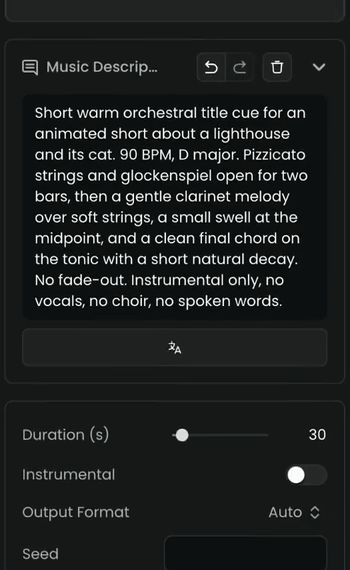
- Drag Duration (s) to 20. Set the duration in the model's setting, not only in the prompt: the setting is a rule, the prompt is a hint.
- Turn on Instrumental. Keep "no vocals, no choir, no spoken words" in the prompt anyway; the two together work best.
- Leave Output Format on Auto. Set a Seed only to repeat a take exactly.
- Click Generate, then listen from start to end, with headphones, at the volume it will play.
Step 4: Check the length and the ending
The take appears in your session with its duration in the corner of the card: 00:20, as set.
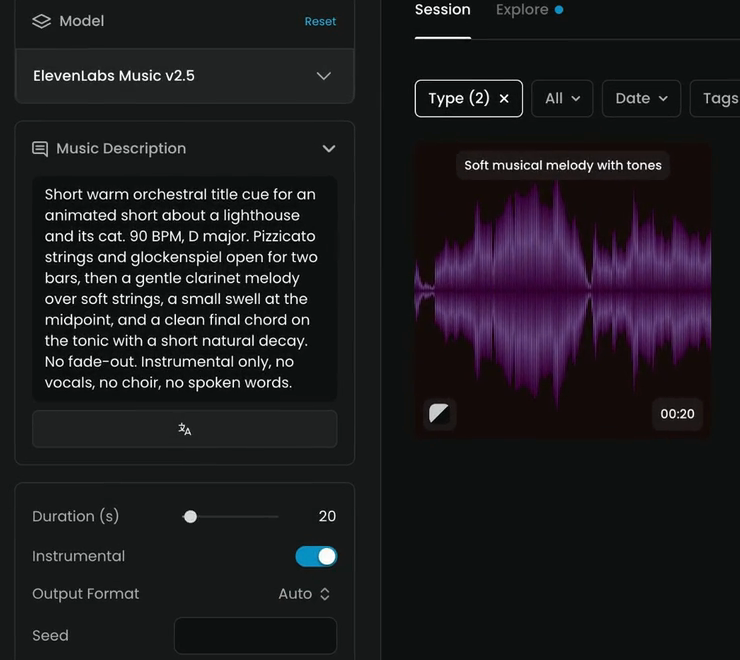
Audio: lighthouse-title-cue-elevenlabs-music-v2-5.mp3
Listen for the ending you asked for. Here the last chord rings out with a short natural decay and no fade, so the editor can cut on the chord or let it ring.
Step 5: Check that it has no words
Music models sometimes sing or speak words from the prompt, and under a voice that's easy to miss. Transcribe every instrumental:
- Open Create › Text and pick Gemini 3.5 Transcribe.
- Under Audio, click Select from Library and choose the cue.
- Click Generate.
On a clean instrumental, Gemini 3.5 Transcribe returns No intelligible speech: nothing to transcribe. That's what this cue returned. If it returns words, the model sang something from your prompt. Two fixes:
- Turn the Instrumental setting on, if it was off.
- Take out phrases that read like lyrics: short, rhyming or poetic lines.
Transcribe and subtitle explains the transcription settings.
the length matches Duration (s), the ending fits the cut, the tempo and mood match the brief, the transcript finds no speech in an instrumental, and every sung word in a song matches your lyrics.
a voice, choir or spoken word appears in an instrumental, the track fades when you asked for a clean ending, there's a long silence at the end, or a sung line is garbled or out of order.
Step 6: More control, with sections
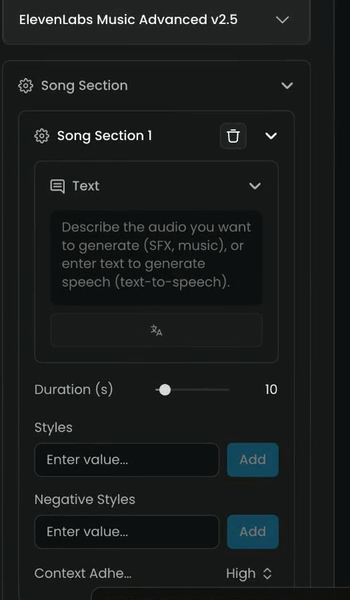
When one description isn't enough, ElevenLabs Music Advanced v2.5 builds a track from sections. Under Song Section, each Song Section 1, 2 and so on has:
- Text: the description of that section.
- Duration (s): its length.
- Styles and Negative Styles: styles to use and to avoid, added one at a time with Add.
- Context Adherence: how closely the section follows the ones around it.
Add a section with Add Song Section. The track plays the sections in order.
ElevenLabs Music Extend v2.5 works on a take you already like: it keeps the parts you want and continues it, or writes a new intro, bridge or ending around them.
Step 7: A song with lyrics
Minimax Music 3.0 has two fields:
- Lyrics for the words, marked by section with tags such as
[Verse]and[Chorus]. The tags aren't sung. - Style prompt for the sound: genre, mood, instruments, voice.
[Verse]
The lamp goes on at six
[Chorus]
Up the stairs, the cat is there
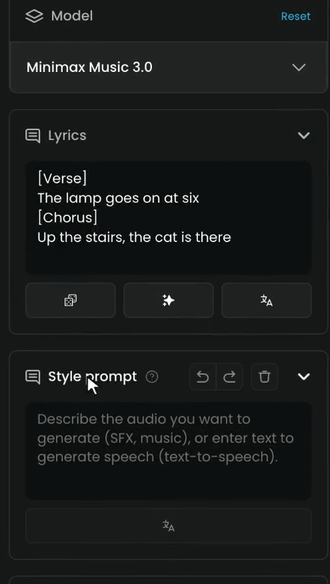
Under Audio Settings it also has Instrumental, Auto lyrics, Sample rate and Bitrate. Keep lines short and singable, spell words the way they're sung, and keep to one language per song.
Google Lyria 3.5 takes the whole song in one Prompt, with each section and its time range, and up to 10 reference images under Images for the mood:
Warm folk song about a lighthouse keeper and his cat. [0:00 - 0:08] solo glockenspiel, soft. [0:08 - 0:30] verse with acoustic guitar. [0:30 - 0:45] chorus, full band.
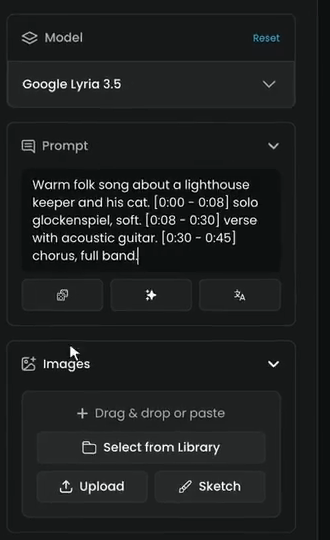
Add images with Drag & drop or paste, Select from Library, Upload or Sketch. Keep Lyria songs to 3 minutes or less for the most reliable structure.
Settings explained
- Duration. Always set it when the model has a setting. "20 seconds" in a prompt is only a hint.
- Tempo in BPM. Write it as a number,
90 BPM, so the editor can cut on the beat and match later cues. - Structure words. "Two-bar intro", "swell at the midpoint", "clean ending on the tonic" give the model a shape. Without them you often get a loop that fades.
- Ending. Ask for "no fade-out" when the picture needs a button ending. Ask for a fade when the music runs under a scene change.
- Lyrics length. On Minimax Music 3.0, the more lyrics you write, the longer the song.
Loops
For a loop, such as a menu screen or a waiting state:
- Ask for "a steady groove with no intro and no ending, the same four bars repeating".
- Cut the loop yourself at a bar line in an audio editor.
- Test the join by playing it twice in a row.
Effect models have a loop switch; see Sound for video.
Common problems
| What you see | What to do |
|---|---|
| Words in an instrumental | Turn on Instrumental, add "no vocals, no choir, no spoken words", remove lines that read like lyrics, then transcribe again |
| The track is the wrong length | Use a model with a duration setting and set it; trim silence at the end in an editor |
| It fades out instead of ending | Ask for "a clean final chord" and "No fade-out" in the description |
| Garbled lyrics | Shorten lines, tag every section, spell words as they're sung, keep to one language |
| A generic, stock-music result | Name fewer instruments and give a structure; "cinematic, epic, emotional" alone isn't enough |
| A section tag is sung | Keep tags on their own line in square brackets, in the Lyrics field |
| The job failed or is stuck | See Failed or stuck jobs |
What's next
Once a prompt gives the sound you want, keep it: save the take in a collection with the prompt in its description, or put the music node in a workflow so the next episode only changes the mood line. Next, Narration and speech steers a voice, clones one with consent and re-voices a take.