See it made
About this use case
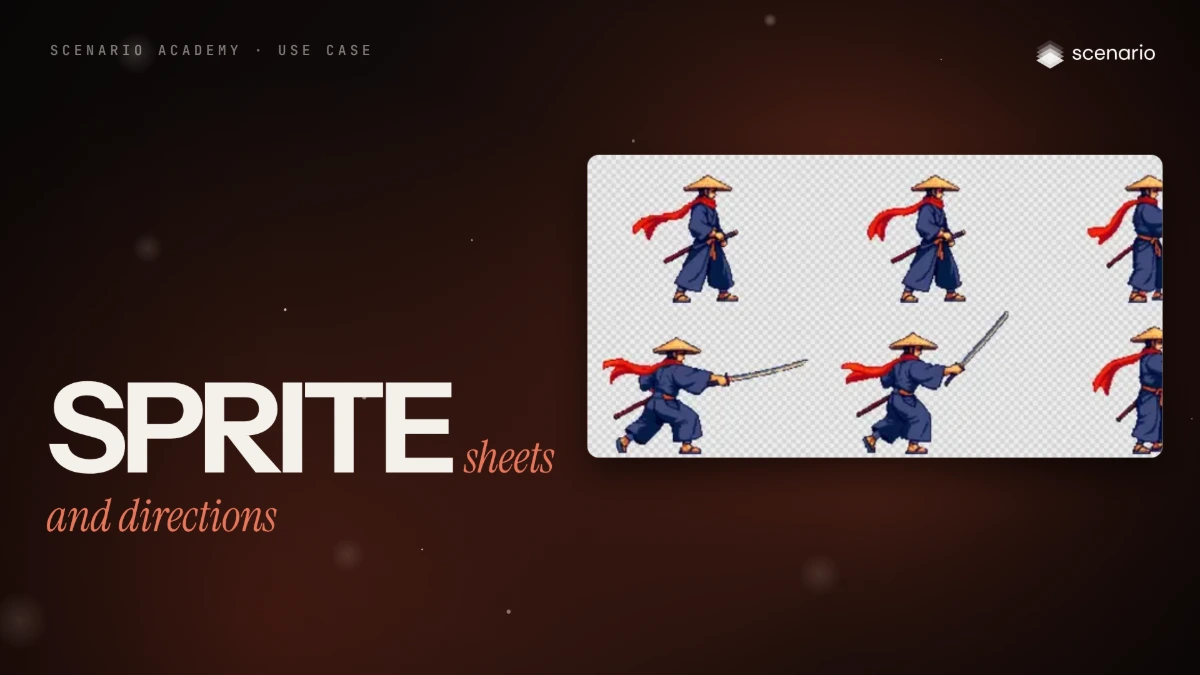
One pixel character, made engine-ready in two parts. Part 1 generates a four-direction walk directly as a sheet and cuts a 12-frame sword attack from a short video clip, pixelated back to the character's palette. Part 2 puts the same character in all eight facings for top-down and isometric games, with real pixels and the same baseline in every cell. Everything ends as transparent PNG sheets on a fixed grid that an engine slices without cleanup. The models and settings in this use case are as of October 2026.
See moreSee less
- Engine-ready pixel sprites of one character: a four-direction walk, a 12-frame sword attack, and an idle frame in all eight facings.
- Generate pixel walk sheets directly; for an attack, animate a magenta plate, then key, crop, pixelate and pack frames in code.
- For eight facings, generate all eight in one image, snap it to a pixel grid and cut cells in code; mirroring moves one-sided details to the wrong side.
Step by step with an agent, through the Scenario MCP (6 steps)Hide the steps
Connect the Scenario MCP
Connect your agent and sign in once at mcp.scenario.com. Then tell it which Scenario team and project to use, so every file lands there.
Give the agent the files
The approved pixel sprite of the ronin first, then his turnaround. Upload them with upload_asset or give their asset IDs; the prompts call them reference 1 and reference 2. A local agent also needs Python for the key, crop, pixelate and pack scripts.
Brief the agent: the walk and the attack
A walk is regular enough for a sprite model. An attack is not: draw a side-view plate on flat magenta, which keys out easily, and animate it with the same image first and last, so it ends in the stance it started from.
Prompt1. Walk: run Retro Diffusion Animation (model_retrodiffusion-animation) with image set to the sprite, style "four_angle_walking", width 48, height 48, returnSpritesheet true, seed 4127. Prompt, word for word: Ronin swordsman, wide straw hat, long red scarf, dark indigo robe, orange sash, katana at the left hip, straw sandals 2. Plate: run GPT Image 2.5 Sunburst (model_openai-gpt-image-2-5-sunburst) with referenceImages [sprite, turnaround], 1024 x 1024, quality "high". Prompt, word for word: Reference 1 is the character's identity as a pixel sprite, reference 2 his turnaround. Game sprite plate: the same ronin, full body, strict side view facing RIGHT, standing in a low ready stance, left hand on the sheathed katana at his left hip, right hand resting on the hilt, feet on one level line. What the camera sees in this view: his RIGHT side. The steel shoulder guard is on his LEFT shoulder, the far side, so it is hidden behind his body; his near right shoulder shows only the indigo robe and the red scarf. He fills about 40 percent of the frame height, centered, with wide empty margins on every side. Keep his wide straw hat, long red scarf, dark indigo robe, orange sash, katana in a dark red scabbard and straw sandals. Premium pixel art, crisp single-pixel lines, limited 32-color palette (indigo night, warm lantern orange, steel), hard pixel edges, no anti-aliasing blur, no glow. Background: one single uniform flat pure magenta field, hex FF00FF, edge to edge, no ground, no shadow, no gradient, no vignette. No text. When I approve the plate: 3. Attack clip: run Wan 3.0 (model_alibaba-wan-3-0) with image and endImage both set to the plate, resolution "480P", duration 5, audio false; and Kling V3 I2V Pro (model_kling-v3-i2v-pro) with startImage and endImage set to the plate, duration "5", aspectRatio "1:1", generateAudio false and a negativePrompt of "glowing halo, light spill, slash trail". Same prompt for both, word for word: Strict side view, the camera is locked and does not move. The ronin performs one fast iaido draw: he snaps the katana out of the scabbard at his hip in a single horizontal slash to the right, holds the extended pose for a short beat, then slides the blade back into the scabbard and settles into the same ready stance he started in. He faces RIGHT the whole time and stays in place with both feet planted. What the camera sees: his right side, the red scarf trailing behind him to the left. Same pixel art look and colors as the first frame. The flat magenta background stays uniform the whole time. No glow, no slash trail, no light effects, no text. Quote every run with a dry run first and wait for my go. Show me a contact sheet of every take before any frame work.Check the takes, then cut the sheet in code
Accept when every frame shows the full character and blade inside the cell, there is one sword, the first and last frames match, and no far-side detail appears on the near side. In the run, Wan's take was kept: Kling left a second hilt in the scabbard. Slash smears on magenta are dropped and drawn as an effect sprite in the engine.
PromptWith the kept clip, in code: mark pixels where red and blue are both far above green as background and drop isolated specks; crop every frame with one box, the union of all frames; pick 12 frames at equal steps of motion; scale so the stance is 108 px tall; set alpha fully on or off; map every pixel to the nearest of the sprite's 33 colors; pack the 12 frames on a grid. Report the frames picked, the magenta pixels left and the baseline row in the first and last cells.Brief the agent: eight facings
None are mirrored, because his guard and katana sit on his left side only. Each facing is described by what the viewer sees.
PromptRun GPT Image 2.5 Sunburst with referenceImages [sprite, turnaround], width 1536, height 512. Five-facing prompt, word for word: Reference 1 is the approved pixel-art sprite of the ronin: copy its pixel size, palette, dark outline and proportions exactly. Reference 2 is his turnaround: use it only for what the back and sides look like. Draw the same pixel-art ronin standing still, empty hands at his sides, in FIVE facings, one row, left to right, evenly spaced, same size, feet on one ground line: 1 facing down toward the viewer, we see his face under the straw hat and both shoulders; 2 facing down-right diagonal, three-quarter front, we see his face, his chest and his right side; 3 facing right in profile, we see only his right side and one eye; 4 facing up-right diagonal, three-quarter back, we see the back of his hat, his back and his right shoulder, no face; 5 facing up, back view, we see only his back and the scarf tails. Keep in every facing: wide straw kasa hat, red scarf whose two tails hang down his back, indigo kimono, steel shoulder guard on his LEFT shoulder only, orange obi sash, katana in a dark red scabbard at his LEFT hip, grey leg wraps, straw sandals. Top-down action RPG camera, about 30 degrees from above. Each figure about 56 art pixels tall. Hard pixel edges, no anti-aliasing, no glow, no halo, no light spill. Background: one flat pure magenta field, hex FF00FF, edge to edge, no shadow, no ground. No text, no numbers. Style: premium pixel art, crisp single-pixel lines, limited 32-color palette (indigo night, warm lantern orange, steel), no anti-aliasing blur, readable silhouettes. When I approve the row, run it again with referenceImages [the five-facing row, turnaround], width 2048, height 1024. Eight-facing prompt, word for word: Reference 1 is an approved row of the same pixel-art ronin: copy its pixel size, palette, outline, camera angle and figure height exactly. Reference 2 is his turnaround: use it only for what his back and sides look like. Draw the same ronin standing still, empty hands at his sides, in EIGHT facings, two rows of four, evenly spaced, all the same size, feet on one ground line per row. Top row, left to right: 1 facing down toward the viewer: face, both shoulders, steel guard on the viewer's right, katana hilt at the viewer's right hip. 2 facing down-right diagonal, turned 45 degrees: his face and chest point to the lower right, we see his right side clearly; the steel guard is on his far shoulder, only its edge shows. 3 facing right in profile: we see only his right side and one eye. The steel guard and the katana are on his far side: we never see the guard; only the katana hilt tip shows in front of his belly. 4 facing up-right diagonal, turned 45 degrees: a three-quarter back view, we see his back with the scarf tails and his right shoulder and right arm almost in profile on the right of the figure; no face; the steel guard shows only as a small grey rim on the far left edge. Bottom row, left to right: 5 facing up, back view: his back, scarf tails, steel guard on the viewer's left, katana on the viewer's left hip. 6 facing up-left diagonal, turned 45 degrees: a three-quarter back view, we see his back and his left shoulder with the steel guard, katana scabbard on the near hip, no face. 7 facing left in profile: we see only his left side: steel guard on the near shoulder, katana in its scabbard at the near hip. 8 facing down-left diagonal, turned 45 degrees: his face and chest point to the lower left, we see his left side, steel guard on the near shoulder, katana at the near hip. Keep in every facing: wide straw kasa hat, red scarf whose two tails hang down his back, indigo kimono, steel shoulder guard on his LEFT shoulder only, orange obi sash, katana in a dark red scabbard at his LEFT hip, grey leg wraps, straw sandals. Top-down action RPG camera, about 30 degrees from above. Hard pixel edges, no anti-aliasing, no glow, no halo, no light spill. Background: one flat pure magenta field, hex FF00FF, edge to edge, no shadow, no ground. No text, no numbers. Style: premium pixel art, crisp single-pixel lines, limited 32-color palette (indigo night, warm lantern orange, steel), no anti-aliasing blur, readable silhouettes. Then run Pixel Snapper (model_pixel-snapper) on the kept take with 32 colors. Quote each run first and wait for my go.Cut, inspect, file and report
Accept when all eight figures share one baseline, the diagonals read as diagonals, no magenta or purple pixels remain, identity reads at 1x, and the guard and katana sit on his left in every facing. Reject a diagonal that looks like a profile, figures of different sizes, palette drift, blurred pixels or a one-sided detail on the wrong side.
PromptIn code, key out the magenta and the purple fringe, split each row into figures, paste each into a 128 x 128 cell bottom-aligned on one baseline, and save one 1024 x 128 sheet in the order S, SE, E, NE, N, NW, W, SW. Show me the walk sheet, the attack sheet and the eight facings at 1x and 3x, on dark and light. Then create a collection for the ronin with the kept takes and sheets (upload the sheets with upload_asset), and report the models, every asset ID and the total cost spent.
Step by step in the web app (7 steps)Hide the steps
A dedicated sprite model
A walk cycle is regular enough for a sprite model. Create › Images › View all models, search Retro Diffusion and pick Retro Diffusion Animation.
Style, size and sheet
Reference Image: the ronin sprite, for identity. Style four_angle_walking, Width and Height 48, and Return Spritesheet on, or you get a GIF instead.
PromptRonin swordsman, wide straw hat, long red scarf, dark indigo robe, orange sash, katana at the left hip, straw sandalsA side-view plate on flat magenta
An attack is too complex for a sprite model, so draw one side-view plate on flat magenta, which keys out easily. Create › Images › GPT Image 2.5 Sunburst, Reference Images: the ronin sprite, Dimensions 1:1; the prompt says what the camera sees, because without it the far-side shoulder guard moved to the near shoulder.
PromptReference 1 is the character's identity as a pixel sprite, reference 2 his turnaround. Game sprite plate: the same ronin, full body, strict side view facing RIGHT, standing in a low ready stance, left hand on the sheathed katana at his left hip, right hand resting on the hilt, feet on one level line. What the camera sees in this view: his RIGHT side. The steel shoulder guard is on his LEFT shoulder, the far side, so it is hidden behind his body; his near right shoulder shows only the indigo robe and the red scarf. He fills about 40 percent of the frame height, centered, with wide empty margins on every side. Keep his wide straw hat, long red scarf, dark indigo robe, orange sash, katana in a dark red scabbard and straw sandals. Premium pixel art, crisp single-pixel lines, limited 32-color palette (indigo night, warm lantern orange, steel), hard pixel edges, no anti-aliasing blur, no glow. Background: one single uniform flat pure magenta field, hex FF00FF, edge to edge, no ground, no shadow, no gradient, no vignette. No text.Same image first and last
Create › Videos › Wan 3.0, with the plate in both First Frame and Last Frame so the attack ends in the stance it started from. Lock the camera and ask for no glow and no slash trail, because effects don't key cleanly; Wan's take was kept over Kling's, which left a second hilt in the scabbard.
PromptStrict side view, the camera is locked and does not move. The ronin performs one fast iaido draw: he snaps the katana out of the scabbard at his hip in a single horizontal slash to the right, holds the extended pose for a short beat, then slides the blade back into the scabbard and settles into the same ready stance he started in. He faces RIGHT the whole time and stays in place with both feet planted. What the camera sees: his right side, the red scarf trailing behind him to the left. Same pixel art look and colors as the first frame. The flat magenta background stays uniform the whole time. No glow, no slash trail, no light effects, no text.Key, crop, pixelate, pack
A short script cuts the frames: it keys out the magenta, crops every frame with one box so the feet don't jump, maps each pixel to the sprite's 33 colors and packs 12 frames on a grid.
All eight facings, one image
Create › Images › GPT Image 2.5 Sunburst, Reference Images: the five-facing row. All eight go in one image, each described by what the viewer sees; none are mirrored, because his guard and katana sit on his left side only.
PromptReference 1 is an approved row of the same pixel-art ronin: copy its pixel size, palette, outline, camera angle and figure height exactly. Reference 2 is his turnaround: use it only for what his back and sides look like. Draw the same ronin standing still, empty hands at his sides, in EIGHT facings, two rows of four, evenly spaced, all the same size, feet on one ground line per row. Top row, left to right: 1 facing down toward the viewer: face, both shoulders, steel guard on the viewer's right, katana hilt at the viewer's right hip. 2 facing down-right diagonal, turned 45 degrees: his face and chest point to the lower right, we see his right side clearly; the steel guard is on his far shoulder, only its edge shows. 3 facing right in profile: we see only his right side and one eye. The steel guard and the katana are on his far side: we never see the guard; only the katana hilt tip shows in front of his belly. 4 facing up-right diagonal, turned 45 degrees: a three-quarter back view, we see his back with the scarf tails and his right shoulder and right arm almost in profile on the right of the figure; no face; the steel guard shows only as a small grey rim on the far left edge. Bottom row, left to right: 5 facing up, back view: his back, scarf tails, steel guard on the viewer's left, katana on the viewer's left hip. 6 facing up-left diagonal, turned 45 degrees: a three-quarter back view, we see his back and his left shoulder with the steel guard, katana scabbard on the near hip, no face. 7 facing left in profile: we see only his left side: steel guard on the near shoulder, katana in its scabbard at the near hip. 8 facing down-left diagonal, turned 45 degrees: his face and chest point to the lower left, we see his left side, steel guard on the near shoulder, katana at the near hip. Keep in every facing: wide straw kasa hat, red scarf whose two tails hang down his back, indigo kimono, steel shoulder guard on his LEFT shoulder only, orange obi sash, katana in a dark red scabbard at his LEFT hip, grey leg wraps, straw sandals. Top-down action RPG camera, about 30 degrees from above. Hard pixel edges, no anti-aliasing, no glow, no halo, no light spill. Background: one flat pure magenta field, hex FF00FF, edge to edge, no shadow, no ground. No text, no numbers. Style: premium pixel art, crisp single-pixel lines, limited 32-color palette (indigo night, warm lantern orange, steel), no anti-aliasing blur, readable silhouettes.Snap to a real pixel grid
Pixel Snapper from the model picker, Colors 32, on the eight facings: it rebuilds the image with one art pixel per pixel. A script then cuts eight cells on one baseline.
Related