About this use case
A 13-second presenter video, then the same video for another market. An invented host in a pottery studio speaks a script about the product on the bench, lips in sync, label intact; then a Spanish version carries a translated voice, re-synced lips and the product name spelled right in subtitles placed clear of the product. For marketing and learning teams who need the same host in every short video, without a shoot, and who check each market's version before it ships. The models and settings in this use case are as of October 2026.
See moreSee less
- A 13-second presenter video (an invented host speaks a script, lips in sync, product label intact), then a Spanish version with lips re-synced and subtitles that spell the product name right.
- Approve the portrait and the voice before paying for lip sync; compare one-step translation with voice-first lip sync once; check every version by frames, transcript and native ear.
- Once the models are chosen, a new script is two runs (voice, then lip sync) and each extra language is one translation run.
Step by step with an agent, through the Scenario MCP (7 steps)Hide the steps
Connect the Scenario MCP
Connect your agent and sign in once at mcp.scenario.com. Then tell it which Scenario team and project to use, so every file lands there.
Give the agent the files
The product packshot (here the Kilnwren Trail Mug) and the approved script. Upload the packshot with upload_asset or give its asset ID.
Brief the agent: the host portrait
Approve each part before paying for the next: the portrait, then the voice, then the lip sync, which costs the most.
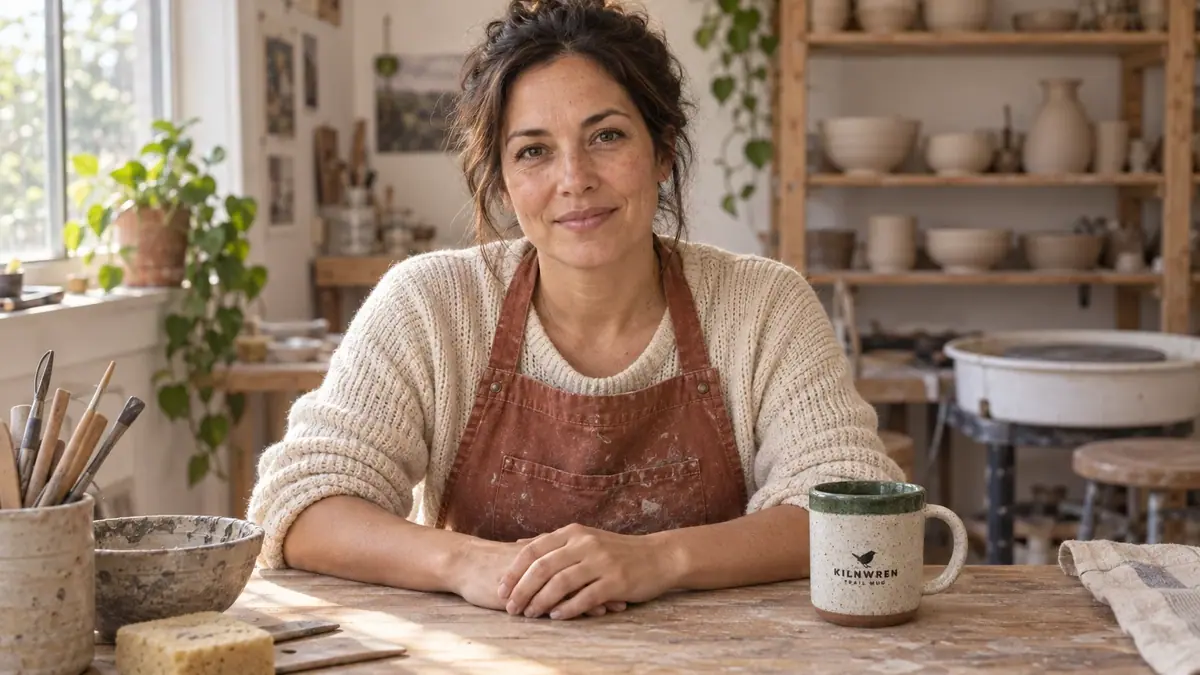
PromptMake the host portrait with GPT Image 2.5 Sunburst (model_openai-gpt-image-2-5-sunburst): referenceImages [packshot] as an array, width 1536, height 864, quality "high". Quote the cost with a dry run first and wait for my go. Prompt, word for word: Photoreal medium shot of a woman in her late 30s, warm olive skin, dark brown hair tied back loosely, a few loose strands, light freckles, no makeup look. She wears a faded rust-colored canvas work apron over a cream knit sweater with sleeves pushed up. She sits at a wooden pottery workbench in a small sunlit ceramics studio; behind her, softly out of focus, wooden shelves with a few unglazed bowls and a potter's wheel. On the bench in front of her, at the lower right, stands the exact mug from the reference image with its printed wren logo and the words KILNWREN and TRAIL MUG facing the camera. Waist-up framing, straight-on, eye-level, camera on a tripod in front, she looks directly into the lens, mouth closed with a calm friendly expression, both hands resting relaxed on the bench, five normal fingers each. Soft window daylight from the left, natural skin texture, 35mm photo. Not a selfie, no arm toward the camera, no side profile, no other text or logos. Show it to me and wait: I check the face, both hands and the label at 1:1 before we go on.The voice, then the lip sync
PromptMake the voice with ElevenLabs v4 (model_elevenlabs-tts-v4): voice Sarah, stability 0.5, similarity 0.75 (read model_schema_get for the parameter names). Script, word for word: Every Kilnwren Trail Mug is made by hand, right here in this studio. It's fired hot enough for cold campsite mornings, and each green rim is glazed one mug at a time. Take it wherever you wake up early. When I approve the voice, run Minimax H3 Max Lip Sync (model_minimax-h3-max-lip-sync) with image set to the approved portrait and audio set to the voice track, resolution 768P. For comparison, run Omni Human 1.5 (model_bytedance-omni-human-1-5) with the same image and audio. Quote every video job with a dry run first and wait for my go.Check the presenter video
Accept when the transcript matches the script, the lips close on m, b and p, the face matches the portrait from first to last frame, the label reads when it faces the camera and the hands keep five fingers. Reject a face that changes, new accessories, pseudo-letters on the label, a cut or stretched voice, or a mouth that moves after the audio ends.
PromptDownload both videos with asset_download. Extract 6 frames from each into one contact sheet, plus a close crop of the mug, and transcribe each video's audio with whisper. Compare each transcript with the script word by word and tell me which take passes. Then create a collection for the host with the approved portrait and the kept video, and put the voice settings and the chosen model in its description.The Spanish version, two ways
One model can translate, clone the voice and re-sync the lips; or you write the translation, make the voice and lip sync the video to it. Run both once and keep the one you can approve with less work.
PromptMake the Spanish (Spain) version two ways. Quote the cost with a dry run first and wait for my go. 1. HeyGen Video Translate Precision (model_heygen-v2-translate-precision) on the kept English video: outputLanguage "Spanish (Spain)", speakerNum 1, enableDynamicDuration false. 2. ElevenLabs v4 (model_elevenlabs-tts-v4) with the same voice settings as the English source. Text, word for word: Cada Kilnwren Trail Mug se hace a mano, aquí mismo, en este taller. Se cuece a alta temperatura para las mañanas frías de acampada, y cada borde verde se esmalta taza a taza. Llévala allí donde madrugues. Then Sync-3 Lipsync (model_sync-lipsync-v3) with the English video and the Spanish audio, syncMode "bounce", since the Spanish audio runs longer than the video.Check, subtitle and report
Accept when the transcript matches the approved text except for names checked by ear, the lips close on m, b and p, and the subtitles say exactly what is heard, clear of the label and the face. Reject a missing or changed sentence, a frozen mouth, a mispronounced product name or a version longer than its slot. A native speaker listens once before publishing.
PromptTranscribe both Spanish videos with whisper, compare them word by word with the approved Spanish text, and extract 6 frames from each into a contact sheet. Tell me which to keep. Then correct the product name and line breaks in the subtitle file, burn the subtitles in clear of the mug label, and check one frame per line. Add the kept version to the host's collection and report the models, every asset ID and the total cost spent.
Step by step in the web app (12 steps)Hide the steps
Make the host portrait
Create › Images › GPT Image 2.5 Sunburst, the packshot in Reference Images, Dimensions 1536x864 (16:9), Quality high. The mug stands on the bench, not in her hands; check the face, both hands and the label at 1:1 before going further.
PromptPhotoreal medium shot of a woman in her late 30s, warm olive skin, dark brown hair tied back loosely, a few loose strands, light freckles, no makeup look. She wears a faded rust-colored canvas work apron over a cream knit sweater with sleeves pushed up. She sits at a wooden pottery workbench in a small sunlit ceramics studio; behind her, softly out of focus, wooden shelves with a few unglazed bowls and a potter's wheel. On the bench in front of her, at the lower right, stands the exact mug from the reference image with its printed wren logo and the words KILNWREN and TRAIL MUG facing the camera. Waist-up framing, straight-on, eye-level, camera on a tripod in front, she looks directly into the lens, mouth closed with a calm friendly expression, both hands resting relaxed on the bench, five normal fingers each. Soft window daylight from the left, natural skin texture, 35mm photo. Not a selfie, no arm toward the camera, no side profile, no other text or logos.Record the voice
Create › Audio › Choose a Model › Audio › Speech › ElevenLabs v4. Paste the script and pick a voice (Sarah, stability 0.5, similarity 0.75), then listen once for the product name.
Run the lip sync
Create › Videos › Choose a Model › Video › Lipsync › Minimax H3 Max Lip Sync. The portrait as the image, the voice track as the audio, resolution 768P; no prompt is needed.
Run the comparison take
Same portrait and audio on Omni Human 1.5 (about 6 minutes). Skip this once you have chosen a model for your host.
Check with frames and a transcript
Extract 6 frames per video into one contact sheet, plus a close crop of the mug. Transcribe each video with whisper and compare it with the script word by word.
Keep the host kit
Save the approved portrait, the voice settings and the chosen model in one collection. Every later video for this host starts from the same portrait.
Spanish: translate in one step
Create › Videos › Choose a Model › Video › HeyGen Video Translate Precision. The source video, output language Spanish (Spain), one speaker, dynamic duration off so the length stays at 13.3 seconds; the result includes a subtitle file.
Or write the translation yourself
Create › Audio › Choose a Model › Audio › Speech › ElevenLabs v4, the same voice as the English source. It returned 14.8 seconds, 1.5 seconds longer than the source.
PromptCada Kilnwren Trail Mug se hace a mano, aquí mismo, en este taller. Se cuece a alta temperatura para las mañanas frías de acampada, y cada borde verde se esmalta taza a taza. Llévala allí donde madrugues.Lip sync the source to the new voice
Choose a Model › Video › Lipsync › Sync-3 Lipsync, with the English video and the Spanish audio. The audio is longer, so pick how the model fills the gap: the run used bounce.
Transcribe both results
Transcribe each with whisper and compare it word by word with the approved Spanish text. Extract 6 frames from each into a contact sheet and check the mouth shapes and the face.
Fix the subtitles in code
Correct the product name and line breaks in the subtitle file, then burn it in with your own font, size and position. Check one frame per line: keep every line clear of the mug label.
Get a native read
Before publishing, a native speaker listens once. A transcript proves the words; only a native ear judges the tone.
Related