See it made
Run it in Scenario
About this use case
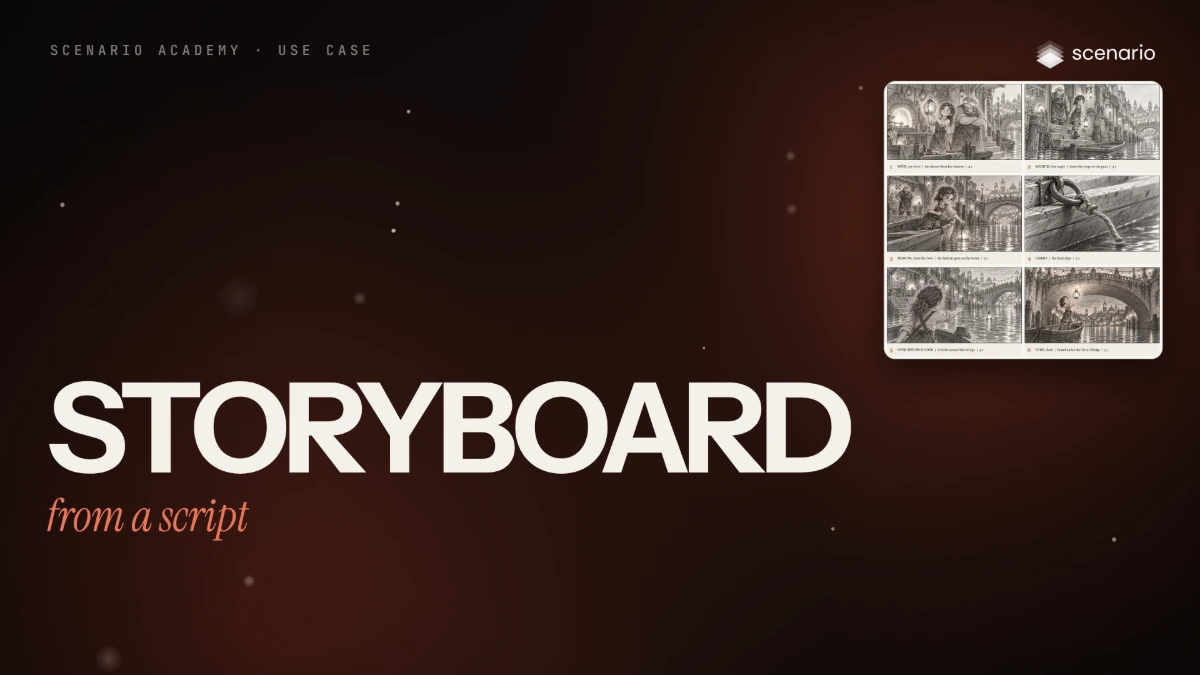
A six-panel storyboard for a 20-second sequence of an animated feature: numbered pencil panels with the same two characters, lantern and screen direction throughout, each captioned with shot size, action and duration. For directors, storyboard artists and producers who need to agree on a sequence before production. The models and settings in this use case are as of October 2026.
See moreSee less
- A six-panel pencil storyboard with the same cast, lantern and screen direction in every shot, captions set in code.
- Build two reference sheets and one shared prompt block first; each panel only adds its shot line.
- Nine image runs and about 3 minutes of waiting; once the sheets exist, each new panel is one run.
Step by step with an agent, through the Scenario MCP (6 steps)Hide the steps
Connect the Scenario MCP
Connect your agent and sign in once at mcp.scenario.com. Then tell it which Scenario team and project to use, so every file lands there.
Give the agent the files
The script, already broken into scenes, the approved portrait of Isa and a city mood image for the prop and location sheet. A local agent also needs Python with Pillow (or ImageMagick) to set the captions and lay out the board.
Brief the agent: shot list and sheets
The agent drafts the shot list itself; you fix the cuts before any panel. Then it makes the two color sheets the panels will follow.
PromptFirst, break the script into a shot list with this instruction, word for word, and show it to me as a table. Do not draw anything until I approve it: Break this script into a storyboard shot list. One line per shot: number, shot size, camera angle, the action in one sentence, duration in seconds (2 to 5). Keep screen direction consistent and say who is on the left and who is on the right in every shot. Script: [paste the script] When I approve the list, make the cast sheet with GPT Image 2.5 Sunburst (model_openai-gpt-image-2-5-sunburst), width 2048, height 1152, quality "high", with Isa's approved portrait as the only reference, in referenceImages as an array. Prompt, word for word: Character reference sheet for an animated feature film. The reference image is Isa: keep her face, freckles, wavy auburn hair tied back, brass goggles on her forehead, cream shirt with rolled sleeves, soot-stained brown leather apron, olive trousers and worn brown boots exactly as shown. Plain warm light-grey background, no text, no labels. Two characters, each shown full body in three views side by side: front, three-quarter, back. Same scale, standing on one faint ground line, empty hands. Left group, ISA: the 12-year-old glassblower's apprentice from the reference image. Right group, MASTER OREN: a stout elderly glassblower, a head and a half taller than Isa, bald with a thick white walrus mustache, round leather-rimmed spectacles, rolled shirt sleeves showing strong forearms, a long burn-marked dark leather apron over a faded blue shirt, grey trousers, heavy boots. Bottom row, small: four head close-ups of Isa (proud smile, surprised, worried, determined) and two of Oren (warm smile, laughing). Style: prestige painterly 3D feature animation, hand-painted textures, expressive appealing shapes, soft volumetric light, rich color. Even soft studio light. Clean gutters between figures. Then make a prop and location sheet with the same settings and the city mood image as the reference: Isa's round amber glass globe lantern with exactly three brass bands and a ring handle, the single stone arch of the Great Bridge hung with lanterns, Oren's canal-side workshop with its round furnace and stone steps, and the canal between tall leaning houses. Quote the cost with a dry run first and wait for my go.Brief the agent: the panels
One shared block starts every panel prompt, unchanged, and one shot line goes under it. Keep the block in a file and have the script append each line, so the agent cannot paraphrase it between panels.
PromptMake one panel per approved shot with GPT Image 2.5 Sunburst (model_openai-gpt-image-2-5-sunburst): referenceImages as an array, the cast sheet first and the prop and location sheet second; width 1536, height 864, quality "high". Save this block to a file and start every panel prompt with it, word for word, then add the shot line on a new paragraph: Storyboard panel for an animated feature film. Loose graphite pencil sketch on plain white paper, quick confident lines, light grey shading only, no color, no text, no numbers, no arrows, no panel border. Image 1 is the cast sheet: Isa, a 12-year-old girl with wavy hair tied back, goggles on her forehead, rolled shirt sleeves, a long leather apron, trousers and boots; Master Oren, stout and a head and a half taller, bald, thick white walrus mustache, round spectacles, rolled sleeves, long leather apron. Match their proportions, faces, hair and costume shapes. Image 2 is the prop and location sheet: Isa's round glass globe lantern with three brass bands and a ring handle on top, the single stone arch of the Great Bridge hung with lanterns, Oren's canal-side workshop with its round furnace and stone steps, and the canal between tall leaning houses. In every exterior shot the canal flows from left to right and the Great Bridge is on the right side of the frame. For example, panel 5's shot line, word for word: Shot: 5. OVER THE SHOULDER, behind Isa standing in the punt. The lantern floats away from her on the current, left to right, toward the Great Bridge on the right side of the frame, getting smaller. Isa reaches one arm out after it. Start all panels with wait: false and collect them with one jobs_wait. Quote the total first and wait for my go. Never put panel numbers, shot sizes or seconds in a prompt.Check each panel against its shot line
Accept when both characters keep their silhouettes, the lantern keeps its globe, bands and ring, the canal flows left to right with the Great Bridge on the right, and each panel shows exactly who its shot line names. Reject a character the script does not put there, a duplicated landmark or written captions. In the run, panel 6 came back with Oren rowing beside her, because the block described both characters.
PromptFor each panel, tell me who is in it, which way the canal flows, where the Great Bridge is, and whether the lantern has its three bands and ring. Redo only the panels that fail. For panel 6, use this retake prompt, word for word, with the same references and settings: Storyboard panel for an animated feature film. Loose graphite pencil sketch on plain white paper, quick confident lines, light grey shading only, no color, no text, no numbers, no arrows, no panel border. Image 1 is the cast sheet: Isa, a 12-year-old girl with wavy hair tied back, goggles on her forehead, rolled shirt sleeves, a long leather apron, trousers and boots. Match her proportions, face, hair and costume shapes. Image 2 is the prop and location sheet: Isa's round glass globe lantern with three brass bands and a ring handle on top, and the single stone arch of the Great Bridge hung with lanterns. Shot: 6. WIDE, dusk, under the arch of the Great Bridge. Isa stands alone in the punt holding the lantern high in both hands, its warm light filling the underside of the arch and reflecting on the water; the hanging lanterns of the parapet glow above. She is UNDER the only Great Bridge in the story: no other bridge, arch or viaduct appears anywhere in the frame, and the canal beyond the arch opens onto calm water and rooftops only.Caption, lay out, file and report
PromptSet each panel's number, shot size, action and seconds under it in code, from the same shot list, and lay out the board as one image. Create a collection named after the story, add the two sheets and the kept panels, and report the model, every asset ID, which panels you redid and the total cost spent.
Step by step in the web app (7 steps)Hide the steps
One line per shot
Create › Text opens Scenario LLM: paste the instruction, and add the script under Text Inputs. The model drafts one line per shot with who is on the left and right; you fix the cuts by hand.
PromptBreak this script into a storyboard shot list. One line per shot: number, shot size, camera angle, the action in one sentence, duration in seconds (2 to 5). Keep screen direction consistent and say who is on the left and who is on the right in every shot. Script: [paste the script]A cast sheet and a prop sheet
Before any panel, make two color sheets: Isa and Master Oren in three views with expressions, and a prop and location sheet. The lantern is described part by part (round amber globe, exactly three brass bands, ring handle), because counting details keeps it the same later.
PromptCharacter reference sheet for an animated feature film. The reference image is Isa: keep her face, freckles, wavy auburn hair tied back, brass goggles on her forehead, cream shirt with rolled sleeves, soot-stained brown leather apron, olive trousers and worn brown boots exactly as shown. Plain warm light-grey background, no text, no labels. Two characters, each shown full body in three views side by side: front, three-quarter, back. Same scale, standing on one faint ground line, empty hands. Left group, ISA: the 12-year-old glassblower's apprentice from the reference image. Right group, MASTER OREN: a stout elderly glassblower, a head and a half taller than Isa, bald with a thick white walrus mustache, round leather-rimmed spectacles, rolled shirt sleeves showing strong forearms, a long burn-marked dark leather apron over a faded blue shirt, grey trousers, heavy boots. Bottom row, small: four head close-ups of Isa (proud smile, surprised, worried, determined) and two of Oren (warm smile, laughing). Style: prestige painterly 3D feature animation, hand-painted textures, expressive appealing shapes, soft volumetric light, rich color. Even soft studio light. Clean gutters between figures.A shared block, unchanged
Create › Images › GPT Image 2.5 Sunburst. Reference Images › Select from Library › the cast sheet, then the prop sheet; Dimensions 1536x864, Quality high; then paste the shared block that starts every panel prompt.
PromptStoryboard panel for an animated feature film. Loose graphite pencil sketch on plain white paper, quick confident lines, light grey shading only, no color, no text, no numbers, no arrows, no panel border. Image 1 is the cast sheet: Isa, a 12-year-old girl with wavy hair tied back, goggles on her forehead, rolled shirt sleeves, a long leather apron, trousers and boots; Master Oren, stout and a head and a half taller, bald, thick white walrus mustache, round spectacles, rolled sleeves, long leather apron. Match their proportions, faces, hair and costume shapes. Image 2 is the prop and location sheet: Isa's round glass globe lantern with three brass bands and a ring handle on top, the single stone arch of the Great Bridge hung with lanterns, Oren's canal-side workshop with its round furnace and stone steps, and the canal between tall leaning houses. In every exterior shot the canal flows from left to right and the Great Bridge is on the right side of the frame.Add one shot line
Under the block, add one shot line. Panel 5: over Isa's shoulder, the lantern drifts left to right toward the bridge. All six panels ran at once.
PromptShot: 5. OVER THE SHOULDER, behind Isa standing in the punt. The lantern floats away from her on the current, left to right, toward the Great Bridge on the right side of the frame, getting smaller. Isa reaches one arm out after it.Describe only who’s there
Panel 6 came back with Oren rowing beside her, because the block described both characters. The retake keeps only Isa in the block and says she stands under the only Great Bridge in the story.
PromptStoryboard panel for an animated feature film. Loose graphite pencil sketch on plain white paper, quick confident lines, light grey shading only, no color, no text, no numbers, no arrows, no panel border. Image 1 is the cast sheet: Isa, a 12-year-old girl with wavy hair tied back, goggles on her forehead, rolled shirt sleeves, a long leather apron, trousers and boots. Match her proportions, face, hair and costume shapes. Image 2 is the prop and location sheet: Isa's round glass globe lantern with three brass bands and a ring handle on top, and the single stone arch of the Great Bridge hung with lanterns. Shot: 6. WIDE, dusk, under the arch of the Great Bridge. Isa stands alone in the punt holding the lantern high in both hands, its warm light filling the underside of the arch and reflecting on the water; the hanging lanterns of the parapet glow above. She is UNDER the only Great Bridge in the story: no other bridge, arch or viaduct appears anywhere in the frame, and the canal beyond the arch opens onto calm water and rooftops only.Captions set in code
Panel numbers, shot sizes and seconds never go to the model. A short Python script sets them under each panel from the same shot list, then lays out the board.
Idea → Storyboard → Animated Video
To run this every time, build it as a workflow, or open the Idea → Storyboard → Animated Video template, which goes on to video.
Related