About this lesson
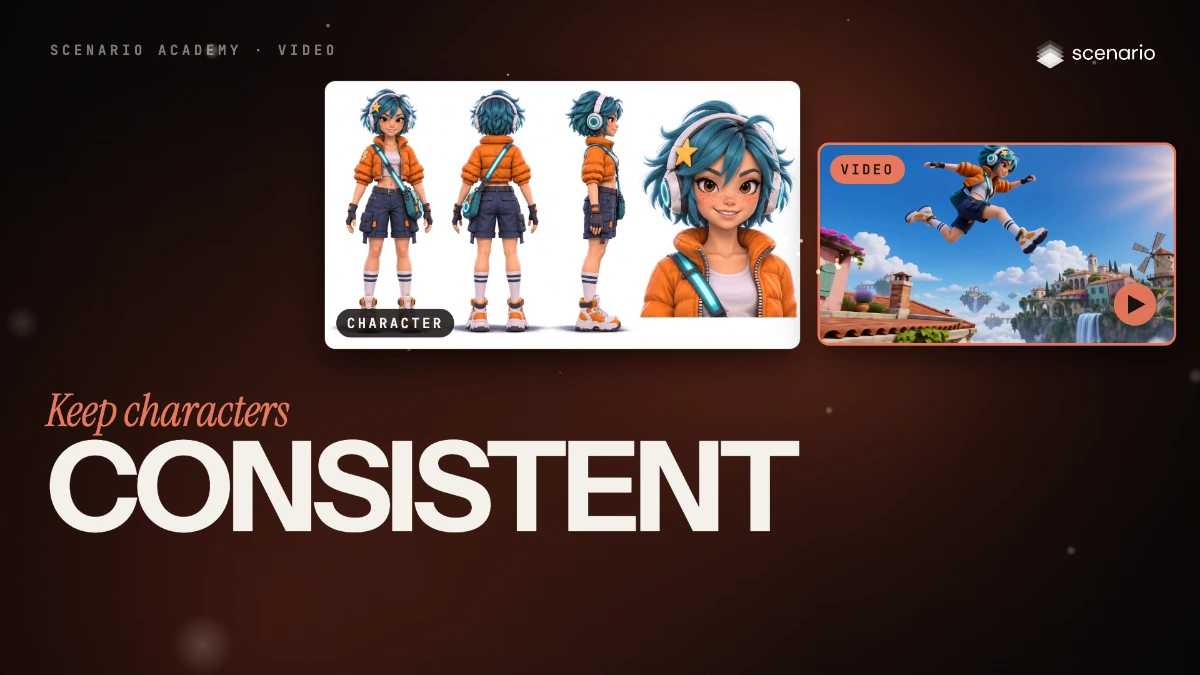
A video model redraws your character in every frame, so a face, an outfit or a product can drift as the camera moves. This lesson keeps one character, Kiko, the same from every angle: first you make a character sheet with GPT Image 2.6 Sunburst, then you pass the sheet and a place to Minimax H3 as reference images and get a rooftop chase where she stays on-model running, in the air and close up. The models and prices in this lesson are as of November 2026.
See moreSee less
- Make a character sheet first: one image of the character from the front, the back and the side, with a close-up of the head.
- In Create > Videos, leave First Frame empty, add the sheet and a place to Reference Images, and say in the prompt which image is which.
- Describe the action and the camera, then pause on frames and compare the character with the sheet.
Step by step with an agent, through the Scenario MCP (6 steps)Hide the steps
Connect the Scenario MCP
Connect your agent and sign in once at mcp.scenario.com. Then tell it which Scenario team and project to use, so every file lands there.
Give the agent the files
The approved image of the character (Kiko on a white background) and the image of the place (the rooftop town). Upload them with upload_asset or give their asset IDs, and say which is which.
Brief the agent: the character sheet
PromptMake a character sheet with GPT Image 2.6 Sunburst (find its model id with models_list), with the approved character as the only reference image. Quote the cost with a dry run first and wait for my go. Prompt, word for word: Character sheet of the character in image 1, Kiko, in the same stylized 3D animated game style. Four panels in one row, left to right, on one plain pure white studio background, evenly spaced; the three full-body figures are the same height with their feet on the same ground line; soft even light and soft floor shadows. Panel 1: full body, front view, standing straight in a neutral relaxed pose, arms slightly away from the body, looking at the camera. Panel 2: full body, back view, the same pose, showing the back of the hair, the headphones band, the back of the orange puffer jacket, the bag strap across the back and the bag at her left hip. Panel 3: full body, side view in profile facing right, the same pose (the star clip and the lightning patch are on her right side, so they are hidden in this view). Panel 4: a close-up of her head and the top of her chest, front view, slight smile. Keep exactly the same character in every panel: face, brown eyes, freckles, short messy teal hair, yellow star clip on her right side, white headphones with glowing teal rings, cropped orange puffer jacket with the lightning patch on the right sleeve, white top, navy cargo shorts, fingerless black gloves, teal crossbody bag with a glowing teal strap, white socks with two navy stripes, chunky orange and white sneakers. No text, no labels, no numbers, no logos, no UI. Show me the sheet. Before any video, check each panel against the original: same face, hair, jacket, bag and sneakers, the star clip and the lightning patch on her right side, the three full-body figures the same height.Brief the agent: the video
PromptMake the clip with Minimax H3 (model_minimax-h3) from reference images, with no first or last frame: the approved sheet first (image 1), the rooftop town second (image 2), in the model's reference-images input (read model_schema_get for its parameter name). Duration 6, aspect ratio 16:9, a lower resolution for the test take, then 2K for the final one. Quote the cost with a dry run first and wait for my go. Prompt, word for word: Image 1 is the character, Kiko, shown from the front, back, side and close up. Image 2 is the place. One continuous shot with no cuts, a dynamic game-trailer camera. It starts low behind Kiko's sneakers as she sprints along the red-tiled rooftop from image 2, then the camera swings around her side at roof height, overtaking her, as she races toward the edge. She leaps across the gap between two roofs; the camera tilts up from below her, so we see her mid-air against the blue sky, the floating islands and the waterfall. She lands in a crouch on the next roof, and the camera pushes in to her face as she looks up and grins. One character only, the same Kiko as in image 1 from start to end. Sound: quick footsteps on clay tiles, rushing wind, a landing thud, distant birds. No music, no speech.Check and redo
Accept when the face, hair color, outfit, bag and sneakers match the sheet in every frame you pause on, details stay on the correct side, there is one Kiko and the place looks like image 2. Reject a face or hair that changes between angles, a recolored jacket or bag, a second character, swapped sides or a drifting place.
PromptWait for the job with jobs_wait and show me the clip. Pull frames where the camera shows her from behind, from the side, in the air and close up, compare each with the sheet and tell me what fails. Fix the sheet or the prompt and redo only what fails; quote each redo first.File and report
PromptCreate a collection for this shot with the character, the sheet, the place and the takes, and report the models, the settings and every asset ID.
Step by step in the web app (6 steps)Hide the steps
Make a character sheet
Create › Images › GPT Image 2.6 Sunburst, with the approved character in Reference Images. Ask for four views in one row (front, back, side, head close-up) and name every detail and which side it sits on.
PromptCharacter sheet of the character in image 1, Kiko, in the same stylized 3D animated game style. Four panels in one row, left to right, on one plain pure white studio background, evenly spaced; the three full-body figures are the same height with their feet on the same ground line; soft even light and soft floor shadows. Panel 1: full body, front view, standing straight in a neutral relaxed pose, arms slightly away from the body, looking at the camera. Panel 2: full body, back view, the same pose, showing the back of the hair, the headphones band, the back of the orange puffer jacket, the bag strap across the back and the bag at her left hip. Panel 3: full body, side view in profile facing right, the same pose (the star clip and the lightning patch are on her right side, so they are hidden in this view). Panel 4: a close-up of her head and the top of her chest, front view, slight smile. Keep exactly the same character in every panel: face, brown eyes, freckles, short messy teal hair, yellow star clip on her right side, white headphones with glowing teal rings, cropped orange puffer jacket with the lightning patch on the right sleeve, white top, navy cargo shorts, fingerless black gloves, teal crossbody bag with a glowing teal strap, white socks with two navy stripes, chunky orange and white sneakers. No text, no labels, no numbers, no logos, no UI.Check the sheet
Compare each panel with the original: same face, hair, jacket, bag and sneakers, details on the correct side, the three full-body figures the same height. Fix it now: what's wrong in the sheet is wrong in every video.
Add the references to the video panel
Create › Videos › Minimax H3. Leave First Frame empty, then add the character sheet to Reference Images first (image 1) and the rooftop town second (image 2).
Say which image is which, then direct the shot
Open the prompt by naming each reference, walk the action and the camera beat by beat, end with the sound, and repeat that there is one character only.
PromptImage 1 is the character, Kiko, shown from the front, back, side and close up. Image 2 is the place. One continuous shot with no cuts, a dynamic game-trailer camera. It starts low behind Kiko's sneakers as she sprints along the red-tiled rooftop from image 2, then the camera swings around her side at roof height, overtaking her, as she races toward the edge. She leaps across the gap between two roofs; the camera tilts up from below her, so we see her mid-air against the blue sky, the floating islands and the waterfall. She lands in a crouch on the next roof, and the camera pushes in to her face as she looks up and grins. One character only, the same Kiko as in image 1 from start to end. Sound: quick footsteps on clay tiles, rushing wind, a landing thud, distant birds. No music, no speech.Set the aspect ratio and generate
Settings: Duration 6, Resolution 2K (lower for test takes), and Aspect Ratio set yourself, here 16:9, since there's no first frame to set the shape. Check the price on Generate, then click it.
Check the result
Open the clip; Info keeps the model, prompt, references and settings for Reload Parameters. Pause where the camera shows a new side of her and compare with the sheet; reject a changed face, swapped details, a second character or a drifting place.
Related