

Nodes reference
Every node in the workflow editor by palette category, with its ports, main settings and typical use, as of October 2026.
- Reference
- Step 2 Repeat
On this page7 sections
Labels are as they appear in the node palette (Add node, +) as of October 2026. Port names come from the live editor where visible, otherwise from Scenario's help center. Model lists are a snapshot.
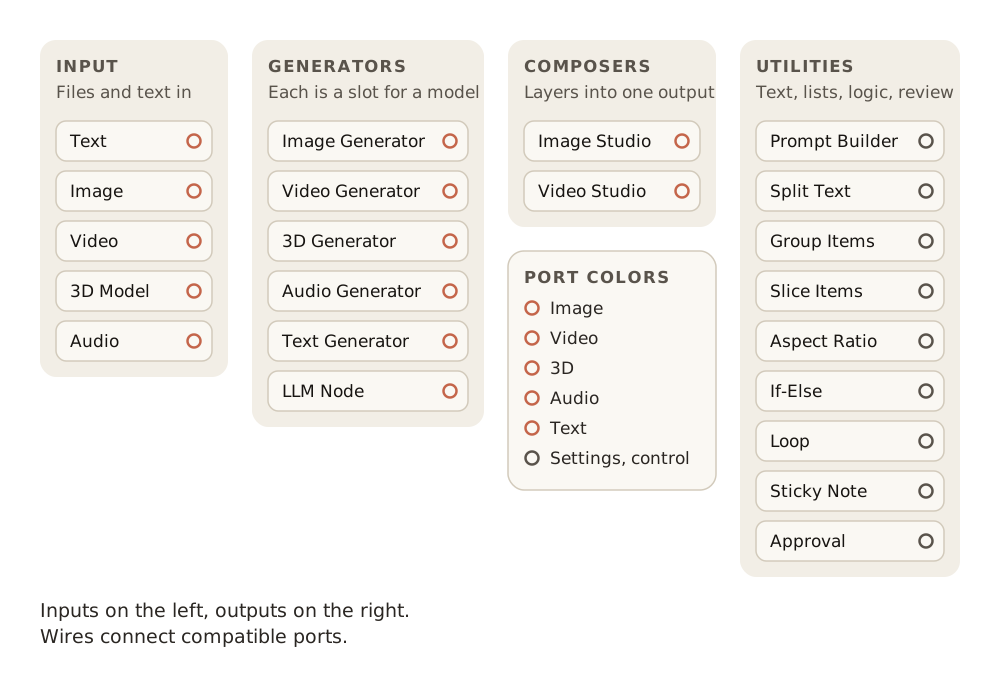
Port colors
Each port color carries one type of data.
| Color | Carries | Typical formats |
|---|---|---|
| Green | Images | PNG, JPG, WebP |
| Yellow | Video | MP4, MOV |
| Red | 3D models | OBJ, FBX, GLB |
| Purple | Audio | MP3, WAV |
| Blue | Text | Prompts, scripts, JSON |
| Gray | Settings and control | Any type on utility nodes; on/off and option values on generators |
Outputs are on the right of a node, inputs on the left. A wire connects only ports of a compatible type.
Input
Input nodes hold what you bring in.
| Node | Palette description | Output port | Notes |
|---|---|---|---|
| Text | Prompts, scripts, lyrics | Prompt (blue) | Plain text or JSON. Shows a character count. Can be pinned as an App field |
| Image | PNG, JPG, ref images | Image (green) | Drag and drop, paste, Select from Library or Upload. Enable Multiple Images holds up to 10 images, which downstream nodes receive together |
| Video | MP4, MOV, source footage | Video (yellow) | Up to 10 videos per node |
| 3D Model | OBJ, FBX, GLB files | 3D model (red) | For retexturing, rigging, retopology and reference |
| Audio | MP3, WAV, sound files | Audio (purple) | Upload, library or record |
Generators
Each generator is a slot for a model, and its ports depend on the model you pick. Click the model name at the foot of the node to open Choose a Model (tabs All, Generate, Edit, Expand, Upscale, Vectorize, Remove Background, Tools).
| Node | Palette description | Main inputs | Main outputs | Good picks as of October 2026 |
|---|---|---|---|---|
| Image Generator | Gemini, Flux, Seedream... | Is Active, Prompt, Reference Images, Mask, Aspect Ratio, Settings | Approval, Output | GPT Image 2.5 Sunburst for stills and edits; GPT Image 2.5 Flare as a cheaper sibling; Topaz Image Upscale from the Upscale tab |
| Video Generator | Veo, Kling, Wan... | Prompt, Negative Prompt, First Frame, Last Frame, reference images; some models add Voice Script, Voice Prompt or Portrait Image | Output (video), First Frame, Last Frame | Seedance 2.5 as the reference for finished shots; Wan 3.0 for first and last frame control |
| 3D Generator | Hunyuan, Meshy, Trellis... | Reference Image, Prompt, 3D Model | 3D model | Meshy 7.1, Rodin Gen-2.5 |
| Audio Generator | ElevenLabs, TTS, SFX... | Prompt or script, Images, Reference Audio | Audio | ElevenLabs v4 for speech; Sync-3 Lipsync for lip sync |
| Text Generator | Transcribe, caption, extract text | Depends on the model | Text | Captioning and transcription models |
| LLM Node | GPT, Gemini, text & vision | Is Active, Instruction, Images, Text Inputs | Approval, First Result, All Results | Default Gemini 3.5 Flash Lite; Claude and GPT models for harder reasoning |
LLM Node settings
Set these on the node.
| Setting | Values |
|---|---|
| Model | Claude Fable 5.1, Claude Opus 5.5, Claude Sonnet 5.5, Claude Haiku 4.5, GPT-6 Astra, GPT-5.6 Sol, GPT-5.6 Terra, GPT-5.6 Luna, GPT-5.4 Mini, Gemini 3.7 Flash, Gemini 3.5 Flash Lite (default) |
| Number of Results | 1 to 5. First Result carries the first; All Results carries the list |
| Thinking Level | None, Minimal, Low, Medium, High (available levels depend on the model) |
| Instruction | Up to 100,000 characters |
Composers
Composers assemble several results into one output.
| Node | Palette description | Inputs | Outputs | Main controls |
|---|---|---|---|---|
| Image Studio | Combine multiple images | One image layer per connected input; first connected is the bottom layer | Composed image | Canvas size, X/Y position, scale with aspect lock, opacity, blend modes (Normal, Multiply, Screen, Overlay and more), alignment |
| Video Studio | Layers, transitions, effects | Video Layer, Image Layer, Audio Layer, as many as needed | Output (video), First Frame, Last Frame | Position, size, Fit to canvas, scale, rotation, opacity; effects Blur, Brightness, Contrast, Saturation, Grayscale |
Utilities
Utilities shape lists, branch, repeat, annotate and pause.
| Node | Palette description | Inputs | Outputs | Settings and behavior |
|---|---|---|---|---|
| Prompt Builder | Combine text blocks | Text 1, Text 2, ...; optional Instructions | Combined text | A template with a chip per connected text, plus your own literal text and line breaks |
| Split Text | Split text into a list | Text | List of text items | Delimiter: Comma, Space, Semicolon, Period, Newline or Custom. Shows the items as chips |
| Group Items | Bundle multiple assets | Image 1, Image 2, ..., one asset per slot | One collection, in slot order | Gathers outputs from parallel branches |
| Slice Items | Extract from a list or randomize | A list of assets or texts | The kept items | Modes: Default (From Item, zero-based, negative counts from the end; Number of Items), Randomize (lockable seed), Choose (pauses for a person to pick; Message, Confirm, Stop Workflow) |
| Aspect Ratio | Pick a ratio for generators | None | Ratio value | Wire it to several generators so they share one ratio |
| If-Else | Conditional logic | The results to check, from connected nodes | Case 1, any further cases, then Else | Each case is a field (a connected result), an operator and, when needed, a value; Add Condition with an AND / OR toggle, Add A New Case for another branch. Operators: is empty, is not empty, contains, does not contain, =, !=. Cases are checked top to bottom and the first one met runs. You write no expressions |
| Loop | Iterate over a list of inputs | Input List (from Split Text, Group Items, a multi-image Image node or another list) | The current item, to the repeated nodes | Add Loop End adds its partner node, Loop (End), which collects all results. The nodes wired between the Loop and its end run once per item. Shows the current iteration. Concurrent Runs processes several items at once. Called ForEach in the API |
| Sticky Note | Notes and annotations | None | None | About 5,000 characters of plain text. Does not run |
| Approval | Wait for user approval | Items to review | The same items, once approved | Shows your review message. Approve continues; Reject cancels the run (inside a Loop, the rejection cascades to the loop) |
Tool nodes
Tool nodes apply a fixed operation, such as a video cut, and have no palette entry of their own.
To find one, type in the palette search ("Search models, nodes, or tools"): below the matching node types, a Models group lists models and tools by name, each with its provider.
Searches in October 2026 returned, for example:
| Search | Tools returned |
|---|---|
| "cut" | Video Cut, Video Split, Audio Cut, Audio Split |
| "vectorize" | Scenario Vectorize, VTracer, Recraft Vectorize |
| "grain" | Grain, Grain (Video) |
| "background" | Background removal tools such as Photoroom Background Removal and Bria Remove Background |
Search by the operation's name, and pick the entry whose provider is Scenario when there is one.
Execution and limits
How to run a graph, and the limits that apply.
| Item | Value |
|---|---|
| Run the whole graph | Run, top right |
| Run one node | Run This Node on the node |
| Run a node and everything after it | Run From Here on the node |
| Run one group | The run button on the group |
| Saving | Automatic |
| Maximum size | 50 nodes per workflow (API documentation) |
| Concurrent workflow runs | 10 per project (API documentation) |
| Export format | JSON (Export Workflow, Import) |