

Give a whole team one brand look
Turn approved campaign images into one brand look the whole team applies: a reference set now, a trained style model at volume, instructions for agents.
- Playbook
Run it in ScenarioGPT Image 2.5 Sunburst
See it made
Run it in Scenario
One brand look your team can apply to any new subject: a saved reference set with a fixed prompt block, the criteria for moving to a trained style model, and instructions so teammates and Scenario Agents use it unprompted. For brand and team leads.
The brief
| Field | Brief |
|---|---|
| Goal | Any teammate can make on-brand images of new subjects |
| Source | Four approved images: the top-handle bag on travertine, the silk scarf flat-lay, two on-model scarf images |
| Fixed | Soft window light from the side, limestone and travertine, palette of ivory, warm stone and deep oxblood with small touches of gold, close material detail, restraint, calm negative space |
| May vary | Subject, place, composition |
| Accept when | A stranger can tell the new image belongs with the four originals; nothing copied from them (the bag, the scarf, the people, the layouts) |
The look is Maison Liseron's, an invented Paris leather house. Two of the four references come from Fashion try-on, colorways and model changes. The products are left out on purpose: the goal is the look, applied to anything.
Approach
- 1Pick referencesFour approved images, three subjects
- 2Prompt blockLook only, nothing copied
- 3New subjectsGPT Image 2.5 Sunburst, four references
- 4BaselineSame subject, no references
- 5Compare and saveCollection plus block for the team
A brand look can be carried three ways. Use them in this order, and move on only when the previous one stops being enough:
- A reference set with a fixed prompt block. Pick four approved images that share the look but not the subject. Attach them as references and open every prompt with the same sentence that names what they define ("the brand look only") and what they must not give ("Do not copy their subjects, their compositions, the bag, the scarf or the people in them"). Works today with any model that takes several references, and costs nothing to set up. See Give references a role.
- A trained style model. Train one on 10 to 15 images when the team makes hundreds of images a month, when prompts must stay short, or when workflows and the API need one model name instead of a reference set. See When to train a model.
- Instructions. Write the look and the rule for using it into the Organization Instructions so the Agent applies it in every project. If your organization has the Quality Gate add-on (Enterprise), also put it into its Brand brief so new images are checked against it.
The test that decides between 1 and 2 is the one this run used: generate one subject with and without the look, and judge whether the reference set is already enough.
- Capability: image to image with several references.
- Model used: GPT Image 2.5 Sunburst at high quality with four references, as of October 2026.
- Alternative: Nano Banana 2.1, which also accepts many references.
- For training: Flux 2 is the default base family as of October 2026.
Steps
-
Choose the reference set (Lock a style anchor). Four approved images with the same light and palette and different subjects. Different subjects teach the model that the subject is not part of the look. This set has three subjects (a bag, a flat-lay, people); the two on-model images show two different women, so no single face becomes part of the look.
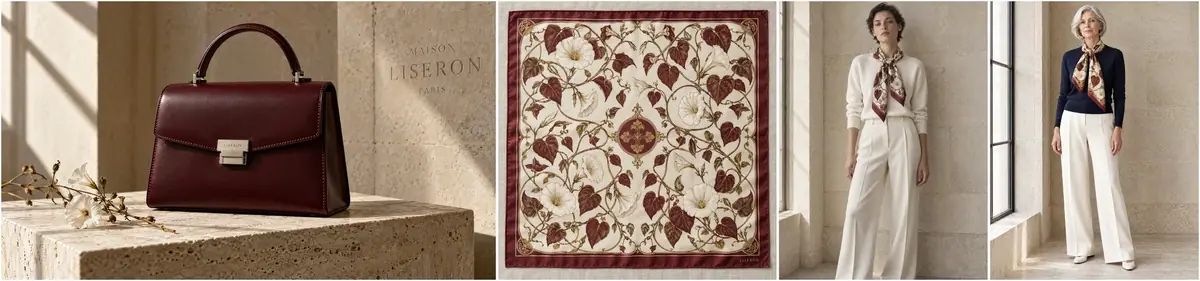
The reference set: four approved images, one look, three subjects. -
Write the fixed prompt block (Give each reference a role). It goes at the start of every prompt, unchanged:
PromptThe four reference images define the brand look only: soft window light from the side, warm limestone and travertine surfaces, a palette of ivory, warm stone and deep oxblood with small touches of gold, exquisite material detail, quiet restraint, editorial photography on a medium-format camera, generous calm negative space. Do not copy their subjects, their compositions, the bag, the scarf or the people in them. No bag, no scarf, no logo, no text anywhere. New subject in exactly that look: ... Style: quiet luxury still life and editorial: window light, limestone and travertine, exquisite material detail, restraint. -
Generate new subjects (Batch from a template). Create > Images, GPT Image 2.5 Sunburst, the four images in Reference Images, Dimensions 1536x1024, Quality
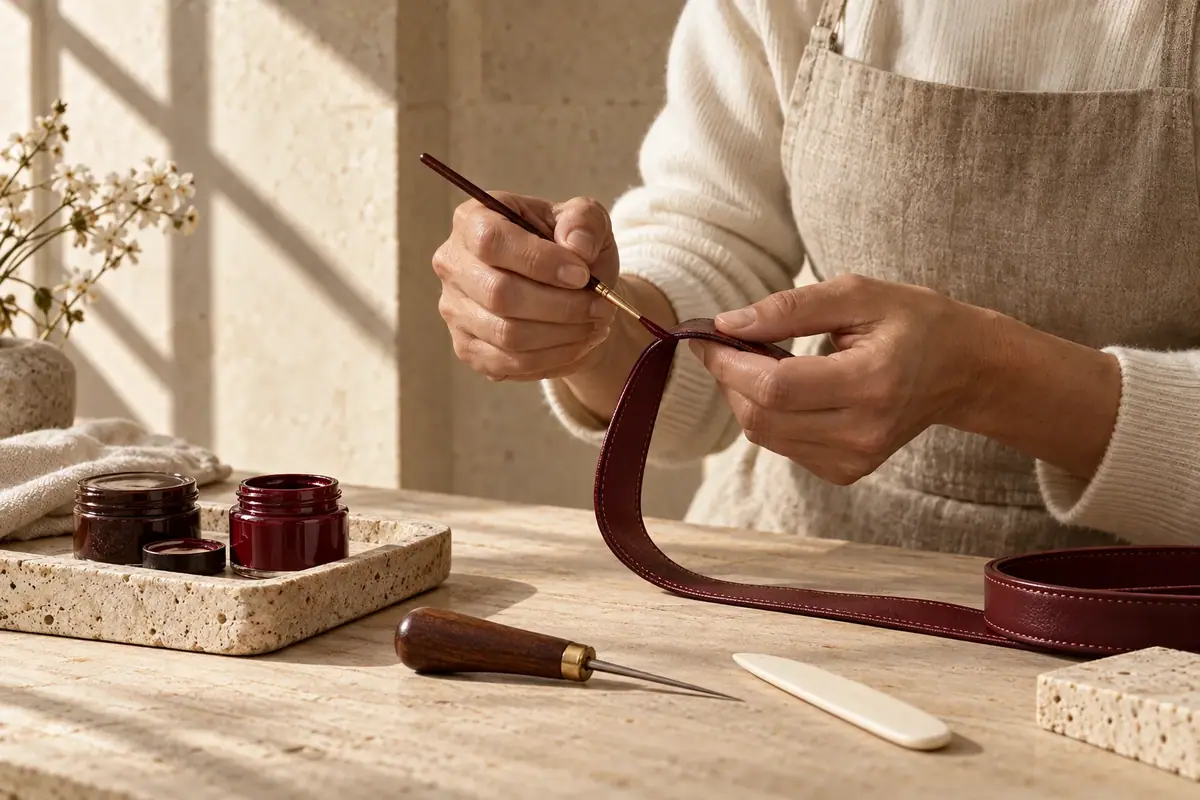
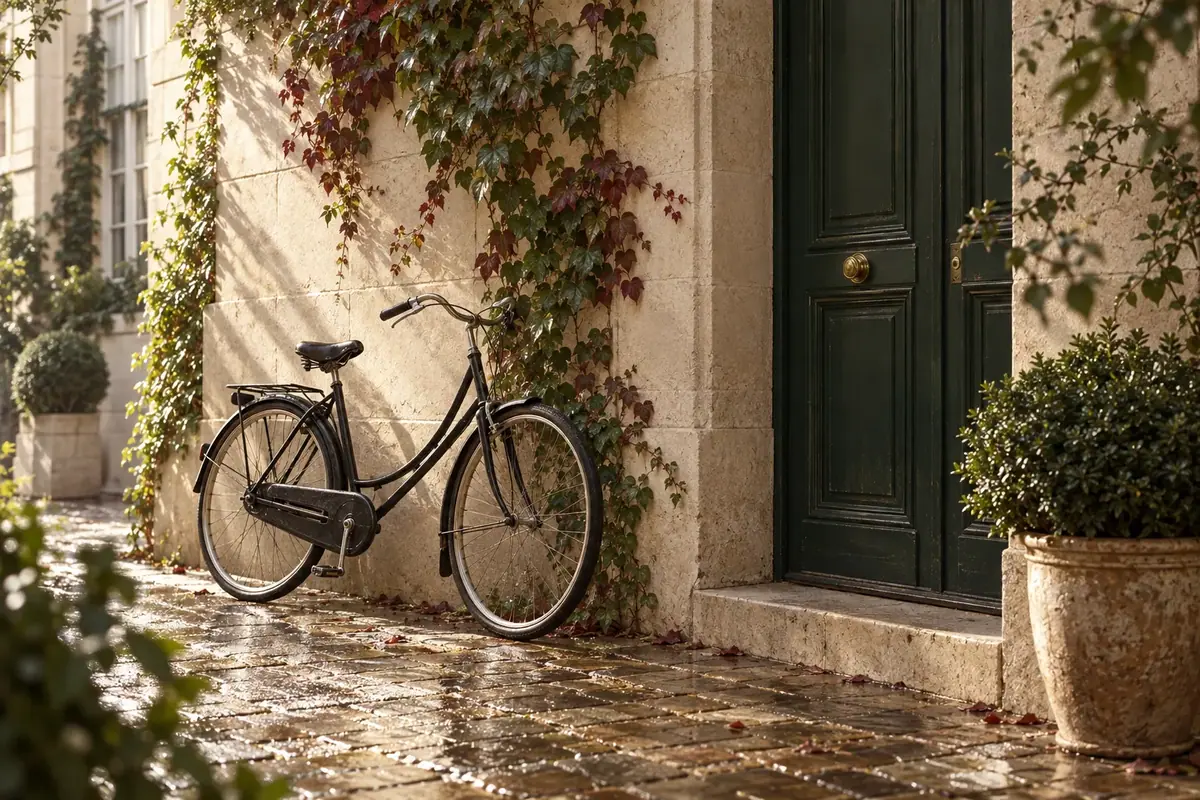
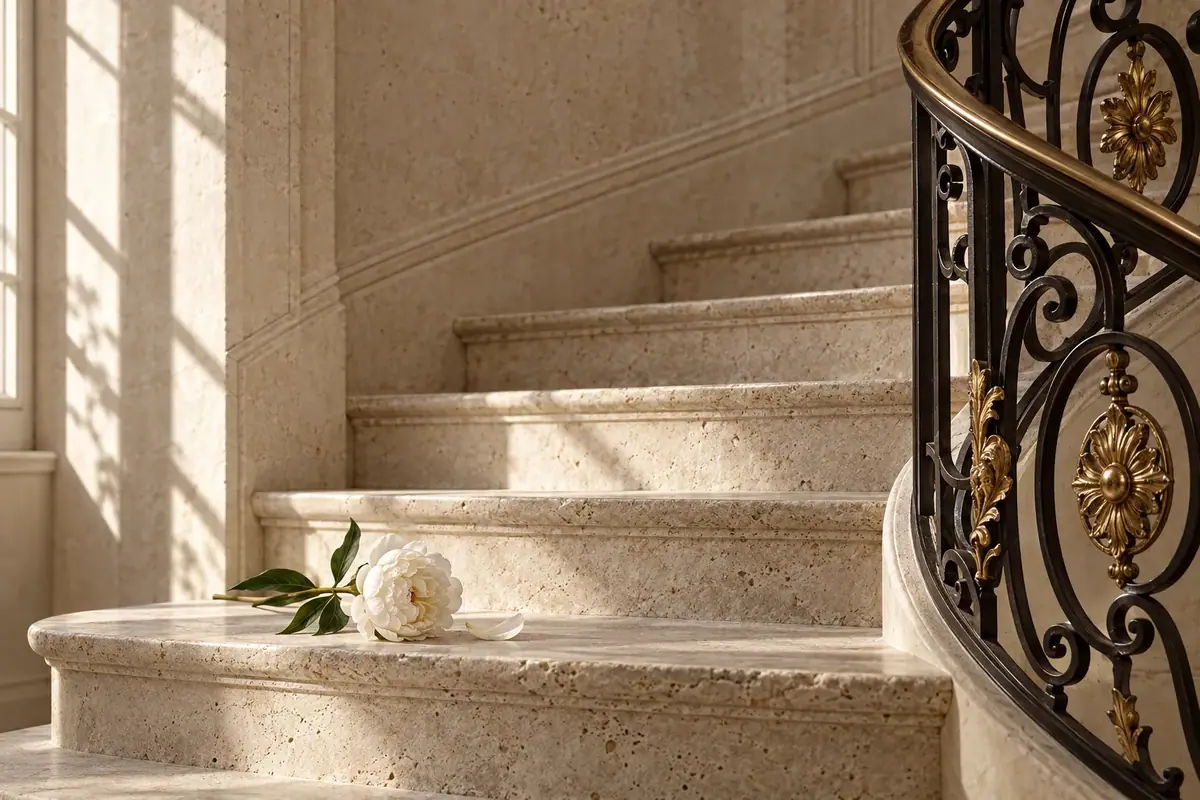
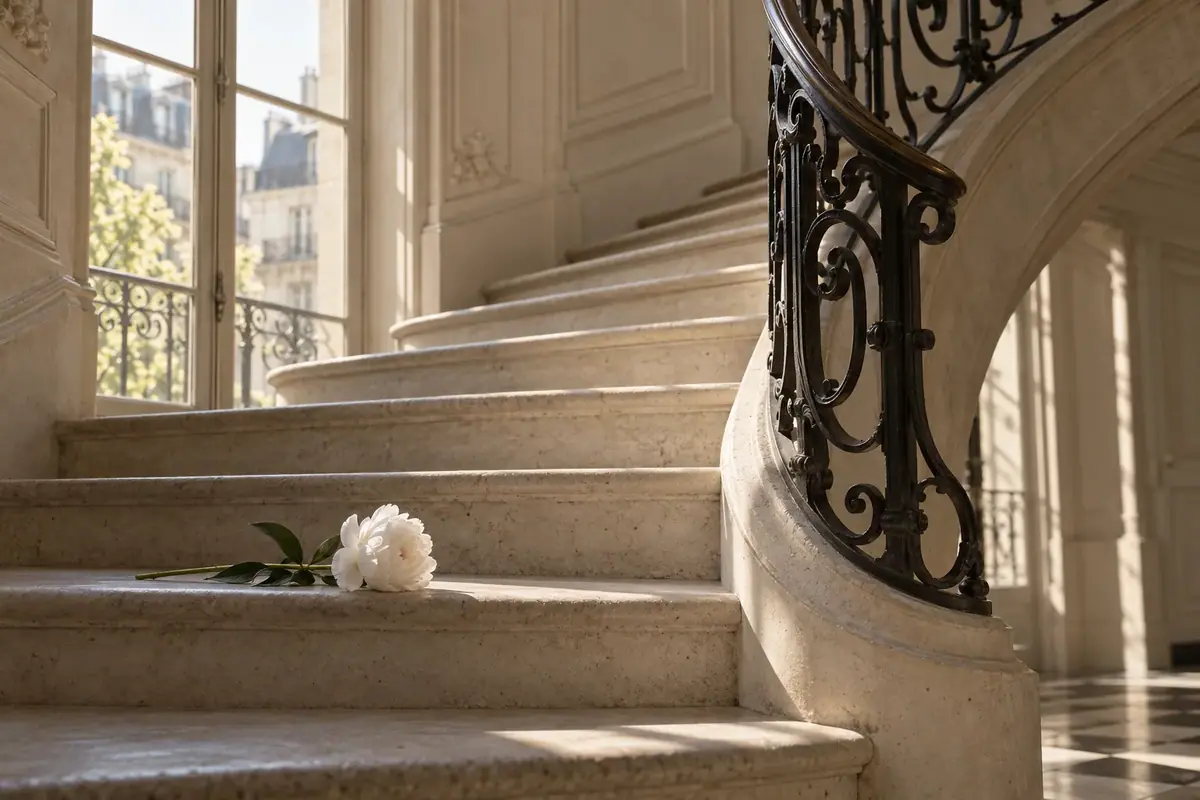
high. Put one subject line where the block ends with "...":Promptan artisan's hands painting the edge of a cut leather strap with a fine brush at a pale wooden workbench, small pots of edge paint, an awl and a bone folder beside it, face not visible.Prompta limestone spiral staircase in a Paris townhouse in the morning, a wrought-iron banister, a single white peony lying on one step.Prompta quiet Paris courtyard in the early morning, a black bicycle leaning against a limestone wall, climbing ivy, wet cobblestones, a tall green door. -
Run the baseline. Generate one of the subjects without references and without the block, with a generic brand line:
PromptA limestone spiral staircase in a Paris townhouse in the morning, a wrought-iron banister, a single white peony lying on one step. Luxury brand photography for a Paris fashion house. No text, no logo. -
Compare. Put the referenced and the baseline image side by side with the four references. If the referenced image belongs with them and the baseline does not, the reference set works.
-
Save the kit. Put the four references in a collection named for the look, and the prompt block in its description. This is what the team uses until a trained model replaces it.
With the Scenario MCP: model_run on model_openai-gpt-image-2-5-sunburst with referenceImages set to the four asset ids, the block plus a subject line as prompt, width: 1536, height: 1024 and quality: "high". An agent can loop over a list of subjects with the same references; launch them with wait: false and collect them with one jobs_wait.
Check the result
the light comes soft and warm from the side; the palette stays in ivory, warm stone and oxblood, with gold only as an accent; there is calm space in the frame; the subject is new; nothing from the references (the bag, the scarf, a face, a composition) is copied.
a reference's object, person or layout reappears; the palette turns cool, white or saturated; the image is busier than the references; the look only appears with a long scene description.
The baseline is a good photo that belongs to a different house: cool white daylight, white plaster paneling, rooftops through a window and a checkered marble floor. Nothing in it is wrong, and nothing in it says Maison Liseron.
The referenced versions match the four originals. The model took the brand's oxblood into the subjects without being told where: the strap on the workbench, the ivy leaves in the courtyard. All three referenced takes were kept on the first run, hands included, and none brought back the bag, the scarf or a face. For this team, the reference set is enough to start.
1Two takes of the same subject, a limestone staircase with a peony. Which one belongs with the four Maison Liseron originals?
Answer: A. Take B is a good photo for a different brand: cooler and brighter, with a window view and a checkered floor nobody asked for. The test is whether a stranger can tell the image belongs with the originals.
2Your team makes a few dozen brand images a month, and the reference set already beats the baseline. A teammate wants to train a style model now. What does this page suggest?
Answer: B. Use the three ways in order and move on only when the previous one stops being enough. Training pays off for volume and short prompts, and a trained model stays only if it beats the reference set.
Make it repeatable
-
Write the look into the instructions. In Settings, organization Agent > Organization Instructions ("Rules the Agent always follows across every project."), add for example:
For brand images, attach the four images from the "Brand look" collection as references and open the prompt with the brand block from its description. Never add the bag or the scarf unless asked.Add project-specific rules in Project Instructions. See Instructions and memory. -
Check every new image against the brand. On Enterprise with the Quality Gate add-on, in organization Quality Gate, fill the Brand brief ("Define your brand standards and reference images.") with the same block and references, and turn on Run automatically if you want every new image scored. See Governance: watermark, IP and quality.
-
Wrap it in an App (Package it as a workflow or skill). In the Node Editor: four Image inputs pinned to the references, a Text input (
Subject), a Prompt Builder joining the block and the subject, an Image Generator on GPT Image 2.5 Sunburst. Teammates only type a subject. -
Train when volume justifies it. Keep the trained model only if it beats this reference set on your own subjects. The full procedure is in Train a style model.
- Open Create > Train, click Start Training, and in Choose a Model pick Flux 2 (Klein 9B for production).
- Upload 10 to 15 approved images with varied subjects. Rewrite each caption to describe the content only, never the look; optionally add a trigger word to every caption.
- Add four test prompts on subjects outside the set (the three above plus one more), then Compare epochs and keep the earliest one where the look holds on all four.
Training needs a Pro, Max or Enterprise plan; failed trainings are refunded, canceled ones are not.
Runs and time
| Step | Model | Runs | Kept | Wait |
|---|---|---|---|---|
| Edge painting | GPT Image 2.5 Sunburst, high, 4 refs | 1 | 1 | about 50 s |
| Staircase | GPT Image 2.5 Sunburst, high, 4 refs | 1 | 1 | about 50 s |
| Courtyard | GPT Image 2.5 Sunburst, high, 4 refs | 1 | 1 | about 70 s |
| Baseline, no references | GPT Image 2.5 Sunburst, high | 1 | 0 (comparison) | about 40 s |
Four runs in parallel, about 70 seconds of wait. Four references cost slightly more per image than the baseline; the price shows on the Generate button before you run.
The cost of training depends on the base model and settings, and is shown before you start it.
Variations
- Illustration brands: the same method works for a drawn style; references with varied subjects matter even more, since models copy drawn characters readily.
- Learning and publishing: one look per course or series, applied to every illustration.
- Games: one look for marketing art, separate from the in-game art style; keep two collections and two blocks.
- Agencies with many clients: one collection and one Project Instructions entry per client project, so the Agent never mixes looks.
- Seasonal sub-looks: add one seasonal reference to the set (a winter image) and keep the block unchanged.
If it breaks
- The model copies a reference's subject or layout. Say "brand look only" and "do not copy their subjects or compositions", and use references with different subjects.
- The same face keeps appearing. One person dominates the references. Use people only in some references, and different people in each.
- The look is weak. Name its parts in the block (light direction, materials, palette names, lens, negative space) and keep the references consistent with each other.
- The look drifts between teammates. Someone is not using the block or the full reference set. Put both in an App or in the instructions so nobody retypes them.
- The product appears uninvited. It is in the references. Say "No bag, no scarf" (or your product) in the block.
- A trained model loses to the reference set. Keep the reference set. Training pays off for volume and short prompts, not by default.