

Build a character sheet and keep it consistent across scenes
Design one original character, derive a turnaround, an expression sheet and an outfit sheet from her, then place her in new scenes and next to a second character without her face, hair or clothes drifting.
- Playbook
Run it in ScenarioGPT Image 2.5 Sunburst
See it made
Run it in Scenario
One original character, built once and reused everywhere. Part 1 makes an approved hero image and three sheets (turnaround, expressions, outfits). Part 2 attaches those sheets to put her in four different scenes with no drift in face, hair or clothes. Part 3 adds a second character and stages both together without their identities mixing. Anyone who will later ask a model for "the same character again" attaches this pack to every scene, pose and mesh.
The brief
| Field | Part 1: the sheet | Part 2: one character, many scenes | Part 3: two characters, one scene |
|---|---|---|---|
| Goal | One original hero for a stylized team shooter, with reference sheets for production | Four story scenes of the same hero for a game's loading screens | Two story scenes with Zuri and a new second hero, Marlow |
| Format | Hero image 1024x1536 (2:3); turnaround 2048x1152 (16:9); expressions and outfits 1536x1024 (3:2); plain warm-gray background | 1536x1024 (3:2), one image per scene | 1536x1024 (3:2) |
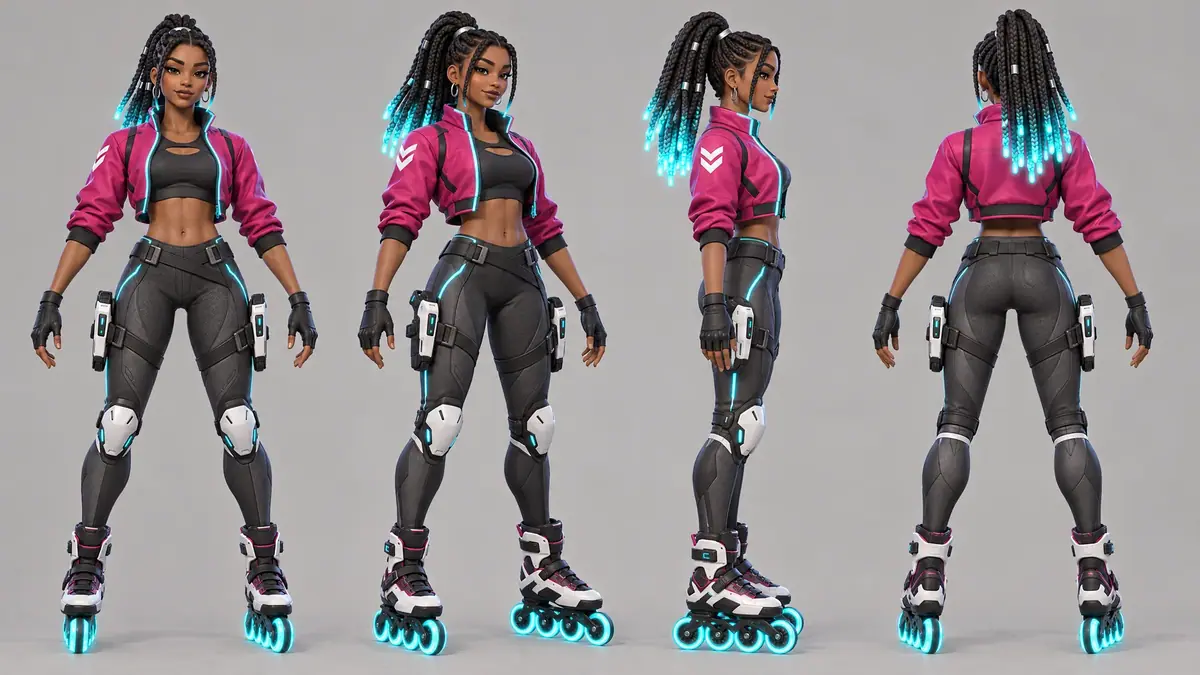
| Fixed | Face, warm brown skin, long box braids tied high with glowing cyan tips, silver hoop earrings, cropped magenta jacket with cyan piping and a white chevron on the right sleeve, black top, fingerless gloves, charcoal leggings, white knee guards, two white blasters holstered on the thighs, roller blades with glowing cyan wheels | The keep-list from the reference sheet and the rendering style | Each character's keep-list; Marlow is a head taller than Zuri; the stylized 3D rendering of Zuri's hero |
| May vary | Pose, expression, outfit on the outfit sheet only | Place, time of day, light, camera, pose, held props, outfit (scene 4) | Place, light, pose, action |
| Accept when | Every view shows the fixed list; views share one scale and ground line | A stranger shown two scenes says "same person" without hesitating | Nothing from one character's list appears on the other; positions and size relation match the prompt; both are full body |
Zuri Vex is one of four heroes of VOLTARIS, an invented hero shooter. Other VOLTARIS playbooks start from the sheets made here: Rigged 3D character and Key art and store assets.
Approach
Part 1, the sheet:
- 1HeroGPT Image 2.5 Sunburst, two takes
- 2ApproveKeep-list updated to match the take
- 3TurnaroundSunburst, hero as identity reference
- 4ExpressionsHero only, one layout sentence
- 5OutfitsHero only, outfits named by position
- 6File the setOne collection per character
Part 2, scenes:
- 1Load referencesHero first, turnaround second
- 2Identity paragraphKeep-list pasted verbatim
- 3Scene paragraphPlace, action, shot and light
- 4GenerateGPT Image 2.5 Sunburst, 3:2, high
- 5Inspect and fileFace at full size vs hero
Part 3, two characters:
- 1Second heroGPT Image 2.5 Sunburst, style-only reference
- 2Attach castThree references, fixed order
- 3Labeled promptNames, keep-lists, then staging
- 4ScenesSunburst, 3:2, same identity block
- 5InspectOne character at a time
A reference sheet answers questions a model would otherwise guess: what the back looks like, which sleeve carries the chevron, how the face reads when she frowns.
Generate one hero image first, approve it, then generate each sheet from that hero, attached as the identity reference. Never generate the sheets from text alone: each text-only run invents a slightly different person.
The method in three rules:
- Approve one hero before anything else. Everything downstream inherits its mistakes, so this is the cheapest place to fix them (Repair at the cheapest stage).
- Write the keep-list once and paste it into every prompt (Write a keep-list). The "Fixed" line of the brief becomes a sentence you reuse word for word (Decide what stays fixed). In scenes, the same paragraph opens every prompt: you change the scene paragraph, never the identity paragraph.
- Give each reference one job, and attach only what that job needs (Give each reference a role). A reference brings everything in it, angles included. In this run, adding the turnaround to the expression sheet turned every head to three-quarter view (Give references a role). In scenes, say what each is for: "Reference 1 is the character's identity. Reference 2 is her approved turnaround sheet: use it for angles and for parts the first image does not show."
In scenes, add a scene paragraph that names camera and light. Shot size, camera height and light direction keep the model from improvising a close-up that hides the outfit.
With two characters, the method has two more parts:
- Make the second character in the first one's style. Generate Marlow's hero image with Zuri's hero attached as a style-only reference, and say so: "Reference 1 is for STYLE ONLY... Do not copy the person in it." Without that sentence, the model tends to give the new character the first one's hair, palette or outfit.
- Label every reference with a name, and write the staging. In the scene prompt, say which references belong to whom ("References 1 and 2 are ZURI... Reference 3 is MARLOW..."), repeat each keep-list under its name, and add "Do not mix their features or clothes". Then write who stands where and does what. Names in capitals are easy for the model to match between the reference list and the action.
Models, as of October 2026:
- Capability: text to image for the hero, then image to image with reference images for the sheets and scenes.
- Model used: GPT Image 2.5 Sunburst for every step. It accepts up to 10 reference images, which leaves room for a turnaround per character, follows long prompts closely and renders full-body sheets with a clean shared ground line.
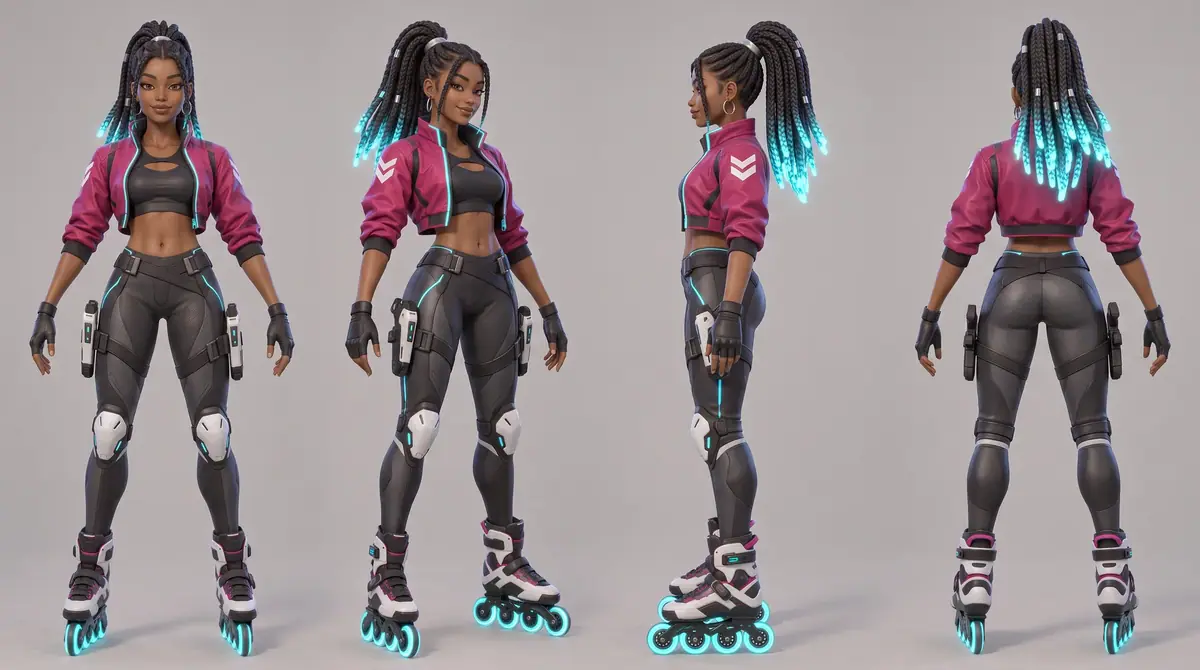
- Alternative: Nano Banana 2.1, tested on the same turnaround prompt. It also held identity and returned a larger 2752x1536 sheet, with a cooler crimson jacket and softer shading than the hero. See Compare models on your brief to run that shoot-out on your own character or cast.
Steps
Part 1: Build the reference sheet
-
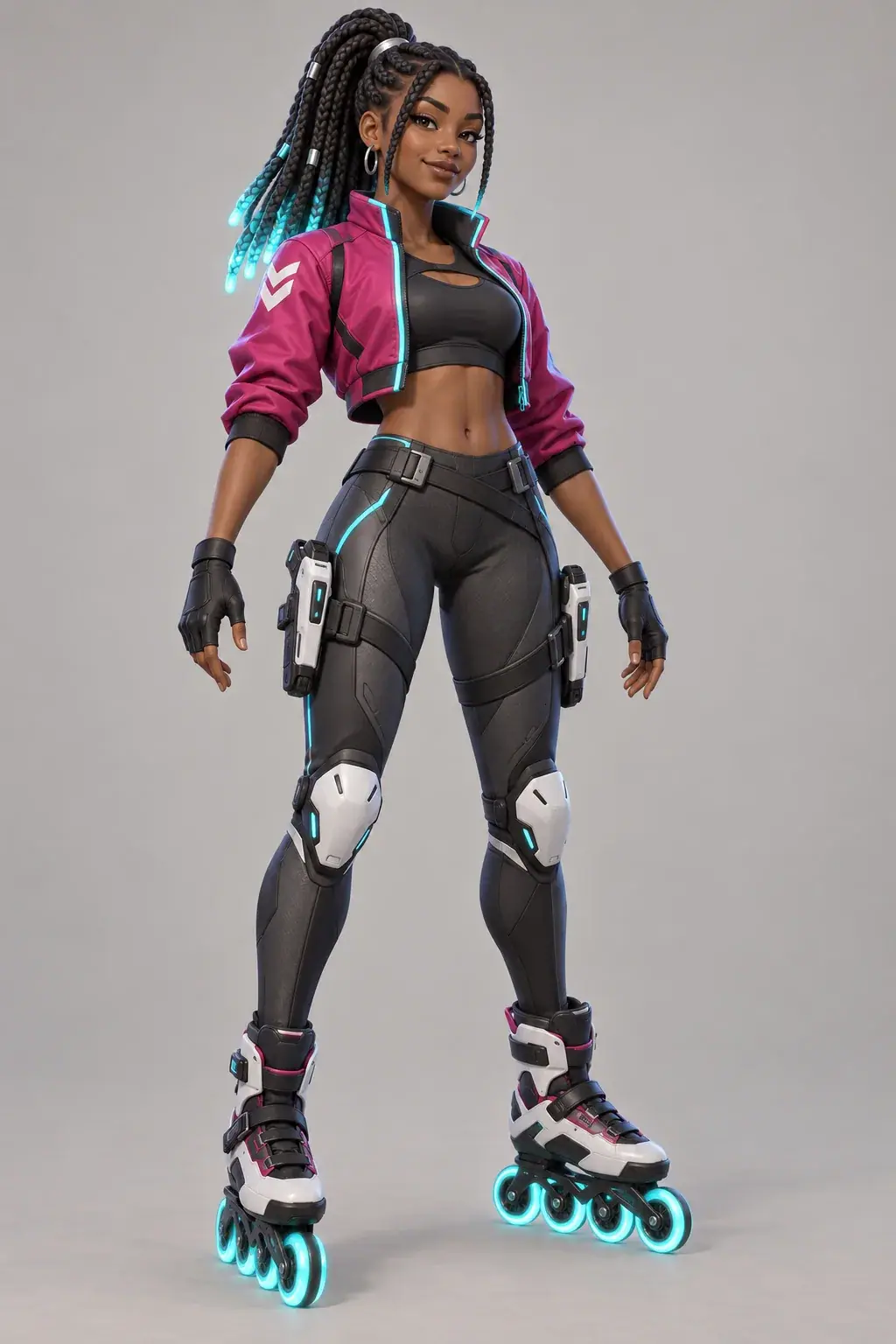
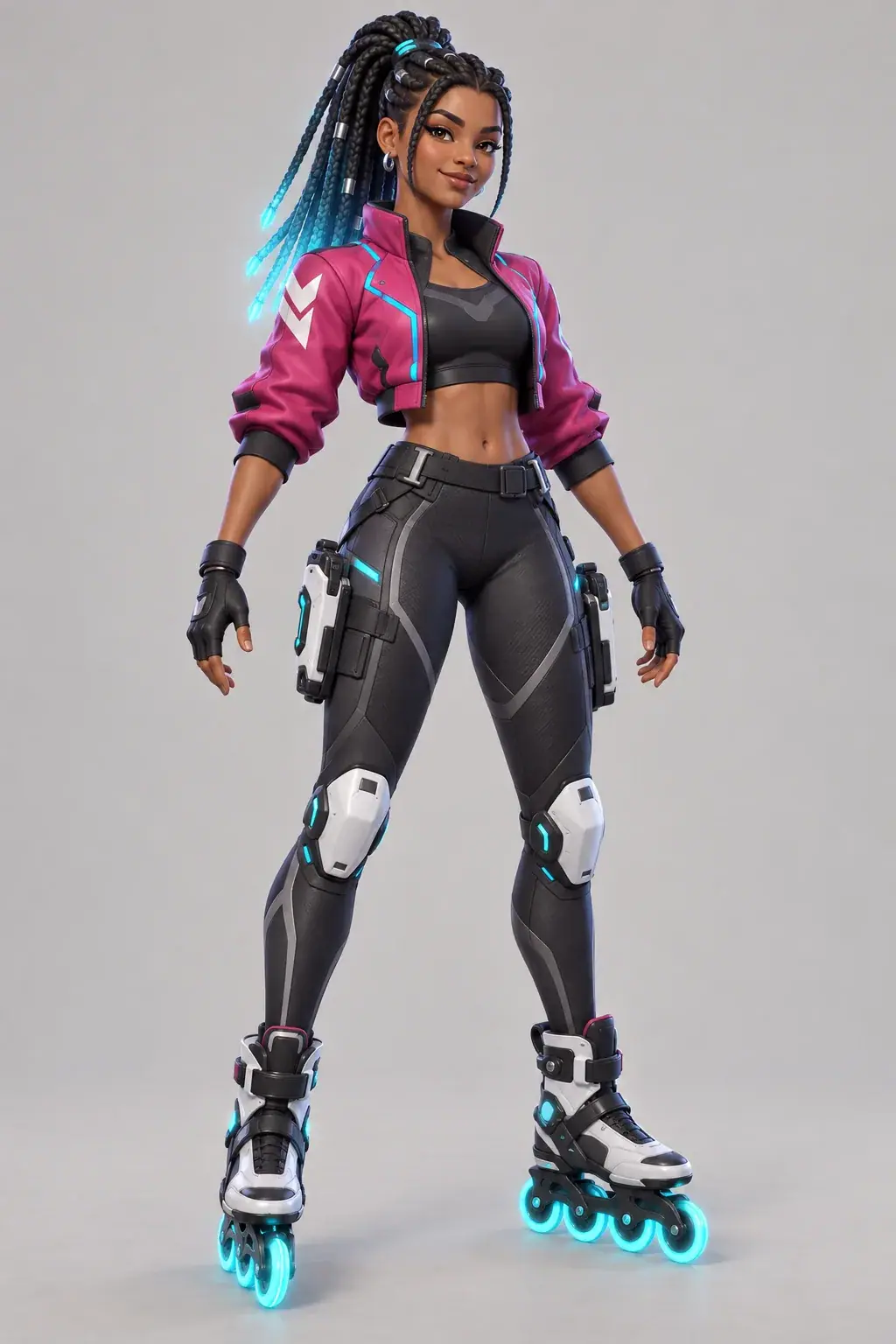
Generate the hero. Open Create and choose Images. Click the model card, then See all models, and pick GPT Image 2.5 Sunburst. Under Settings, set Image Count to 2, Dimensions to 2:3 (1024x1536) and Quality to
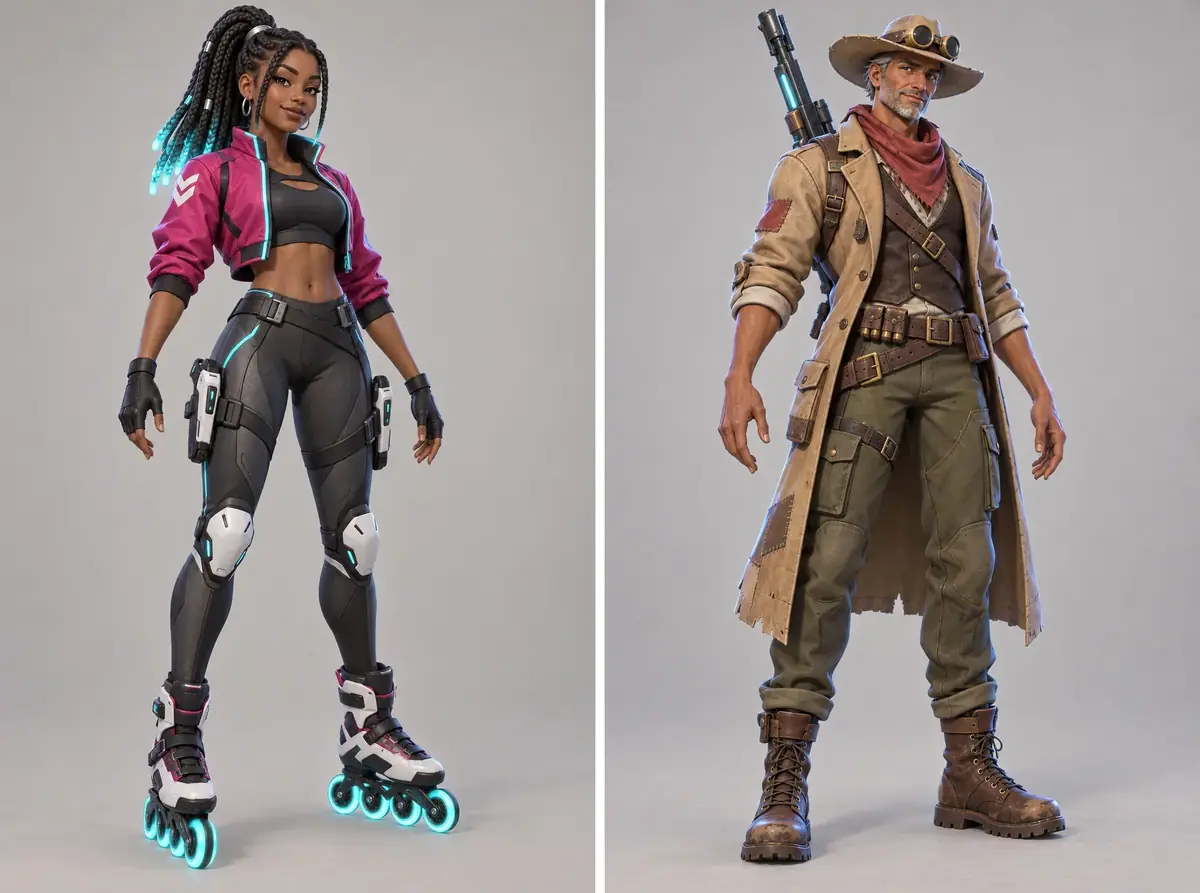
high. Paste the prompt below and click Generate. The price shows on the Generate button before you run.TextOriginal game character concept, full body, standing in a relaxed A-pose, three-quarter front view, feet fully visible, centered on a plain light warm-grey background. Character: Zuri Vex, a 22-year-old roller-blade sprinter hero. Warm brown skin, confident grin, long box braids tied high with glowing cyan tips, small silver hoop earrings. Cropped magenta bomber jacket with cyan piping and a white chevron on the left shoulder, black athletic top, fingerless black gloves. Charcoal tech leggings, white knee guards, inline roller blades with four glowing cyan wheels each. Two compact white-and-black pulse blasters holstered on her thighs. Empty hands, arms slightly away from the body. Style: stylized 3D game art at the standard of the best free-to-play hero shooters, bold readable silhouette, appealing face, stylized PBR materials, soft key light with a cool rim. No text, no logo. -
Approve one take and update the keep-list to match it. Both takes put the chevron on her right sleeve, not the left shoulder the prompt asked for, and take B doubled it. Take A is kept. The approved image is now the source of truth, so the keep-list says "white chevron on her right sleeve". Fixing the text to match the picture is free; fighting the picture costs a new hero. Open the kept take and add it to a collection named for the character with Collections.
-
Generate the turnaround. In the same Images panel, open Reference Images, choose Select from Library and pick the approved hero. Set Image Count to 1 and Dimensions to 16:9 (2048x1152). Prompt:
TextCharacter turnaround sheet of the character in the reference image. The reference image is the identity: keep her face, warm brown skin, long box braids tied high with glowing cyan tips, silver hoop earrings, cropped magenta bomber jacket with cyan piping and the white chevron on her right sleeve (viewer's left in the front view), black athletic top, fingerless gloves, charcoal tech leggings, white knee guards, roller blades with glowing cyan wheels and the two white pulse blasters holstered on her thighs exactly as shown. Four full-body views side by side in one row, same height, same scale, wheels on one shared ground line, evenly spaced, neutral A-pose with empty hands: front view, three-quarter view, left side profile, back view. Plain light warm-grey background, even studio light, no cast shadows, no text, no labels, no frames. Same stylized 3D game art rendering as the reference. -
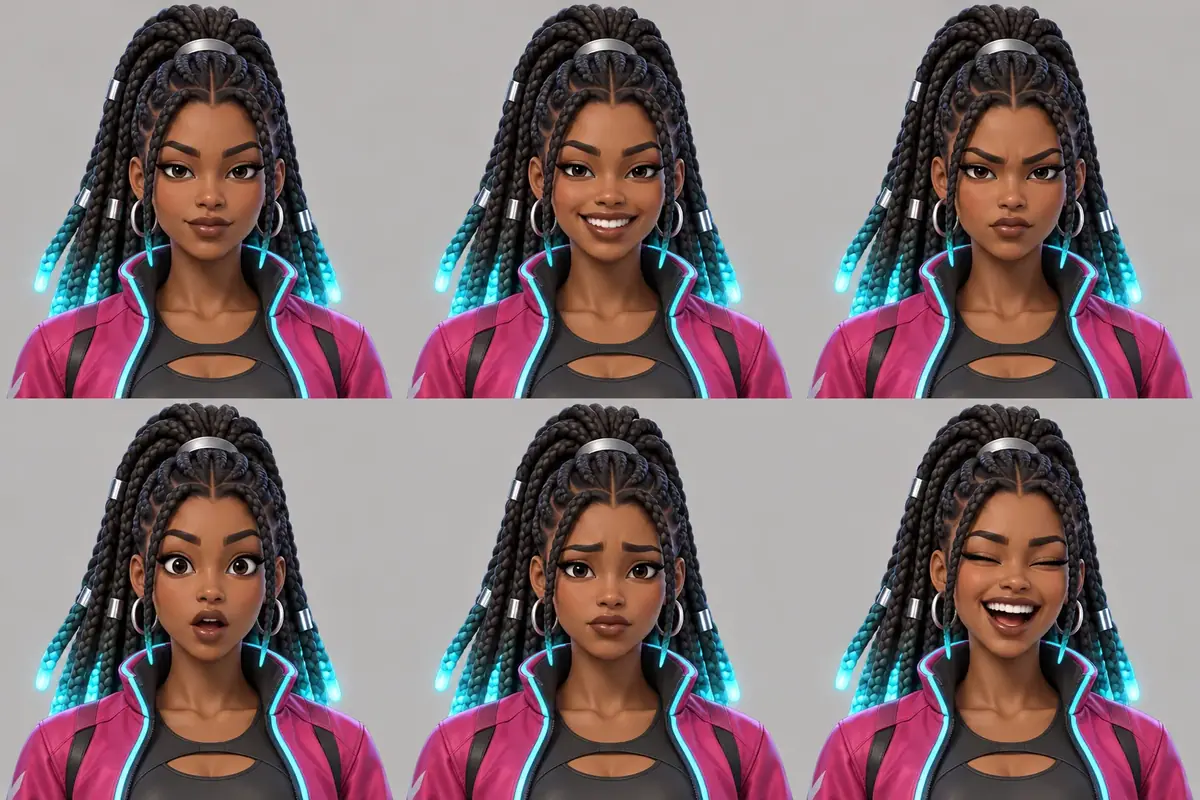
Generate the expression sheet from the hero alone. Attach only the hero, at 3:2 (1536x1024). One sentence fixes the layout and the head angle:
TextExpression sheet of the character in the reference image. Keep her face shape, warm brown skin, dark eyes, long box braids tied high with glowing cyan tips, silver hoop earrings and the collar of her magenta jacket. Six head-and-shoulders portraits in a 3 by 2 grid, every head turned straight to the viewer at the same size: neutral, big open smile, determined frown, surprised with raised eyebrows, worried, laughing with both eyes closed. Plain light warm-grey background, even light, generous space between portraits, no text, no numbers, no borders. -
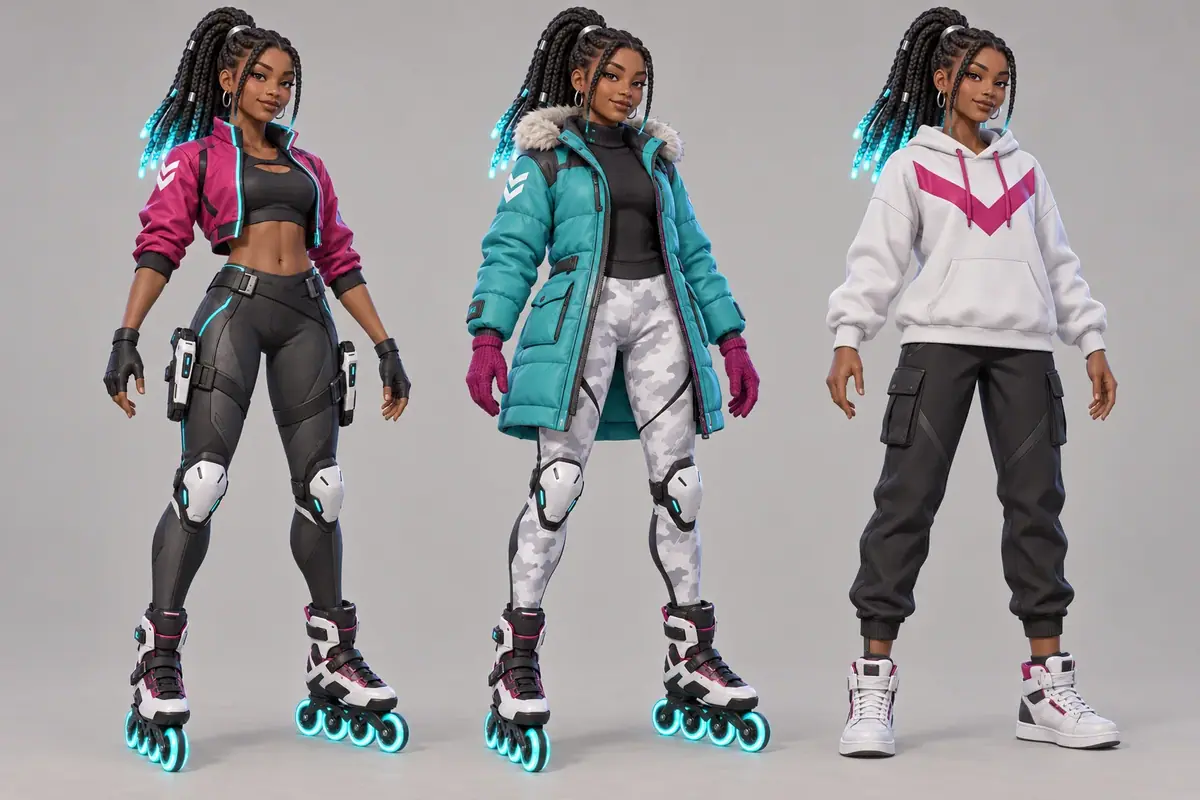
Generate the outfit sheet. Hero as the only reference, 3:2. Describe each outfit by position (left, middle, right) and repeat what must not change with the clothes: face, hair, height.
TextOutfit sheet of the character in the reference image. The reference image is the identity: keep her face, warm brown skin, long box braids tied high with glowing cyan tips, silver hoop earrings, body proportions and height exactly as shown. Three full-body front views side by side, same scale, feet on one shared ground line, neutral A-pose with empty hands. Left: her standard outfit exactly as in the reference, roller blades included. Middle: winter skin, a long padded teal parka with a fur-lined hood down, magenta knit gloves, white snow-camo leggings, the same roller blades with glowing cyan wheels. Right: off-duty skin, an oversized white hoodie with a magenta chevron, black joggers and white high-top sneakers instead of roller blades. Plain light warm-grey background, even light, no text, no labels. Same stylized 3D game art rendering as the reference. -
File the set (Lock a character sheet). Add the turnaround, expression sheet and outfit sheet to the character's collection. That collection is the identity pack Parts 2 and 3, and every later page, attach.
With the Scenario MCP: run model_run on model_openai-gpt-image-2-5-sunburst with referenceImages as an array (["asset_..."], even for one image; a bare string is ignored), width, height and quality: "high". Use numOutputs: 2 for the two hero takes. Launch the three sheets with wait: false and collect them with one jobs_wait call.
Part 2: Keep her consistent across scenes
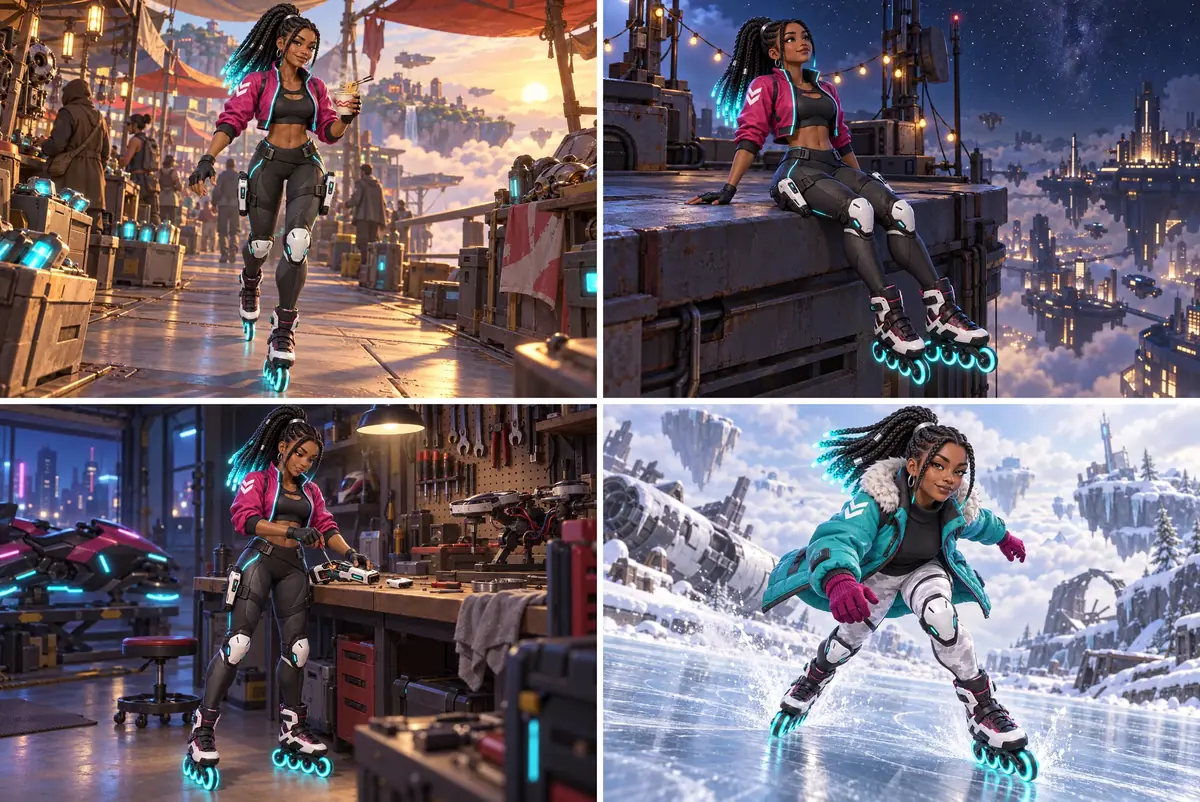
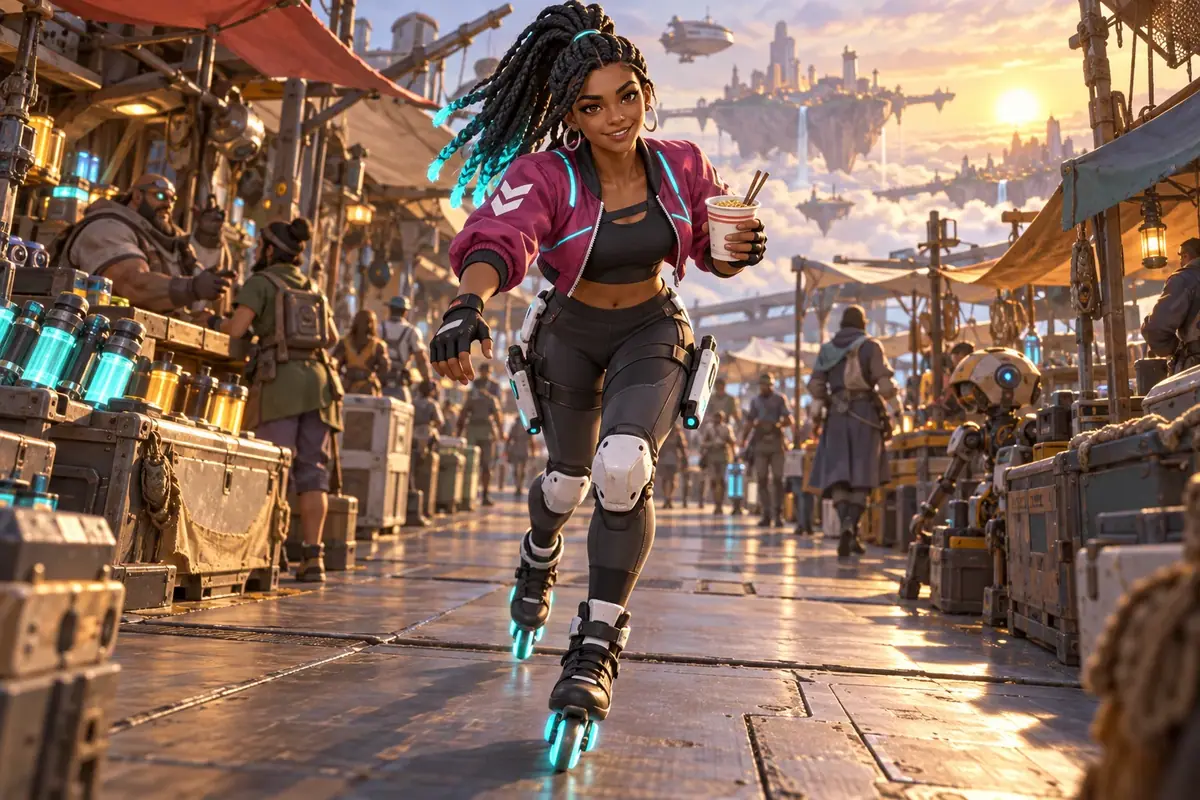
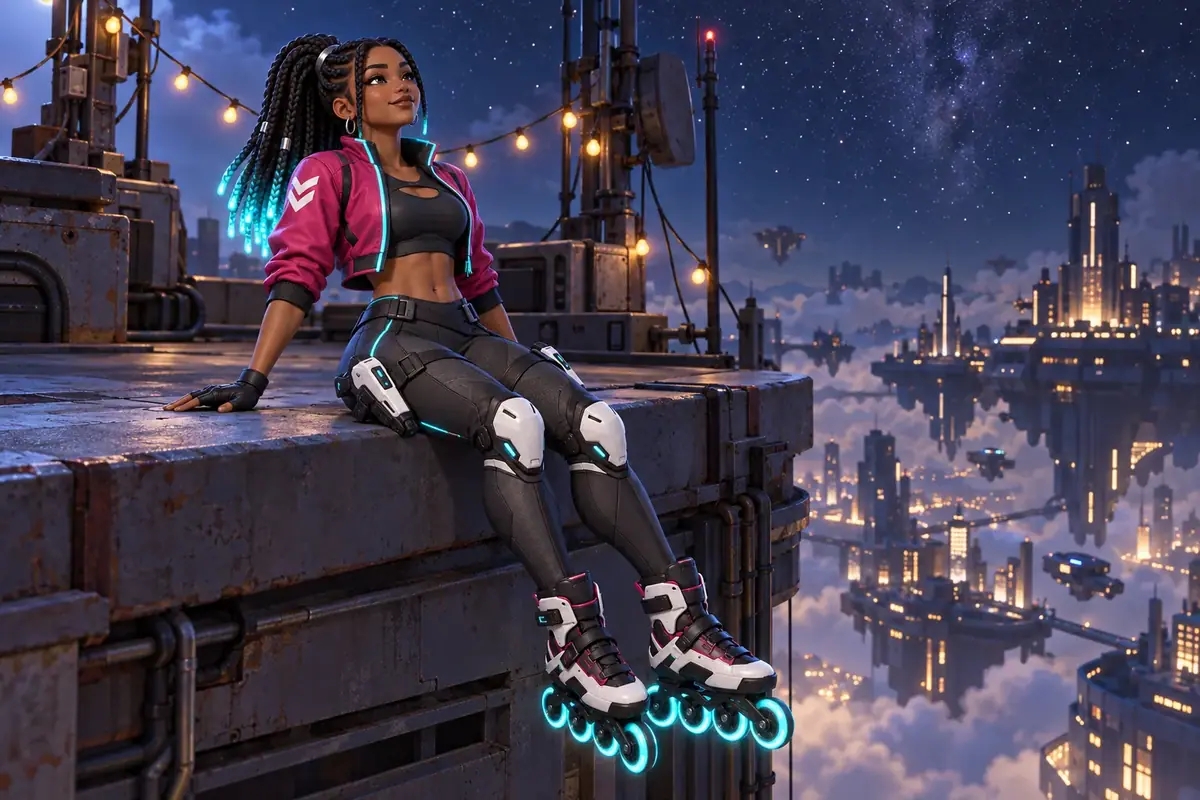
Four scenes of the same character (a sunrise market, a night rooftop, a garage workbench, a frozen rink), for key art, story beats, social posts and loading screens.
-
Open the image tool with both references (Lock a character sheet). Open Create, choose Images, and pick GPT Image 2.5 Sunburst. Under Reference Images, choose Select from Library and add the hero first, then the turnaround. Order matters because the prompt refers to them by number.
-
Set the format. Under Settings, set Image Count to 1, Dimensions to 3:2 (1536x1024) and Quality to
high. -
Write the identity paragraph once. This is the paragraph used for every scene in this run:
TextReference 1 is the character's identity. Reference 2 is her approved turnaround sheet: use it for angles and for parts the first image does not show. Keep exactly: her face, warm brown skin, dark eyes, long box braids tied high with glowing cyan tips, silver hoop earrings, cropped magenta bomber jacket with cyan piping and the white chevron on her right sleeve, black athletic top, fingerless black gloves, charcoal tech leggings, white knee guards, two white pulse blasters holstered on her thighs, inline roller blades with glowing cyan wheels. Same stylized 3D game art rendering as reference 1. -
Add the scene paragraph and generate. Leave one blank line, then describe place, action, shot and light:
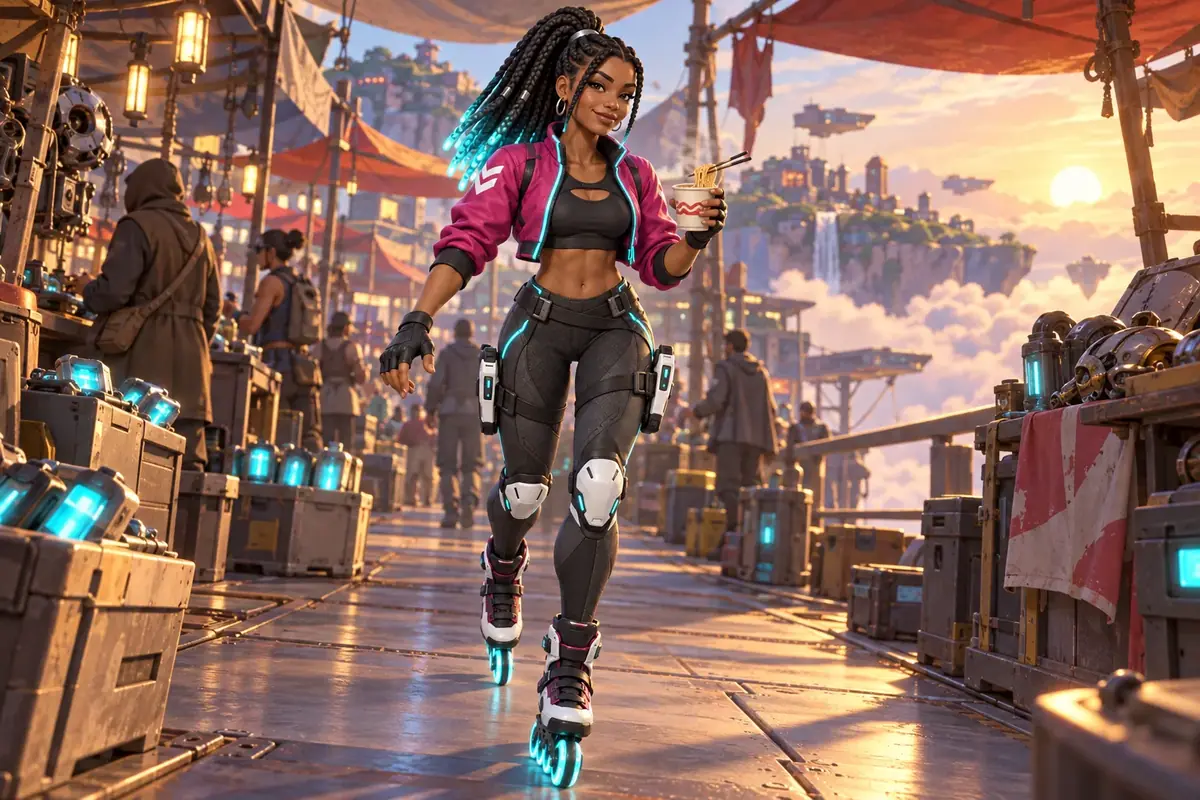
TextScene: a busy salvage bazaar on a floating island at sunrise, stalls built from old hull plates under patched canvas awnings, crates of glowing batteries, a sea of clouds beyond the railing. She skates toward the camera down the middle aisle, holding a paper cup of noodles in her left hand, grinning. Medium-wide shot, full figure visible, camera at hip height, warm low sun from the right. No text, no signs with letters.The run also closed every prompt with the world's fixed style line ("Style: stylized 3D at the standard of the best free-to-play hero shooters: bold readable silhouettes, appealing expressive faces, hand-tuned stylized PBR..."). Click Generate. The price shows on the button before you run.
-
Change only the scene paragraph for the next images (Batch from a template). The run used these, each with the same identity paragraph:
- "the flat roof of a salvage tower at night above a floating city of lit windows... She sits on the roof edge with her blades dangling over the drop, leaning back on her hands, looking up at the stars. Three-quarter view, full figure visible, cool moonlight from the left, warm string-light glow on her face"
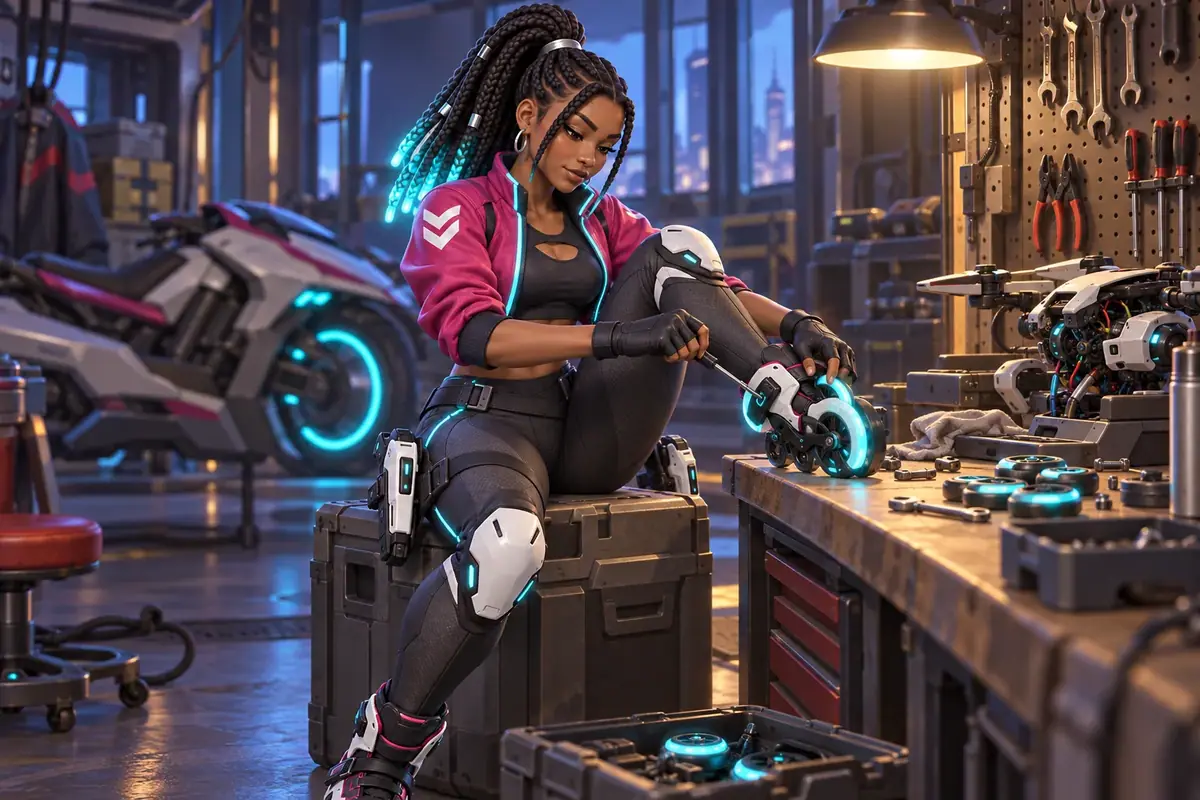
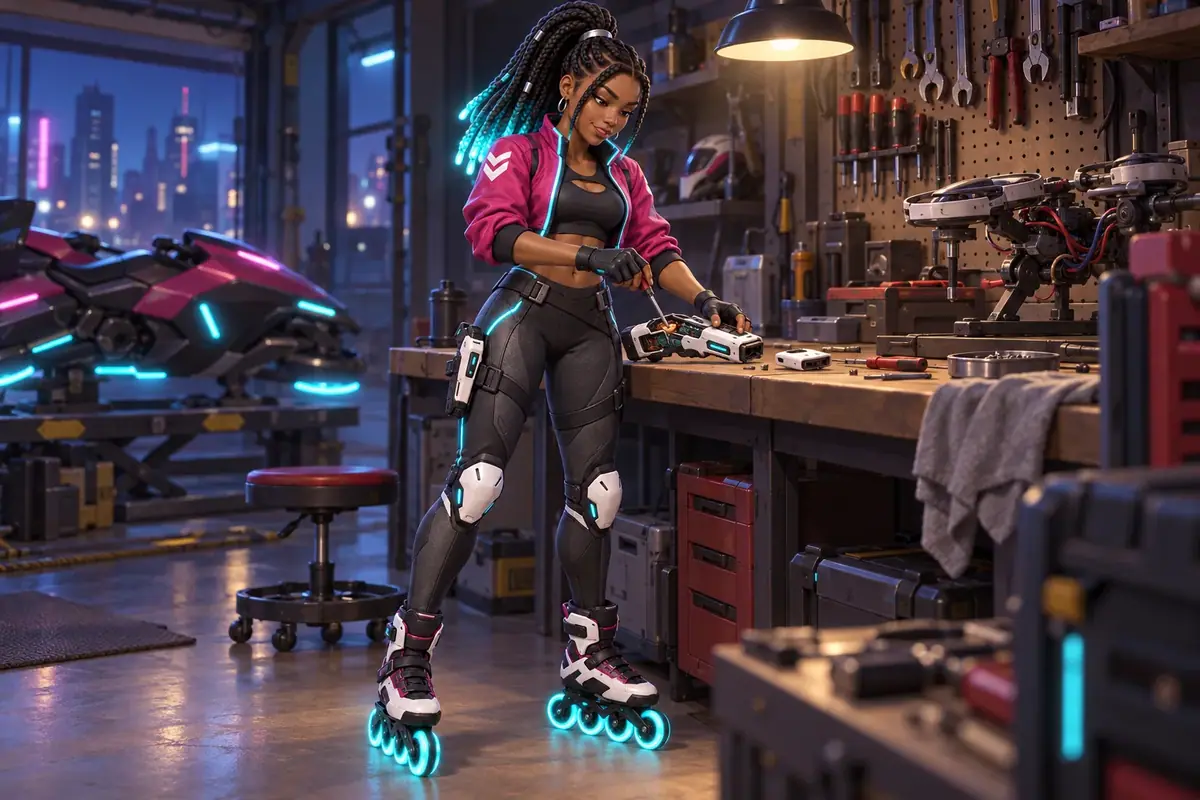
- "a cluttered hover-bike garage at night... She stands at the workbench, one of her white pulse blasters lying open on the bench in front of her, and tightens a screw inside it with a small screwdriver held in her right hand... The other blaster stays holstered on her left thigh"
- "a frozen rink on a snowy floating island at noon... She skates toward the camera in a low racing crouch, ice spray from her wheels, determined smile"
-
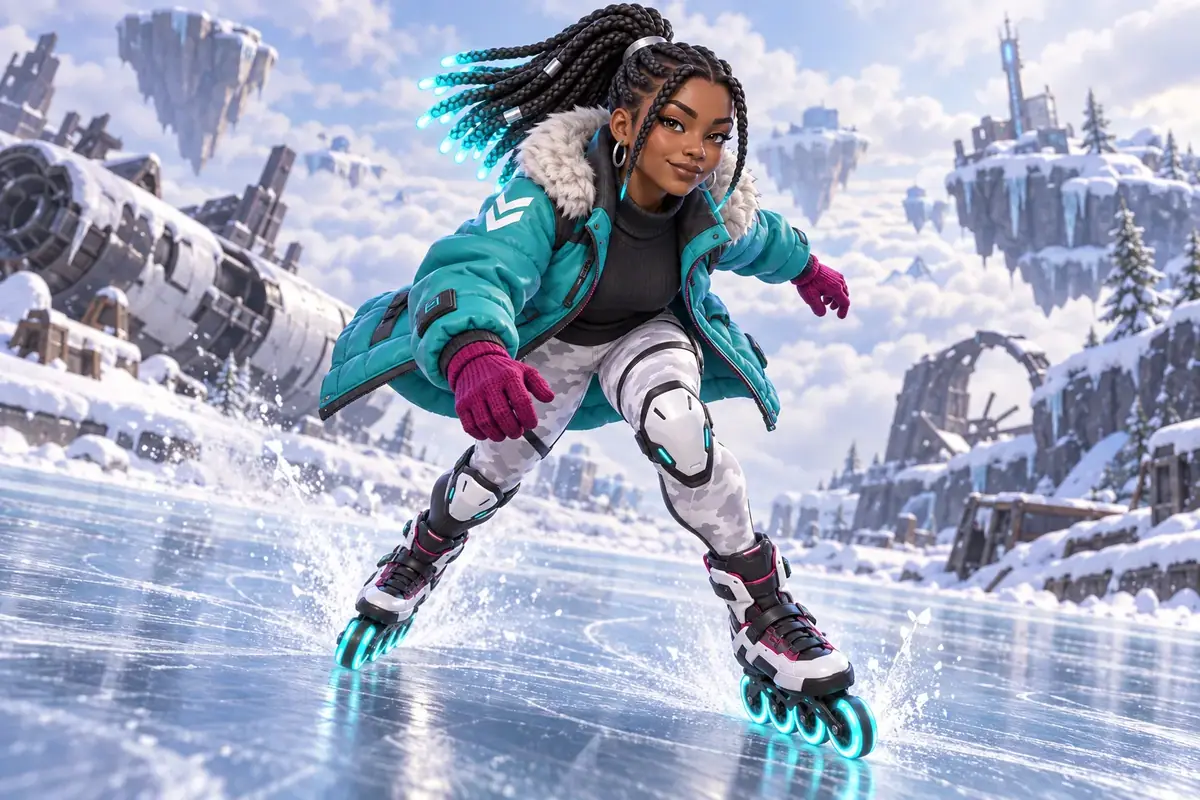
Swap a reference to change the outfit on purpose. For the rink scene, replace the turnaround with the outfit sheet and rewrite the identity paragraph around it: "Reference 2 is her outfit sheet: she wears the MIDDLE outfit only (long padded teal parka with the fur-lined hood down, magenta knit gloves, white snow-camo leggings, the same roller blades with glowing cyan wheels)." Face, skin, braids and earrings still come from reference 1.
-
Inspect, then file. Compare each scene with the hero at the same zoom (face, braid tips, chevron side, holsters, wheels). Add the kept scenes to the character's collection with Collections.
With the Scenario MCP: keep the identity paragraph in a variable and loop over a list of scene paragraphs. Call model_run on model_openai-gpt-image-2-5-sunburst with referenceImages: [hero, turnaround], width: 1536, height: 1024, quality: "high" and wait: false, then one jobs_wait for the batch.
Part 3: Put two characters in one scene
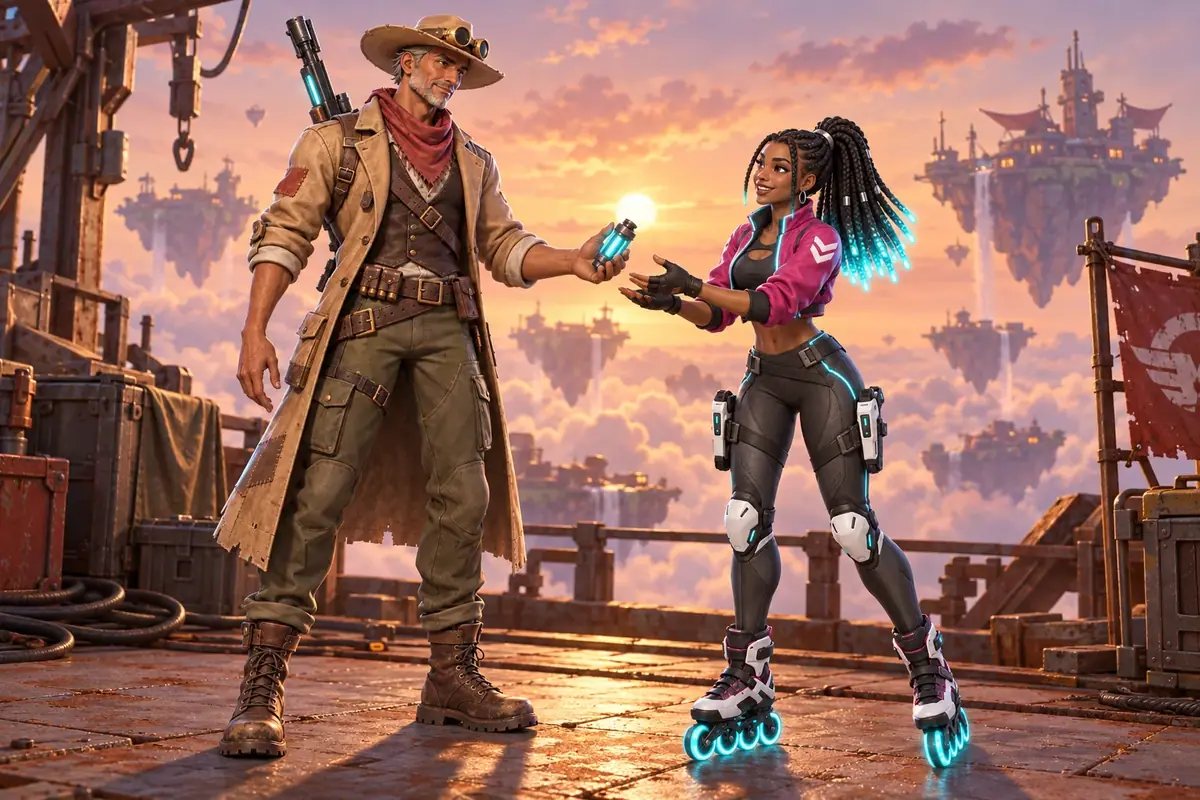
Two characters in one image is where consistency usually breaks: blended faces, an item that jumps from one to the other, positions the model picks. Here a second hero, Marlow, joins the cast and both are staged in two scenes.
-
Generate the second character's hero. Open Create, choose Images, pick GPT Image 2.5 Sunburst, attach the first character's hero under Reference Images, and set Dimensions to 2:3 (1024x1536), Quality
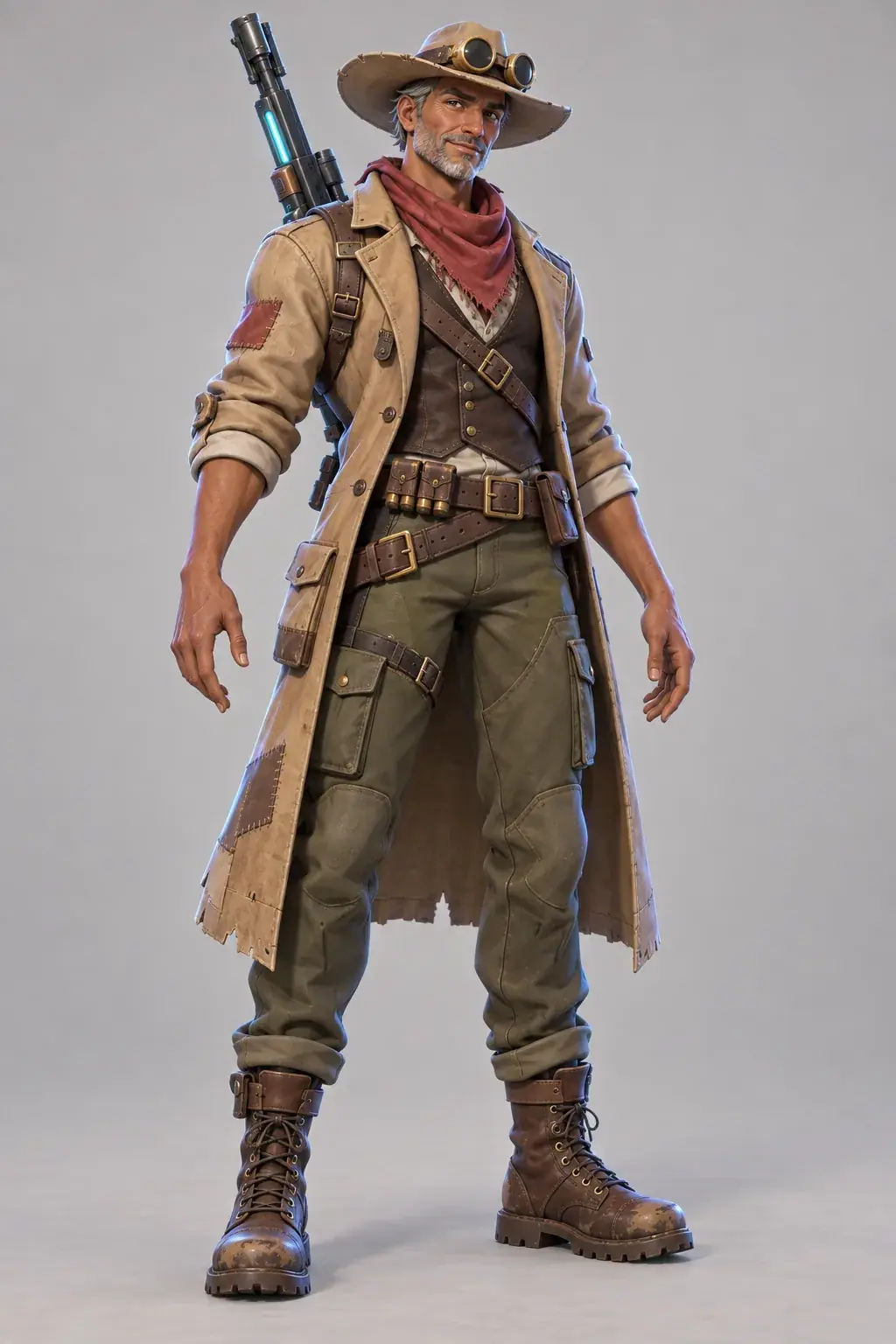
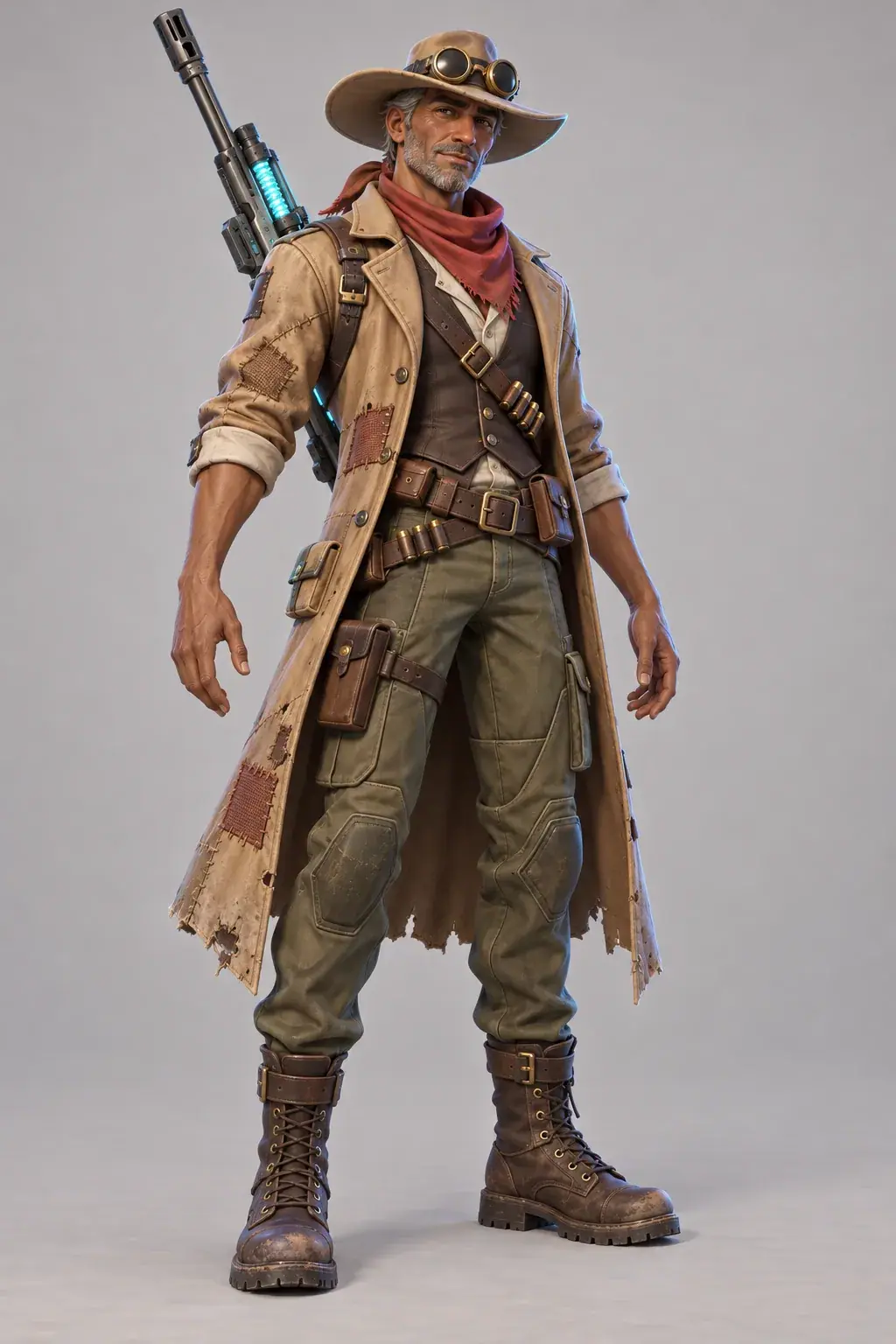
high, Image Count 2:TextReference 1 is for STYLE ONLY: copy its stylized 3D game art rendering, stylized PBR materials, soft key light with a cool rim, plain light warm-grey background and full-body A-pose framing. Do not copy the person in it. New original character, full body, standing in a relaxed A-pose, three-quarter front view, feet fully visible, centered: Marlow Dune, a 50-year-old desert sniper hero. Tall and lean, a head taller than an average adult, weathered tanned skin, short grey stubble beard, calm half-smile, crow's feet. Wide-brimmed sand-colored hat with brass sun goggles pushed up on the brim, faded red bandana around the neck. Long patched sand-colored duster coat with patched pockets, worn to the knees, over a dark brown vest and a cream shirt, two crossed leather belts with ammo pouches, olive cargo trousers, scuffed brown lace-up boots. A long rail rifle with a cyan energy coil slung diagonally across his back, barrel up over his right shoulder. Empty hands, arms slightly away from the body. No text, no logo.Approve one take and write his keep-list from the image, as you did for the first character. Both takes held the brief here; the first was kept and the second filed as runner-up.
-
Attach the cast in a fixed order. For the scene, attach three references: the first character's hero, her turnaround, then the second character's hero. Set Dimensions to 3:2 (1536x1024).
-
Write the labeled prompt (Write a keep-list). Names first, keep-lists under each name, then the scene:
TextTwo characters in one scene. References 1 and 2 are ZURI (identity and turnaround): 22, slim, warm brown skin, long box braids tied high with glowing cyan tips, silver hoop earrings, cropped magenta bomber jacket with cyan piping and a white chevron on her right sleeve, black athletic top, fingerless black gloves, charcoal tech leggings, white knee guards, two white pulse blasters holstered on her thighs, roller blades with glowing cyan wheels. Reference 3 is MARLOW: 50, tall and lean, a head taller than Zuri, weathered tanned skin, short grey stubble beard, wide-brimmed sand hat with brass goggles on the brim, faded red bandana, long patched sand duster over a dark brown vest and cream shirt, leather bandolier and belts, olive cargo trousers, brown lace-up boots, a rail rifle with a cyan coil slung on his back. Do not mix their features or clothes. Render both in the stylized 3D game art style of reference 1. Scene: the rusted edge of a floating salvage island at sunset, a sea of clouds and distant floating islands behind them. Marlow, on the left, hands Zuri a small glowing cyan power cell; Zuri, on the right, reaches for it with both hands, grinning. Both full body, medium-wide shot, camera at chest height, warm sunset light from behind with a soft cool rim light. No text.Click Generate. The price shows on the button before you run.
-
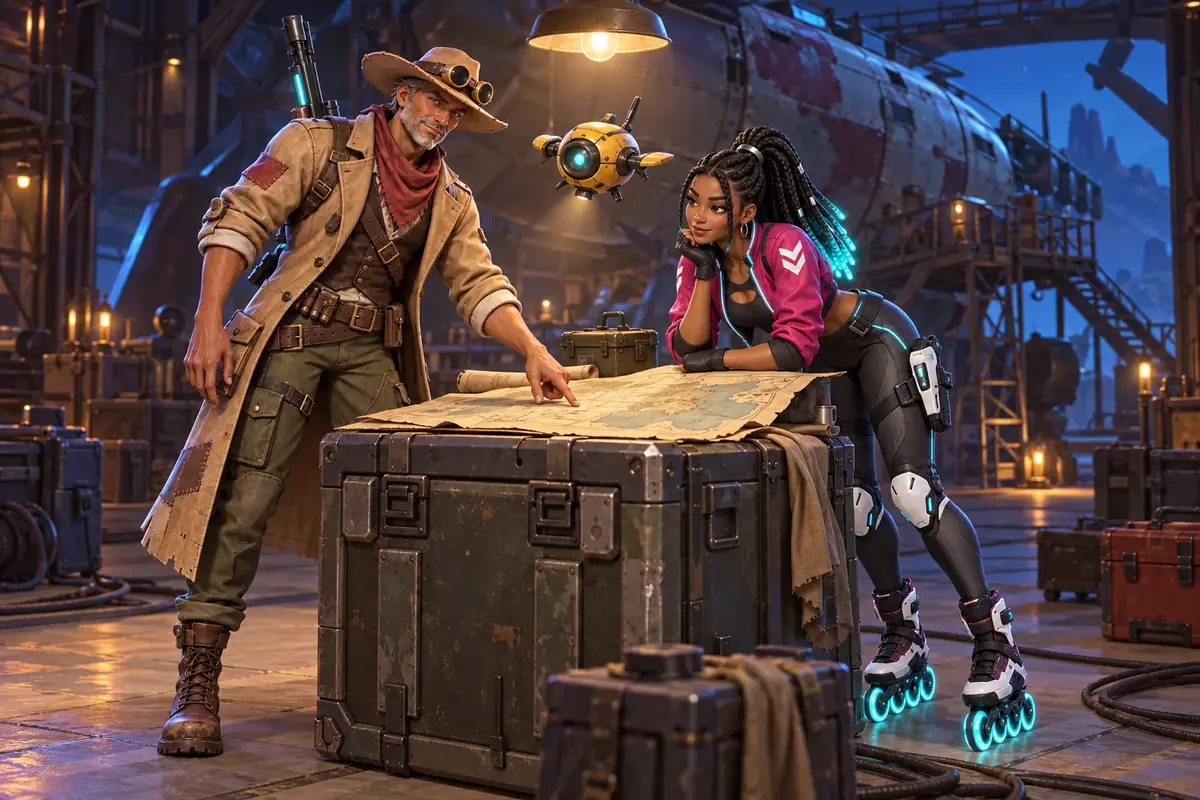
Reuse the identity block for the next scene (Batch from a template). Keep everything above "Scene:" and replace the scene paragraph. The second scene put both in a salvage hangar at night, leaning over a paper map on a metal crate, with "No text, no writing on the map" and a small yellow hover drone above them.
-
Inspect each character separately. Zoom on one character at a time and check his or her keep-list. Then check positions, the height relation and the action.
With the Scenario MCP: pass referenceImages: [zuri_hero, zuri_turnaround, marlow_hero] in that order, every time. Changing the order silently changes what "Reference 3" means.
Check the result
Check the sheet
every view shows the whole keep-list (chevron side, braid tips, earrings, knee guards, both blasters, glowing wheels); all figures in a sheet share one height and one ground line; the rendering matches the hero; every cell is what the prompt asked, head angle included.
an expression or angle differs from what was asked, the rendering style drifts from the hero, a fixed item disappears or moves to the other side, or a view is cropped.
To test the usual advice, a second expression sheet was run with two references: the hero as identity and style, the turnaround to confirm the braids, with numbered cells. The expressions were right, but every head turned to three-quarter view. The turnaround is full of angled views, and the model carried them over.
The hero-only sheet kept every head facing the viewer and goes into the collection. Add a second reference only when the first one is missing something the sheet needs, and say which part of it to use.
Two smaller deviations were accepted and recorded instead of re-rolled:
- Right profile, not left. The turnaround's side view shows her right profile where the prompt asked for the left.
- No chevron on the back view. The back view drops the sleeve chevron.
Neither changes identity. Both are written in the collection's description so nobody "fixes" them later by accident.
Check the scenes
Look at the face first, at full size, next to the hero. Small differences are easy to miss in a full scene and obvious once three images sit side by side.
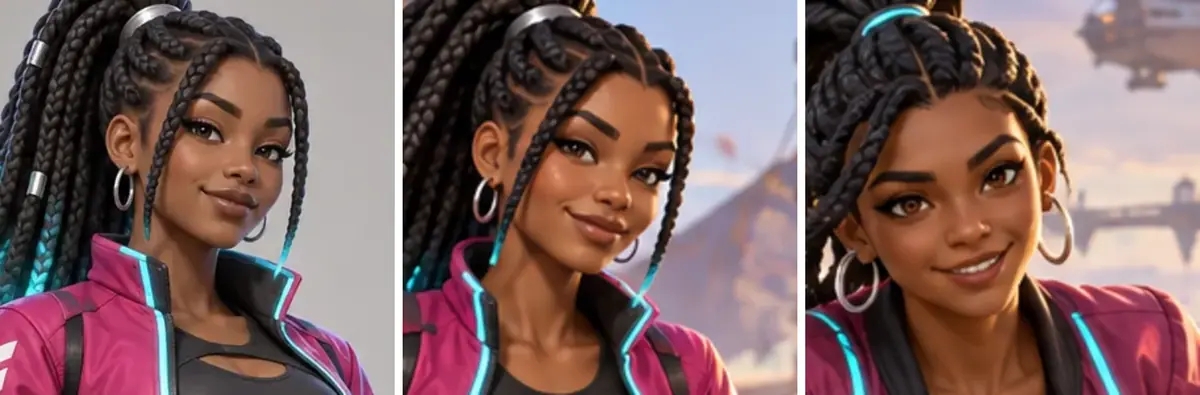
face shape, skin tone and eyes match the hero; the braids are tied high with cyan tips and the silver clip; the chevron sits on her right sleeve; gloves, knee guards, holsters and glowing wheels are present when visible; the rendering style matches.
the chevron flips sides, the face rounds or ages, the jacket changes color without a reason in the brief, an item is added or lost, or the style drifts toward photoreal or flat vector.
As a control, the market scene was also generated from text only: the keep-list written out in full, no references attached. The result is a plausible roller-blade hero who is not quite Zuri:
- Hair: a glowing cyan headband where the hero has a silver clip.
- Earrings: larger hoops.
- Jacket: a darker wine magenta, cut differently at the collar.
- Face: a wider, toothier grin and a different jaw.
Without references, the keep-list describes a category of person, not one person.
 Accepted
 Rejected
The first garage take: rejected. That prompt had her fitting a new wheel into a raised roller blade. The skate came out muddled: one oversized glowing wheel overlapping the frame and wheels that no longer matched. Small mechanical parts held in hands are where image models break; the retake gave her a simpler action (a screwdriver in an open blaster) and passed. In the retake the second blaster sits in the holster on her right thigh, where the prompt said left: the action explains the empty holster, and the holster side is staging, not identity. If a later shot depends on which hand draws, write the holster side into the keep-list.
 Rejected
The rink scene with the outfit sheet held the face, braids, chevron and knee guards. The parka came out hip length where the sheet shows it to mid-thigh. For a loading screen that is acceptable; for a skin you sell, it is a reject, because the item must match what players buy.
Check the two-character scenes
each character carries only his or her own items (braids, chevron and blasters on her; hat, goggles, bandana and rifle on him); the taller character is about a head taller; left and right match the prompt; the action is the one written; both are full body.
an item jumps between characters, the faces converge, positions are swapped, or one character is cropped.
Both labeled scenes passed. One small departure: in the island scene Zuri reaches with one hand, not both. The brief does not fix her hands, so the take was kept.
As a comparison, the same three references were sent with a short, unlabeled prompt: "Use these images. The two characters on the rusted edge of a floating salvage island at sunset. The older one hands the younger one a small glowing power cell."
Both identities held, which shows how much the attached references carry on their own. What was lost is control: the model sat both on a rusted wall, chose a tighter framing, and cut Zuri's skates at the bottom edge. Marlow happened to land on the left, but nothing in the prompt held him there.
For a single social image that may be acceptable; for a storyboard where screen direction and full-body staging must stay the same from shot to shot, it is not.
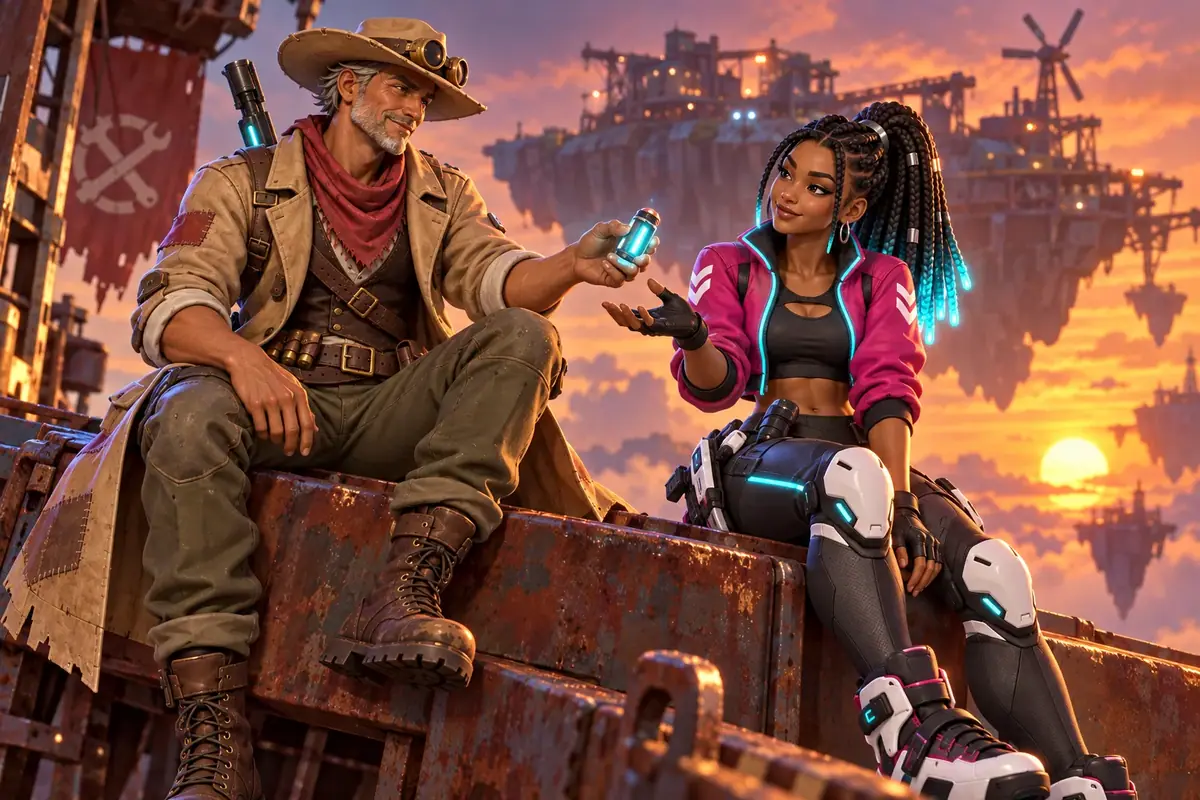
One drift to watch: Marlow renders a little more detailed and realistic than Zuri, in his hero and in both scenes. When the cast's heroes differ in rendering, the scene drifts toward one of them. Make every hero in the same style before you stage them together, or name the style reference explicitly, as the prompt above does.
1Two expression sheets for Zuri. The prompt asked for "every head turned straight to the viewer". Which sheet goes into the collection?
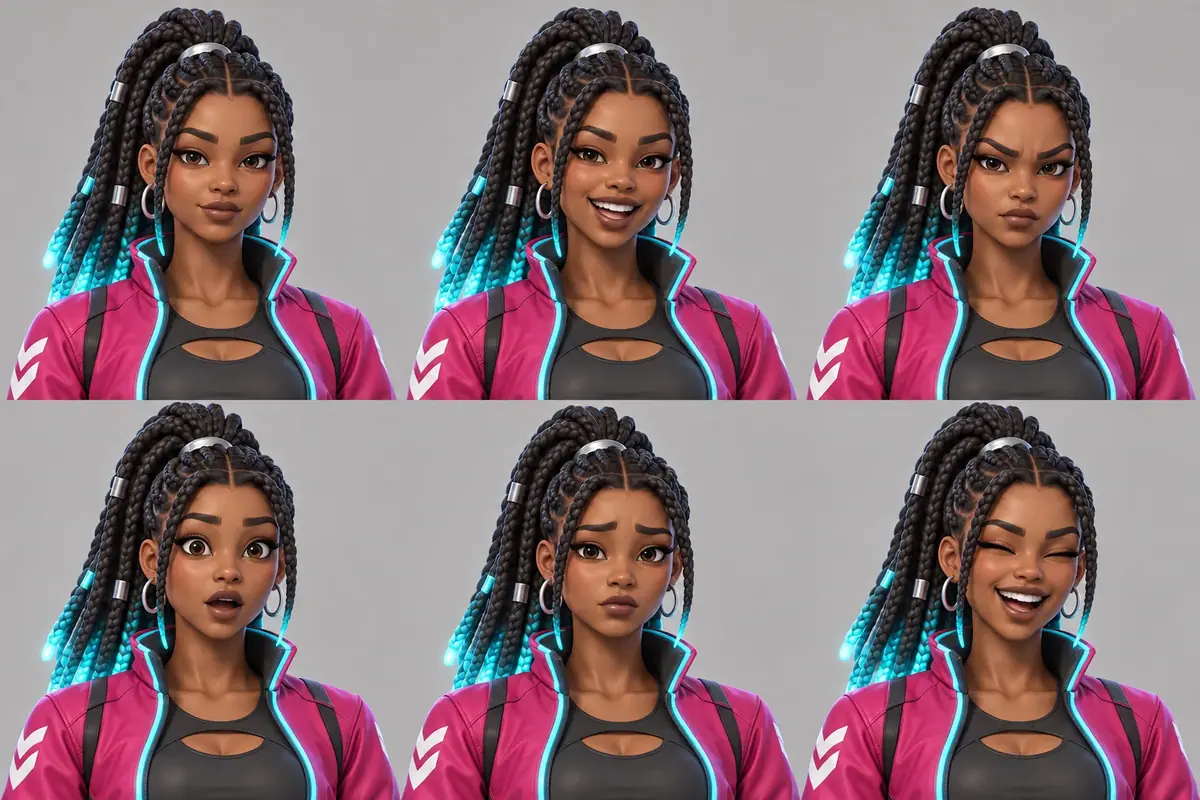
Answer: B. A cell that differs from the request is a reject, even when it looks good. Take A added the turnaround as a second reference and inherited its angled views; Take B used the hero alone.
2Both hero takes put the chevron on her right sleeve, while the prompt asked for the left shoulder. Everything else matches the brief. What do you do?
Answer: C. The approved image becomes the source of truth. Fixing the text to match the picture is free; fighting the picture costs a new hero.
3Two takes of the market scene. A stranger shown it next to the hero should say "same person". Which take goes into the collection?
Answer: B. Take A came from the keep-list text alone: a cyan headband instead of the silver clip, larger hoops, a darker jacket. Only the attached references hold one person from run to run.
4The prompt places Marlow, the taller character in the hat, on the left and Zuri on the right, both standing and full body. The scene opens a storyboard. Which take passes?
Answer: C. Both takes kept the identities; only the labeled prompt kept the staging. Take B sat them down and cut Zuri's skates at the frame edge, which fails "both full body".
Make it repeatable
-
Save the identity pack. Keep the hero, turnaround, expression and outfit sheets in one collection per character, plus a text note with the exact keep-list sentence and the identity paragraph (in the collection description, or in a Text node in the Node Editor). Every later prompt pastes it verbatim. With a cast, keep one identity block per character, so a scene prompt is "cast list + scene", assembled the same way every time.
-
Use a ready-made App for the next character. Under Workflows, Apps, the Platform tab lists Character Turnaround - 6 Angles (Camera-Locked) (new camera angles from one reference) and Character Expression Sheet (a 3 by 3 expression grid from one reference). Costume Sheet does a related job: it extracts named clothing items from a character image. Run them on your approved hero and compare with your own prompts before standardizing.
-
Build your own workflows (Package it as a workflow or skill). In the Node Editor:
- Sheets: an Image input node (the hero) and a Text node holding the keep-list; a Prompt Builder that joins the keep-list with each sheet's layout sentence; three Image Generator nodes (turnaround, expressions, outfits) set to GPT Image 2.5 Sunburst; an Approval node after the hero, so nobody spends credits on sheets for an unapproved design.
- Scenes: two Image input nodes (hero, turnaround), a Text node with the identity paragraph, a Text input exposed to the user for the scene, a Prompt Builder that joins them, and an Image Generator set to GPT Image 2.5 Sunburst at 1536x1024. Add an Approval node before anything is shared.
- Two characters: three Image input nodes in a fixed order, two Text nodes for the identity blocks, a Text input for the scene, a Prompt Builder that joins them with the "Do not mix" line, and an Image Generator on GPT Image 2.5 Sunburst, with an Approval node before export. See Approval and review steps.
-
Publish it as an App. Use Edit App so the whole team gets the same layout, and writers and marketers can request scenes without touching the identity paragraph. See Publish a workflow as an App.
-
Batch many scenes. Feed a list of scene lines through Split Text and a Loop node. See Batches, loops and logic.
-
For larger casts, try the Multiple Characters Story App under Workflows, Apps. It takes three to seven character references plus a genre and theme, and returns a six-scene story video. It suits an ensemble; for one character, your own workflow gives more control.
-
Train later, not first. A trained character model pays off when you need hundreds of images of the same character. For one character's first fifty images, references are faster and cheaper, and need no training run. See Train a character or object model.
Runs and time
Part 1, the sheet:
| Step | Model | Runs or takes | Kept | Wait |
|---|---|---|---|---|
| Hero | GPT Image 2.5 Sunburst | 1 run, 2 takes | 1 | about 40 s |
| Turnaround | GPT Image 2.5 Sunburst | 1 | 1 | about 40 s |
| Turnaround shoot-out | Nano Banana 2.1 | 1 | 0 (runner-up) | about 40 s |
| Expression sheet | GPT Image 2.5 Sunburst | 1 | 1 | about 35 s |
| Expression sheet, two references | GPT Image 2.5 Sunburst | 1 | 0 (rejected) | about 40 s |
| Outfit sheet | GPT Image 2.5 Sunburst | 1 | 1 | about 45 s |
The hero run makes two images, so it costs about twice a sheet; the shoot-out and the rejected sheet are the only spend you can skip.
Part 2, scenes:
| Step | Model | Runs | Kept | Wait |
|---|---|---|---|---|
| Market, rooftop, garage scenes | GPT Image 2.5 Sunburst | 3 | 2 | about 50 to 60 s each |
| Garage retake, simpler action | GPT Image 2.5 Sunburst | 1 | 1 | about 45 s |
| Rink scene with the outfit sheet | GPT Image 2.5 Sunburst | 1 | 1 | about 55 s |
| Text-only control | GPT Image 2.5 Sunburst | 1 | 0 (rejected) | about 45 s |
Six runs, about 2 minutes with the runs in parallel. Every scene costs the same, so the total grows with the number of scenes.
Part 3, two characters:
| Step | Model | Runs | Kept | Wait |
|---|---|---|---|---|
| Second character hero, two takes | GPT Image 2.5 Sunburst | 1 | 1 | about 40 s |
| Two labeled scenes (3 references) | GPT Image 2.5 Sunburst | 2 | 2 | about 45 s each |
| Unlabeled comparison | GPT Image 2.5 Sunburst | 1 | 0 | about 50 s |
About 3 minutes in all. Each scene costs about the same; a third reference adds very little. The price shows on the Generate button before you run.
Variations
- Animation and film: add a height line-up of the whole cast and a mouth-shape sheet for lip sync, both generated from the same hero.
- Animation and storyboards: write the scene paragraph as a shot description (shot size, lens, action) and generate a sequence; keep screen direction fixed across shots by writing "Marlow on the left" in every shot of the sequence. See Storyboard from a script.
- Marketing: one character across a campaign's formats, or the cast staged for a poster. Make the scene at 3:2, then cut every store format from it with Key art and store assets, which uses this cast.
- Mascots and brand characters: replace the outfit sheet with a "do and don't" sheet (approved poses, forbidden colors) and keep it next to the brand guide.
- Creatures and vehicles: a turnaround works the same way; name what the camera sees in each view ("rear view: tail and exhaust visible, no face"), because models drift back toward the side they know best.
- Creature and rider: label the creature as a character too, with its own keep-list; the "Do not mix" line matters even more when both share colors.
- Learning and publishing: for a picture-book cast, make the expression sheet first; readers judge a character by its face more than its clothes. For one guide character across a course, keep a fixed pose library in the scene paragraphs ("pointing at a board on her left") so layouts stay predictable. For a teacher and a student in recurring classroom scenes, keep the same camera so learners recognize the setting.
- Seasonal skins: use the outfit sheet as reference 2 and name the outfit by position, as in Part 2, step 6.
- Video: use an accepted scene as the first frame of a clip. See Animate a still.
- 3D handoff: the approved hero image is enough input for Rigged 3D character, which starts from it directly. Generate an extra front view in a strict A-pose with empty hands only when the hero pose hides the arms or hands.
If it breaks
- A badge, braid or bag switches sides between views or scenes. Write the side twice, relative to her body and to the viewer: "on her right sleeve (viewer's left in the front view)". Check that the turnaround is attached; it carries that information. If it still flips, accept the hero's version and update the keep-list.
- The style drifts from the hero. Name the hero as the style reference too ("match its shading, rim light and material finish"), and keep the background plain. With a cast, make every hero in the same style before you stage them together.
- Heads or bodies turn when you add a reference. The extra reference carries its own angles. Remove it, or name the one thing to take from it ("use reference 2 only to confirm the braid color") and repeat the angle you want.
- Views come out at different sizes or float. Ask for "same height, same scale, feet on one shared ground line" and keep the background plain; scenery invites perspective.
- Back or side views invent details. Describe what the camera sees and does not see in that view. For a stubborn view, generate it alone and paste it into the sheet.
- Every take changes the face. Your reference may not be attached. In the Scenario MCP,
referenceImagesmust be an array; in the app, check that the thumbnail shows under Reference Images before you click Generate. - She looks older, younger or rounder in a scene. Move the hero to reference 1 and say "Reference 1 is the identity". A turnaround as the only reference gives smaller faces and weaker identity.
- Hands and small mechanical parts melt together. Give her a simpler action with fewer small parts in her hands, as in the garage retake.
- The outfit leaks between references. When you attach an outfit sheet, name the one cell to use ("the MIDDLE outfit only") and list its items.
- The scene is a close-up that hides the clothes. Name the shot size: "medium-wide shot, full figure visible".
- Items swap between characters. Put each keep-list directly after the name, in capitals, and add "Do not mix their features or clothes". Remove items both share (two cyan glows invite confusion).
- Positions swap. Write left and right from the camera, and attach the references in a consistent order.
- One character is much smaller or cropped. Ask for "both full body" and name the shot size. State the height relation in words: "a head taller".
- Faces converge. Add a turnaround for the character who drifts, and describe the facial differences you care about (age, skin tone, beard).
- One cell or one detail is wrong in a good image (a wink, a missing prop). Fix only that region with Edit with Prompts instead of re-rolling, or regenerate the sheet with numbered cells and the failed item written in capitals. See Edit one thing.