

Creator-style product video from a product image
Turn a product image into a short vertical creator-style video with the UGC Apps or their models, then add the app screen, end card and button in code.
- Playbook
Run it in ScenarioMinimax H3 Seedance 2.5 Gemini Omni 1.1 Flash GPT Image 2.5 Sunburst
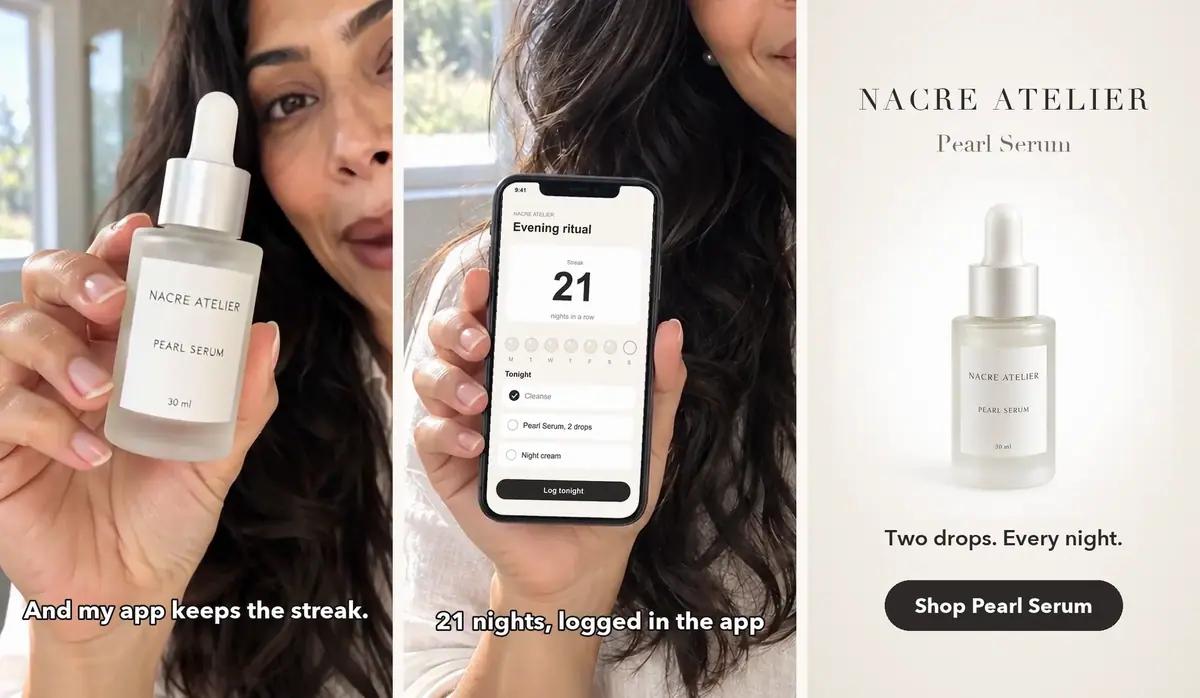
See it made
Run it in Scenario
A vertical, creator-style video for the Pearl Serum of Nacre Atelier, an invented skincare brand, and its evening-ritual app. An invented creator says one line, the exact app screen appears, then an end card with a button. Plus a second cut for an A/B test.
Watch the video: https://ufgc0c9mhl4ueq76.public.blob.vercel-storage.com/academy/051ba269aa2863e657d9f86250d234c0076f64c585b6c873615913246f53a336.mp4
The brief
| Field | Brief |
|---|---|
| Goal | One vertical creator-style video and one test variant for a serum and its streak app |
| Inputs | A creator photo, a product packshot, an app screenshot |
| Format | 9:16, 720x1280, 30 fps, about 13 seconds, with the creator's voice |
| Fixed | Bottle shape and finish (frosted glass, pearl-white dropper bulb), label text NACRE ATELIER, PEARL SERUM, 30 ml; app screen pixel for pixel; end card text |
| May vary | Gestures, handheld sway, the order of the shots in the variant |
| Accept when | The line is spoken word for word; hands and bottle hold in every frame; the label reads; the screen matches the screenshot; captions sit on the right words |
Approach
- 1Inputscreator, packshot, app screen in code
- 2Try the Appsthree featured UGC Apps
- 3Vertical first framethe App's first step, at 9:16
- 4Talking takeMinimax H3, line in the prompt
- 5Assemble in codescreen, captions, end card, button
The Home screen lists three creator-style Apps under FEATURED APPS: UGC Product Showcase, UGC Product Demo and UGC App Showcase. They are the fastest route, so run them first.
In this run, the two video Apps returned 16:9 clips with a music bed and no speech. So the playbook rebuilds the same chain in 9:16, with a scripted line, and picks the video model in a preview shoot-out. Anything that must be exact (screen, words, button) is done in code.
- Capability: image to video with native speech.
- Model used: Minimax H3 at 768P, the shoot-out winner: the line word for word and the label readable in close-up. GPT Image 2.5 Sunburst for the first frame, as in the App.
- Alternatives: Seedance 2.5, the model inside UGC Product Demo: its draft preview turned the label into invented letters. Gemini Omni 1.1 Flash: native 9:16 and clean speech, but the label never read and the bottle left the frame at the end.
What the models generate, and what code sets exactly:
| Made by the models | Set in code |
|---|---|
| The creator holding the bottle in the vertical first frame | The app screen, pasted pixel for pixel onto the phone |
| The gestures and the handheld sway | The captions, timed to the transcript |
| The spoken line, in her voice | The push-in on the phone |
| The label catching the light as she tilts the bottle | The end card and its button |
| The order of shots in the test variant |
Steps
-
Make the inputs. An invented creator (waist-up, bright bathroom, hands empty at chest height, no products), the same creator holding a phone with a blank white screen, and the packshot from the brand's own phone photo of the bottle. GPT Image 2.5 Sunburst, one run each, 31 to 36 seconds. Draw the app screen in code. Name every product detail that must survive, label text included:
PromptE-commerce packshot of the product in the reference image: the Nacre Atelier Pearl Serum, a frosted glass dropper bottle, 30 ml, with a pearl-white rounded dropper bulb and a short pearl-white collar, a clear glass pipette inside, and a small white rectangular label that reads exactly NACRE ATELIER on the first line, PEARL SERUM on the second line and 30 ml at the bottom, in fine dark grey serif capitals. Standing upright, three-quarter front view, centered, on a seamless pure white background with a soft natural contact shadow. Style: luxury beauty photography, crisp frosted glass, clean typography on pack. No other objects, no other text.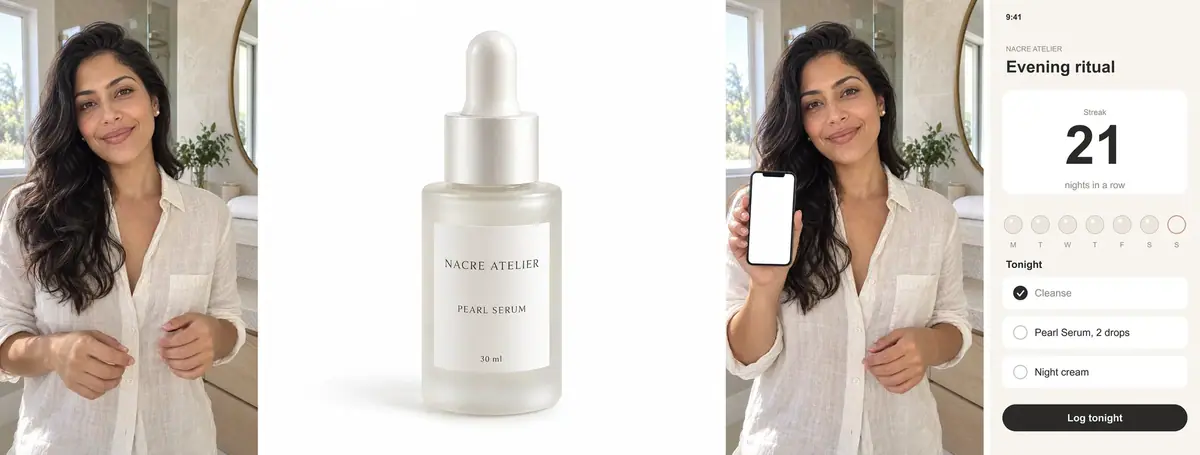
The four inputs. The app screen is drawn in code, not generated. -
Run the three Apps (Quote before you run). This run started them through the Scenario MCP (see below); in the web app, open each App from Home > FEATURED APPS and add the inputs. UGC Product Showcase (person, product): 3 minutes 37 seconds. UGC Product Demo (person, product): 6 minutes 48 seconds, the most expensive. UGC App Showcase (person photo, app screenshot): 32 seconds, a single image.
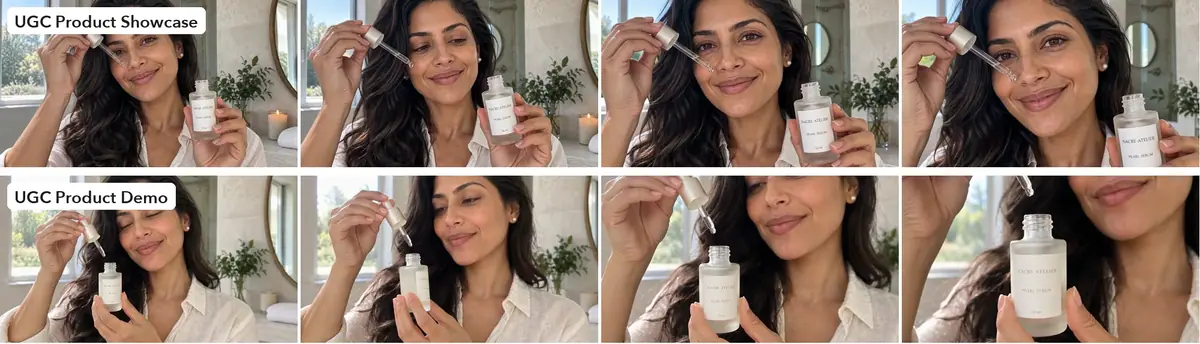
Both video Apps: 8 seconds, 16:9, a music bed but no speech. -
Decide what to rebuild. Both video Apps chain a Sunburst composite into an 8-second 16:9 video. Keep their method, change the shape and add the line. UGC App Showcase keeps the vertical shape but redraws the screen, and in this run it dropped Thursday from the week row: step 7 fixes that.
-
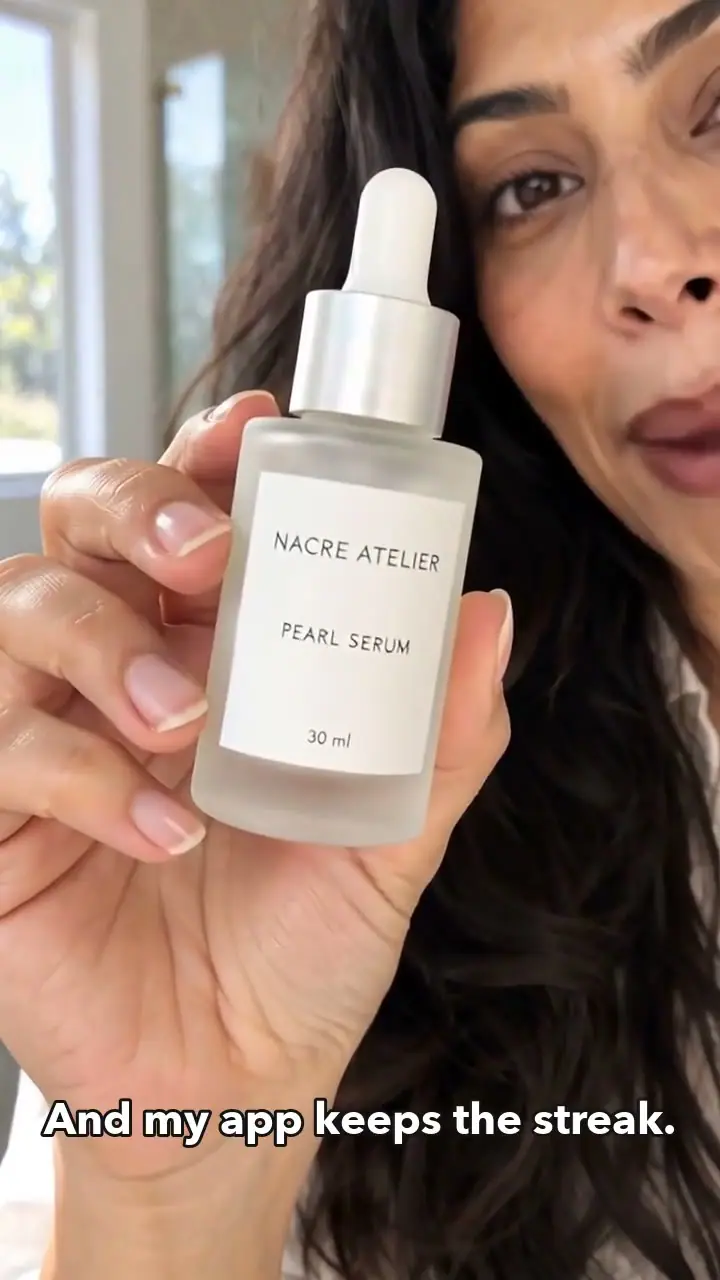
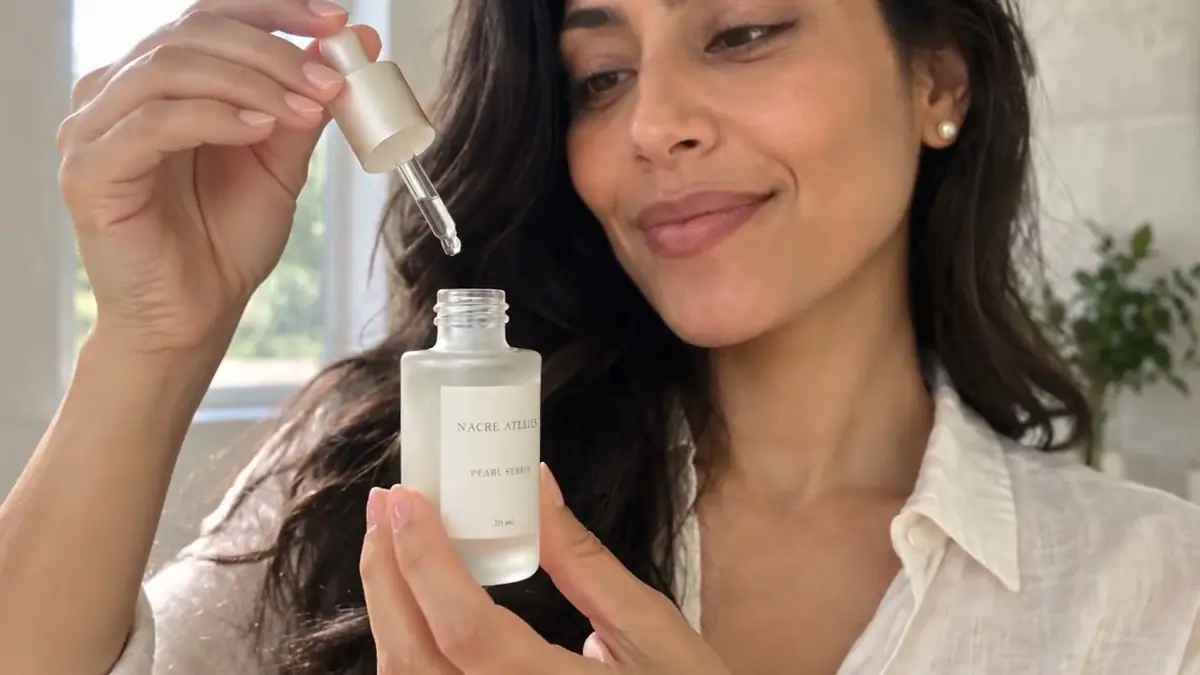
Make the vertical first frame (Give each reference a role). Sunburst at 1088x1920, creator and packshot as references, starting with the App's own first sentence. 31 seconds. Check the hand and the label before going further (Approve the still first).
PromptAdd the product held by the person. The woman from the first reference image (same face, long dark wavy hair, small pearl stud earrings, ivory linen shirt, same bright bathroom) holds the serum bottle from the second reference image up beside her face toward the camera in her right hand, as if showing it to a friend on a video call. The bottle keeps its exact look: frosted glass body, pearl-white rounded dropper bulb, satin pearl-silver collar, white label reading NACRE ATELIER, PEARL SERUM and 30 ml, label facing the camera. Relaxed natural grip with all fingers correct, the label not covered by her fingers, warm smile, looking into the camera. Authentic creator-style phone video framing, vertical, waist-up, natural daylight, casual and unposed. No other text anywhere.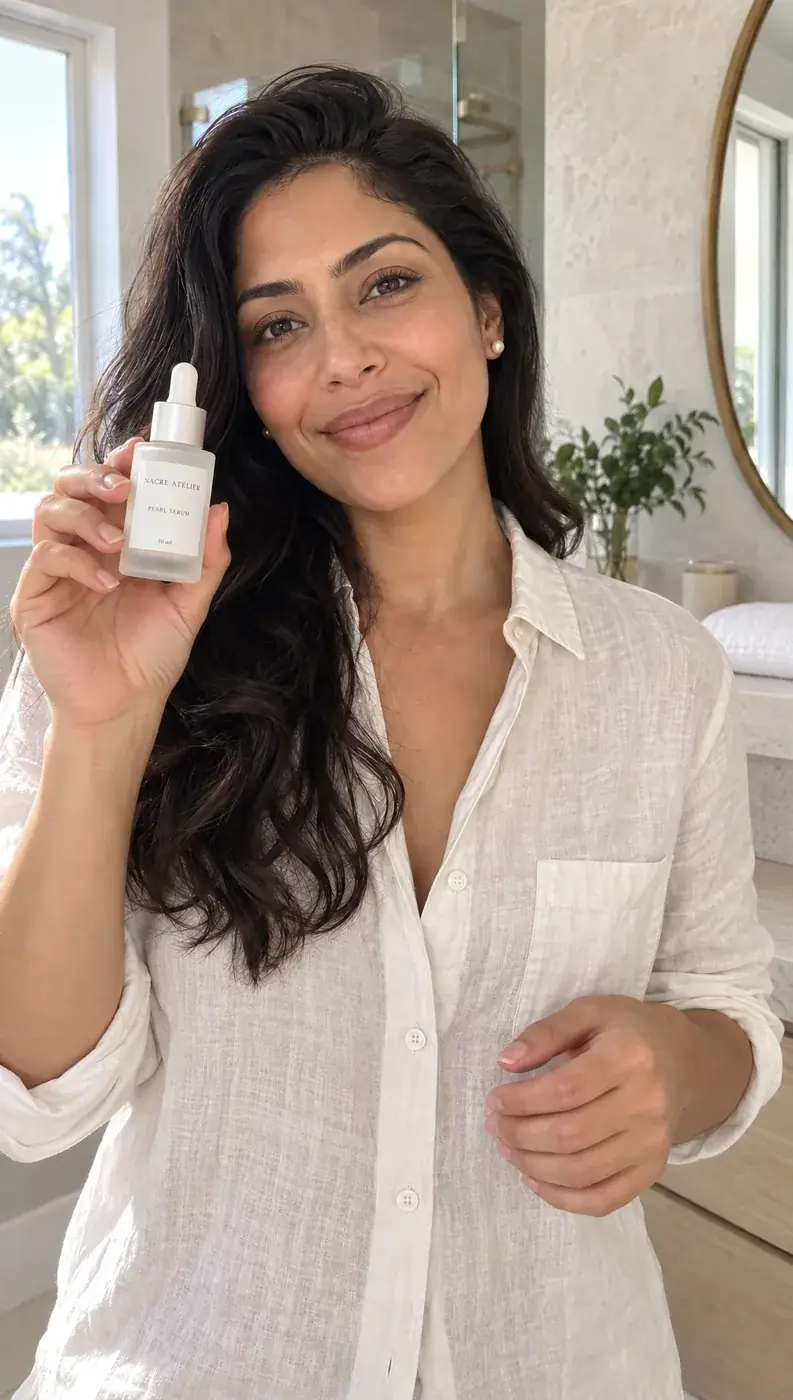
The 9:16 first frame. -
Preview three models on that frame (Run a same-input shoot-out). 8 seconds, speech on, one prompt: Minimax H3 at 768P, Seedance 2.5 in draft mode (480p), Gemini Omni 1.1 Flash at 720p in 9:16. Watch the label and the hand frame by frame, and check the words with a transcript (
whisper take.mp4 --model base.en).PromptCreator-style vertical phone video. The woman holds the serum bottle up beside her face, smiles and says to the camera in a natural, warm voice: "Two drops every night. And my app keeps the streak." She tilts the bottle a little toward the camera so the label catches the light, then taps the pearl-white dropper bulb once with one finger. The label stays facing the camera and readable. Slight handheld phone-camera sway, natural daylight bathroom. The bottle keeps its exact shape, frosted glass and label. No on-screen text, no captions. Quiet bathroom ambience, no music.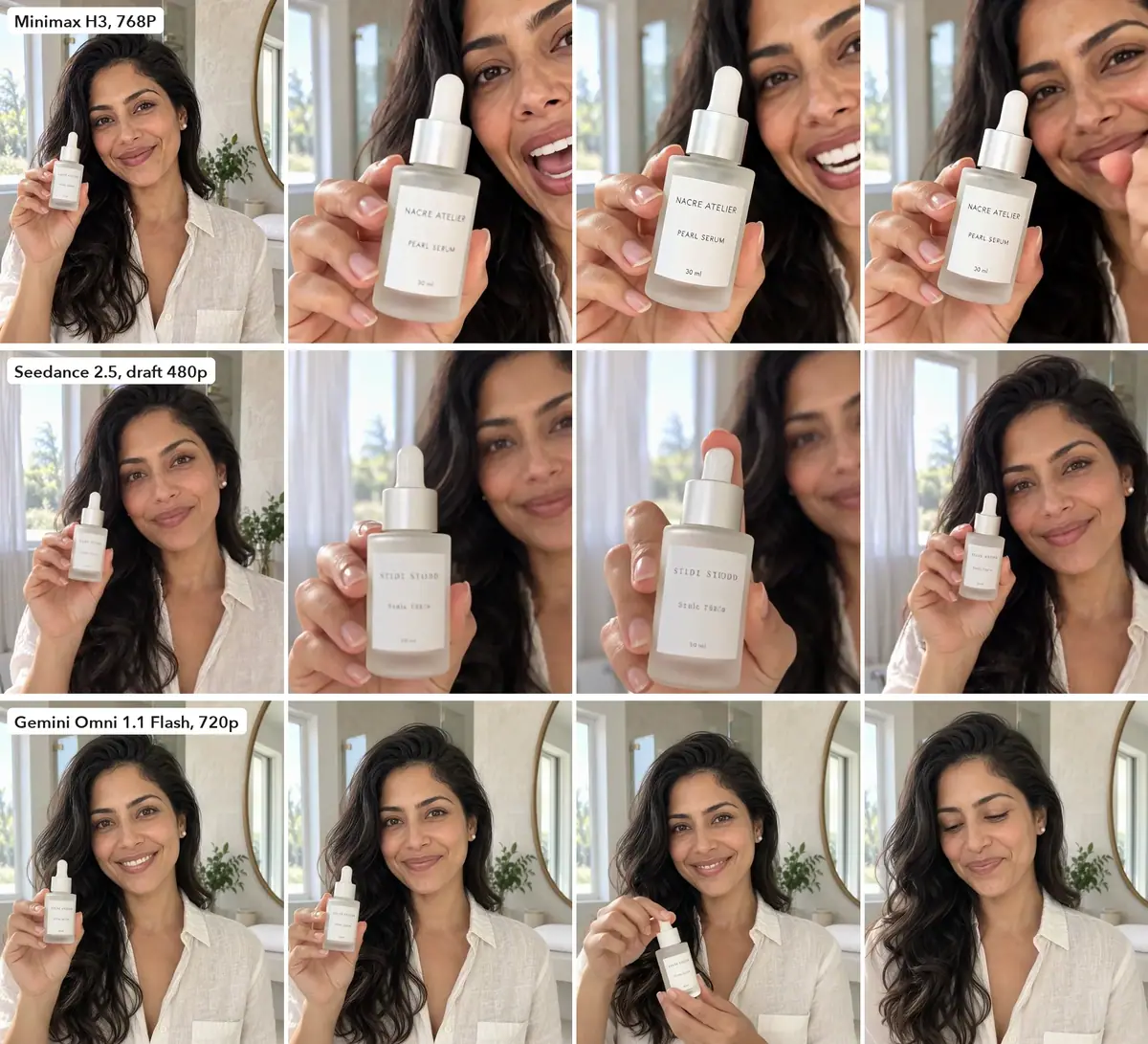
Frames at 25, 55, 75 and 95% of each preview, top of frame. -
Keep the preview that passes (Animate from a first frame). The H3 preview came back at 768x1344, above the 720x1280 delivery size, with the line word for word, the label readable and the hands correct. A rerun at a higher resolution would cost more for nothing the feed can show, so the preview is the final. 4 minutes 14 seconds. In the web app: Create > Videos, Model Minimax H3, the frame in First Frame, Duration 8 s, Resolution 768P; the price shows on the Generate button first. Minimax H3 always adds sound: here, her voice and a quiet room.
-
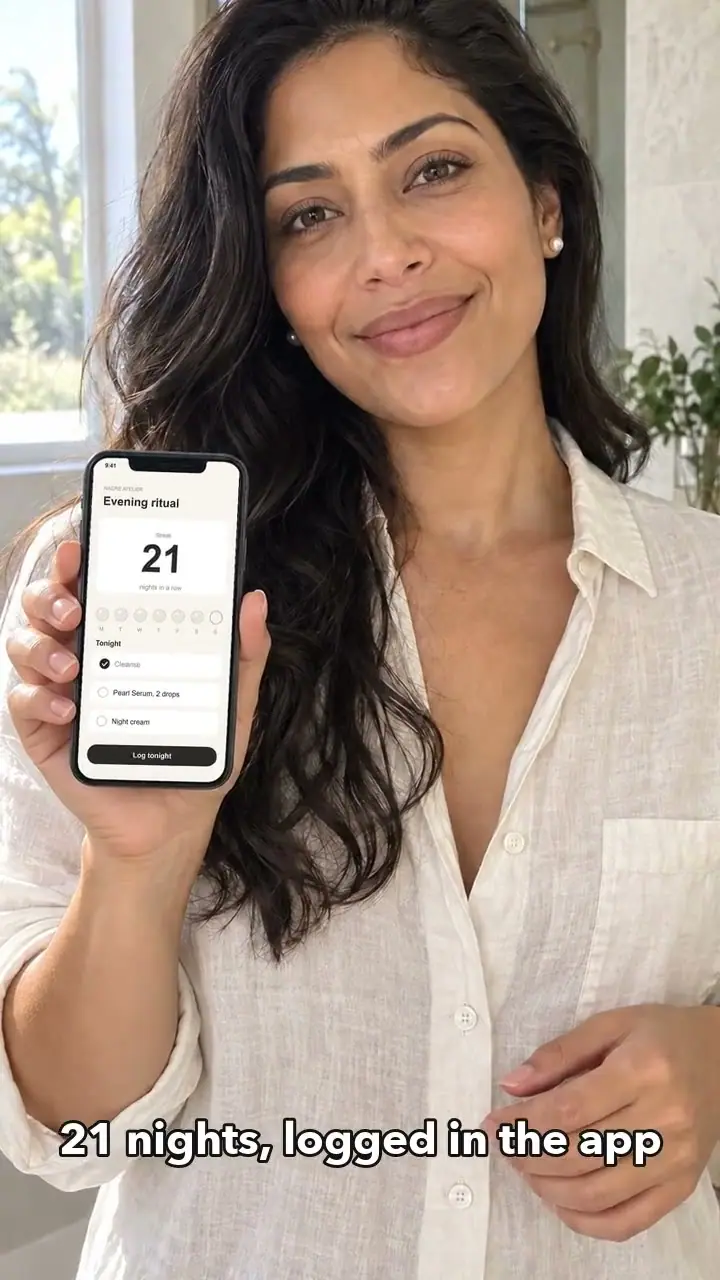
Paste the exact screen in code (Do the exact part in code). Find the white screen in the phone photo, fit its four corners, and warp the screenshot onto it. Shrink the screenshot first with a high-quality filter to avoid jagged text; for the push-in, upscale the photo 2x before pasting so the screen stays sharp up close.
Pythonwhite = (P.min(axis=2) > 236) & (np.ptp(P, axis=2) < 14) # blank screen pixels # largest tall blob -> corners tl, tr, br, bl -> perspective coefficients warped = screen.transform(photo.size, Image.PERSPECTIVE, coeffs, Image.BICUBIC)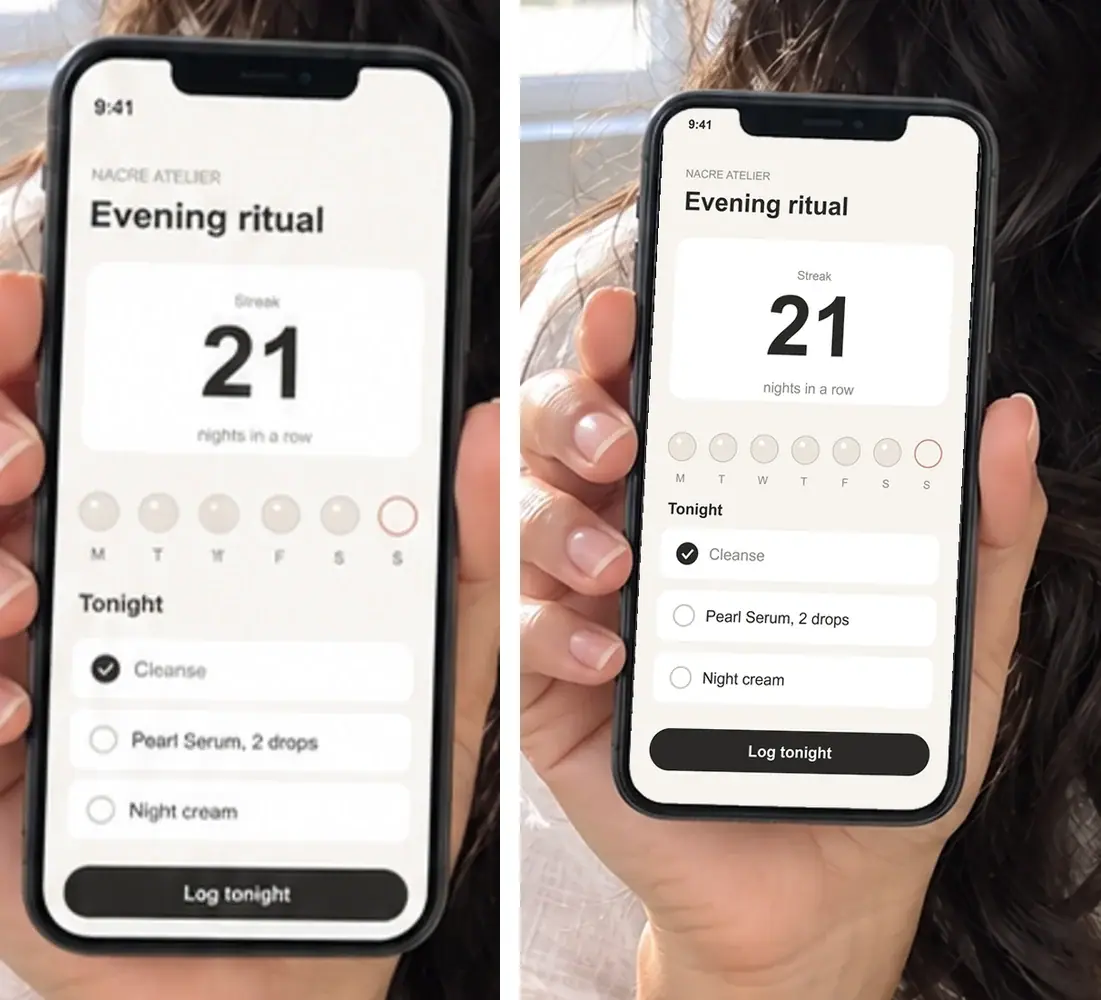
Left: UGC App Showcase redraws the screenshot and drops a day. Right: pasted in code, pixel-exact. -
Assemble in code (Typeset text, never generate it, Conform clips before the edit). Conform the take to 720x1280 at 30 fps. Add two captions timed to the transcript, a 2.5-second push-in on the phone ("21 nights, logged in the app"), then a 2.5-second end card. Draw the button on its own layer: it slides in at 0.35 s and pulses at 1.3 s.
Shellffmpeg -i take.mp4 -vf "scale=720:1280:force_original_aspect_ratio=increase,crop=720:1280,fps=30" take-720.mp4 -
Cut the test variant (Edit one thing). Variant B uses the same shots and end card, with the app shot first. One difference only, so the test result points at the hook.
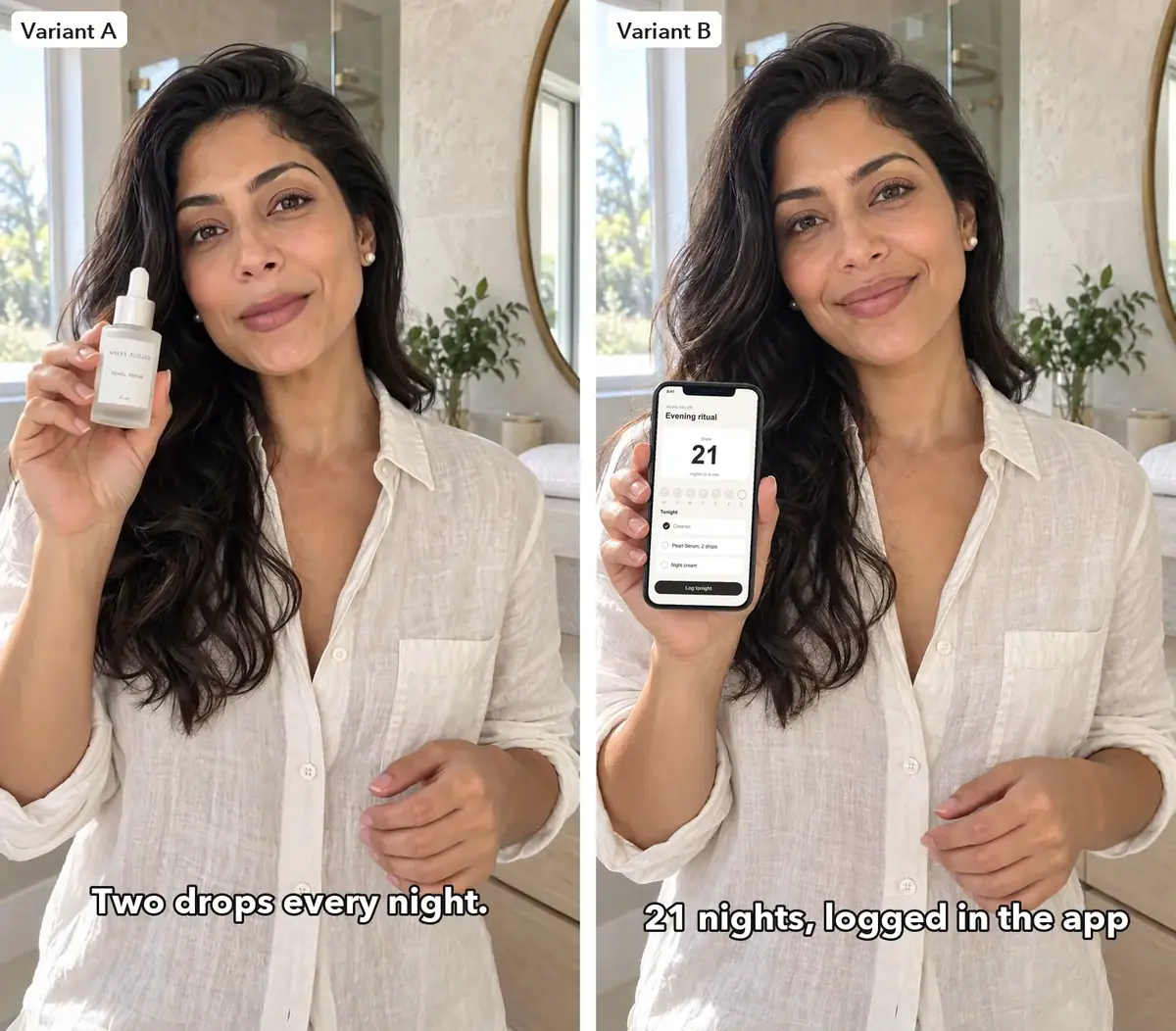
Variant A opens on the creator, variant B on the app screen.
With the Scenario MCP: workflows_list with privacy: "public" and tags: ["featured"] finds the Apps; workflow_get lists their inputs; workflow_run runs them. The App job itself shows no charge: the cost sits on its child jobs.
The final: model_run on model_minimax-h3 with firstFrameImage, duration: 8, resolution: "768P"; ask for a dry-run quote first.
Check the result
the transcript matches the line; the bottle keeps its shape and its label reads in every close-up; fingers stay correct; the screen matches the screenshot; captions change on the right words; the button stays readable on a phone.
the label turns into invented letters; a second bottle appears; the voice says other words; screen text is redrawn; music covers the voice.
| Vertical preview, 8 s | Wait | Product | Speech |
|---|---|---|---|
| Minimax H3, 768P | 4 min 14 s | label readable in close-up, hands correct | line word for word, winner |
| Seedance 2.5, draft 480p | 1 min 37 s | label turns into invented letters | |
| Gemini Omni 1.1 Flash, 720p | 50 s | label never reads; bottle leaves the frame at the end | clean |
| App (one run each, October 2026) | Output | Speech | Wait |
|---|---|---|---|
| UGC Product Showcase | 8 s, 16:9, an older fast Seedance model; label roughly holds, background drifts | none, music bed | 3 min 37 s |
| UGC Product Demo | 8 s, 16:9, Seedance 2.5; a second bottle appears and the label garbles | none, music bed | 6 min 48 s |
| UGC App Showcase | still, keeps the input shape; screen redrawn, one weekday missing | 32 s |
Transcript of the final: "Two drops every night, and my app keeps the streak." The take ran 8.0 seconds at 768x1344. The finished video runs 13.0 seconds.
Watch the video: https://ufgc0c9mhl4ueq76.public.blob.vercel-storage.com/academy/03ff66d4662414c236ba636becedf309f223db80be7a93553e5ca82b5c320cab.mp4
Watch the video: https://ufgc0c9mhl4ueq76.public.blob.vercel-storage.com/academy/11d1def6146436a64a2b9becbaa91008856576232de163cb20b7c0f786f64de9.mp4
1The phone screen must match the app screenshot pixel for pixel. Two versions of the screen on the creator's phone. Which one goes into the video?
Answer: B. Redrawn screen content is a reject. The App redrew the screenshot and dropped Thursday from the week row; pasting it in code keeps it exact.
2The transcript of a take reads "Two drops a night, and the app tracks it." The bottle and hands hold in every frame. What do you do?
Answer: C. The brief asks for the line word for word, and a voice saying other words is a reject.
Make it repeatable
- Build the vertical chain once. In the Node Editor: two Image nodes (creator, packshot), an Image Generator on GPT Image 2.5 Sunburst at 1088x1920 with the step 4 prompt, a Video Generator on Minimax H3, and an Approval before the video. Publish it as an App (Publish a workflow as an App).
- Or start from the featured App. In its editor, Duplicate Workflow and change the sizes and the video model on its generators.
- Keep the assembly as a script with the variant as an argument: A or B, the caption lines, the button text.
- Test one change at a time: the hook order, then the line, then the end card.
Runs and time
| Step | Model | Runs | Wait |
|---|---|---|---|
| Creator, phone photo, packshot | GPT Image 2.5 Sunburst | 3 | 31 to 36 s, in parallel |
| Three UGC Apps | Sunburst, an older fast Seedance model, Seedance 2.5 | 3 Apps | 6 min 48 s, in parallel |
| Vertical first frame | GPT Image 2.5 Sunburst | 1 | 31 s |
| Vertical previews, 8 s | Minimax H3, Seedance 2.5 draft, Gemini Omni 1.1 Flash | 3 | 4 min 14 s, in parallel |
| Final | the H3 preview, kept | 0 | none |
| Screen paste, assembly, variant | Python, ffmpeg | about 3 min |
Ten runs, about 12 minutes of wait. The video runs (Apps and previews) are nearly all the cost; a repeat needs only the first frame and one take. Read the price on the Generate button, or ask for a dry-run quote, before each video.
Variations
- Lip balm or a fragrance: same chain, with the label text and the fragile parts in the keep-list of each prompt.
- App only: UGC App Showcase for the framing, then the code paste for the screen.
- Web banner: a 16:9 App output, if its product holds in every frame.
- Another market: rerun the take with the line in another language and check it against a transcript (Lip-sync and talking avatars).
- More hooks: a question as the first caption, or the label close-up first; one change per variant.
If it breaks
- The App output is the wrong shape or silent. Rebuild its chain with the models directly, as in steps 4 to 6.
- The label turns into invented letters. Ask for the label "facing the camera and readable", preview at delivery size, and keep the model that holds it.
- A second product appears. Reject the take; say "only one bottle" and keep the product in one hand.
- Wrong words. Keep the line short, in quotes, and check every take with a transcript.
- Fingers go wrong. Fix it on the first frame, before the video.
- Screen content drifts. Never let a model draw the screen; paste it in code.
- Music under the voice. Ask for "quiet ambience, no music"; the App takes come with a music bed.