

Make a consistent icon set and item catalog
Produce a matching set of ability icons and a growing item catalog with tiers and chromas by approving one style anchor at full and small size, then generating every other cell from it, one job per line.
- Playbook
Run it in ScenarioGPT Image 2.5 Sunburst GPT Image 2.5 Flare
See it made
Run it in Scenario
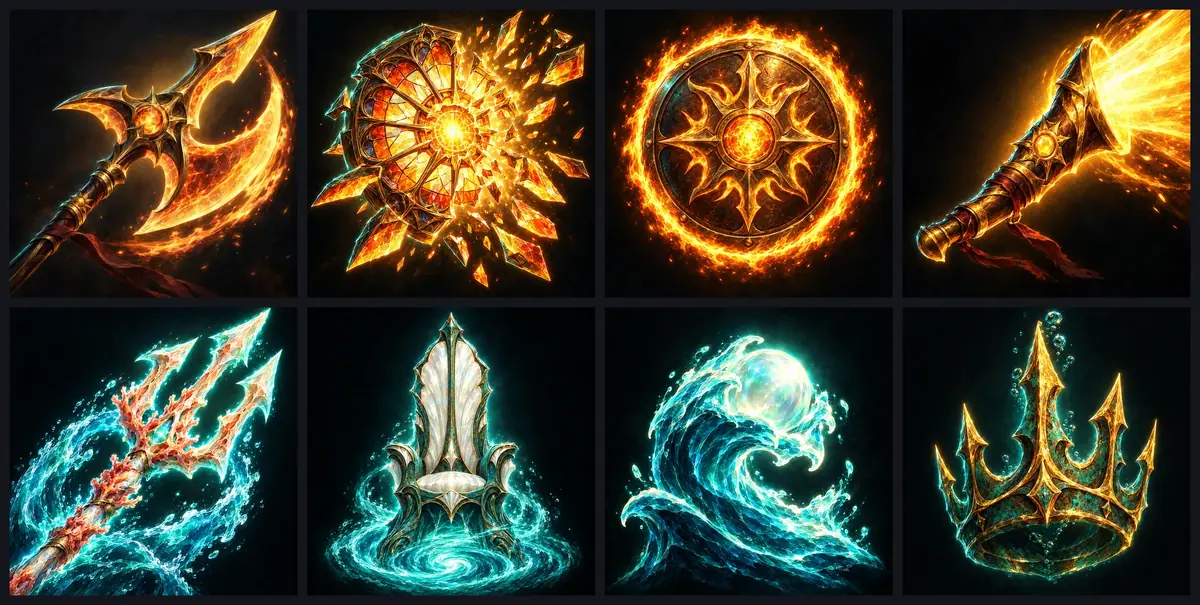
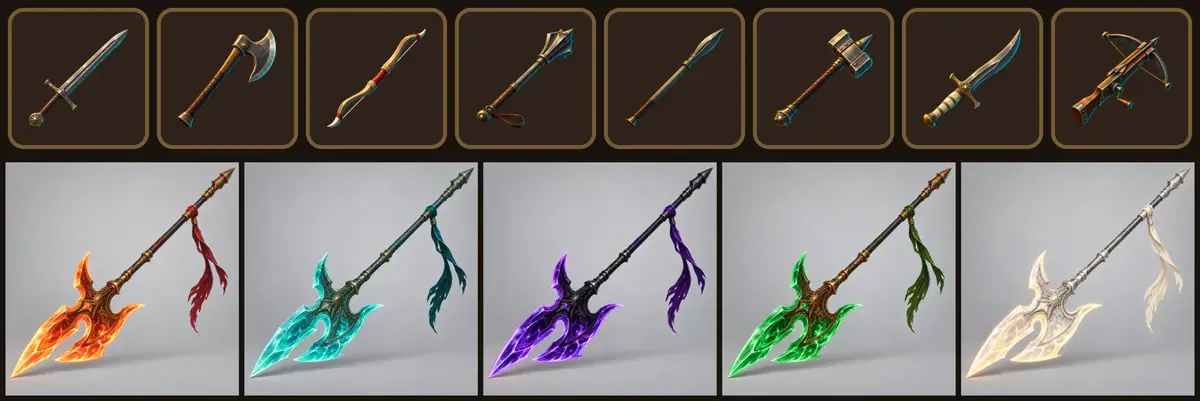
Icons for Cinderthrone, a fantasy battle arena game in painterly splash-art style, in two parts. Part 1 makes eight ability icons for the action bar: four for the fire-and-gold Sunforged faction, four for the sea-born Tidebound, with no odd one out in brushwork, light or how much of the square the subject fills. Part 2 turns a list file into an inventory catalog that grows for months: eight weapons with common, rare and epic tiers, and five chromas (color variants) of a cosmetic halberd. Both start from one approved "style anchor".
The brief
| Field | Part 1: ability icons | Part 2: item catalog with tiers |
|---|---|---|
| Goal | 8 ability icons for an arena game's action bar, 4 per faction | 8 weapons with common, rare and epic tiers, plus 5 chromas of one cosmetic halberd |
| Format | 1024x1024 masters, opaque square, full bleed; the frame comes from the game UI; shown at 64 and 32 px | 1024x1024 PNG: transparent for the weapons, plain light grey for the halberd |
| Fixed | Painterly brushwork, plain dark background with a soft glow behind the subject, vignette, gold and teal rim light, one bold subject filling most of the square | Weapons: painterly style, rim light, top-left key light, diagonal placement, fill. Halberd: shape, framing, light, background |
| May vary | The subject; the glow color (warm gold for Sunforged, teal for Tidebound) | The weapon in the slot; materials and glow per tier; colors per chroma |
| Accept when | Side by side, no icon stands out in style or size; each reads at 32 px and in the grey cooldown state | Every cell reads as the same set at full size and at 32 px; tiers and chromas overlay their base cell |
The factions and champions are the same as in the faction reskin of Seasonal and market variants of one approved shot.
Approach
Part 1, ability icons:
- 1Style anchorGPT Image 2.5 Sunburst, 2 takes
- 2Approve1024 px, 32 px and grey
- 3Other iconsGPT Image 2.5 Flare, anchor attached
- 4Size test64 px, 32 px, cooldown grey
- 5RetakeThe odd one out, alone
Part 2, item catalog:
- 1List fileOne line per item in a CSV
- 2Style anchorShoot-out, one approved cell at high
- 3Template runOne slot, anchor attached, one job each
- 4Tiers and chromasEdit the approved cell, keep-list fixed
- 5Small-size checkNormalize fill, view at 64 and 32 px
- 6Fix one cellRewrite one line, rerun one job
Write the style once, generate one icon, and approve it as the style anchor. Every other icon gets the anchor as a reference: the reference gives the style, the text gives the subject ("Do not copy its object"). See Give references a role.
Ability icons are opaque squares: the game draws the frame, the cooldown sweep and the key binding on top. Inventory icons are different: they need real transparency, set with Background at generation time. That case is Part 2; see also Remove and replace backgrounds.
A catalog adds two rules, because weapon 41 has to match weapon 1:
- Keep the list as data (Keep sources as data). People edit the list, never the prompts.
- One template, one slot (Batch from a template). Only the item description changes:
Game inventory icon of {item}. Match the reference icon exactly in style:
same painterly fantasy rendering, brushwork, edge control, gold and teal rim
light, warm top-left key light, palette saturation, three-quarter view, the
same diagonal placement from lower left to upper right and the same fill of
the square (about 80 percent). Draw only the new object, not the sword.
Transparent background, no frame, no cast shadow, no text.
Models, as of October 2026:
- Ability anchor: GPT Image 2.5 Sunburst, ranked first for this task.
- The seven other ability icons: GPT Image 2.5 Flare, same family, up to 10 references. At
highit cost the same as Sunburst here; it is cheaper atmedium. See Control cost. - Catalog: GPT Image 2.5 Sunburst for every cell. On transparent cells, GPT Image 2.5 Flare reversed the diagonal and dropped the sun pommel on the anchor, and baked a smoky haze into the alpha on the batch test. Nano Banana 2.1 painted an opaque dark background instead of transparency.
Steps
Part 1: Ability icons
-
Generate the anchor. Open Create, choose Images, pick GPT Image 2.5 Sunburst. Under Settings, set Image Count to 2, Dimensions to 1:1 (1024x1024), Quality to
highand Background toopaque. Use the prompt below and click Generate. The anchor is the champion Vael's signature strike, the icon players see most. -
Approve the anchor at full size and at 32 px (Lock a style anchor), and once in grey. Every later icon inherits it: fix composition and contrast now. The first two takes failed here (see Check the result); the retake below was approved.
-
Generate the other icons from the anchor (Batch from a template). Switch to GPT Image 2.5 Flare, Image Count 1, same settings, anchor under Reference Images, and change only the ability line and the glow color (template below).
-
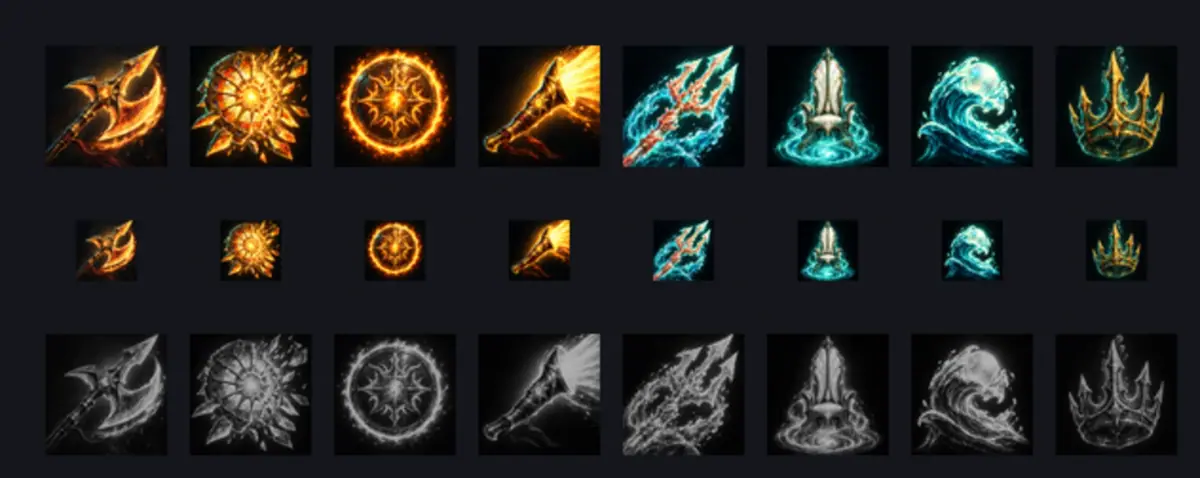
Lay the set out the way players see it: at 64 px, at 32 px, and once in grey at 70 percent brightness, which is how an ability on cooldown looks.
-
Retake the odd one out alone. Rewrite its ability line, run that one job, and check it in the same three views.
The approved anchor prompt (the first try did not have the "seen whole" and "no scenery" clauses):
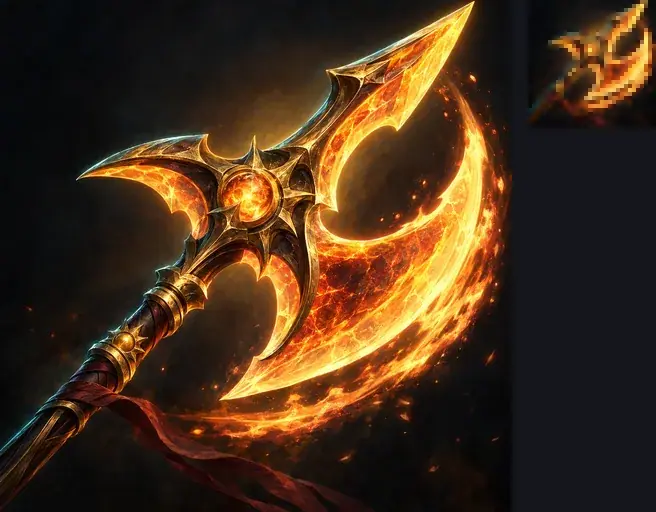
Ability icon for a fantasy battle arena game: Sunbrand, the Ember Warden's
halberd strike. One large halberd head of molten glass, seen whole, angled
diagonally from lower left to upper right, its edge trailing a short crescent
of fire. The halberd head fills most of the square and reads as one bold
silhouette at 32 pixels. Plain dark background: deep charcoal with a soft warm
glow behind the blade and a vignette toward the corners; no scenery, no
buildings, no banners. Strong value contrast between the blade and the
background. Square, full bleed, no frame, no border, no text, no letters.
Style: painterly champion splash art at the level of the top arena games:
confident brushwork, crisp edge control, strong diagonal composition, gold
and teal rim light, atmospheric depth, rich armor and cloth detail. No text.
The template for the seven others:
The reference image is the approved style anchor of this ability icon set:
match its painterly brushwork, edge control, plain dark background with a
soft glow behind the subject, vignette, value contrast, gold and teal rim
light, and how much of the square the subject fills. Do not copy its object.

Ability icon for a fantasy battle arena game: <ABILITY>. One bold silhouette
that reads at 32 pixels, glow in <COLOR>. Square, full bleed, no frame, no
border, no scenery, no text, no letters.
The seven abilities in this run:
- Cathedral Fall, a round stained-glass sun window bursting outward into falling shards (warm gold);
- Ember Ward, a round bronze shield engraved with a sun, ringed by a dome of floating embers (warm orange);
- Dawnbell, a curved bronze war horn blasting a cone of golden light from its bell (warm gold);
- Coral Trident, a trident of pale coral and light thrusting diagonally upward through sea spray (bioluminescent teal);
- Whirlpool Throne, a spiraling whirlpool seen from above, its center glowing (teal);
- Pearl Tide, a large glowing pearl lifted on the crest of a curling wave (teal);
- Drowned Crown, a verdigris bronze crown sinking through dark water, trailing bubbles (teal).
With the Scenario MCP: run model_openai-gpt-image-2-5-flare once per ability with referenceImages: [anchor_id], background: "opaque", quality: "high" and wait: false, then a single jobs_wait for all of them.
Part 2: Item catalog with tiers
-
Write the list. One row per item in
items.csv: an id and a short description with shape, material and one distinctive detail, such as "a bearded war axe with a forged iron head, a leather-wrapped ash haft and one round sun-stamped rivet". -
Make the style anchor (Lock a style anchor). Open Create, choose Images. Write the full style for the first item. Set Dimensions to 1:1 (1024x1024), Quality to
highand Background totransparent. -
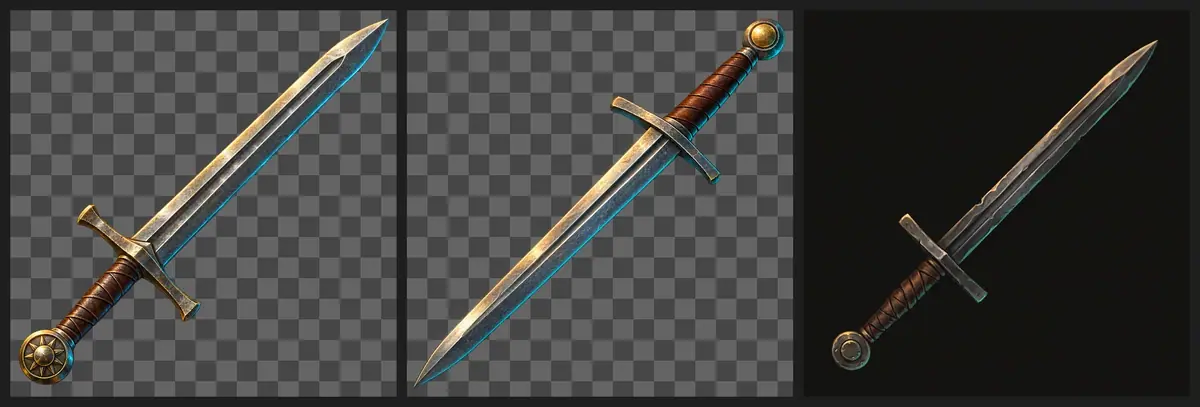
Run the anchor on two or three models (Run a same-input shoot-out). Approve one cell; here, the Sunburst longsword.
-
Test the batch settings on one item (Pilot the hardest case). Fill the template with the axe, add the anchor under Reference Images, set Quality to
mediumand run it on two models; compare style, alpha and fill. -
Run the rest, one job per row, with the anchor attached. Several items in one prompt blend.
-
Normalize the fill in code (Do the exact part in code). The prompt asked for 80 percent of the square; cells came back at 95 to 98 percent, and the warhammer touched the edge. Trim each cell to its alpha bounding box and pad it back to 80 percent.
-
Check at full size, then at 64 and 32 px (Check by measurement) on the game's slot color.
-
Fix one cell alone (Repair at the cheapest stage). Rewrite that row and rerun that job only.
-
Make the tiers from approved cells (Write a keep-list). Attach the common cell as the only reference, so it holds the silhouette, and run the tier template once per item and tier.
-
Make the chromas the same way. Approve one master at
highwith Background set toopaque, then run the chroma template once per color with the master attached.
The anchor prompt as run:
Game inventory icon of a forged iron longsword with a leather-wrapped grip, a
plain crossguard and a round sun-disc pommel, laid diagonally from lower left
to upper right. Single object, centered, three-quarter view, filling about 80
percent of the square. Painterly fantasy game item art: confident brushwork,
crisp edge control, gold and teal rim light, rich material detail, warm key
light from the top left. Transparent background, no frame, no cast shadow, no
text.
On the axe test, Sunburst returned clean alpha; Flare's axe carried a faint smoky haze across the transparent area, which shows as a grey veil on any slot color. The rest ran on Sunburst.
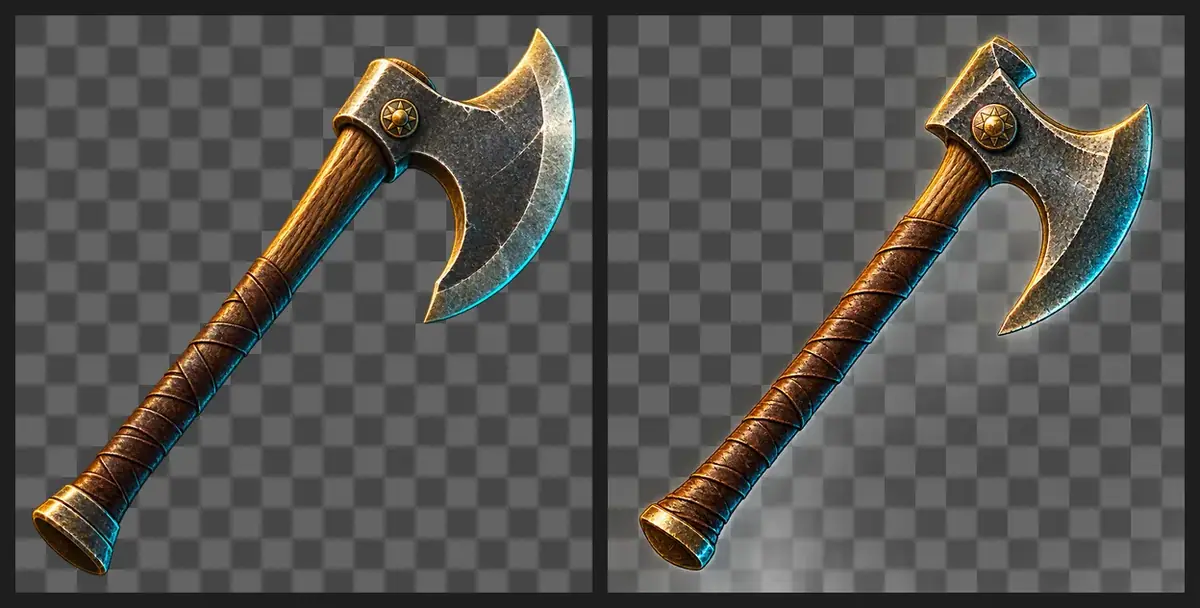
With the Scenario MCP: an agent read items.csv, called model_run on model_openai-gpt-image-2-5-sunburst once per row with wait: false, then one jobs_wait.
The catalog at full and small size

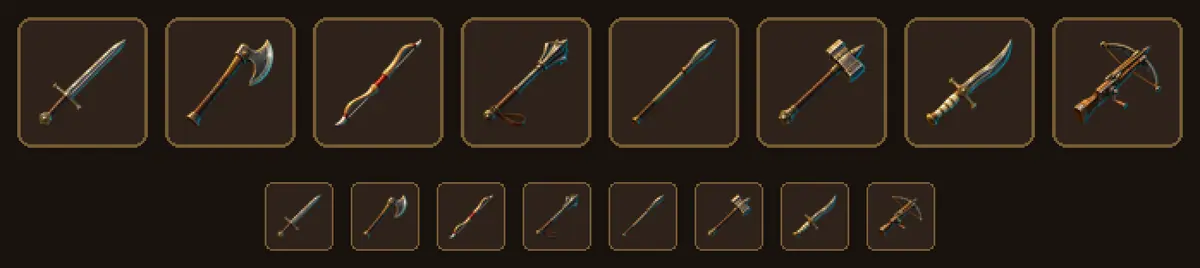
The cell that failed
At 32 px the first bow was a thin dark line on the dark leather slot, nearly invisible. Only its row changed:
Before: a recurve bow of dark ash wood with horn tips, a braided leather grip
        and a taut string
After:  a thick recurve bow of pale golden ash wood with bright ivory horn
        tips, a wide red leather grip and a taut white string, simple bold
        shapes
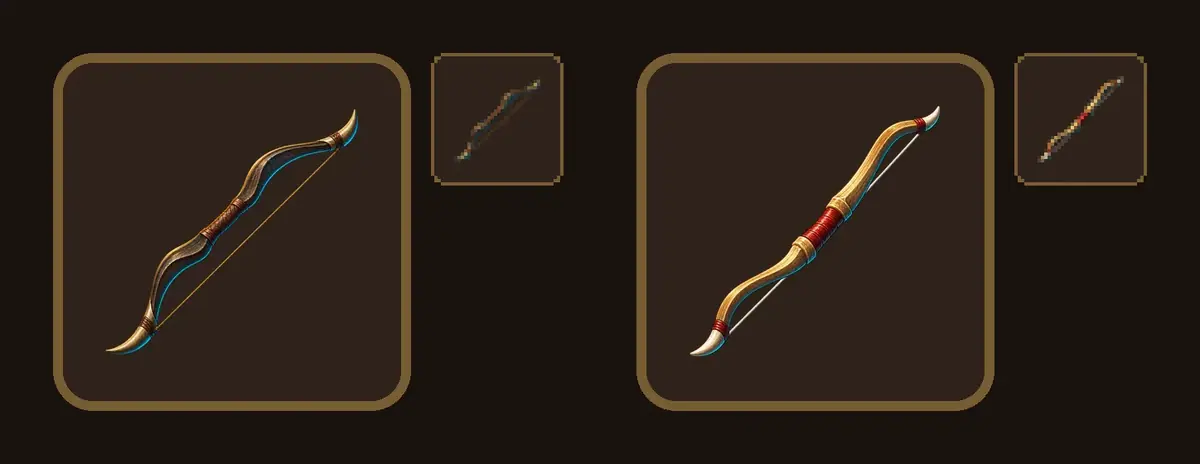
The fixed bow is still the thinnest cell, as a bow is by nature, but it now reads at 32 px. The fix cost one job; rerunning the set would have cost eight and changed seven approved cells.
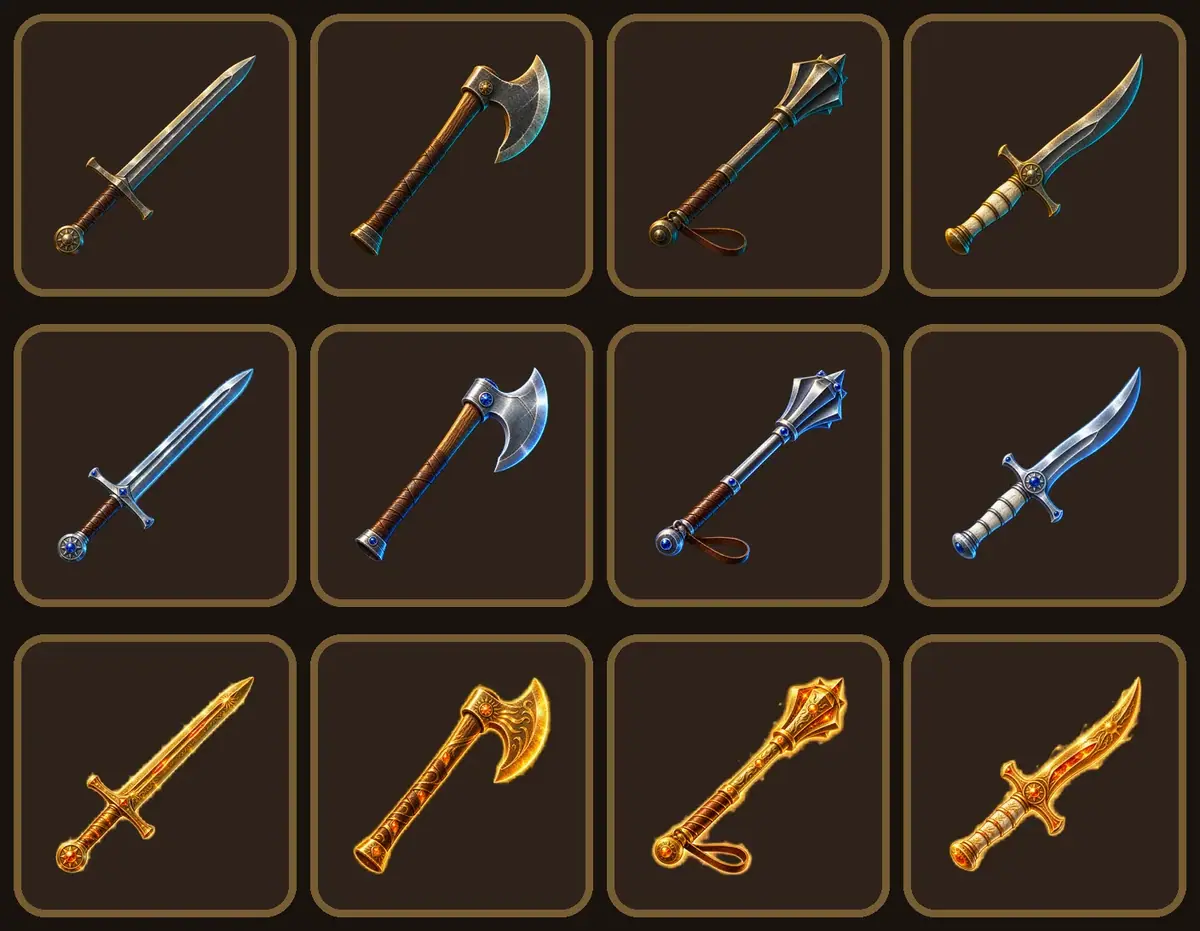
Tiers
A second template; only the tier clause changes:
Upgrade the game icon in the reference image to its {tier} tier. Keep exactly
the same object, silhouette, three-quarter angle, diagonal placement,
painterly rendering, top-left light and fill of the square. Change only
materials and glow: {tier clause}. Transparent background, no frame, no cast
shadow, no text.

rare: polished silver steel instead of iron, small inset blue sapphires, a
      faint cool blue glow along the edges
epic: Sunforged gold with fine engraved sun filigree instead of iron, inset
      ember-orange crystals, a soft molten-gold aura around the object
Chromas
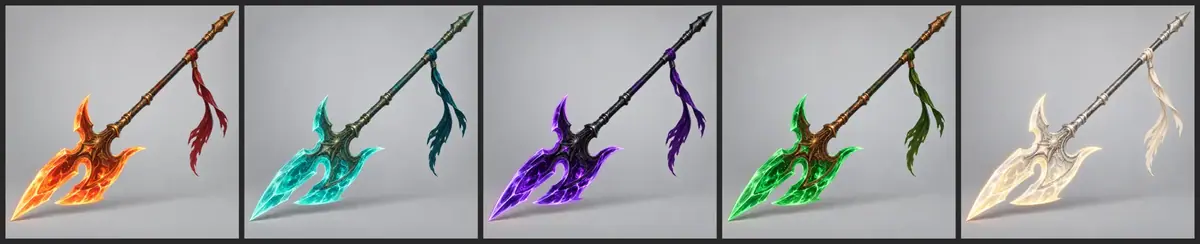
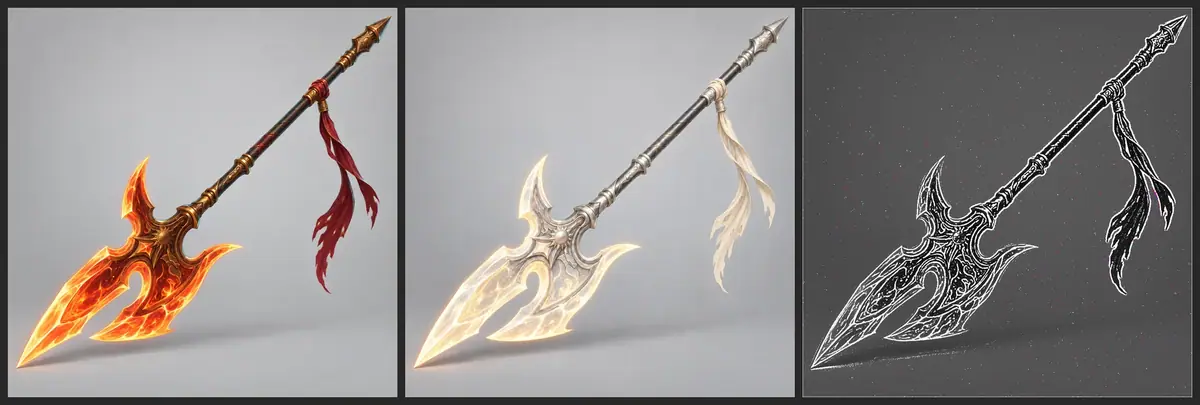
The master is Vael's halberd from Cinderthrone's splash art, drawn alone as a cosmetic shot at high with Vael's art as the only reference. Each chroma is one edit of the master:
Recolor the halberd in the reference image to the {name} chroma. Keep exactly
the same halberd, shape, proportions, angle, framing, cord and ribbons, light,
background and shadow. Change only the colors: {colors}. No text.
Check the result
Check the ability icons
brushwork, glow and value contrast match across the bar; each subject is one bold shape that fills most of the square; each icon reads at 32 px and in grey.
an icon carries scenery or a second subject, the subject is cropped so its shape is lost, it melts into the background in grey, or two icons share one silhouette at 32 px.
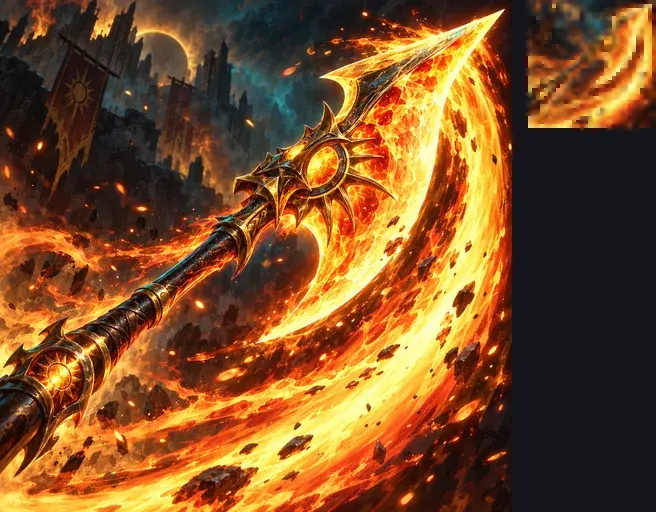
The anchor needed a retake. The first two takes were strong paintings at 1024 px: a burning halberd sweeping across a ruined city with sun banners. At 32 px they became an orange swoosh, and the halberd was gone. The retake asked for the halberd head "seen whole" on a plain background; it reads at 32 px and in grey.
Six of the seven icons from the anchor were accepted on the first run. Drowned Crown was the odd one out: at 1024 px a tilted crown in a column of bubbles; at 32 px and in grey, the crown and the bubbles merged into one speckled shape. Its ability line was rewritten and that job alone re-run:
Before: Drowned Crown, a verdigris bronze crown sinking through dark water,
        trailing bubbles
After:  Drowned Crown, one large upright verdigris bronze crown with bright
        gold edges and tall points, centered and seen whole, sinking through
        dark water, with only a few bubbles rising above it. The crown is the
        brightest shape in the square, with strong light and dark contrast on
        its points.
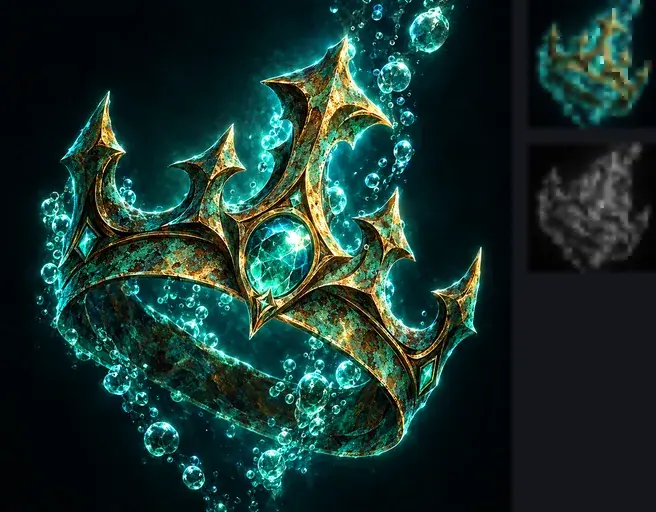
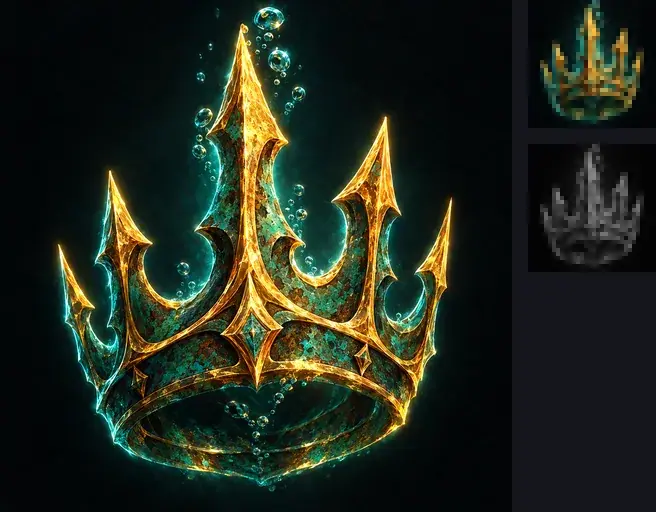
A value-spread measure in code scored both crowns the same; looking at the three views caught the difference.
The size test then showed two weaker icons. Each was fixed by rewriting its line and running that one job again:
- Whirlpool Throne and Pearl Tide were both teal swirls at 32 px, kept apart only by the pearl. The new line puts a tall throne in the whirlpool, an upright shape no other icon has. Its first retake came out coral and gold, the Sunforged colors, and was rejected; the second named the colors to use and the ones to leave out.
- Ember Ward was the faintest Sunforged icon in grey: its thin ring of embers disappeared. The new line asks for the shield face-on, with a thick, bright band of fire at its rim.
Whirlpool Throne, one tall throne of pearl-white shell and verdigris bronze
with a high pointed back, seen whole from the front, rising out of the glowing
eye of a small bright teal whirlpool at its base. The throne is the brightest
shape in the square and its tall back reads as one clear upright silhouette.
The whole icon is cool: teal, sea green and pearl white, with only thin gold
edges, no orange and no warm coral.

Ember Ward, one large round bronze shield seen whole and face-on, centered,
its engraved sun emblem glowing bright gold, ringed close to its rim by a
thick, bright band of fire. The shield's bright rim and sun are the lightest
shapes in the square, with strong light and dark contrast against the dark
background.
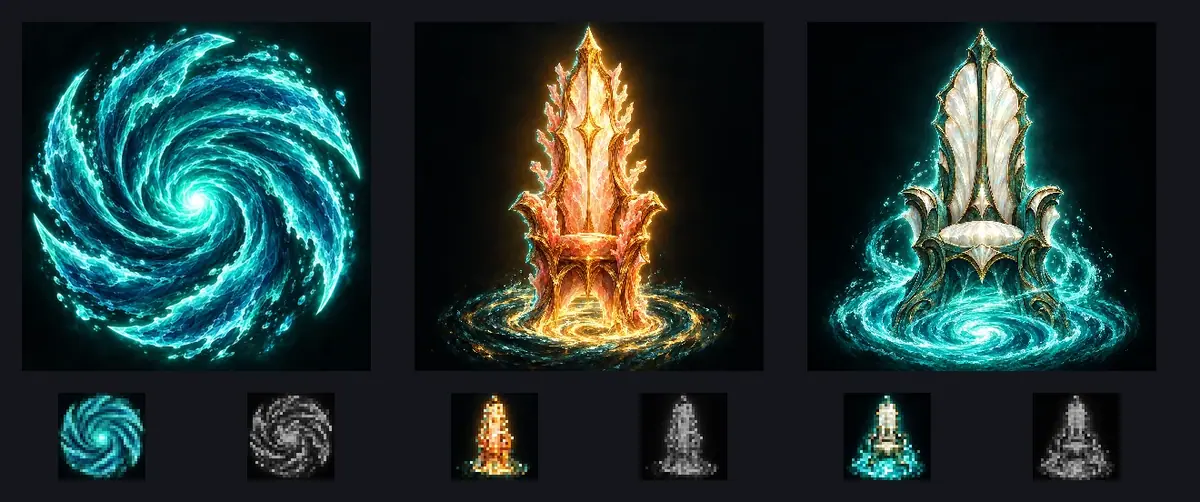
Check the catalog
every cell shares the anchor's rendering, rim light and diagonal; fills match after normalizing; each item reads at 32 px on the slot color; tier and chroma cells overlay their base cell, with only the named materials or colors changed.
an item is drawn in the anchor's shape, a cell has a painted background or a haze instead of clean transparency, an item vanishes at 32 px, a tier changes the silhouette, or a chroma moves the item in the frame.
Measured on this run:
- Tier silhouettes. Against the common cell (opaque core only), rare tiers overlapped at 0.93 to 0.98. Epic tiers scored 0.72 to 0.83, and every pixel of the common silhouette was still covered: the difference is the aura rim around the object.
- No epic misses this time. Wood and leather parts stayed wood and leather; the dagger's bone grip stayed bone.
- Chroma edges. 94 to 95 percent of the master's edges lie within 4 px in each chroma. Dawnpearl scored lowest: its pale blade loses contrast on grey, and the shape did not move.
Looking at the 32 px strip caught the bow; the alpha statistics did not flag it, since its alpha was clean.
1The first full set at 64 px, 32 px and in grey. Which icon do you retake before shipping?
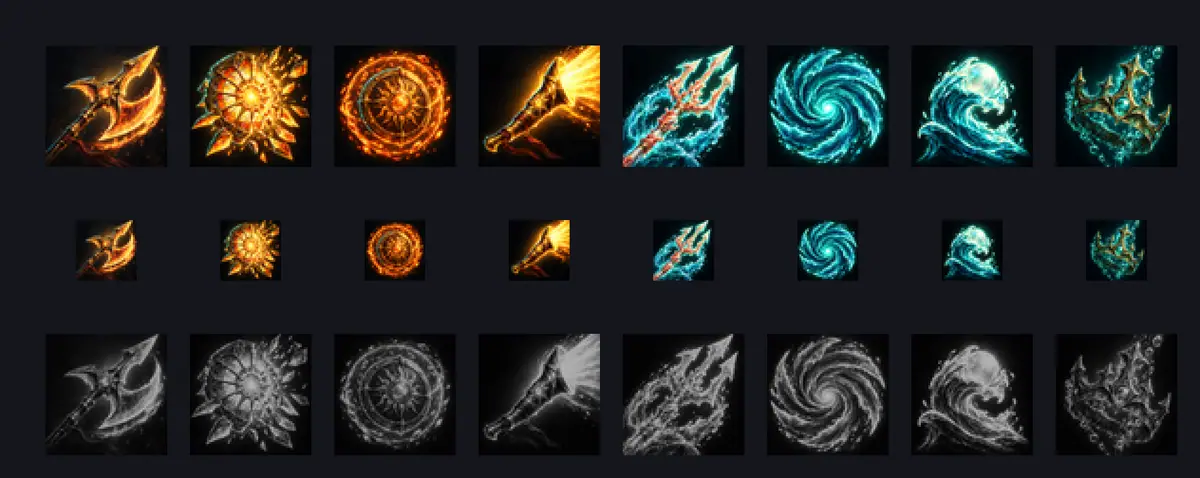
Answer: B. The crown is the only icon whose subject is lost at small size and on cooldown. Rewrite its line (one upright crown, bright edges, few bubbles) and rerun that job alone.
2The anchor looks great at 1024 px but becomes a color smear at 32 px. What do you do?
Answer: B. Every other icon inherits the anchor's composition. A busy anchor makes a busy set, so the 32 px check comes before approval.
3Two takes of the bow, each shown at full size and at 32 px in the inventory slot. Which one goes into the catalog?
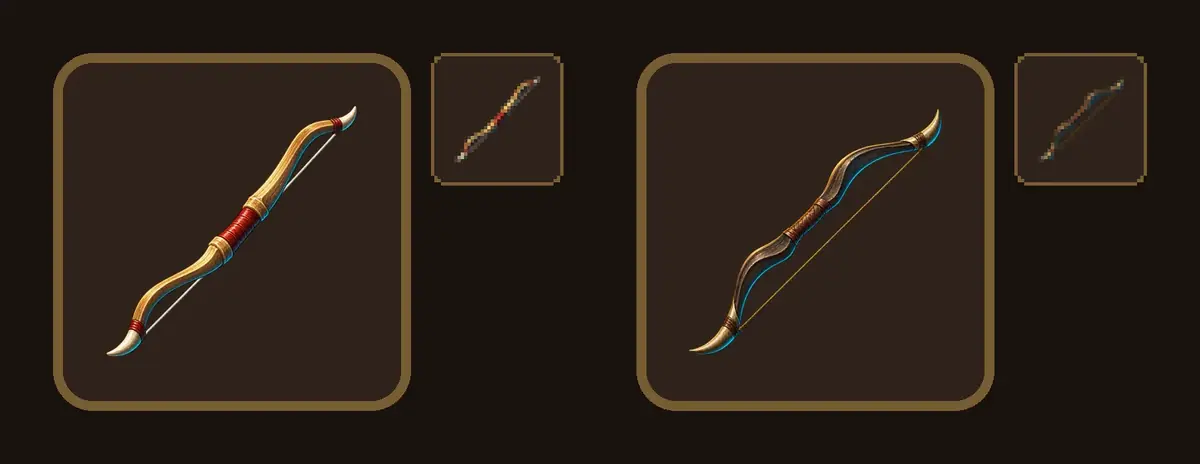
Answer: A. At 32 px the dark bow vanishes into the dark slot. Only its row was rewritten (pale wood, red grip, bold shapes) and that one job rerun.
4The epic mace comes back with its leather wrist strap turned gold. The other epic cells are fine. What do you do?
Answer: A. The tier template changes only the named materials and glow. A part that should stay is fixed in the keep line, one cell at a time, so approved cells do not change.
Make it repeatable
- Keep the anchor and the template together in a collection, the template in its description. A new ability or item is one line.
- Batch workflow for ability icons. In the Node Editor: an Image input (the anchor), a Text input with one ability per line, Split Text to turn it into a list, a Loop over an Image Generator on GPT Image 2.5 Flare, and an Approval node at the end.
- Publish it as an App so designers request icons by typing a list. See Batches, loops and logic.
- Platform Apps to compare (Workflows, Apps): Icon Set Forge, Icon Generator and Collection of 3D Icons. Try one on your anchor before building your own.
The catalog list runs three ways.
- As a workflow, in the Node Editor (Package it as a workflow or skill):
- a Text node with the list and an Image node with the anchor;
- Split Text on new lines, one item per line;
- Slice Items in Default mode with 2 items while you test, removed for the full run;
- a Loop holding a Prompt Builder with the template and an Image Generator on GPT Image 2.5 Sunburst, the anchor in Reference Images;
- an Approval node before any later step, such as an upscale. See Batches, loops and logic.
- Parallel runs: set Concurrent Runs on the Loop above 1. The documented limit is 10 concurrent workflow jobs per project (API errors and limits).
- Through the API, loop over the CSV and keep a receipt per row (Keep a cost receipt):
import csv, os, requests

BASE = "https://api.cloud.scenario.com/v1"
AUTH = (os.environ["SCENARIO_API_KEY"], os.environ["SCENARIO_API_SECRET"])
MODEL = "model_openai-gpt-image-2-5-sunburst"
ANCHOR = "asset_YOUR_APPROVED_ANCHOR"
TEMPLATE = open("template.txt").read()

jobs = {}
for row in csv.DictReader(open("items.csv")):
    body = {"prompt": TEMPLATE.replace("{item}", row["item"]),
            "referenceImages": [ANCHOR], "width": 1024, "height": 1024,
            "quality": "medium", "background": "transparent", "numOutputs": 1}
    r = requests.post(f"{BASE}/generate/custom/{MODEL}", json=body, auth=AUTH)
    r.raise_for_status()
    jobs[row["id"]] = r.json()["job"]["jobId"]
# Then poll GET /jobs/{jobId} for each, and write id, jobId,
# metadata.assetIds and billing.cuCost to receipts.csv.
Polling and downloads work as in the API quickstart. The documented limit is 100 requests per minute; on a 429 error, wait and retry.
- To compare, try a public App. The Asset Evolution App returns rare, epic and legendary versions of one image in one run. It was run here through the Scenario MCP: find it with
workflows_list, thenworkflow_runonwflow_asset-evolution, with the longsword anchor and an empty prompt.
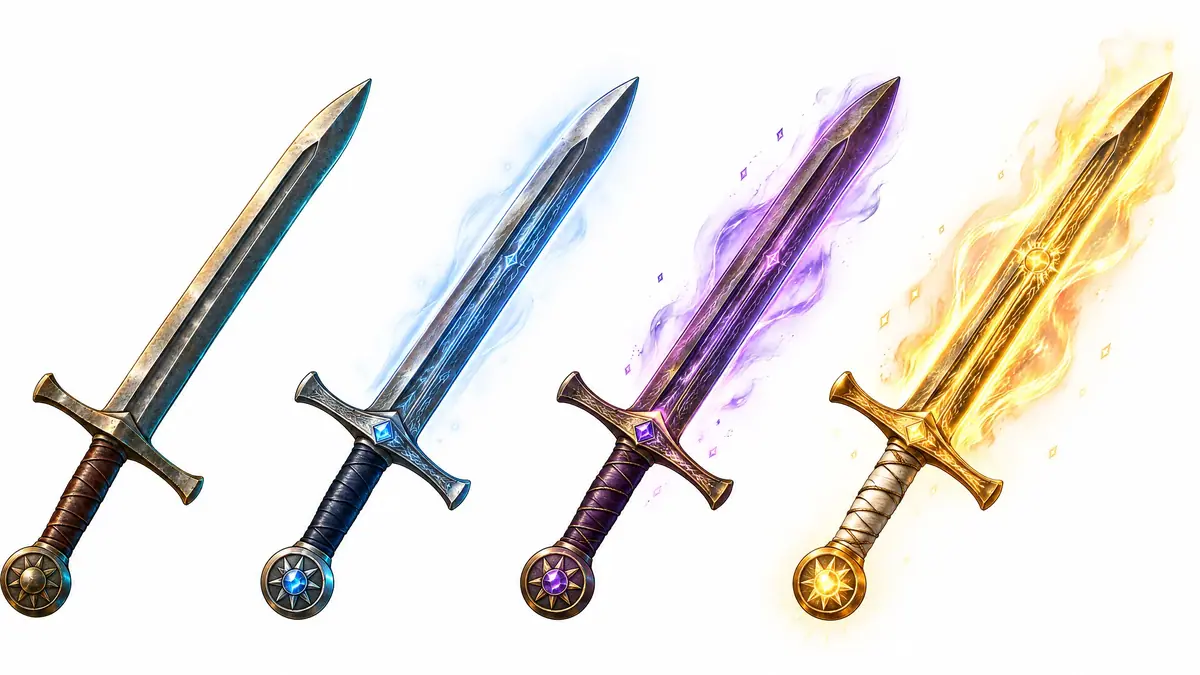
The App suits exploring tier looks: its legendary flame is a good direction for a fourth tier. To ship, the per-cell edit wins: each tier is its own transparent file in the slot's placement.
Runs and time
Part 1, ability icons:
| Step | Model | Runs | Kept | Wait |
|---|---|---|---|---|
| Style anchor, first try | GPT Image 2.5 Sunburst, 2 takes | 1 | 0 (rejected) | about 65 s |
| Style anchor, retake | GPT Image 2.5 Sunburst, 2 takes | 1 | 1 | about 55 s |
| Seven icons from the anchor | GPT Image 2.5 Flare, high | 7 | 6 | about 25 s each, in parallel |
| Drowned Crown retake | GPT Image 2.5 Flare, high | 1 | 1 | about 30 s |
| Whirlpool Throne retakes | GPT Image 2.5 Flare, high | 2 | 1 | about 25 s each |
| Ember Ward retake | GPT Image 2.5 Flare, high | 1 | 1 | about 25 s |
| Size and cooldown test | local script | 0 | n/a | seconds |
About 4 minutes of waiting in all. Every icon costs the same, so the set grows in cost with the ability count; medium quality on Flare is the lever for a long list.
Part 2, item catalog:
| Step | Model | Runs | Kept | Wait |
|---|---|---|---|---|
Anchor shoot-out at high | Sunburst, Flare, Nano Banana 2.1 | 3 | 1 | 20 to 40 s |
| Batch test on the axe | Sunburst and Flare, medium | 2 | 1 | 15 to 30 s |
| Six more items | Sunburst, medium | 6 | 5 | about 25 s each |
| Bow redone alone | Sunburst, medium | 1 | 1 | about 25 s |
| Rare and epic tiers, 4 items | Sunburst, medium | 8 | 8 | about 25 s each (one took about 90 s) |
Halberd master at high | Sunburst, opaque | 1 | 1 | about 55 s |
| Four chromas | Sunburst, medium | 4 | 4 | about 25 s each |
| Asset Evolution App (comparison) | App on Sunburst | 1 | 0 | about 40 s |
About 5 minutes of waiting, jobs in each row in parallel. A high run costs about three times a medium cell: keep high for the anchor and the master. Tiers triple the cell count.
The price shows on the Generate button before you run; see Control cost.
Variations
- Inventory icons with transparency: the method of Part 2, with Background set to
transparentand a fill check in code. - More tiers: add a legendary clause. Keep the aura small, or the 32 px check fails first on the strongest tier.
- Currency and resource icons: a family (copper, silver, gold) from one material word; the subject line stays identical.
- Factions and seasons: a set restyled for a faction or an event is a reskin of the approved icons; see the faction reskin, where the same Sunforged items become Tidebound, and one season across a kit.
- Pixel-art icons: generate at 1024, then Pixelate with a fixed palette and grid size. See Vectors, pixel art and layers.
- Course badges: the badge frame goes in the anchor, the subject in the slot. Add the course name in code; see Typeset text, never generate it.
- Fashion and products: the chroma template fits colorways of sneakers, headphones or furniture; see Product packshots for the master.
- App and web icons outside games: replace "ability icon for a fantasy battle arena game" with your context.
If it breaks
- The icon becomes a smear or an item vanishes at 32 px. Ask for one subject "seen whole" on a plain background, with "no scenery". For one catalog row, ask in that row only for fewer, bigger shapes and one color that contrasts with the slot.
- One icon or cell drifts from the anchor (different brushwork, a brighter background). Check that every job has the anchor attached and the template word for word, and re-run with the style sentence first in the prompt.
- The model copies the anchor's object (an axe with a sword's crossguard). Keep "Do not copy its object" or "Draw only the new object, not the sword" in the template and describe the new subject in more detail.
- An icon disappears in the grey cooldown view. Ask for one bright edge on the subject and strong light and dark contrast; color alone does not survive grey.
- Two icons look alike at small size. Change the silhouette in the ability line, not the color only.
- Fills differ from cell to cell. Normalize in code from the alpha bounding box; do not spend reruns on it.
- A painted background or a haze appears behind the item. The model painted it. View the cell on a checkerboard, set Background to
transparent, or switch models. - An epic tier changes a part that should stay. Name the part in the keep line ("the leather wrist strap stays leather") and rerun that cell only.
- A chroma shifts the item. Keep "same framing" in the keep line and check the edge overlay.