

Cut a game trailer with score and sound
Plan a 21-second teaser as a shot list, animate approved key frames, score it first and cut to the hits with title cards set in code; then give a locked trailer cut a full soundtrack of score, timed foley and a hero effect, mixed to a target loudness.
- Playbook
Run it in ScenarioMinimax H3 Seedance 2.5 Gemini Omni 1.1 Flash GPT Image 2.5 Sunburst Sonilo V1.1 - Video to Music Sonilo V1.1 Video to SFX ElevenLabs Sound Effects 2
See it made
A 21-second teaser for VOLTARIS, a stylized hero shooter set on floating salvage islands. It opens on the action shot, then shows the world, a quiet moment with the hero, a line and the title. Every shot starts from an approved still, the score is generated first, and the picture is cut to the seconds where the music hits. Part 2 then takes a locked 25-second trailer cut and builds its full soundtrack: a score that follows the cut, timed foley and one hero sound effect on the exact frame, mixed to streaming loudness.
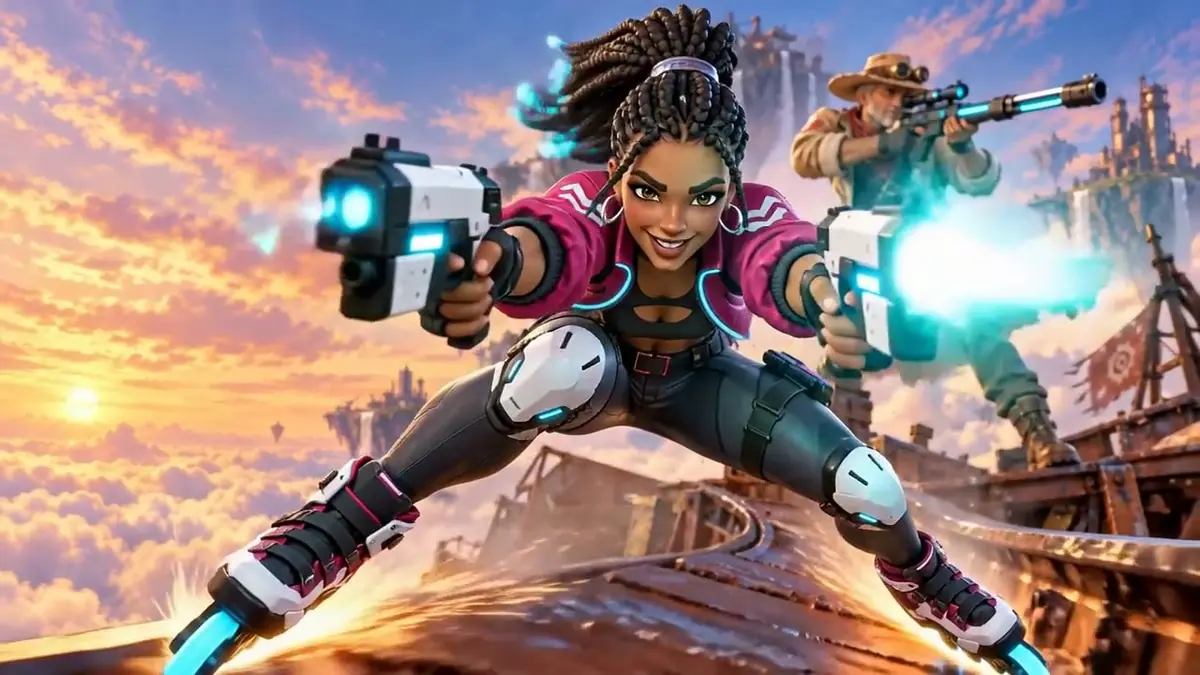
Watch the video: https://ufgc0c9mhl4ueq76.public.blob.vercel-storage.com/academy/9cd3abfad1fda160bd7f8688bb45641f1035d7780fd117283647656a6df52be6.mp4
The brief
| Field | Brief |
|---|---|
| Goal | A 21-second announcement teaser, 16:9 |
| Shots | 1 action (hero and companion, the hook), 2 world, 3 hero (quiet moment), then a line and the title |
| Format | 1280x720, 24 fps, stereo, peaks below 0 dB |
| Fixed | Zuri's braids with glowing cyan tips, her magenta jacket, Marlow's hat and long coat, the sunset palette |
| Rule | No generated text; the line and the title are set in code |
| Accept when | The first frame is the hook; every shot keeps identity and style; the cut lands on the music |
Every key frame comes from an earlier playbook or a single new still:
- Action shot: the key art master in Key art and store assets, Zuri and Marlow on the rail.
- Quiet shot: Zuri on the rooftop in Character reference sheet.
- World shot: one new establishing still made with the key art as a style reference.
The whoosh is reused in Mobile UA video ads.
Part 2 has its own brief, for the full soundtrack of a locked cut:
| Field | Brief |
|---|---|
| Goal | A complete soundtrack for a 25-second trailer |
| Picture | 8 cuts, 2.5 to 4 s each, locked; opens on the lantern catching light; title card from 21.7 s |
| Score | Warm orchestral; intimate celesta and harp in the workshop, a sudden hush when the rope slips (about 8.3 s), strings building as the lantern drifts and Isa follows, soft resolve on the title |
| Foley | What each shot shows: a flame catching, the furnace, wet rope on wood, canal water, a punt creaking, a pole in the water, calm evening water |
| Hero SFX | The rope slipping free of the ring, exactly on the slip |
| Format | Stereo, about -14 LUFS for online video, peaks below -1 dB |
| Accept when | The score's changes land on the cuts that motivate them; the hero sound lands within a frame or two of the slip; no sound contradicts the picture; the mix measures on target |
The Part 2 picture, "Little Light", is cut from shots made in the film playbooks (previs to picture, Animate a still, a music video built layer by layer), so that run generated sound only.
Approach
Part 1 scores first and cuts the picture to the music it got. Part 2 starts from a locked cut and makes every sound layer to the picture.
- 1Shot listRoles, first frames, one move each
- 2Score firstTwo music models, same cue sheet
- 3Measure the hitsLoudness curve and spectrogram
- 4Action shoot-outThree video models, same first frame
- 5World and quiet shotsMiniMax H3, 768P, 5 s
- 6Cards and cutTypeset cards, cut to the measured seconds
- Open on the hook. A teaser loses viewers in its first seconds, so the action shot comes first and its first frame is the key art itself.
- Score first, then cut to what you measure. Ask for a structure in seconds, then measure where the cue really builds and hits. Music models do not always follow the timeline, so the edit follows the music you got, not the one you asked for.
- Animate stills you trust (Approve the still first). The approved image is the first frame, so identity and style are fixed before any motion.
- Spend the shoot-out on the action shot. The calm shots rarely fail. Two characters, weapons and a fast move fail the most, so that is where three models get the same first frame.
- 1Picture lockSilent cut, 25 s
- 2ScoreSonilo V1.1 - Video to Music, timed map
- 3FoleySonilo V1.1 Video to SFX, one segment per cut
- 4Hero effectElevenLabs Sound Effects 2, placed by frame
- 5Mix and measureffmpeg, -14 LUFS, peaks below -1 dB
When the cut is locked, make sound after picture lock: a changed cut means redone sound. Then build three layers, each with the tool suited to it:
- Score from the picture. A video-to-music model watches the cut and follows its pacing; the prompt adds the emotional map with timings ("8 to 9 seconds: the music stops almost completely").
- Foley from the picture, in segments. A video-to-SFX model with one prompt per time range, matched to the cuts. You decide what each shot should sound like; the model times the sounds to the motion.
- One hero sound from text. The moment the story turns on gets its own designed effect, placed by hand on the exact frame.
- Mix with numbers. Levels and edits by measurement, then loudness normalization and a peak check. Never trust one playback device.
Models, as of October 2026. recommend with quality priority put Gemini Omni 1.1 Flash and MiniMax H3 at the top for animating a still, with Seedance 2.5 close behind; the action shoot-out kept MiniMax H3, Seedance 2.5 was runner-up. For music it put ElevenLabs Music v2.5 first and Google Lyria 3.5 second; Lyria won here because it followed the cue sheet. For effects it put Mirelo SFX 2.0 (new) first and ElevenLabs Sound Effects 2 second; ElevenLabs was kept in both parts. For Part 2:
- Score: Sonilo V1.1 - Video to Music. For a score from text alone: ElevenLabs Music v2.5 (Generate music).
- Foley: Sonilo V1.1 Video to SFX, the top pick for video to sound in the October 2026 recommendations. Alternative: Kling Video to Audio.
- Hero effect: ElevenLabs Sound Effects 2, chosen here over Mirelo SFX 2.0 Text to Audio (the top pick for sound effects from text in the October 2026 recommendations) on the same prompt; see step 12.
Steps
Part 1: the teaser, scored first
-
Write the shot list.
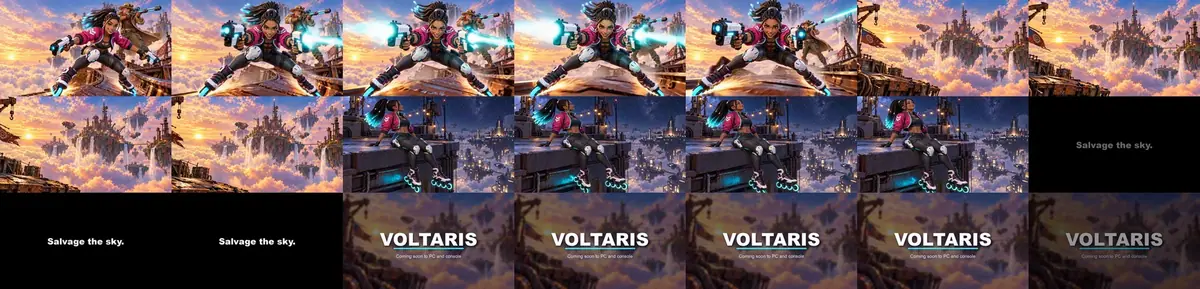
Text0.0-4.5 Shot 1 action key art: Zuri grinds the rail and fires, Marlow fires behind her 4.5-8.5 Shot 2 world slow glide over the clouds toward the salvage islands 8.5-13.0 Shot 3 hero rooftop at night, she looks up and smiles 13.0-15.5 Card line "Salvage the sky." 15.5-21.0 End title VOLTARIS, "Coming soon to PC and console" -
Score it first (Write a cue sheet for sound). Open Create, choose Audio, and run the same cue sheet on two music models. On ElevenLabs Music v2.5, set the duration to 20 seconds and turn on the instrumental switch; on Google Lyria 3.5, write the timestamps into the prompt:
TextInstrumental hybrid orchestral and synth trailer cue for a stylized hero-shooter game teaser, 20 seconds long, 120 BPM, minor key turning hopeful. [0:00 - 0:03.5] opens instantly on a punchy drum hit with driving staccato strings and a pulsing synth bass, high energy. [0:03.5 - 0:09] drops suddenly to wide airy pads and soft sustained strings, scale and wonder. [0:09 - 0:11] a gentle warm solo piano motif over the pads. [0:11 - 0:13] a rising riser and snare build. [0:13 - 0:20] one huge cinematic impact hit with low brass at 0:13, then a long sustained chord that rings out and fades to silence. Instrumental only: no vocals, no choir, no spoken words. -
Measure where the music hits, and pick the cue. Plot loudness every 10 ms and look at a spectrogram (
ffmpeg -lavfi showspectrumpic). Neither cue followed the timeline:- ElevenLabs Music v2.5: exactly 20.04 s, but a steady drive from 0 to 12 s with no drop at 3.5 s and no piano, one hit at 12.0 s, then a ring-out. Runner-up.
- Google Lyria 3.5: returned 65 s for a 20-second request. Drive from 0 to 11.4 s, a decay to near silence by 14.8 s, then an impact at 15.55 s and a soft tail. Kept: the quiet gap fits the rooftop shot and the impact fits the title.
The shot list above is already the version cut to Lyria's seconds; the title lands on 15.55 s.
-
Run the action shoot-out (Animate from a first frame). Open Create, choose Videos, put the key art master under First Frame, and run the same prompt at low resolution on Minimax H3 (768P), Seedance 2.5 (draft) and Gemini Omni 1.1 Flash (360p). Round 1 showed two failures: Omni turned Zuri's braids into a straight ponytail, and MiniMax H3 held the key-art pose with almost no move. Round 2 added beats and a keep-list:
TextFast action. She pushes off and grinds down the rusted iron rail straight toward the camera on her roller blades, sparks spraying from her glowing cyan wheels, then fires both white blasters ahead in short cyan pulses. Behind her, the older sniper in the wide hat fires his long rifle once, a bright cyan beam streaking off to the right. The camera dollies backward fast and low to stay ahead of her. Keep both characters exactly as in the first frame: her face, her long black box braids with glowing cyan tips, silver hoop earrings, cropped magenta jacket with the white chevron, white knee guards; his wide hat, goggles, grey beard and long sand coat. Stylized 3D game art. No text, no cuts.MiniMax H3 take 2 was kept: she pushes toward the lens and fires both blasters, the braid tips keep their glow and her hands hold the grips. Seedance 2.5 take 2 had the bigger camera move but tinted Marlow green; it is the runner-up.
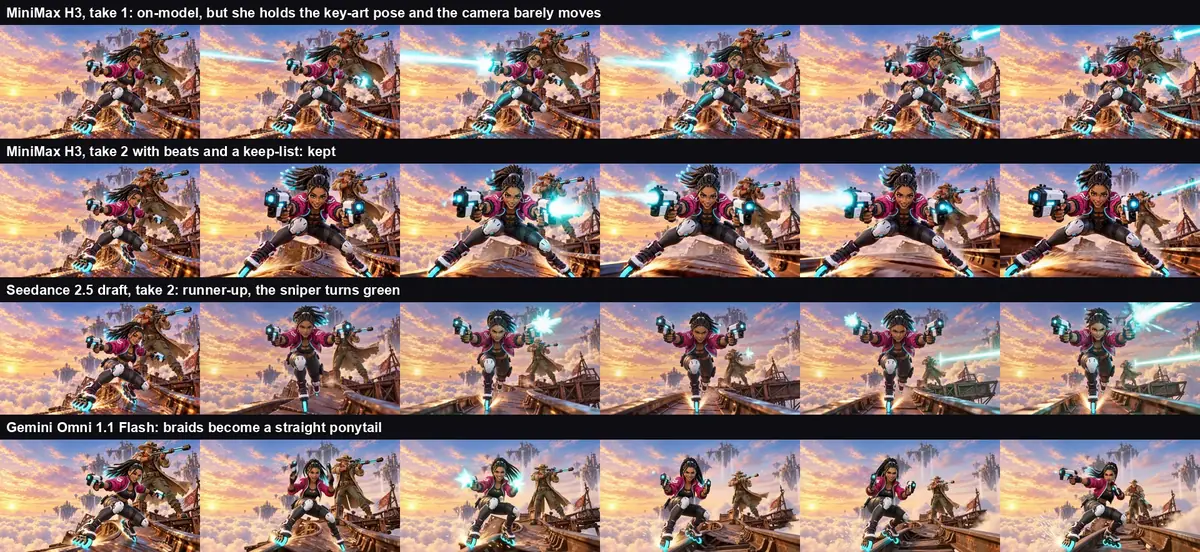
The action shoot-out on one first frame. Row 2 is in the cut. -
Make the world still and animate the calm shots. The world still came from GPT Image 2.5 Sunburst with the key art under Reference Images and "The reference image is the world and the art style only... do not copy its characters, logo or composition". Then Minimax H3, Duration 5 seconds, Resolution 768P:
TextSlow cinematic establishing shot. The camera glides forward and slightly right over the sea of golden sunset clouds toward the floating salvage islands. Waterfalls pour steadily off the island edges, two small salvage airships drift slowly between the islands, the clouds roll gently below, warm window lights flicker on the central island. Keep the islands, towers, cranes, radio mast and colors exactly as in the first frame. Stylized 3D game art. No people, no text, no cuts.The rooftop shot used the same settings: "She sits on the rooftop ledge at night and swings one roller-blade foot slowly. She looks up at the sky... then smiles to herself. The glowing cyan tips of her braids sway gently in the wind. Very slow push-in. Keep her face, braids, magenta jacket, knee guards and skates exactly as in the first frame."
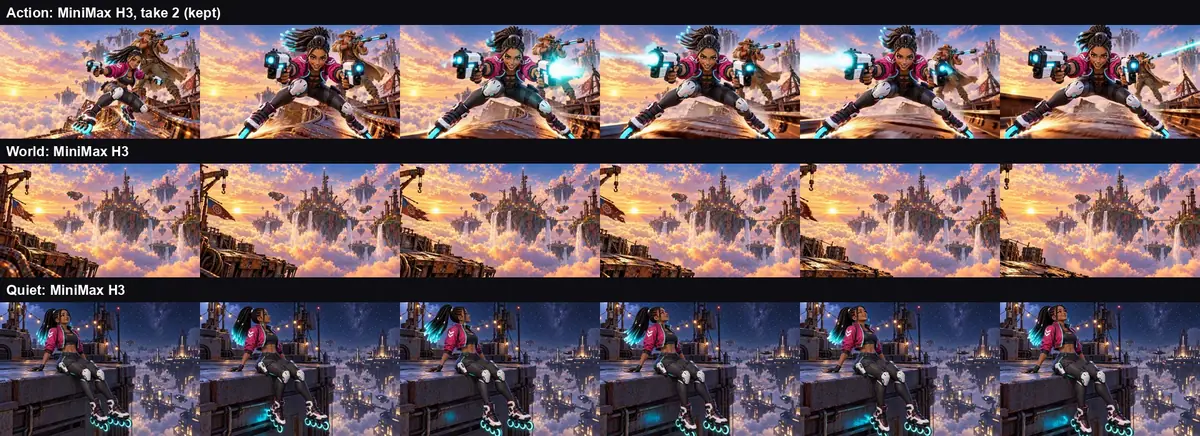
The three shots in the cut, as generated. -
Generate two effects and check them. A whoosh for the cut into the world shot and an impact for the title, each on ElevenLabs Sound Effects 2 and Mirelo SFX 2.0 with the same text ("Fast airy whoosh as a camera swoops past, rising then fading, with a soft metallic rattle, cinematic"; "Heavy metallic slam of a riveted steel hatch, deep cinematic boom with a long low tail"). The ElevenLabs pair was kept: its whoosh rises and falls cleanly, while Mirelo's carries a heavy low rumble.
-
Check every sound for words. Run speech-to-text on each cue alone (this run used whisper medium). Both scores returned only "Music". The short effects returned stock phrases such as "Thanks for watching!" at low confidence (average log probability about -0.9), the usual output of a transcriber on non-speech; Mirelo's impact scored the weakest no-speech value (0.52), one more reason to keep the ElevenLabs pair.
-
Set the cards in code and cut (Typeset text, never generate it). The line card is white text on black; the title card is the wordmark, a cyan underline and the availability line over a blurred, darkened copy of the world still. Trim each shot, put the whoosh at 3.8 s so it peaks on the cut at 4.5 s, the impact at 15.55 s, fade the music out from 19 s, and limit peaks below 0 dB.

Title card set in code over the blurred world still.
With the Scenario MCP: run model_minimax-h3 (firstFrameImage, duration: 5, resolution: "768P"), model_bytedance-seedance-2-5 (image, draft: true, generateAudio: false) and model_google-omni-1-1-flash (image, resolution: "360p") with wait: false, plus model_lyria-3-5, model_elevenlabs-music-v2-5 (durationSeconds: 20, forceInstrumental: true), model_elevenlabs-sound-effects-v2 and model_mirelo-sfx-2-0-text-to-audio; then one jobs_wait for all. A Seedance draft can be finished at 1080p within 7 days with model_bytedance-seedance-2-5-draft-complete.
Quote the video jobs with dry_run: true first (see Quote before you run).
Part 2: a full soundtrack on a locked cut
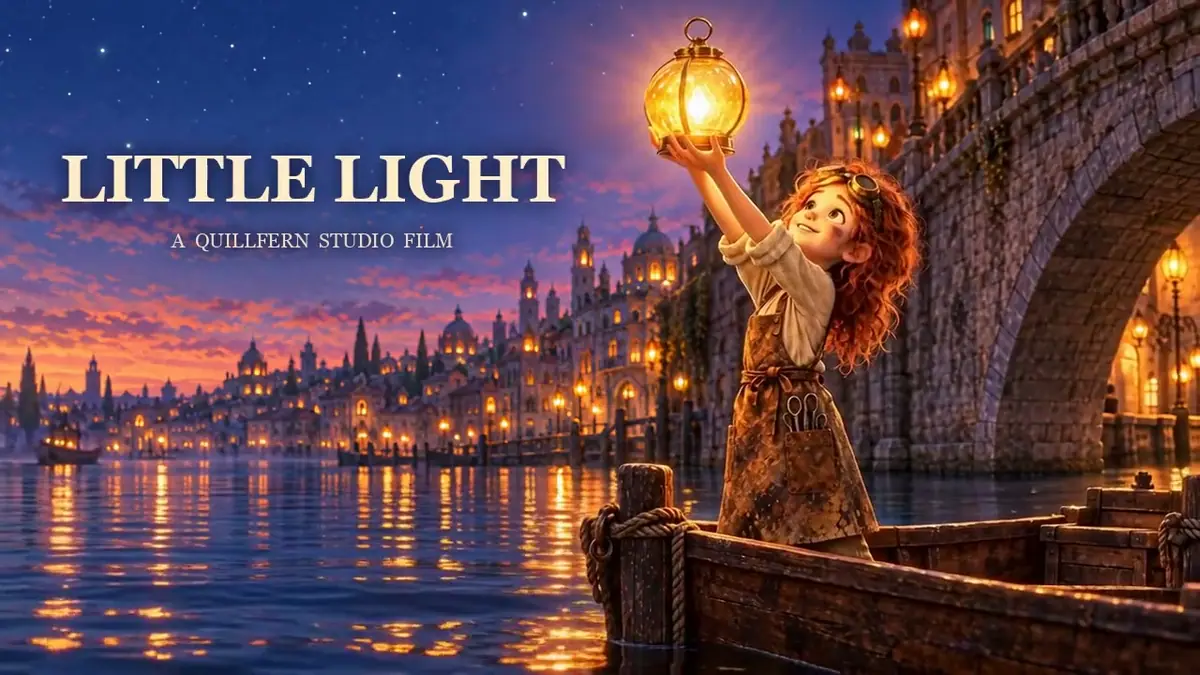
Watch the video: https://ufgc0c9mhl4ueq76.public.blob.vercel-storage.com/academy/fdef0a54106fed99f45d76bbf75ebc9bcc968caaede274f25bcef2f66caba45a.mp4
-
Lock the picture. Export the silent cut at its final length: here 8 cuts of 3, 2.5, 3.5, 3.5, 3, 3, 2.5 and 4 seconds (25 seconds), opening on the hook, the lantern flame catching. The title card is set in code from 21.7 seconds. Strip any audio the video clips came with; it would fight the new layers. Upload the cut to your library.
-
Generate the score (Write a cue sheet for sound). Create > Audio, Choose a Model, search for Sonilo V1.1 - Video to Music. Attach the cut and write the map with times:
PromptOrchestral trailer score for a painterly animated feature, no vocals, with a strict timeline. 0 to 8 seconds: quiet and intimate, a lone celesta and harp motif over soft sustained strings as the lantern is lit and polished in the workshop. 8 to 9 seconds: the music stops almost completely, a held breath of near silence as the rope slips free. 9 to 21 seconds: strings return with a gentle pulse and grow steadily as the lantern drifts down the canal and the girl chases it, building to a soaring strings and french horn theme. 21 to 25 seconds: a soft, warm resolution under the dusk title card, ending on a quiet sustained chord.The run asked for 2 samples and received one 25-second track after about 27 seconds. A first run with the hush described loosely ("a sudden hush at the knot slipping free around 8 seconds") also returned one track. Both swelled at the slip instead of going quiet; step 13 fixes it in the mix.
-
Generate the foley in segments. Sonilo V1.1 Video to SFX on the same cut, one segment per cut:
Text0-3 quiet glass workshop at night, a small flame catching on a wick with a soft whoosh, gentle crackle of a candle flame 3-5.5 cozy workshop interior, low roar of a brick furnace, soft cloth polishing glass, faint clink of hanging glass lanterns 5.5-9 close water lapping against a wooden boat, a wet rope creaking and sliding on wood and iron 9-12.5 calm canal at night, gentle water lapping on stone, a glass lantern bobbing softly on the water 12.5-15.5 small wooden boat creaking, water lapping against the hull, light breeze 15.5-18.5 a wooden pole plunging into water and lifted out with drips, a punt gliding, water rushing along the hull 18.5-21 calm canal water under a stone bridge, soft ripples, light echo 21-25 quiet evening canal, gentle lapping water, soft breeze, calmAbout 1 minute 45 seconds, WAV as requested. The loudest moments landed on the picture: the rope at 8.0 to 8.5 seconds and the pole at 15.5 to 17 seconds.
-
Design the hero effect. Choose a Model > Audio > SFX, ElevenLabs Sound Effects 2, duration 2 seconds, prompt influence 0.6:
PromptA wet rope slipping free from an iron mooring ring on a wooden boat: a short rasp of rope sliding over metal, a soft clank as the ring drops against the wood, then the loose end slapping into canal water with a small splash. Close, intimate, quiet night, no music.4 seconds. The same prompt on Mirelo SFX 2.0 Text to Audio (2 outputs, 8 seconds) returned a single thud in each output. ElevenLabs returned the three parts in the order asked: about 0.8 seconds of rasp, a clank at 1.15 seconds, a splash at 1.5 seconds. Check the shape of an effect on its waveform or spectrogram, not only by ear.
-
Find the frame and cut the hush. Extract frames around the slip and look: the rope is through the ring at 8.20 seconds and gone at 8.30, and the ring swings by 8.45. The rasp should end on the slip, so the effect starts at 7.45 seconds and its clank falls on the swinging ring.

Frames at 8.20, 8.30 and 8.45 s. The rasp ends between the first two. Then make the hush the score did not: drop the score by 26 dB from 7.95 to 9.0 seconds with short fades, so the rope and the water carry that second alone.
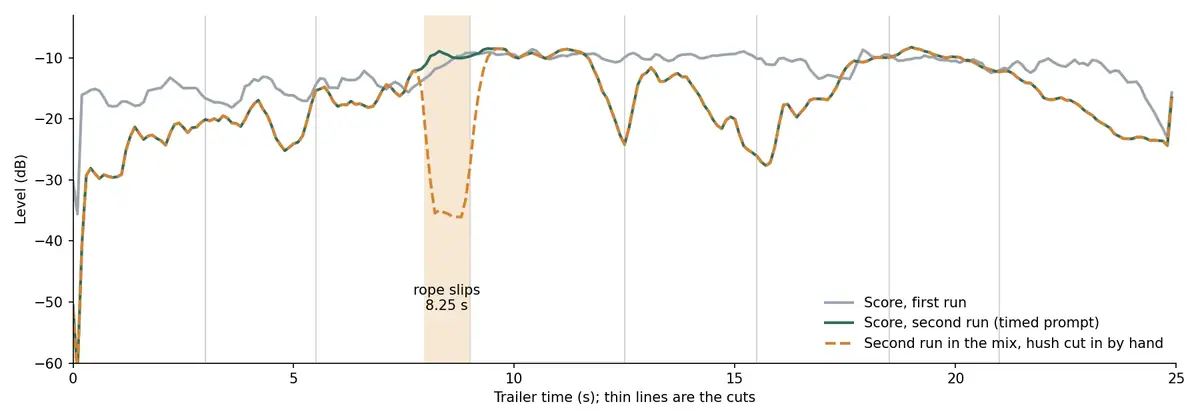
Both score runs swelled at the slip. The hush was cut in by hand, a volume change in the mix. -
Mix. Score at -3 dB with the hush, foley at +13 dB (Sonilo foley came back quiet relative to the score), the hero effect at -2 dB from 7.45 seconds, then loudness normalization and a limiter. Set the same levels in your editor, or use a command along these lines:
Shellffmpeg -i picture.mp4 -i score.m4a -i foley.wav -i rope.mp3 -filter_complex \ "[1:a]volume='if(between(t,7.95,9.0),0.05,1)':eval=frame,volume=-3dB[m]; \ [2:a]volume=13dB[f];[3:a]adelay=7450:all=1,volume=-2dB[s]; \ [m][f][s]amix=inputs=3:normalize=0,loudnorm=I=-14:TP=-2,alimiter=limit=0.85[a]" \ -map 0:v -map "[a]" -c:v copy -c:a aac -b:a 160k trailer.mp4 -
Measure (Check by measurement). Run
ffmpeg -i trailer.mp4 -af ebur128=peak=true -f null -and read the integrated loudness and true peak. This mix measured -13.4 LUFS with peaks at -1.6 dB. Transcribe the score alone too: whisper found no voice in it.
With the Scenario MCP: upload the cut with upload_asset (this 25-second cut went up in two parts). Then call model_run on:
model_sonilo-v1-1-video-to-musicwithvideoandprompt;model_sonilo-v1-1-video-to-sound-effectswithvideoand asegmentsarray ofstart,endandprompt;model_elevenlabs-sound-effects-v2withtext,durationSeconds: 2andpromptInfluence: 0.6.
Quote all three with dry_run: true (see Quote before you run).
Check the result
the first frame is the hook; faces, hair and outfits match the first frames throughout; hands stay whole on the weapons; the camera move matches the shot list; the music has no words; the title lands on a measured hit; on a locked cut, the score's changes land where the picture motivates them (a drop at the slip, a rise over the drift); each shot sounds like what it shows; the rasp ends as the rope leaves the ring; nothing in the foley contradicts the picture (no indoor sound on the canal, no oar on a still shot); integrated loudness is within 1 LU of target and true peak stays below -1 dB.
a character's face or hair drifts mid-shot, a color shifts on one character, a limb breaks or bends wrong, generated text appears, or the score contains vocals or spoken words; the score ignores the cut (a build where the picture asks for silence) and nothing in the mix fixes it; foley is late or early by more than a few frames; the hero effect sounds like a different object; the mix clips or pumps.
What the teaser run showed
- Action shot: 5 runs across three models, 1 kept (MiniMax H3, take 2). Rejected: Omni's ponytail, MiniMax take 1's frozen pose, Seedance take 1's dull braid tips; Seedance take 2 is the runner-up.
- World shot: kept on the first run. The glide is slow and steady and the airships drift between the islands.
- Quiet shot: kept on the first run. Face, braids and skates hold and the braid tips glow; the airship named in the prompt never crosses the frame, a small miss that the cut does not need.
- Sound: MiniMax H3 clips come with their own audio; all of it was replaced by the score and the two effects.
What the soundtrack run showed
Score, foley and the hero effect, as generated (the score before the hush was cut in):
Audio: little-light-score-sonilo-video-to-music.mp3 Audio: little-light-foley-sonilo-video-to-sfx.mp3 Audio: little-light-rope-slip-elevenlabs-sfx-2.mp3
The Mirelo SFX 2.0 take, for comparison:
Audio: little-light-rope-slip-mirelo-sfx-2.mp3
To check timing, compare the foley waveform with the cut list: the rope and the pole should sit where the picture shows them. The silent picture lock, for comparison:
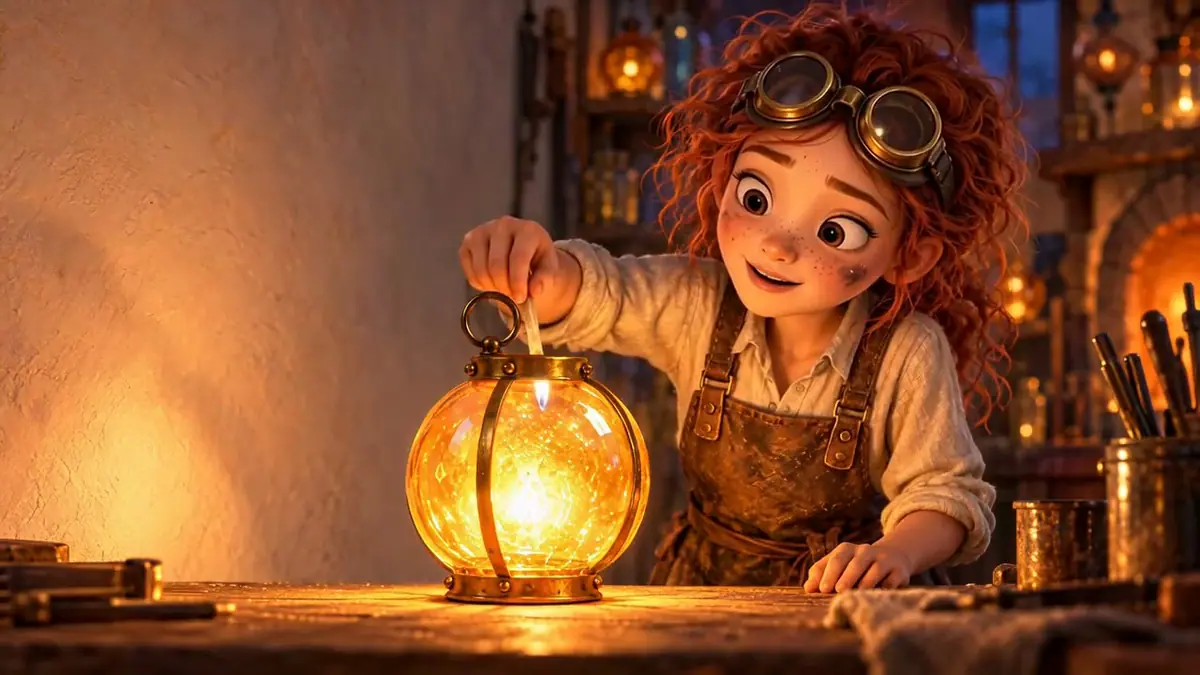
Watch the video: https://ufgc0c9mhl4ueq76.public.blob.vercel-storage.com/academy/953d53faa6e481c85f7357374bc8c61266ce12f7fd456355de809a38869d9b60.mp4
1Speech-to-text on your 20-second music cue returns two clear sentences taken from your prompt. What do you do?
Answer: B. A score with vocals or spoken words fails the brief. Music models sometimes sing or speak parts of the prompt, so check every cue. Stock phrases at low confidence on a short sound effect are a different case: a transcriber filling silence.
2Two takes of the action shot from the same first frame, each shown at 2 and 4.5 seconds. The brief fixes Zuri's braids with glowing cyan tips. Which take goes into the cut?
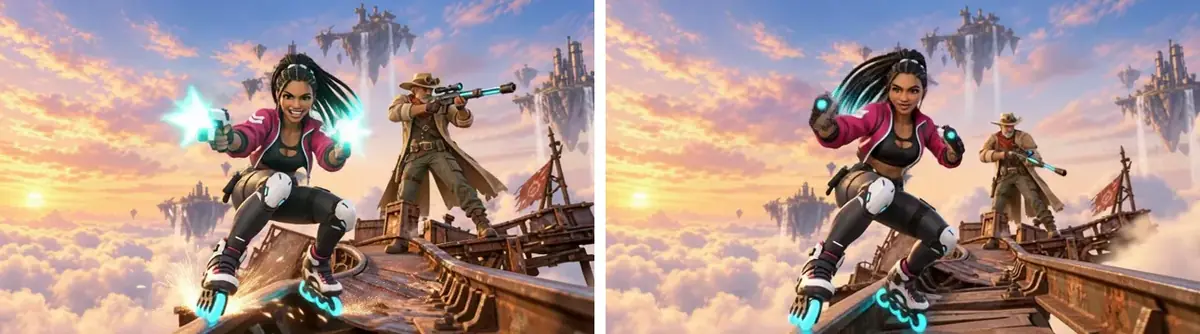
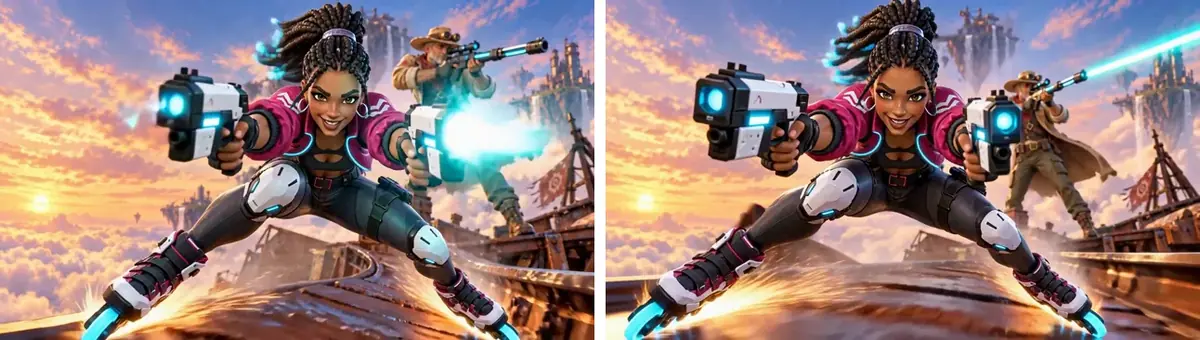
Answer: B. Identity drift rejects a take, however good the motion. Take A came from Gemini Omni 1.1 Flash, which turned the braids into a ponytail; Take B is MiniMax H3 with a keep-list naming the braids.
3The rope is through the ring at 8.20 seconds and gone at 8.30. The hero effect is 0.8 seconds of rasp, then a clank, then a splash. Where does the effect start?
Answer: B. The brief asks for the slip within a frame or two. Line up the part of the effect that matches the event (the end of the rasp) with the frame where it happens, then let the rest follow.
4Two runs of the score both swell at the slip, where the brief asks for a hush. What do you do?
Answer: C. Two runs failed the same way, so change the approach. A volume change in the mix is free and exact to the frame; the rest of the score still follows the cut.
Make it repeatable
- Keep the shot list as data (Keep sources as data). Store each shot as first frame, model, prompt, trim in and out. A new teaser for an update swaps first frames and lines.
- Keep a sound kit per project: the score prompt structure (instrumentation plus a timed map), the foley segment list tied to the cut list, the hero effect prompts, and the mix command with its levels and edits.
- One assembly script. The ffmpeg command that trims, places cards and mixes the audio at the measured seconds turns the shot list into a video in one run; this run wrote it in Python.
- Build the sound as a workflow (Package it as a workflow or skill). In the Node Editor: a Video node for the locked cut, two Audio Generator nodes (video to music, video to sound effects) fed by the same video, and a third for the hero effect from a Text node.
- Approval per shot and for the score. Route each generated shot through an Approval node checking identity, hands and motion direction before it enters the cut, and approve the score the same way: it is the layer most worth a second take. Do the timing, the hush and the mix in code or in your editor. See Approval and review steps.
- Re-cut means re-score. If a locked edit changes, rerun the score and the foley on the new cut; the hero effects can stay, only their timing moves.
- Platform Apps to compare. Under Workflows, Apps: Idea → Storyboard → Animated Video turns a story concept into a storyboard and video, Storyboard to Scenes turns a storyboard into cinematic shots, and Character Sheet to Cinematic Video animates a character sheet into a scene.
Runs and time
Part 1, the teaser:
| Step | Model | Runs | Kept | Wait |
|---|---|---|---|---|
| World still, 2048x1152 | GPT Image 2.5 Sunburst | 1 | 1 | about 39 s |
| Action shot, round 1 | MiniMax H3 768P, Seedance 2.5 draft, Gemini Omni 1.1 Flash 360p | 3 | 0 | about 197 s, 100 s and 36 s |
| Action shot, round 2 | MiniMax H3 768P, Seedance 2.5 draft | 2 | 1 (MiniMax H3) | about 196 s and 95 s |
| World shot, 5 s, 768P | MiniMax H3 | 1 | 1 | about 214 s |
| Rooftop shot, 5 s, 768P | MiniMax H3 | 1 | 1 | about 170 s |
| Score, 20 s requested | Google Lyria 3.5, ElevenLabs Music v2.5 | 2 | 1 (Lyria) | about 37 s and 9 s |
| Whoosh and impact | ElevenLabs Sound Effects 2, Mirelo SFX 2.0 | 4 | 2 (ElevenLabs) | about 7 s each |
| Cards, cut and mix | Pillow and ffmpeg | 0 | n/a | seconds |
Fourteen runs, about 10 minutes of wait with the runs in parallel. The five action runs are most of the cost; test them at low resolution and finish only the take that survives.
Part 2, the soundtrack:
| Step | Runs | Wait |
|---|---|---|
| Score, 25 s (2 runs; 2 samples requested each, 1 received) | 2 | about 27 s each |
| Foley, 8 timed segments | 1 | about 1 min 45 s |
| Hero effect, 2 s, ElevenLabs Sound Effects 2 | 1 | 4 s |
| Hero effect, 2 s, Mirelo SFX 2.0 (2 outputs) | 1 | 8 s |
| Frame check, mix, measurement (ffmpeg) | 0 | minutes |
About 5 minutes of waiting, less with the runs in parallel. The two score runs are most of the cost, the foley and the hero effects the rest; the mix is free.
The price shows on the Generate button before you run; with the Scenario MCP, ask for a dry-run quote.
Variations
- Longer trailers: add shots in groups of three (action, world, hero); for continuity across many shots see Long video from guided frames.
- A painted world shot: start the establishing shot from an environment concept instead.
- Gameplay trailer: replace the action shot with captured gameplay and keep the generated world and hero shots as bookends.
- Hero effects for every hit: score from the cut, with hero effects for each hit or ability shown on screen.
- Vertical teaser: reframe each first frame to 9:16 before animating; see Mobile UA video ads. A 9:16 re-cut changes the pacing, so it needs its own score run.
- Animation and film pitches: the same structure works as a proof-of-concept reel for a series.
- Product video: foley for the product's own sounds (a cap click, a pour) and a light score; keep the hero effect for the moment the product does its job.
- Learning: a quiet bed and a few UI sounds for a screen recording, mixed lower (about -16 LUFS) so a voice can sit on top.
If it breaks
- A face or hairstyle drifts during the shot. Add a keep-list that names the details ("long black box braids with glowing cyan tips"), shorten the action, or switch model for that shot.
- The shot barely moves. Write the action as beats ("pushes off, grinds, then fires") and give the camera one move ("dollies backward fast and low").
- One character changes color. Reject the take; a color shift on a character does not grade out cleanly.
- The music ignores the cue sheet or a moment. Measure where it does hit and cut to those seconds, or try the second music model with timestamps in the prompt. On a locked cut, name the moment and its time in the prompt and make sure the picture shows a clear change there; if it still ignores it, cut the change in the mix.
- The music has words. Turn on instrumental only, add "No vocals, no choir, no spoken words", and re-check with speech-to-text.
- Fewer outputs than requested. Check what came back before planning a comparison; budget for a second run if you need two takes.
- Foley is too quiet or too loud against the score. Balance with gain before normalizing; normalization sets the overall level, not the balance.
- Wrong format returned. Check every file with
ffprobeand convert before the mix. - The hero effect lands late. Place it a frame or two before the visual event; sound that arrives with or slightly before the image reads as in sync.