

Mascot pose and expression library
Lock a mascot with a rules sheet, then build on-model poses, short loops, an ad and a web hero from one prompt template.
- Playbook
Run it in ScenarioGPT Image 2.5 Sunburst Nano Banana 2.1 Wan 3.0 Seedance 2.5
Barley, the red panda cub of Crunchwell, an invented breakfast cereal brand, locked on a rules sheet, drawn in 15 poses and expressions, then looped and placed in a 4:5 ad and a web hero. Barley started as one image: a key visual of him on a box of Honey Hoops.
The brief
| Field | Brief |
|---|---|
| Goal | A locked mascot, a library of poses and expressions, three loops, two layouts |
| Character | Barley: plush red panda cub, russet fur, cream mask and belly, ringed tail, teal knitted scarf with the knot and fringed ends on his left |
| Format | Poses 1024x1024 with transparency; loops 1280x720, 5 s, 24 fps; ad 4:5; web hero 16:9 |
| Fixed | Shape, palette, scarf side, eye highlights, mitten paws, fur and lighting style |
| May vary | Pose, expression, props |
| Accept when | Poses pass the keep and avoid lists; loops restart invisibly; text is sharp |
Approach
- 1Turnaroundfour views from the key visual
- 2Rules sheetpalette sampled, keep and avoid in code
- 3Pilotthree routes, hardest pose
- 4Batchone slot per pose, transparent
- 5Loops and layoutsSeedance 2.5, ad and hero in code
A mascot drifts one detail at a time: the scarf changes sides, fingers appear, teeth arrive. So the rules come first, as a list a reviewer can tick, and every prompt repeats the same block: one job per pose, one reference sheet. Text, layouts and timing stay in code.
Models, as of October 2026: GPT Image 2.5 Sunburst (reference image, transparent output) for the sheet and poses; Seedance 2.5 for the loops. Wan 3.0, the first recommendation for this loop, refused the mascot twice (more in step 7). Nano Banana 2.1 is as on-model without transparency; the Emotion Sheet App drafts nine expressions in one run but broke two rules.
Steps
-
Generate the turnaround (Lock a character sheet). Create > Images, GPT Image 2.5 Sunburst, the key visual in Reference Images, 2048x1152, quality high, 34 seconds. Describe the shape, every color and the four views:
PromptCharacter turnaround sheet for an original brand mascot of a breakfast cereal brand. The mascot is Barley, the red panda cub from the reference image: a small, round, plush red panda cub standing upright on two short legs. Russet-orange fur with a soft cream belly, a cream-white face mask with cream patches above the eyes and on the cheeks, cream-rimmed rounded ears, a small dark brown nose, large warm amber-brown eyes with two white highlights each, a happy closed-mouth smile, dark chocolate-brown arms and legs ending in rounded mitten paws with no fingers, a long fluffy tail with four cream rings. A chunky teal knitted scarf wrapped once around the neck, its knot and both fringed ends hanging on the character's left side. Four full-body views in one row, evenly spaced, same size, same height, standing on one baseline, neutral friendly pose with arms relaxed and empty paws: front view, three-quarter view facing left, side view facing left, back view (tail and scarf ends visible, no face). Plain warm off-white background (#FAF6EE), even soft studio light with a gentle warm key, a small soft contact shadow under each view. Style: premium animated-feature character render, soft individually groomed fur, warm morning light, appealing shapes that read at small size. No text, no labels, no numbers, no logos, no cereal box, no other characters. -
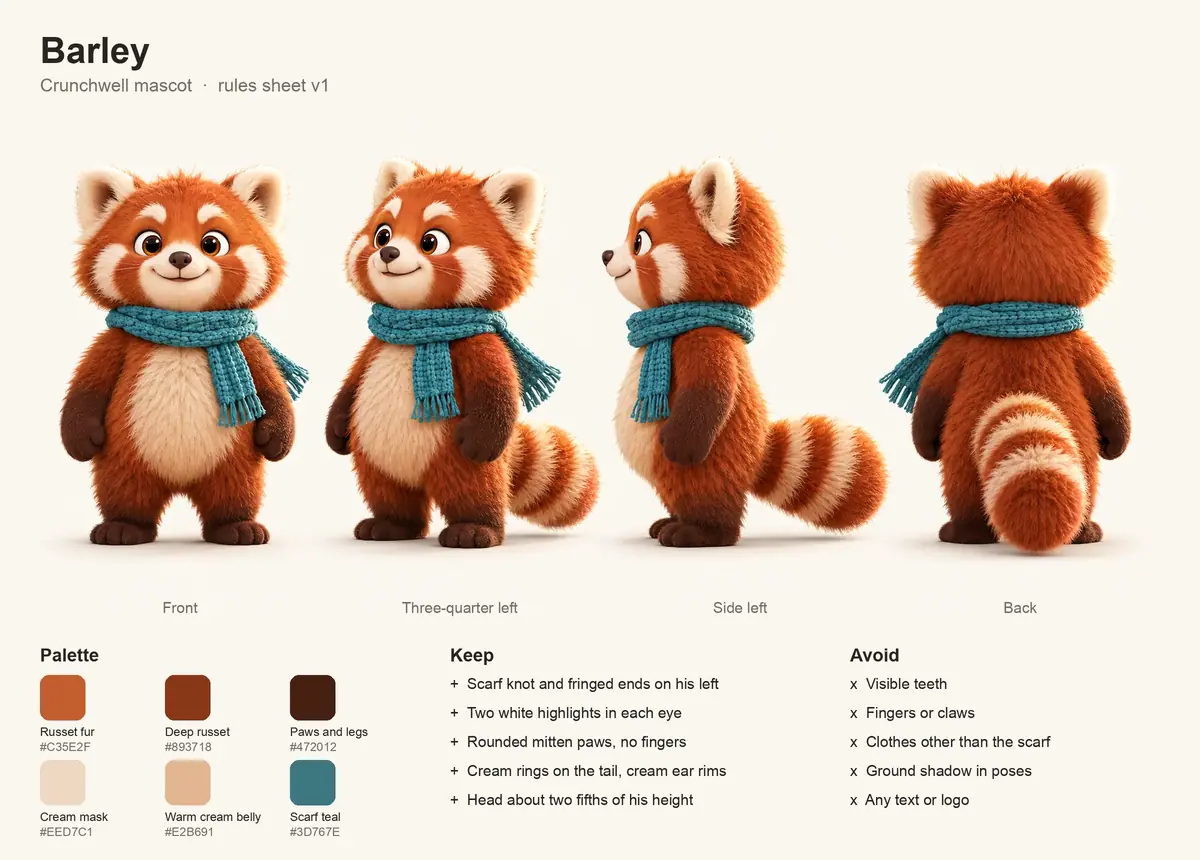
Write the rules sheet in code (Write a keep-list). Sample the palette from the approved image, not the prompt: six swatches from the front view, from russet fur (#C35E2F) to scarf teal (#3D767E). Then list keep (scarf knot and fringed ends on his left, two highlights per eye, mitten paws with no fingers, cream tail rings and ear rims, head about two fifths of his height) and avoid (teeth, fingers or claws, clothes other than the scarf, ground shadow, text or logo).
-
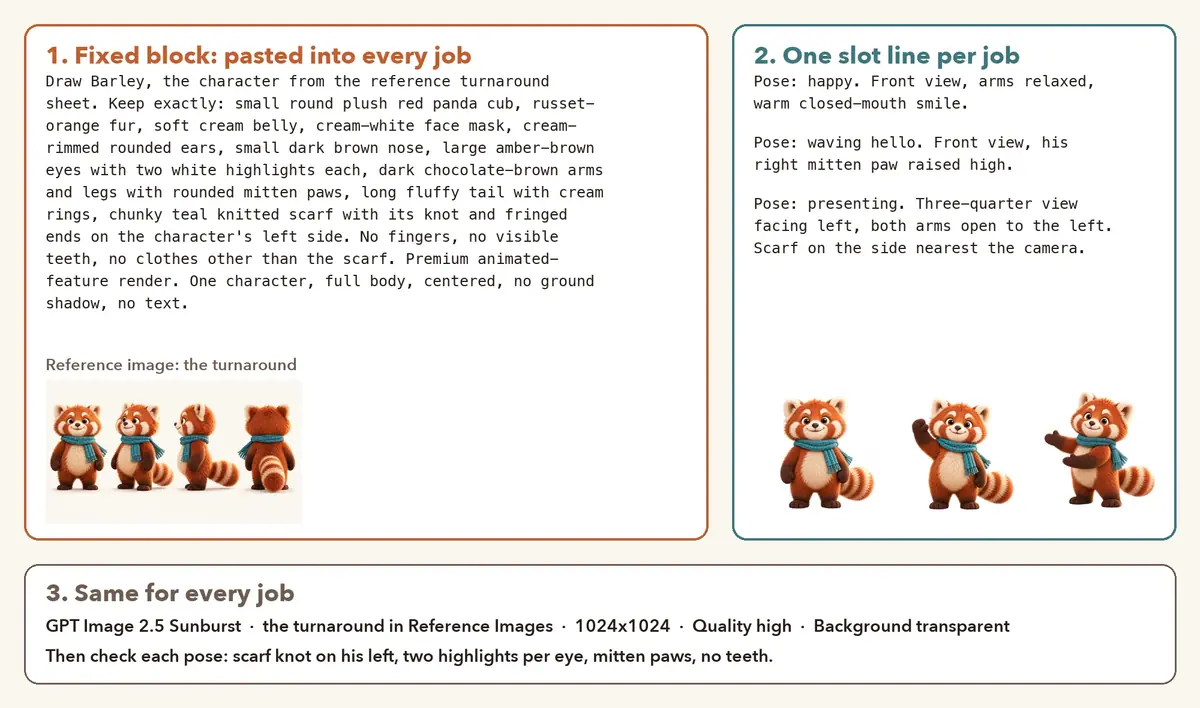
Turn the rules into a template (Batch from a template): one fixed block, one slot. The turnaround in Reference Images, 1024x1024, quality high, background transparent (the model setting this run used). The wave pose:
PromptDraw Barley, the character from the reference turnaround sheet. Keep exactly: small round plush red panda cub, russet-orange fur, soft cream belly, cream-white face mask with cream patches above the eyes and on the cheeks, cream-rimmed rounded ears, small dark brown nose, large amber-brown eyes with two white highlights each, dark chocolate-brown arms and legs with rounded mitten paws, long fluffy tail with cream rings, chunky teal knitted scarf with its knot and fringed ends on the character's left side. No fingers, no visible teeth, no clothes other than the scarf. Premium animated-feature render with soft groomed fur and warm morning light. One character, full body, centered, no ground shadow, no text. Pose: waving hello. Front view, his right mitten paw raised high and waving, the other arm relaxed, a big closed-mouth smile. -
Pilot the hardest pose three ways (Pilot the hardest case). Fingers sneak in where mitten paws hold a prop, so the pilot is Barley hugging a cereal spoon as tall as he is. Sunburst took 45 seconds; Nano Banana 2.1 took 29 seconds and was cheaper; the Emotion Sheet App (one character reference in, a 3x3 sheet out, run through the Scenario MCP) took 58 seconds.
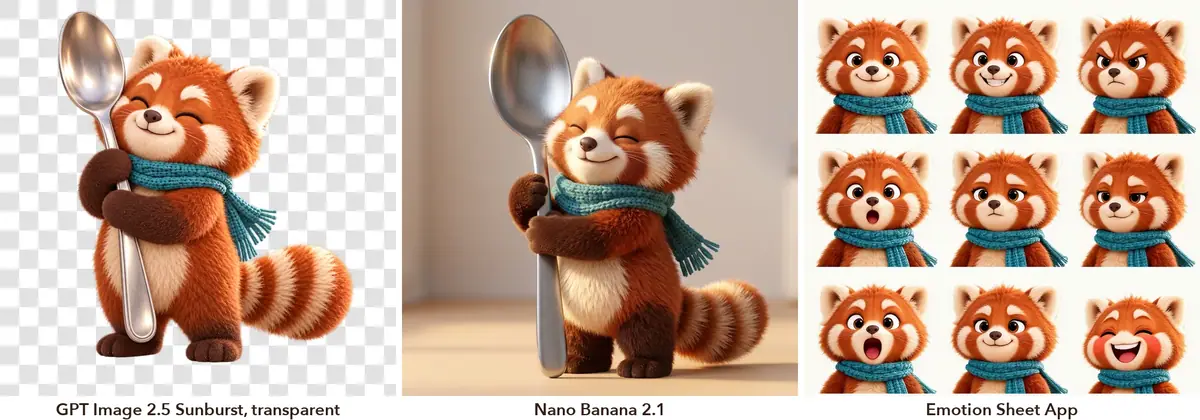
Same reference, three routes. -
Run the batch (Quote before you run). Fourteen jobs, one slot each: eight expressions (happy, laughing, surprised, thinking, sad, proud, confused, sleepy) and six poses (wave, jump, eating, presenting, cheer, running), 37 to 42 seconds each, in parallel.
-
Check every pose against the sheet (Review with a score). One contact sheet, one line per pose against the keep and avoid lists. Twelve passed. Two went back with one added sentence each, about 45 seconds:
- Jump: a wide gray halo around him in mid-air. Added "Crisp cutout edges: no glow, no halo, no motion blur, no dust or particles around him."
- Presenting: facing right, which put the scarf ends on his right. Re-run facing left, as in the turnaround, with "The scarf knot and fringed ends hang on the side nearest the camera."
Then snap alpha of 250 and above to 255, so the opaque pixels are fully opaque.
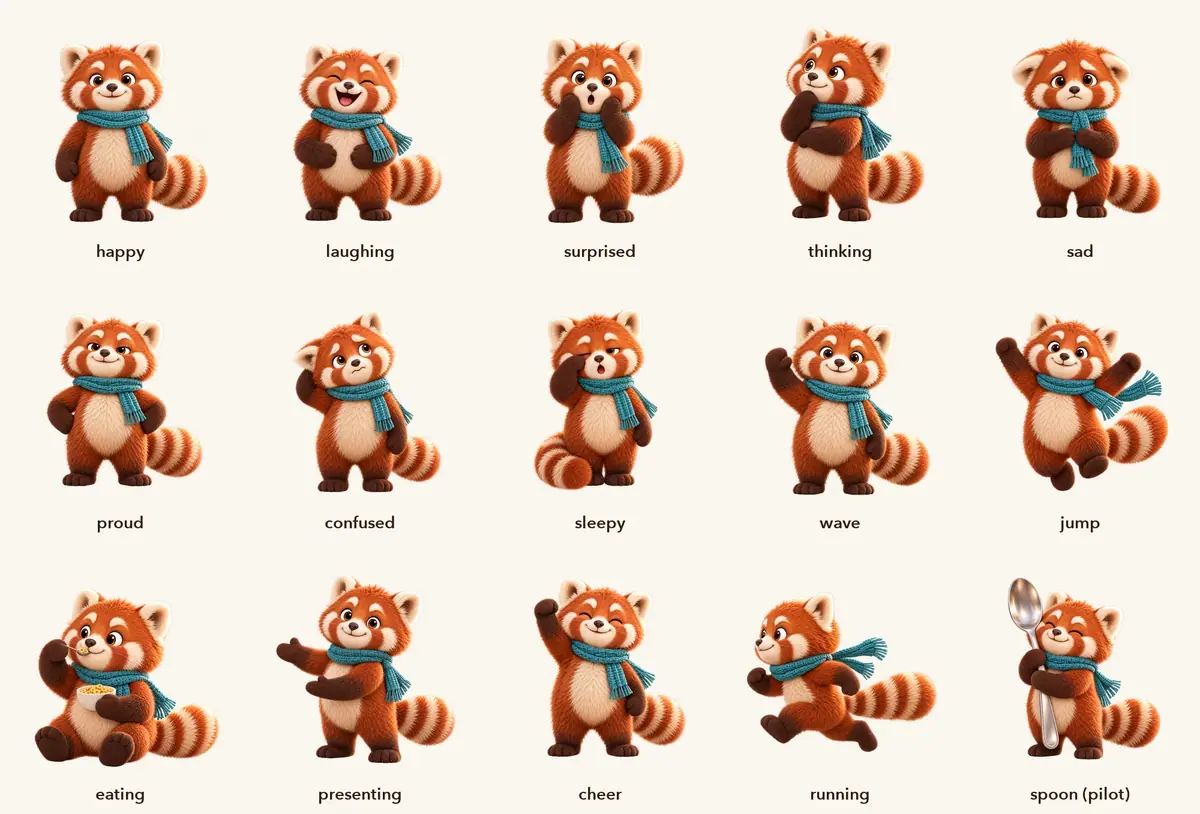
The library: 14 batch poses, two of them re-run, plus the pilot. -
Preview one loop, then run the rest (Loop a clip). Put the pose on the flat off-white background at 1280x720. Wan 3.0, the first recommendation, flagged the job for possible intellectual property twice: once with a prompt that named Barley and an animated-feature look, then with a neutral prompt, when the input image itself was flagged. Both failed in under 30 seconds. Move to the next recommendation rather than rewording a third time.
Create > Videos, Seedance 2.5, that frame as first and last frame, 5 seconds, audio off. Preview in draft mode at 480p (1 minute 50 seconds) against Minimax H3 at 768P (2 minutes 30 seconds), then three finals on Seedance 2.5 at 720p (2 minutes 29 seconds to 3 minutes 25 seconds, in parallel).
PromptSeamless loop. The camera is locked. The small cartoon mascot in the image waves its raised paw side to side twice, its body bobs gently, its tail sways and it blinks once, then it returns to the starting pose. It keeps its exact design, colors and scarf in every frame, with mitten paws and no fingers. The plain warm off-white background stays flat the whole time. Ends exactly as it starts. No new objects, no shadow, no text, no camera move.The presenting and jump loops change only the motion sentence.
-
Measure the loops (Check by measurement). First-to-last-frame RMSE for the seam, against the average change between two frames: a seam below that is an invisible restart. Then count teal pixels in every frame: a frame with no teal means the scarf vanished. Watch the tail too: in the H3 preview it jumped to the other side mid-clip.
-
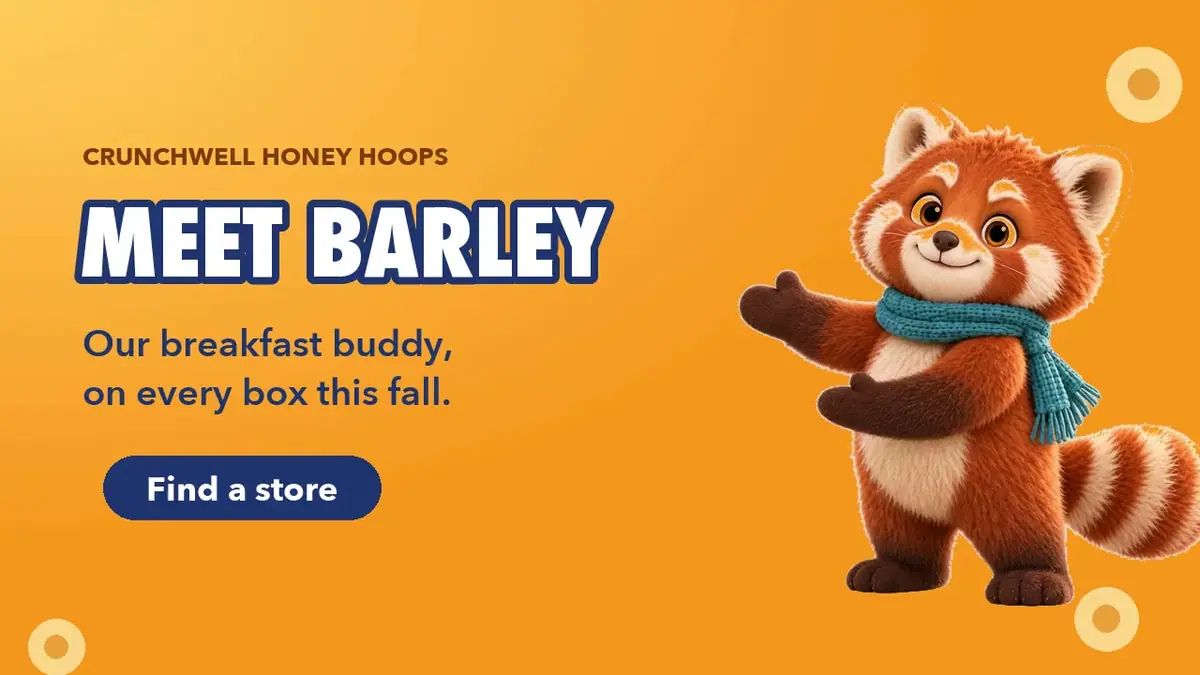
Drop Barley into the layouts (Cut out and key, Typeset text, never generate it). Key the flat background from the loop frames by distance to its color, remove the background tint from the soft edges, then place Barley in layouts drawn in code: a 4:5 ad with the jump loop, a 16:9 web hero with the presenting loop.
Pythonalpha = np.clip((np.abs(frame - BG).sum(2) - 20) / 40, 0, 1) # BG = (250, 246, 238) color = (frame - (1 - alpha) * BG) / alpha # removes the cream fringeThe jump loop adds a soft floor shadow on landing; drop pale, unsaturated pixels near the feet from the key.
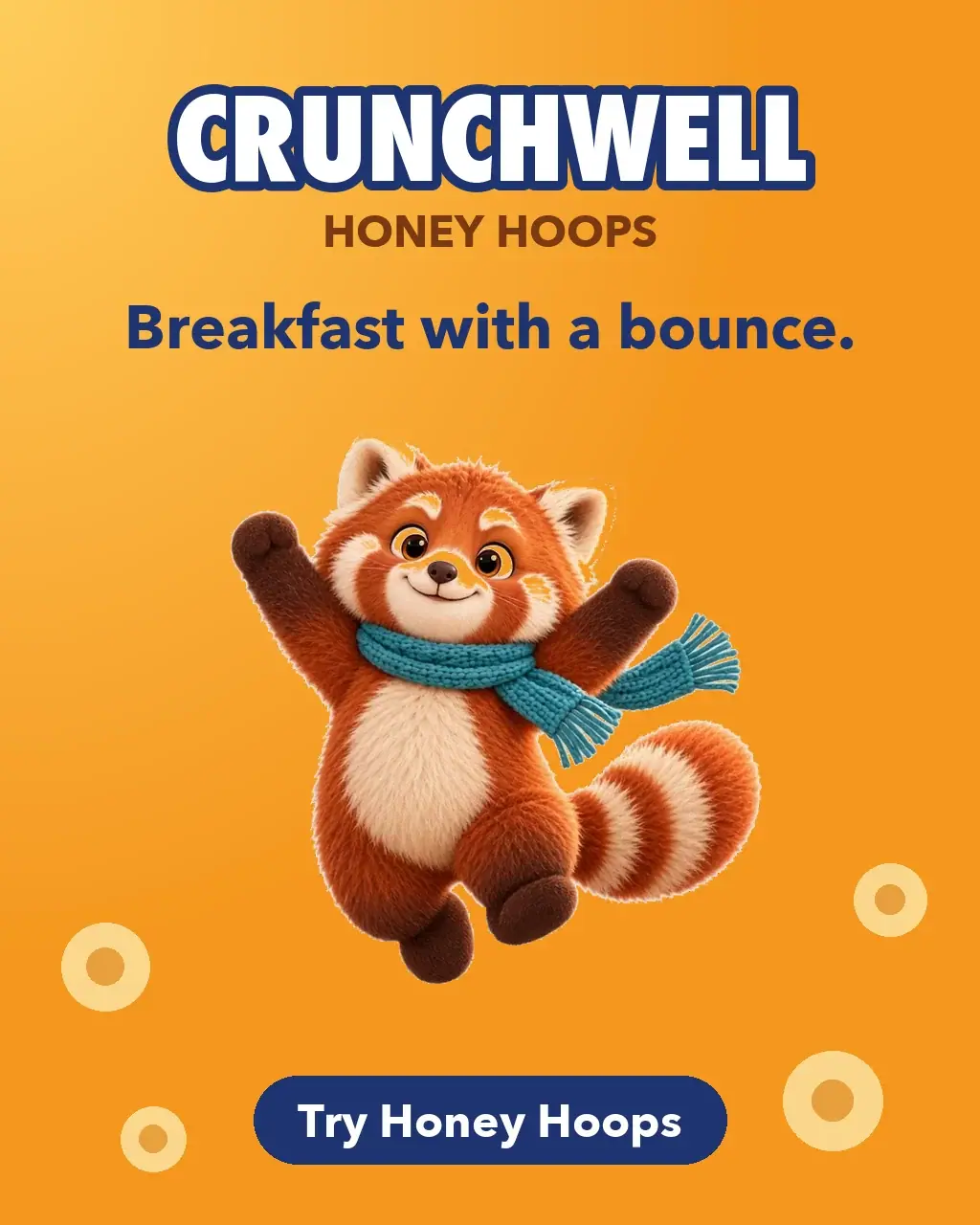
The ad. Wordmark, headline and button are set in code. 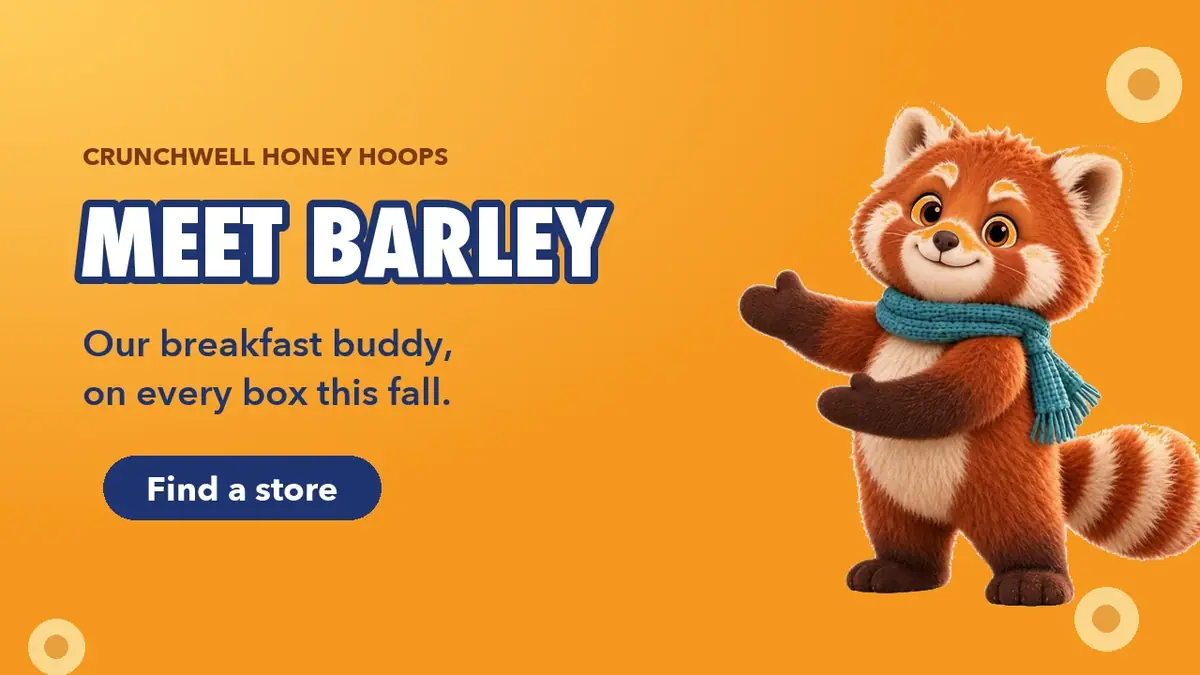
The web hero with the presenting pose.
With the Scenario MCP (the route this run used): poses with model_run on model_openai-gpt-image-2-5-sunburst, referenceImages: [turnaround], background: "transparent", quality: "high", 1024x1024. Loops on model_bytedance-seedance-2-5 with image and lastFrameImage set to the same asset id, duration: 5, resolution: "720p", generateAudio: false; add draft: true for the 480p preview, and ask for a dry-run quote first.
Check the result
every pose shows the scarf knot and ends on his left, two highlights per eye and mitten paws; no teeth or fingers; loops restart invisibly and keep the scarf in every frame; layout text is crisp.
the scarf changes side or disappears; fingers or teeth appear; a halo or glow surrounds the cut-out; the fur or lighting style changes; the loop jumps or the background shifts.
| Pilot, spoon pose | Transparent | On-model | Verdict |
|---|---|---|---|
| GPT Image 2.5 Sunburst | yes | yes | kept |
| Nano Banana 2.1 | no, draws a room and a floor | yes | runner-up, needs Remove Background |
| Emotion Sheet App | no | adds eyebrows and teeth | rejected; useful as a fast draft |
| Loop, 5 s | Seam | Average frame change | Scarf in every frame | Note |
|---|---|---|---|---|
| Wave, Seedance 2.5 draft, 480p | 0.85 | 4.95 | yes | approved the finals |
| Wave, Minimax H3, 768P | 0.72 | 3.37 | yes | rejected: the tail switches sides mid-clip |
| Wave, Seedance 2.5, 720p | 0.82 | 2.04 | yes | |
| Presenting, Seedance 2.5, 720p | 0.81 | 2.42 | yes | used in the web hero |
| Jump, Seedance 2.5, 720p | 0.89 | 3.64 | yes | soft floor shadow on landing, keyed out for the ad |
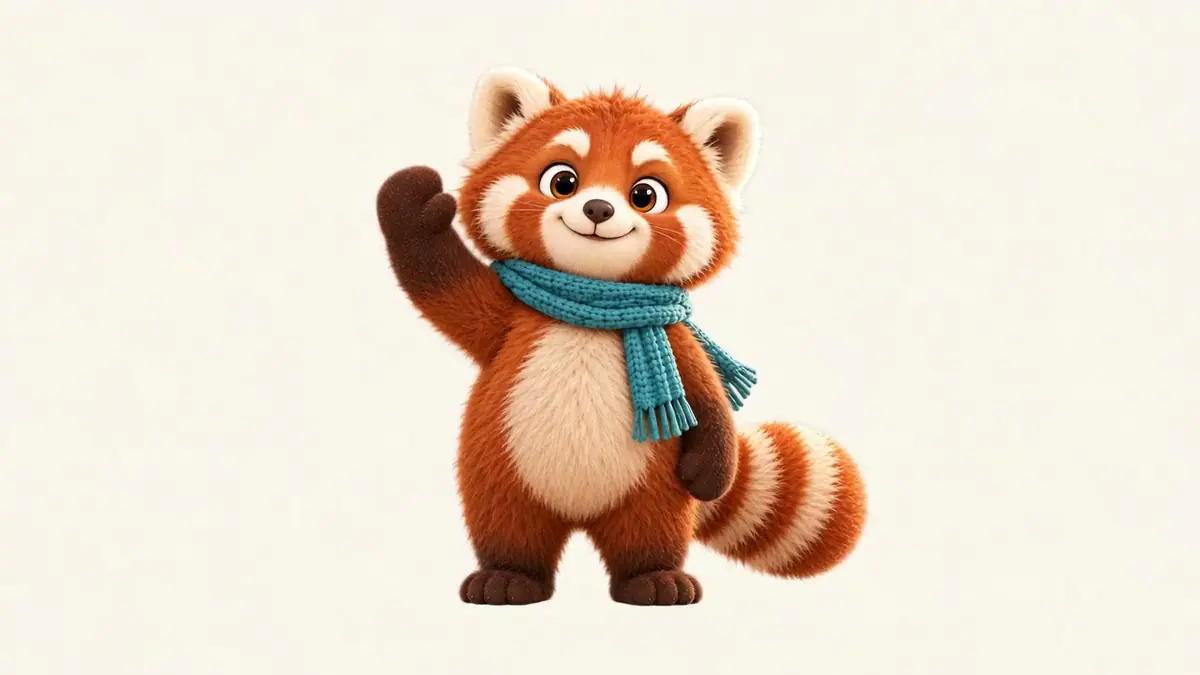
Watch the video: https://ufgc0c9mhl4ueq76.public.blob.vercel-storage.com/academy/3176580e2bf53f31ca674dad6eeabace35419a6518b6e855b4d50ac9d0c87ccd.mp4
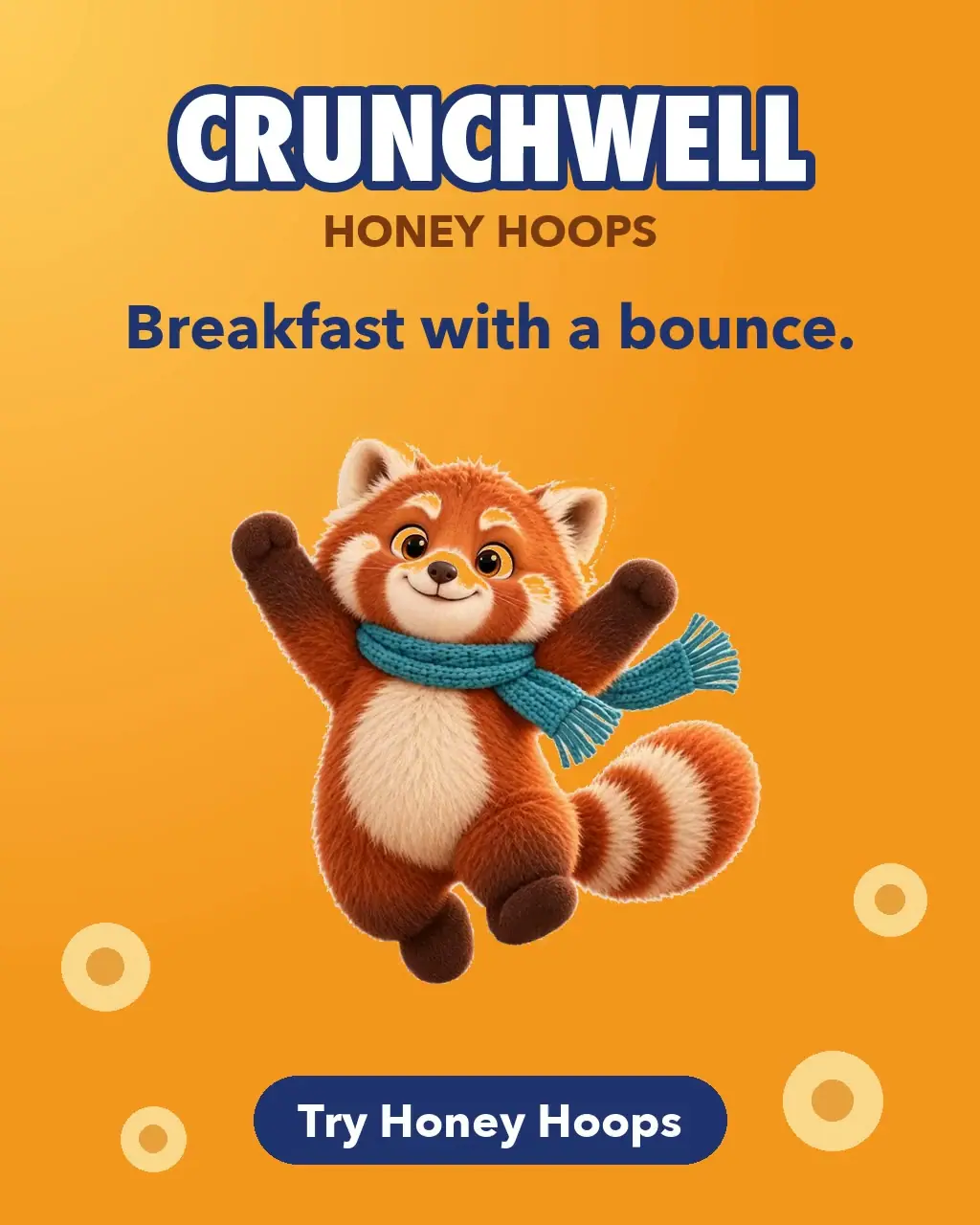
Watch the video: https://ufgc0c9mhl4ueq76.public.blob.vercel-storage.com/academy/6a4da7d820051fedf748cc7f026a331fd5dcecfcefb0812b85dc4001b59b2789.mp4
Watch the video: https://ufgc0c9mhl4ueq76.public.blob.vercel-storage.com/academy/afaa5efcb332c5202044095923256767cf59e051a6da9c4516abf7bad7e2b1d4.mp4
1A new pose of Barley looks on-model, but the scarf knot and ends sit on his right. What is the verdict?
Answer: C. A scarf that changes side is the first item on the Reject list. Say "on the character's left" in the block, and if a turned pose flips it, turn the pose the way the turnaround faces.
2Three takes of Barley from the pilot, all from the same reference sheet. Which one goes into the library as delivered?
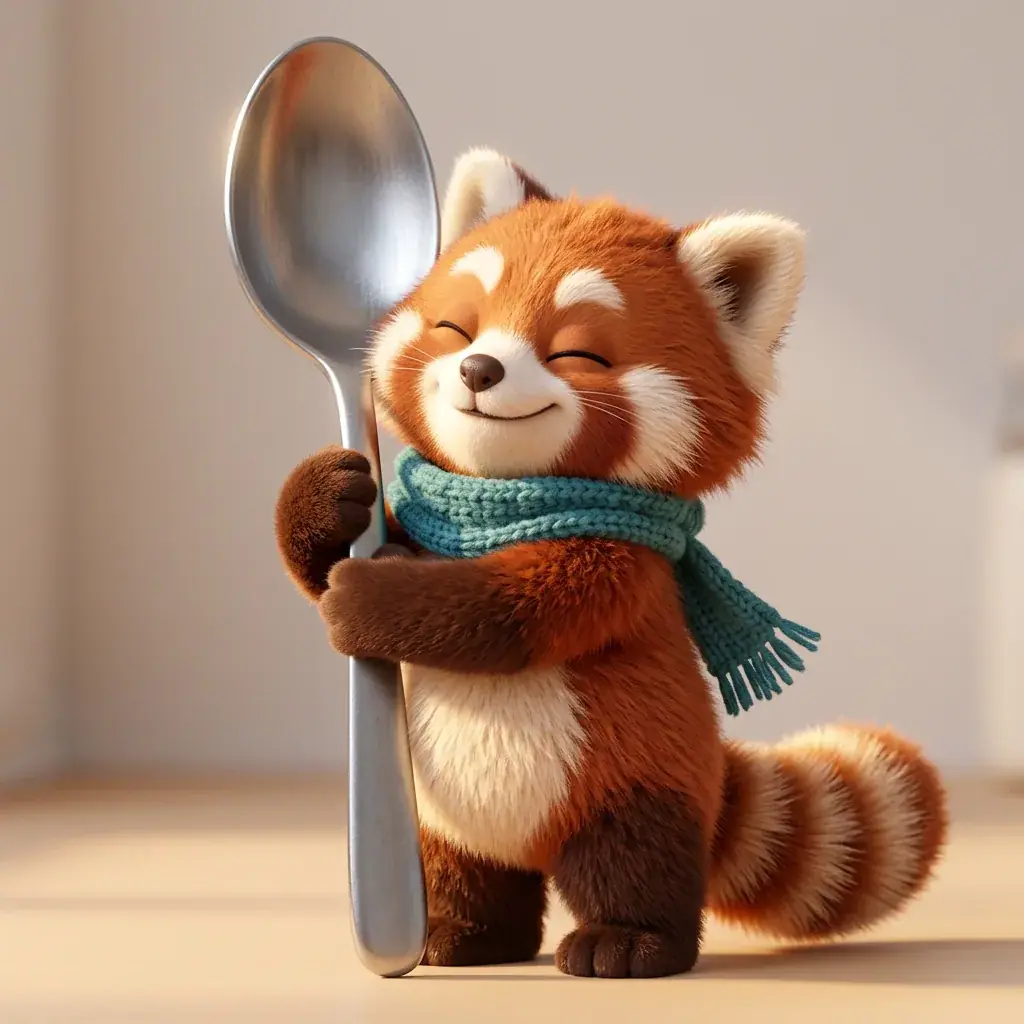
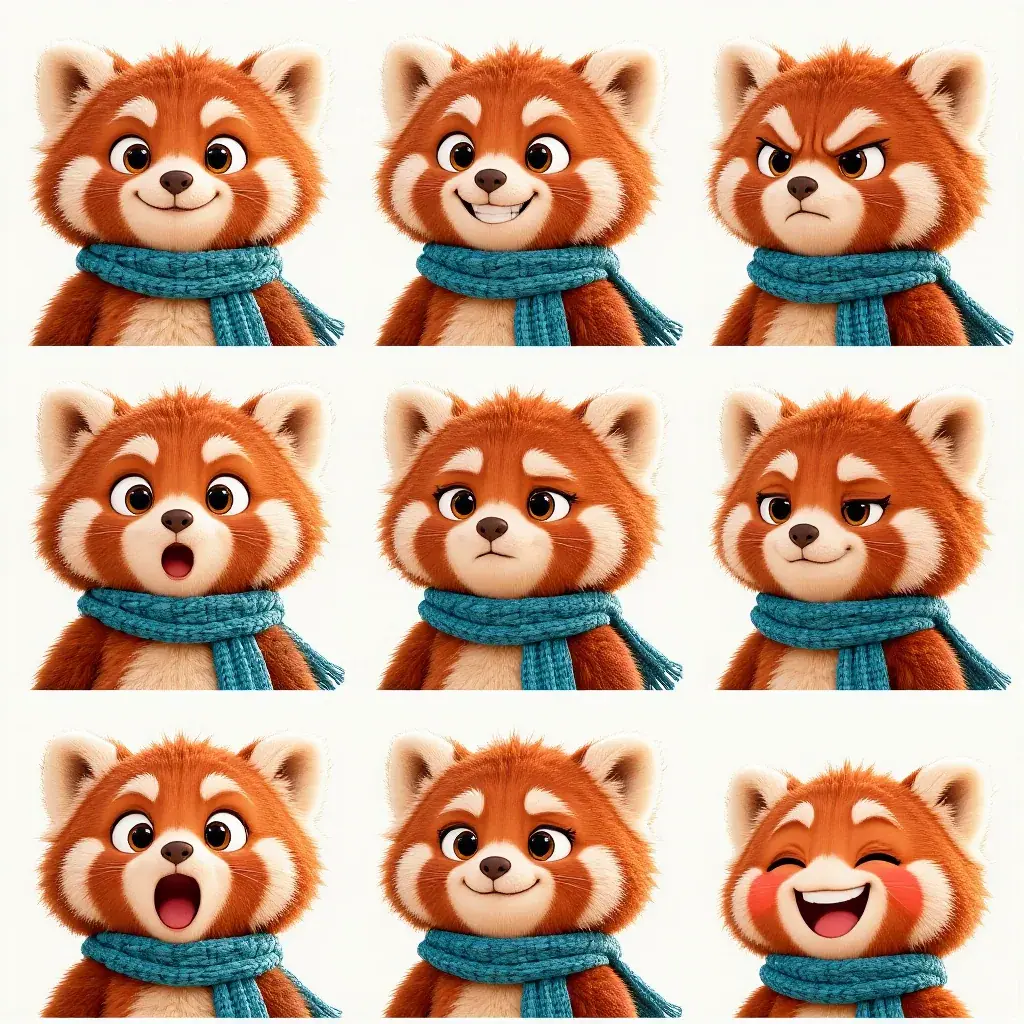

Answer: C. Poses ship with transparency, and teeth are on the Reject list. Take A needs a Remove Background step first and still carries a floor shadow; Take B, from the Emotion Sheet App, adds eyebrows and teeth.
Make it repeatable
- Template as a workflow. In the Node Editor: a Text node with one slot line per pose, Split Text to make the list, a Loop, an Image Generator on GPT Image 2.5 Sunburst with the turnaround and the fixed block, and an Approval after the first pose (Batches, loops and logic).
- Keep and version the sheet. New poses go through the same lists; a design change means sheet v2 and a rerun of the poses you still use.
- Write the fixes into the block. The halo and scarf-side sentences from step 6 belong in the fixed block for the next batch.
- One loop prompt frame: only the motion sentence changes per pose.
Runs and time
| Step | Model | Runs | Wait |
|---|---|---|---|
| Turnaround | GPT Image 2.5 Sunburst | 1 | 34 s |
| Pilot, three routes | Sunburst, Nano Banana 2.1, Emotion Sheet App | 3 | under 1 min, in parallel |
| Batch, 14 poses | GPT Image 2.5 Sunburst | 14 | 37 to 42 s, in parallel |
| Re-runs, jump and presenting | GPT Image 2.5 Sunburst | 2 | 40 s and 50 s, in parallel |
| Loop, refused | Wan 3.0 | 2 | 28 s and 22 s, both failed |
| Loop previews, 5 s | Seedance 2.5 draft 480p, Minimax H3 768P | 2 | 1 min 50 s and 2 min 30 s, in parallel |
| Loops, 5 s, 720p | Seedance 2.5 | 3 | 2 min 29 s to 3 min 25 s, in parallel |
| Rules sheet, key, layouts | Python, ffmpeg | about 5 min |
Twenty-seven runs, about 10 minutes of wait. The five loop runs cost more than the sheet and all the poses together: read the price on the Generate button, or ask for a dry-run quote, before each video.
Variations
- Learning-app mascot: same sheet and template; the layouts become a lesson slide and a streak badge.
- Lip-sync or speech: a front-facing pose as the first frame of a talking clip (Lip-sync and talking avatars).
- Sticker pack: the transparent poses at 512 px with a white outline added in code.
- Packaging: the cheer pose on a box side panel, with the wordmark set in code.
- Several characters: one sheet and fixed block each, one slot list.
If it breaks
- The scarf changes side. Say "on the character's left" and turn the pose the way the turnaround faces.
- Fingers appear on a prop pose. Pilot prop poses first; keep "mitten paws" and "no fingers" in the block.
- No transparency. Use a model that outputs it, or run Remove Background with Transparent after.
- A halo around the cut-out. Ask for crisp cutout edges with no glow or motion blur, and snap near-opaque alpha to fully opaque.
- A video model refuses the mascot. If an original mascot is flagged even with a neutral prompt, switch to the next recommended model instead of rewording.
- The loop shows a shadow or a new object. Repeat "background stays flat" and "no new objects"; key the shadow out or rerun.
- Palette drift across poses. Compare with the sampled swatches, not the prompt colors.