

Make mobile user acquisition video ads with testable hooks
Build vertical video ads as hook, body and end card, generate two hooks from your game art, and assemble variants that share one body for A/B tests.
- Playbook
Run it in ScenarioMinimax H3 GPT Image 2.5 Sunburst
See it made
Run it in Scenario
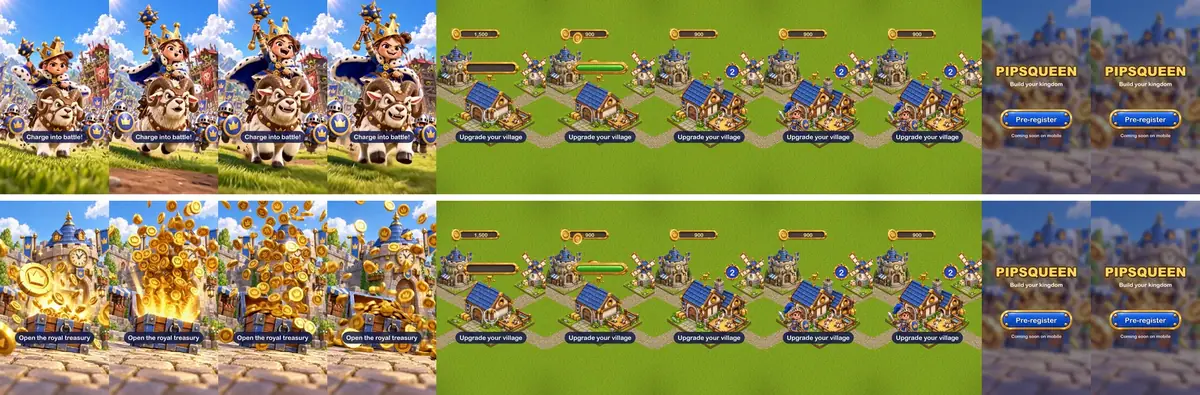
9:16 ads in three parts (a generated hook, a gameplay body, an end card), so you can test a new hook and keep the rest: user acquisition ads live or die in the first two seconds. The game is Pipsqueen by Brightkeep Games, a cozy kingdom builder.
The brief
| Field | Brief |
|---|---|
| Goal | Two 9:16 ad variants for a mobile kingdom builder, A/B test on hook |
| Format | 1080x1920, about 11 s, sound on and readable with sound off |
| Structure | Hook (3.8 s, generated) + body (4.5 s, gameplay) + end card (2.5 s, title and call to action) |
| Fixed | Body, end card, music, caption style, call to action |
| Varies | The hook only (A: character action; B: prop action) |
| Accept when | Motion starts in the first frame; captions sit outside the top 15 percent and bottom 20 percent; nothing in the ad claims a feature the game does not have |
Watch the video: https://ufgc0c9mhl4ueq76.public.blob.vercel-storage.com/academy/eb51015154779716b7ac8c37b36bf024e05a664be1c01b486783694ee504c156.mp4
The body and end card reuse earlier playbooks: the goat stable at levels 1 and 2, the town hall and the windmill from Isometric tiles and buildings, the progress bar, level ring and button from Game UI kit, the coins, the knight, the music loop and the coin and click sounds from and the whoosh from Game trailer cinematic. Queen Pip comes from Your first video.
Approach
- 1Hook stillsGPT Image 2.5 Sunburst, 9:16, safe zones
- 2Animate hooksMiniMax H3, 768P, 5 s
- 3BodyReal buildings, UI and coins, animated in code
- 4End cardTitle, button, availability line
- 5AssembleHook, body, end card, music, cues
- 6Sound-off checkPhone-sized preview
- Plan the test first. Each round changes one variable, usually the hook, and keeps the rest fixed. Name files by their variables (
hook-a-queen_cap1_end1.mp4) so results map back to the change. - Separate what you test from what you keep. Hooks change every week, bodies and end cards rarely, so a new hook is one video generation, not a new ad. For controlled variations of a still campaign, see Ad variations family.
- Generate only the hook. The body must show the real game, assembled in code from its actual buildings, UI and items. Counts, timing and captions are code too, exact and easy to translate (Do the exact part in code).
- Start each hook from an approved still (Approve the still first). A 9:16 first frame, subject in the middle third, keeps identity and style and leaves room for captions and the platform's interface.
Models, as of October 2026: MiniMax H3 at 768P for hooks (first in the picker for animating a still); Seedance 2.5 for a higher-resolution final of the winner; GPT Image 2.5 Sunburst for both first frames.
Steps
-
Make hook A's first frame. The Pipsqueen key art carries a generated logo, so it cannot be cropped into a clean first frame. Open Create, choose Images, pick GPT Image 2.5 Sunburst, attach Queen Pip and the key art under Reference Images, and write the safe zones into the prompt. This run set a custom 1152x2048 (9:16) through the Scenario MCP; in the web panel, Dimensions offers presets only, so pick 9:16 (1088x1920):
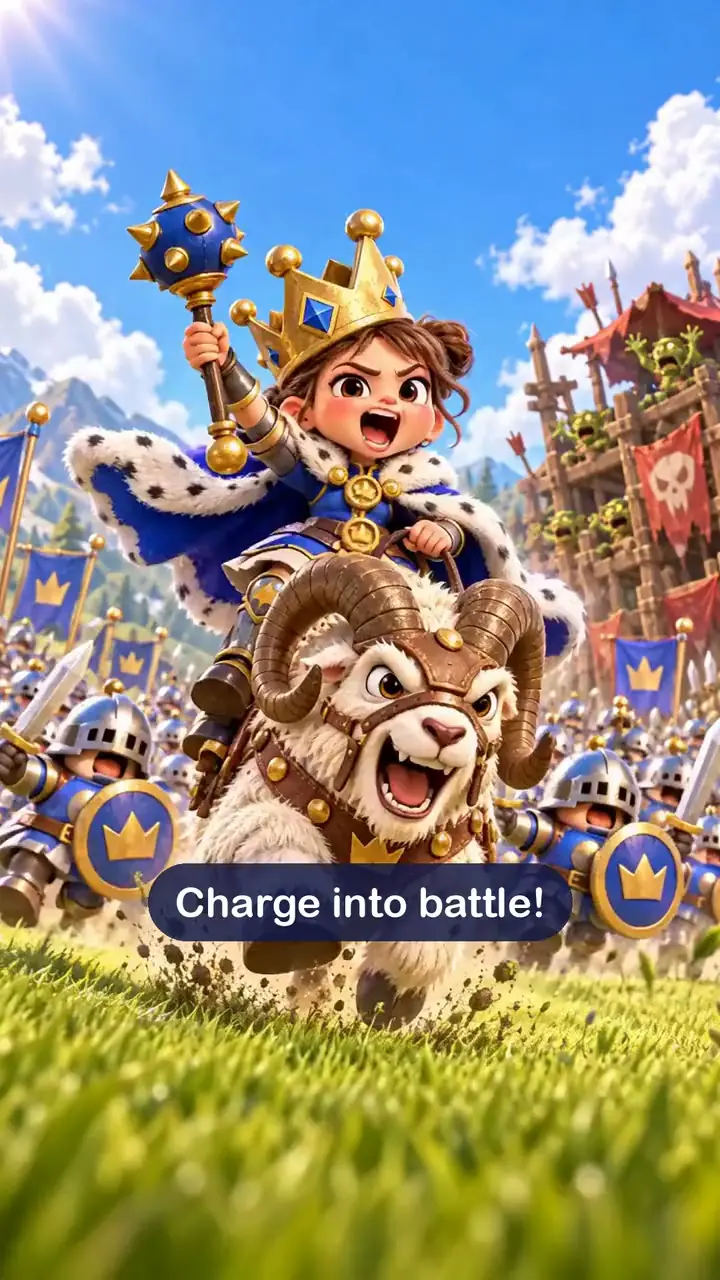
TextReference 1 is Queen Pip: copy her face, brown hair bun, oversized tilted gold crown, ermine cloak, blue and gold dress and toy-mace scepter exactly. Reference 2 is the world and the art style. Vertical mobile ad frame: Queen Pip rides her shaggy white battle goat with curled horns straight toward the camera across a green meadow, scepter raised high, cloak flying, mouth open in a fierce battle cry; a line of stubby knights with round blue shields charges behind her and a wooden goblin fort stands far behind. Low camera, dynamic, bright sunny sky. The queen and the goat sit in the middle third of the frame; keep the top 15 percent as open sky and the bottom 20 percent as plain grass with no important detail. No text, no letters, no logo, no UI. -
Make hook B's first frame the same way, with the game's gold coin and the town hall as references: "a sturdy wooden treasure chest bound in blue-painted iron bursts open in the cobbled square in front of a round stone keep... a fountain of gold crown coins sprays up and out toward the camera, the nearest coin large and sharp in the foreground", with the same safe-zone sentence.
:::compare
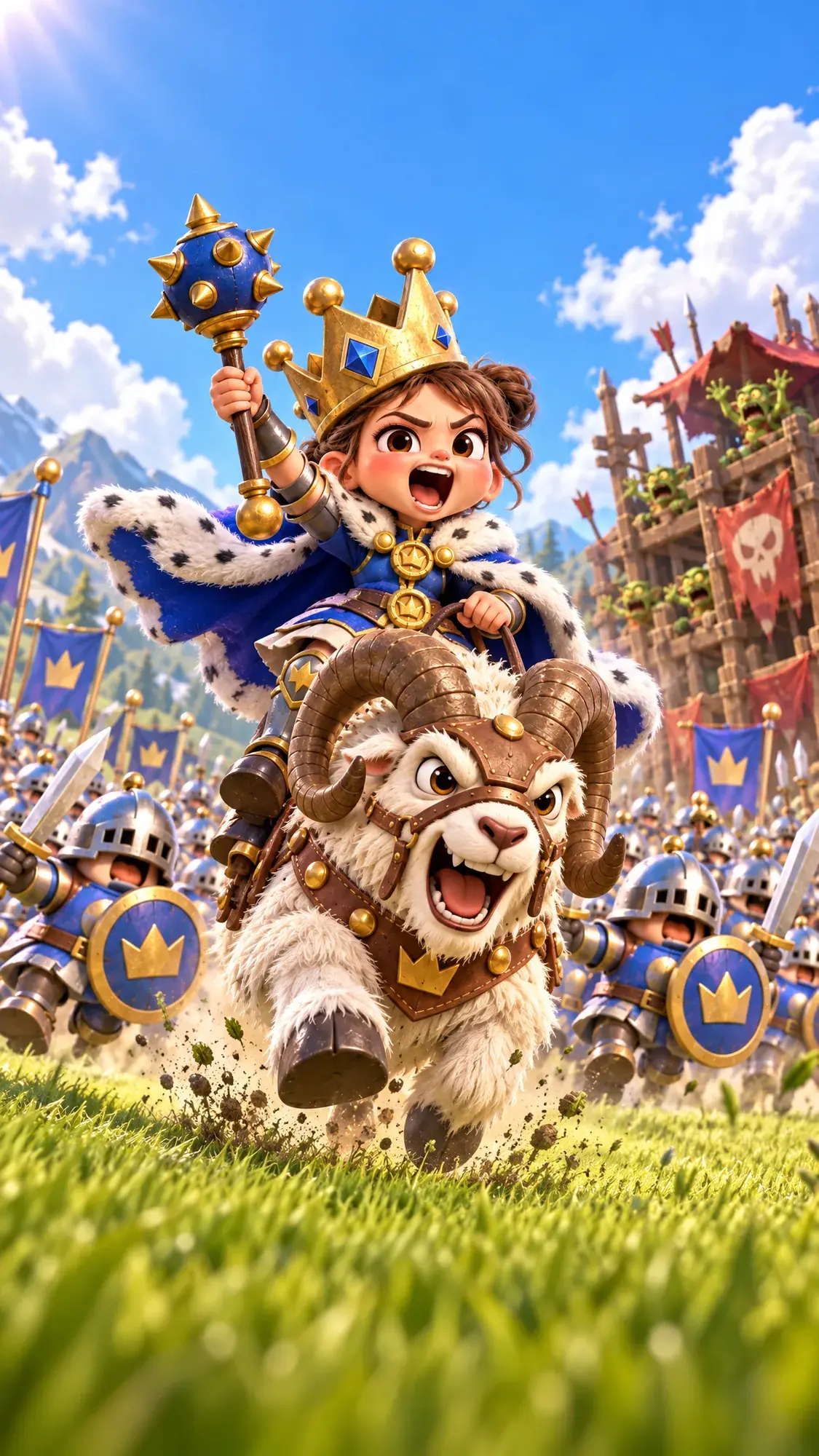
 :::
-
Animate each hook. Open Create, choose Videos, pick Minimax H3. Add the still under First Frame, set Duration to 5 seconds and Resolution to 768P under Settings (the default, 2K, costs more). Hook A's kept prompt:
TextVertical mobile game ad, the first second must grab attention. The little queen rides her shaggy battle goat straight toward the camera at full gallop, shouting a battle cry, cloak streaming behind her; the knights charge behind her. The camera pulls back fast and low ahead of the goat. She holds her scepter raised high above her crown the whole time and shakes it there; the scepter never passes in front of her face, and her face stays sharp and fully visible. Keep her face, crown, ermine cloak, blue dress and scepter, and the goat's curled horns and harness, exactly as in the first frame. Chunky stylized 3D game art, bright sunny light. No text.Hook B: "The treasure chest bursts open wider and a fountain of gold crown coins sprays straight toward the camera, coins spinning and tumbling past the lens, sparkles in the air, more coins landing and bouncing on the cobblestones. The camera is locked. Keep the chest, the gold coin design with the embossed crown and the stone keep behind exactly as in the first frame."
Quote before you run: a hook costs several times the still. The price shows on the Generate button.
-
Build the body from real game assets: 4.5 seconds drawn frame by frame in code. A tap on the level 1 stable, six coins flying from the counter (1,500 down to 900), the progress bar filling, a flash, the level 2 stable with a bounce, the level ring with a 2, and the knight hopping in. Caption: "Upgrade your village".
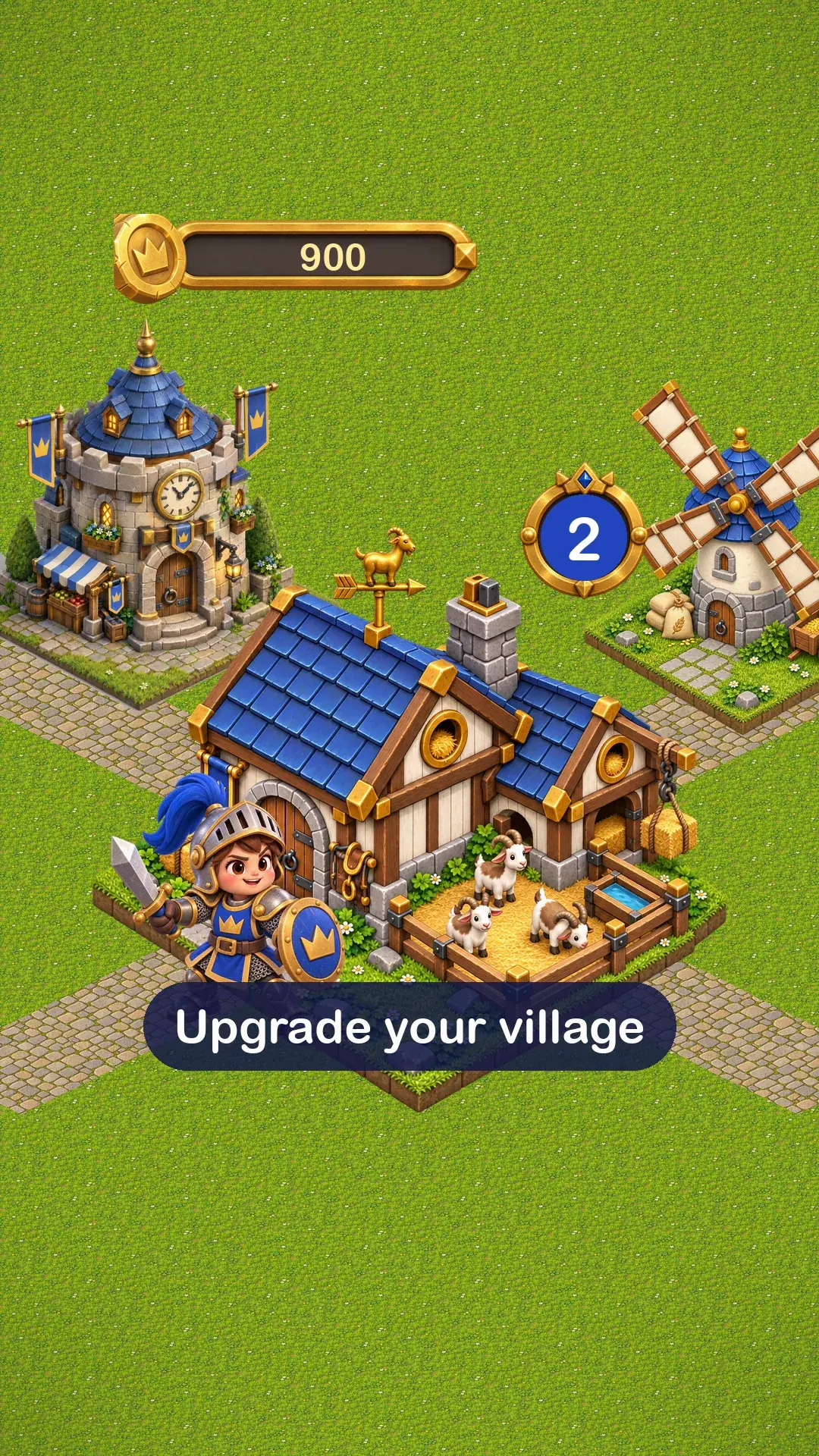
Body: real buildings, UI and coins, animated in code. -
Build the end card: the PIPSQUEEN title set in code, "Build your kingdom", a "Pre-register" button made from the kit's three-slice button, and one availability line. The call to action matches what the game offers at that moment.
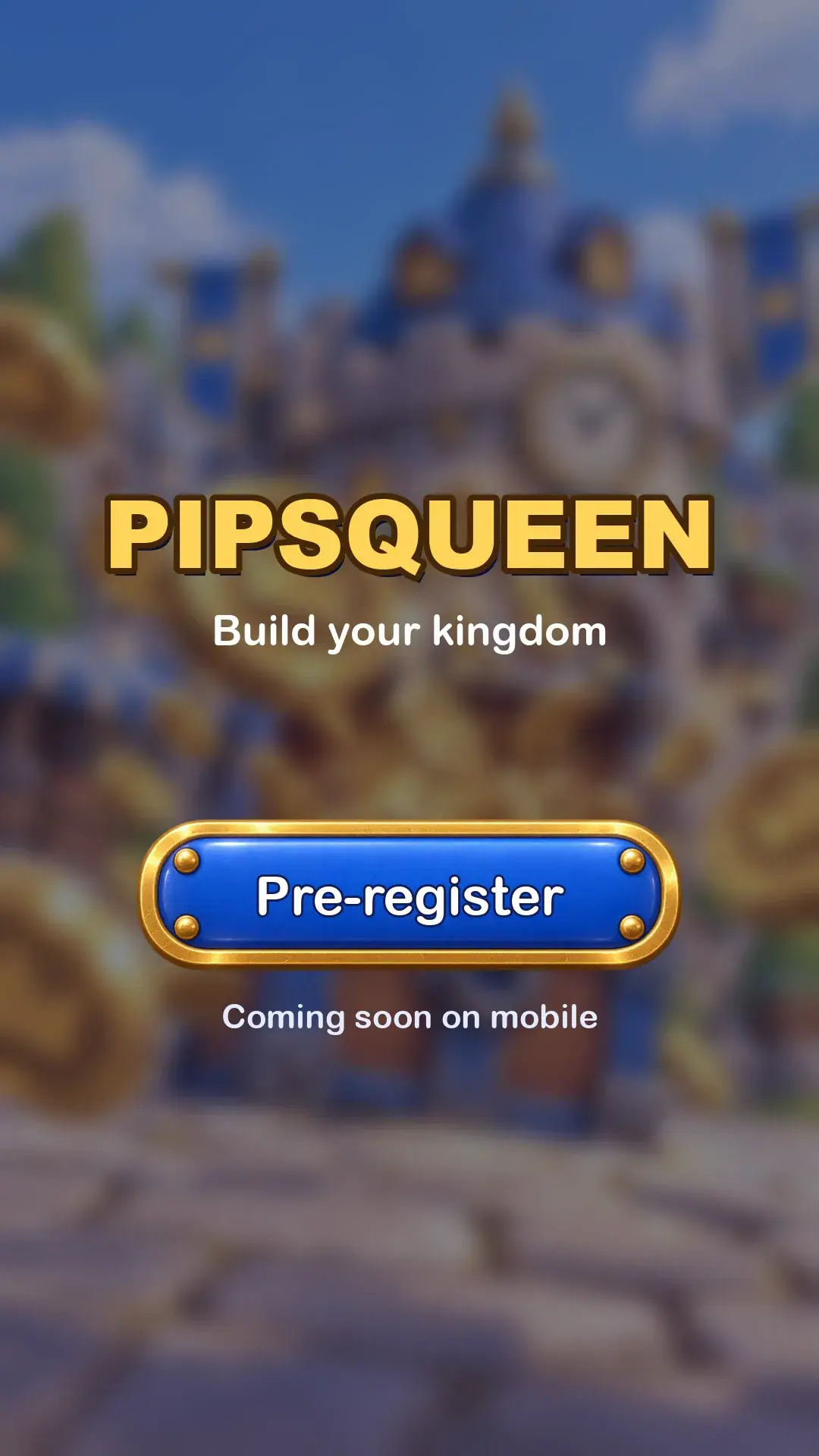
End card: title, button and line set in code. -
Assemble each variant. Conform the clips to 1080x1920 at 30 fps. Trim each hook to its first 3.8 seconds, overlay its caption ("Charge into battle!", "Open the royal treasury"), then join hook, body and end card. Mix the music loop under everything, the whoosh on the first frame, a coin on each coin landing and on the upgrade, a click on the tap and on the button press. Export H.264 with AAC.
-
Check each variant on a phone-sized preview with sound off. The story must read from images and captions alone. Then run speech-to-text on each hook alone: MiniMax H3 adds its own sound, and hook A's takes came with spoken battle cries ("For victory!", "Charge forward and attack!"). The ad replaces all hook audio with the mix.
With the Scenario MCP: run model_minimax-h3 with firstFrameImage, duration: 5, resolution: "768P" and wait: false for each hook, then one jobs_wait. A first frame from your own disk goes through upload_asset first.

Watch the video: https://ufgc0c9mhl4ueq76.public.blob.vercel-storage.com/academy/f0b2cac050766bf207726b17576b186b0bf0da35ba6fd60d92db7e14e77da3f5.mp4
Check the result
motion starts in the first frame; the character or prop keeps its design through the clip; hands and faces are intact in every frame; captions never cover a face; the body shows real buildings, UI and items from the game; the call to action matches what the store page offers.
the hook morphs the character or prop, a prop smears across a face, motion runs backward, a caption sits in a platform's interface zone, or the body shows a feature that is not in the game.
- Hook A, take 1, rejected. The queen swings her scepter across her face; around 1 to 2 seconds the scepter turns into a smear and her face disappears behind it.
- Hook A, take 2, kept. The prompt now keeps the scepter above her crown and her face visible. Face, crown, cloak and the goat's horns hold for all 5 seconds.
- Hook B, kept on the first run. Coins burst toward the lens and settle on the cobblestones; the coin design and the keep hold.
Captions sit at about 68 to 73 percent of the height, above the bottom interface zone and below the faces in both hooks.
1Where does a caption go in a 9:16 ad, for the feed and the stories placement?
Answer: B. Captions stay outside the top 15 percent and bottom 20 percent, where the platform's interface sits. In this run they sit at about 68 to 73 percent of the height.
2Two takes of hook A, each paused at 2 seconds. Which hook goes into the ad?
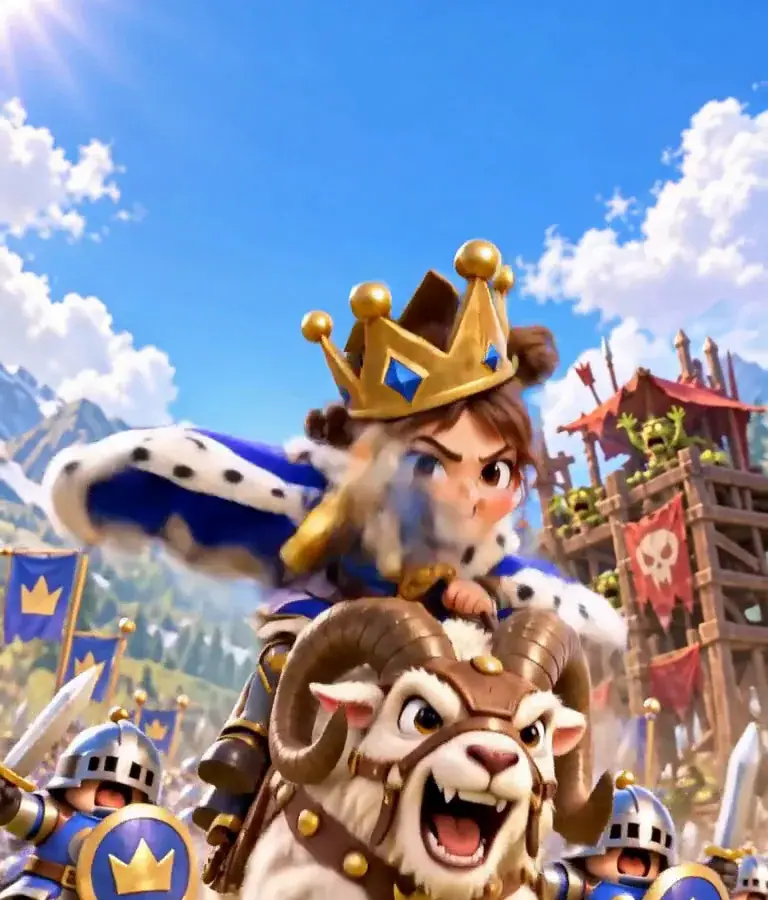
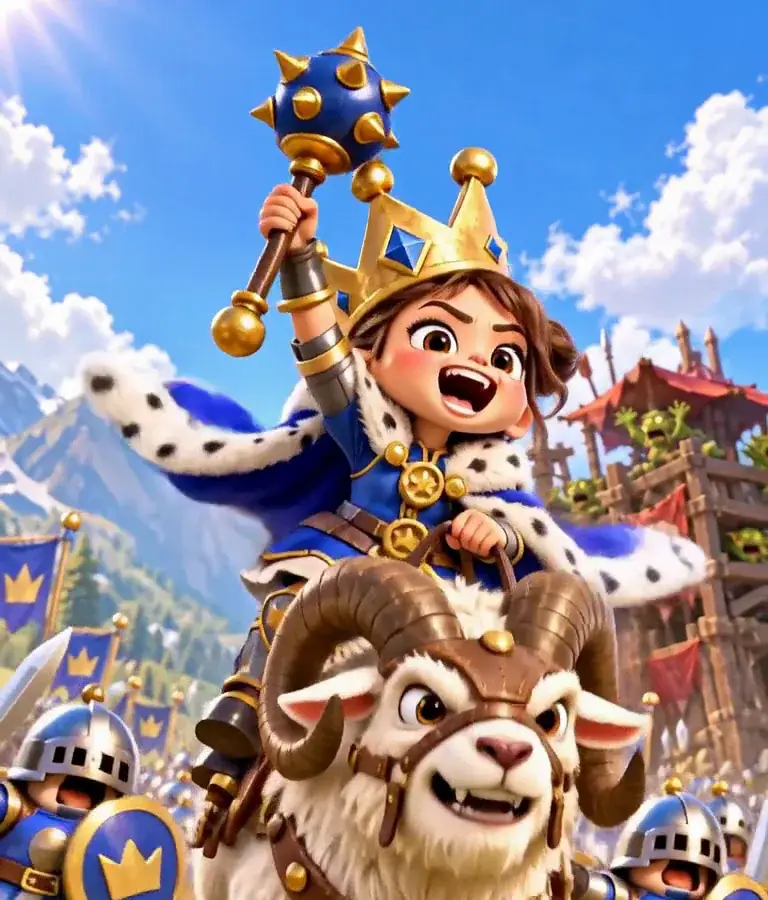
Answer: C. A prop that smears across a face is on the Reject list, and in a 4-second hook there is no room to trim around it. Take B keeps the scepter above her crown because the prompt says where it stays.
Make it repeatable
- A hook library. Each hook clip with its first frame and prompt in a collection; each round adds two to four hooks.
- One assembly script. This run's Python script draws the body and end card and calls ffmpeg to join hook, caption, body and end card with audio cues at fixed offsets; a new variant is one line with a new hook file and caption.
- Localization. Captions, counter and end card text are code: translate, re-run the script. For still ads, the Gaming Ad Localizer App under Workflows, Apps adapts ad copy by country.
- Approval. Route each new hook through an Approval node (identity, hands, faces, motion direction) before it joins an assembly (Approval and review steps).
Runs and time
| Step | Model | Runs | Wait |
|---|---|---|---|
| Hook A and hook B first frames, 9:16 | GPT Image 2.5 Sunburst, 2 references each | 2 | about 42 s each, in parallel |
| Hook A (2 takes) and hook B, 5 s, 768P | MiniMax H3 | 3 | about 191 s, 231 s and 171 s |
| Body, captions, end card, mix | Pillow and ffmpeg | 0 | about 40 s on a laptop |
Five runs, about 8 minutes of wait. The three hook takes are nearly all the cost; the music and sound effects were reused from earlier runs, including Game trailer cinematic.
Variations
- More hooks per round: a failure hook (the stable roof collapses), a satisfying hook (a full row of upgrades), a character close-up, the body fixed.
- Test a concept before you build it: three or four rough hooks on different themes from quick stills; produce the full ad only for the winner. Show only what the game offers or will offer.
- Creator-style ads: a person-to-camera format for the same test (A creator-style product video).
- Square and landscape placements: reframe the first frame and re-animate, or crop to 4:5 if the subject stays centered (Make every format from one master).
- Playable ads: same sprites, UI and sounds.
- Non-game apps: hook, product demo and end card fits any mobile app ad.
- Finishing the winner: re-generate it with Seedance 2.5 at a higher resolution from the same first frame and prompt.
If it breaks
- The character changes during the hook. Shorten the motion described, keep "Keep her face... exactly as in the first frame", and trim before the drift starts.
- A prop crosses the face. Say where the prop stays ("raised high above her crown the whole time") and that the face stays visible.
- The hook comes with speech. MiniMax H3 generates its own audio; mute the hook track or replace it with your mix, and check it with speech-to-text.
- The prop flies backward. Say which side leads ("front face first") and check the direction frame by frame; reversing the clip in the editor costs nothing.
- Captions cover the subject. Plan a clear caption band in the first frame, or move the caption per hook.
- The hook is strong but the ad underperforms. Test the body and end card separately, and rule out a gap between what the hook promises and what the body shows.