

A presenter video, localized for other markets
A short presenter video with a consistent invented host (portrait, voice, lip sync), then dubbed into another language with lips re-synced and subtitles set in code. Two shoot-outs, checked with frames and transcripts.
- Playbook
Run it in ScenarioGPT Image 2.5 Sunburst ElevenLabs v4 Minimax H3 Max Lip Sync Omni Human 1.5 HeyGen Video Translate Precision Sync-3 Lipsync

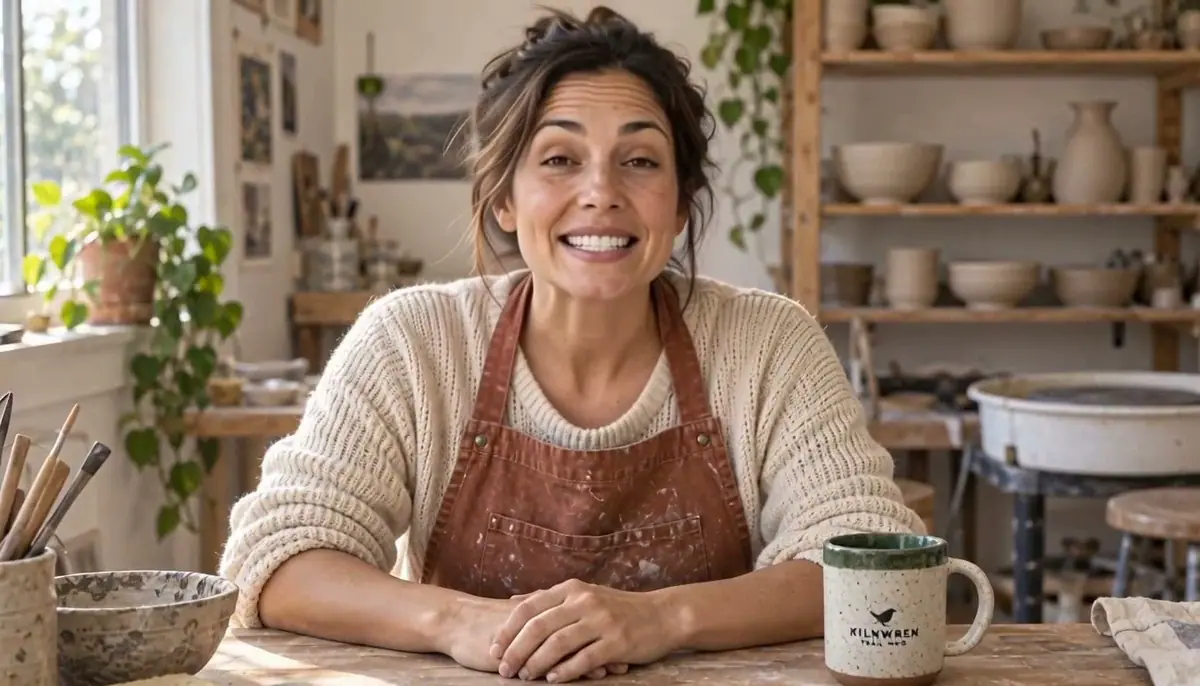
A 13-second presenter video, then the same video for another market. An invented host in a pottery studio speaks a script about the product on the bench, lips in sync, label intact; then a Spanish version carries a translated voice, re-synced lips and the product name spelled right in subtitles placed clear of the product. For marketing and learning teams who need the same host in every short video, without a shoot, and who check each market's version before it ships.
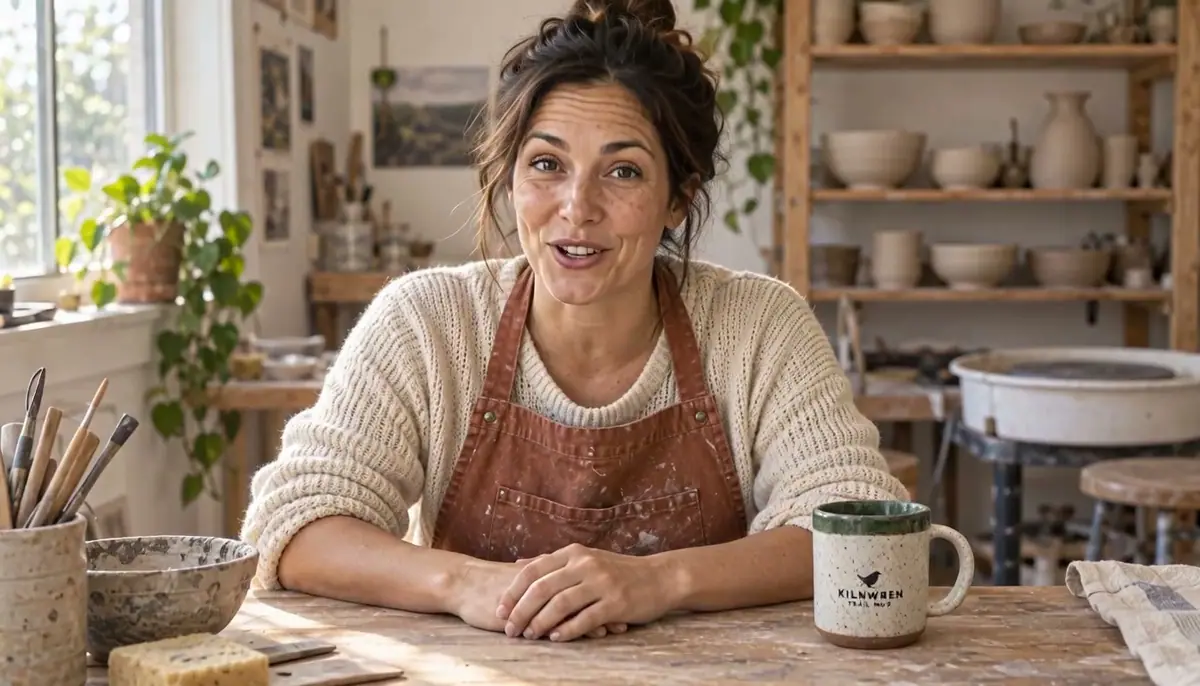
Watch the video: https://ufgc0c9mhl4ueq76.public.blob.vercel-storage.com/academy/dff0a2d075baa22aad1712ece8022349f5f50b71a63eae9df218fffbb5b78b1a.mp4
The brief
| Field | Part 1: the presenter video | Part 2: the Spanish version |
|---|---|---|
| Goal | A 10 to 15 second product intro, spoken by a recurring host | Spanish (Spain), same length, burned-in subtitles |
| Source | Invented potter, late 30s, canvas apron, studio setting, the mug on the bench in front of her | The 13.3 s English presenter video from Part 1, one speaker |
| Script | "Every Kilnwren Trail Mug is made by hand, right here in this studio. It's fired hot enough for cold campsite mornings, and each green rim is glazed one mug at a time. Take it wherever you wake up early." | Translated by the model, or written by hand and approved |
| Format | 16:9, 720p or better, voice included | Same as the source |
| Fixed | The host's face and features, the mug and its label | The picture (face, set, product), the product name "Kilnwren", the meaning of every sentence, the total length |
| May vary | Small head and hand movement, blinking | Exact wording, as long as a native speaker would say it |
| Accept when | Every word audible and in sync; face identical from first to last frame; label readable when visible; normal hands | Every word heard as written in the approved Spanish text; lips in sync; subtitles match the audio and never cover the label |
The product is the Kilnwren Trail Mug from Clean packshots. Part 2 translates the finished English video; the same steps localize any finished video with one clear speaker.
Approach
The video: portrait, voice, lip sync
- 1PortraitGPT Image 2.5 Sunburst, packshot reference
- 2VoiceElevenLabs v4 from the exact script
- 3Lip syncMinimax H3 Max Lip Sync, 768P
- 4ComparisonOmni Human 1.5, same inputs
- 5CheckFrames, label crop, transcript
Build the video in three parts and approve each before paying for the next: the portrait (cheap), the voice track (cheap), then the lip sync (expensive).
A flaw in the portrait or a mispronounced word is cheap to fix at its own stage, and costs a full lip-sync run once it is baked into a video. This is Repair at the cheapest stage applied to talking video.
- Portrait: a still image with the host's look fixed and the product on the bench in front of her, label facing the camera. Ask for a straight-on, eye-level framing, mouth closed and relaxed hands resting on a surface: what is calm in the portrait tends to stay calm in the video.
- Voice: text to speech from the exact script, so you control the wording and the length.
- Lip sync: a model that animates the portrait to the audio.
Talking-avatar models differ in how much they move the body, and movement is where product labels and hands break. Compare two on the same portrait and audio before committing, and check both with frames and a transcript (Compare models on your brief).
Models, as of October 2026:
- Capabilities: image to image with a reference, text to speech, image plus audio to video.
- Models used: GPT Image 2.5 Sunburst (portrait), ElevenLabs v4 (voice), and a shoot-out of Minimax H3 Max Lip Sync against Omni Human 1.5.
- Another candidate: Kling AI Avatar 2 (Pro). See Lip sync and talking avatars.
The other markets: one step or voice first
- 1One-step translateHeyGen Video Translate Precision, Spanish
- 2Or voice firstElevenLabs v4 from an approved script
- 3Lip syncSync-3 Lipsync to the new voice
- 4Transcript checkWhisper against the approved text
- 5Subtitles in codeName corrected, clear of the product
- 6Native readOne listen before publishing
There are two ways to localize a talking video, and they trade control for effort:
| One-step translate | Voice first, then lip sync | |
|---|---|---|
| How | One model translates, clones the voice and re-syncs the lips | You write the translation, generate the voice, then lip sync the video to it |
| Control of wording | The model translates | You choose every word |
| Steps | 1 | 3 (script, voice, lip sync) |
| Length | Kept to the source | Follows the new audio |
Run both once on your own content and keep the one whose results you can approve with less work (Compare models on your brief).
Then check every version the same way: a transcript against the approved text, frames for the mouth and face, and subtitles set in code, never trusted as generated (Let code own what must be exact).
Brand and product names are the weak point of every speech model: they are not in any dictionary. Plan to check them by ear and to fix them in the subtitles yourself.
Models, as of October 2026:
- Capabilities: video translation with voice cloning and lip sync, or text to speech plus video lip sync.
- Compared: HeyGen Video Translate Precision against ElevenLabs v4 plus Sync-3 Lipsync.
- Faster for long batches: HeyGen Video Translate Speed. See Dub and translate video.
Steps
Part 1: the presenter video
-
Make the host portrait (Approve the still first). Create > Images, GPT Image 2.5 Sunburst, the packshot in Reference Images, Dimensions 1536x864 (16:9), Quality
high. The mug stands on the bench rather than in her hands, so the video has less reason to move it:PromptPhotoreal medium shot of a woman in her late 30s, warm olive skin, dark brown hair tied back loosely, a few loose strands, light freckles, no makeup look. She wears a faded rust-colored canvas work apron over a cream knit sweater with sleeves pushed up. She sits at a wooden pottery workbench in a small sunlit ceramics studio; behind her, softly out of focus, wooden shelves with a few unglazed bowls and a potter's wheel. On the bench in front of her, at the lower right, stands the exact mug from the reference image with its printed wren logo and the words KILNWREN and TRAIL MUG facing the camera. Waist-up framing, straight-on, eye-level, camera on a tripod in front, she looks directly into the lens, mouth closed with a calm friendly expression, both hands resting relaxed on the bench, five normal fingers each. Soft window daylight from the left, natural skin texture, 35mm photo. Not a selfie, no arm toward the camera, no side profile, no other text or logos.Check the face, both hands and the label at 1:1 before going further.
-
Record the voice (Lock a voice per character). Create > Audio, Choose a Model > Audio > Speech, ElevenLabs v4. Paste the script, pick a voice (the run used Sarah, stability 0.5, similarity 0.75) and generate. It returned 13.28 seconds. Listen once for pronunciation of the product name; respell it phonetically in the script if needed.
-
Run the lip sync (Run a lip-sync pass). Create > Videos, Choose a Model > Video > Lipsync, Minimax H3 Max Lip Sync. Set the portrait as the image and the voice track as the audio, resolution
768P. No prompt is needed. It finished in about 35 seconds. -
Run the comparison take (Run a same-input shoot-out). Same portrait and audio on Omni Human 1.5 (about 6 minutes). Skip this step once you have chosen a model for your host.
-
Check both with frames and a transcript. Extract 6 frames per video into one contact sheet, plus a close crop of the mug. Transcribe the audio of each video with whisper and compare it with the script word by word.
-
Keep the host kit. Save the approved portrait, the voice settings and the chosen model in one collection. Every later video for this host starts from the same portrait.
With the Scenario MCP: model_run on model_elevenlabs-tts-v4 for the voice, then model_run on the lip sync model with image and audio set to the two asset ids.
Quote every video job with dry_run: true first (see Quote before you run): in this run the two lip sync takes cost more than everything else combined.
Part 2: the Spanish version
-
Translate in one step. Create > Videos, open Choose a Model, select Video and search for HeyGen Video Translate Precision. Set the source video, the output language
Spanish (Spain), one speaker, and dynamic duration off so the length stays at 13.3 seconds. It took about 2.5 minutes. The result includes a subtitle file. -
Or write the translation yourself (Localize the script first). For the comparison, the Spanish script was written by hand:
TextCada Kilnwren Trail Mug se hace a mano, aquí mismo, en este taller. Se cuece a alta temperatura para las mañanas frías de acampada, y cada borde verde se esmalta taza a taza. Llévala allí donde madrugues.Create > Audio, Choose a Model > Audio > Speech, ElevenLabs v4, the same voice as the English source (Sarah, stability 0.5, similarity 0.75). It returned 14.8 seconds: 1.5 seconds longer than the source.
-
Lip sync the source to the new voice (Run a lip-sync pass). Choose a Model > Video > Lipsync, Sync-3 Lipsync, with the English video and the Spanish audio. The audio is longer than the video, so pick how the model fills the gap; the run used
bounce(the video plays forward, then backward). It took about 4.5 minutes. -
Transcribe both results with whisper and compare them word by word with the approved Spanish text. Extract 6 frames from each into a contact sheet and check the mouth shapes and the face.
-
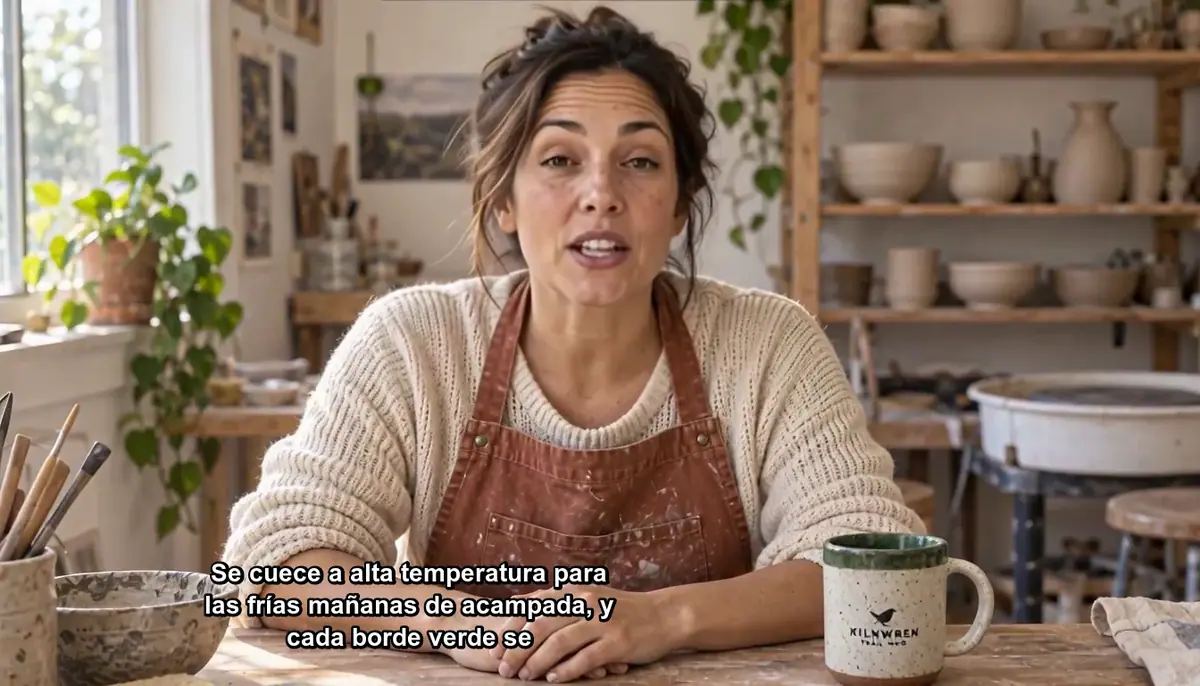
Fix the subtitles in code (Do the exact part in code). Open the subtitle file, correct the product name and line breaks, and burn it in with your own font, size and position. Check one frame per subtitle line against the product: in this run the first burn ran a long line across the mug label, so the lines were shortened and moved left of the mug.
-
Get a native read. Before publishing, a native speaker listens once. A transcript proves the words; only a native ear judges the tone.
With the Scenario MCP: model_run on model_heygen-v2-translate-precision with the video, outputLanguage: "Spanish (Spain)", speakerNum: 1 and enableDynamicDuration: false. For the second method, model_elevenlabs-tts-v4, then model_sync-lipsync-v3 with syncMode.
Quote both with dry_run: true (see Quote before you run): in this run both quotes matched the bills.
Check the result
The presenter video
the transcript matches the script (names aside); the lips close on m, b and p sounds; the face, freckles and hair match the portrait in the first and last frame; the label reads correctly whenever it faces the camera; hands keep five fingers and the mug keeps its handle.
the face changes over the clip; accessories appear that were not in the portrait; the label turns into pseudo-letters when the product moves; the voice is cut or stretched; the mouth keeps moving after the audio ends.
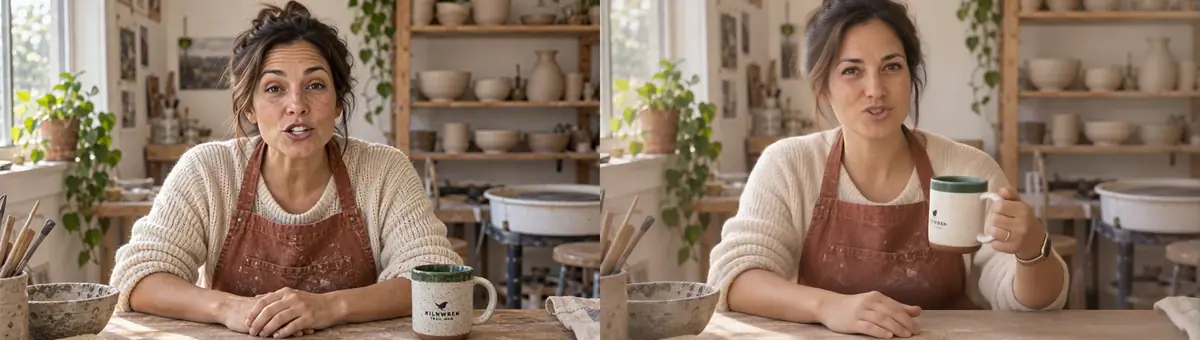
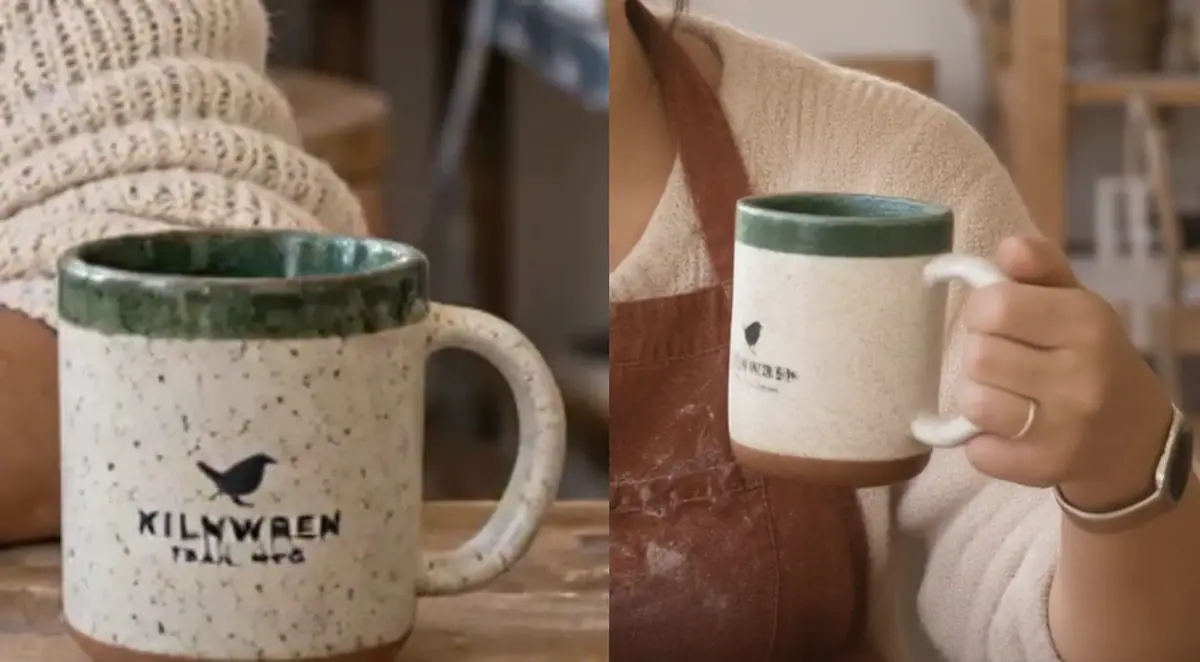
| Minimax H3 Max Lip Sync (winner) | Omni Human 1.5 (runner-up) | |
|---|---|---|
| Output | 1344x768, 13.3 s | 1920x1088, 13.5 s |
| Price and wait | Lower, about 35 s | Higher, about 6 min |
| Lip sync | Clean; transcript matches | Clean; transcript matches |
| Identity | Face and freckles stable | Freckles lost; a ring and a smartwatch added |
| Product | Mug stays on the bench, label intact; small "TRAIL MUG" text slightly soft | Picked up the mug unasked, label garbled, handle deformed |
| Body | Calm, small head movement | Natural gestures, more alive |
Omni Human gives the livelier performance, which suits a host without a product. With a labeled product in hand, its movement is the risk.
Both transcripts matched the script; whisper wrote the invented brand as "Kilnren". Transcription tools misspell invented names, so check names by ear.
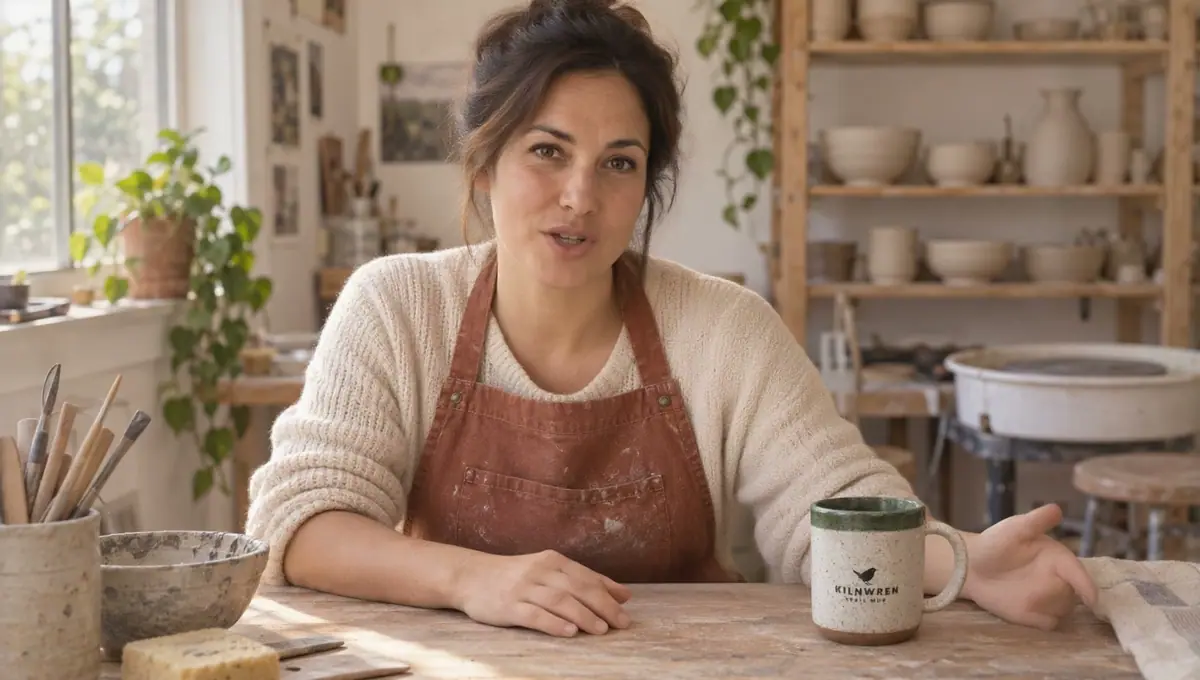
Watch the video: https://ufgc0c9mhl4ueq76.public.blob.vercel-storage.com/academy/ffcdb6e9c3f1b5744287ad83061dcb574e7fc94c4f2b8117bc551925ca7eaa9f.mp4
The Spanish version
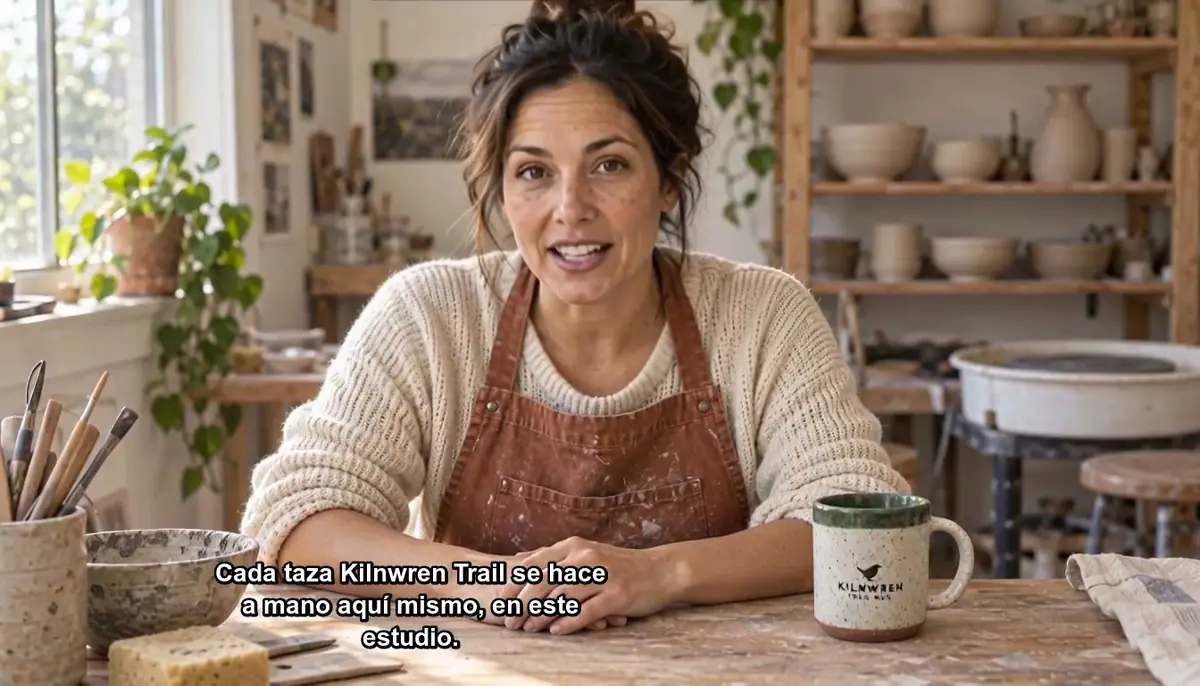
Watch the video: https://ufgc0c9mhl4ueq76.public.blob.vercel-storage.com/academy/e311c2aec5c8723f48b9978dafa007f0bf61f8c060f43fee3dc630e2485024e9.mp4
the transcript matches the approved text except for names you checked by ear; the lips close on m, b and p; the face and product stay as in the source; the subtitles say exactly what is heard, with the product name right, and never cover the label or the face.
a sentence is missing or changed in meaning; the mouth freezes or keeps moving without sound; the product name is mispronounced; subtitles carry the model's spelling of the name; the version runs longer than its slot.
What the run found:
| HeyGen Video Translate Precision (winner) | ElevenLabs v4 + Sync-3 (runner-up) | |
|---|---|---|
| Runs and wait | 1 run, about 2.5 min | 2 runs, about 5 min; the lip-sync run alone cost more than the one-step translation |
| Length | 13.3 s, same as source | 14.8 s, longer than source |
| Wording | Its own translation, natural, close to the source | Exactly the approved text |
| Mouth | Natural throughout | Good, but the last 1.5 s (the bounce) is weaker, mostly a fixed smile |
| Voice | Cloned from the source by the model (its listed feature) | The same stock voice as the English source |
| Product name | Heard from the English audio and spelled "Kilnren" in its subtitles | Pronounced from the script; whisper heard "Kilnwerne" |
HeyGen's own translation was good ("Cada taza Kilnren Trail se hace a mano aquí mismo, en este estudio..."), but its subtitle file spelled the brand as it heard it. The subtitles were corrected to "Kilnwren" before burning in.
Sync-3 is the right choice when legal or brand teams must approve every word in advance; the price is a longer, costlier version.
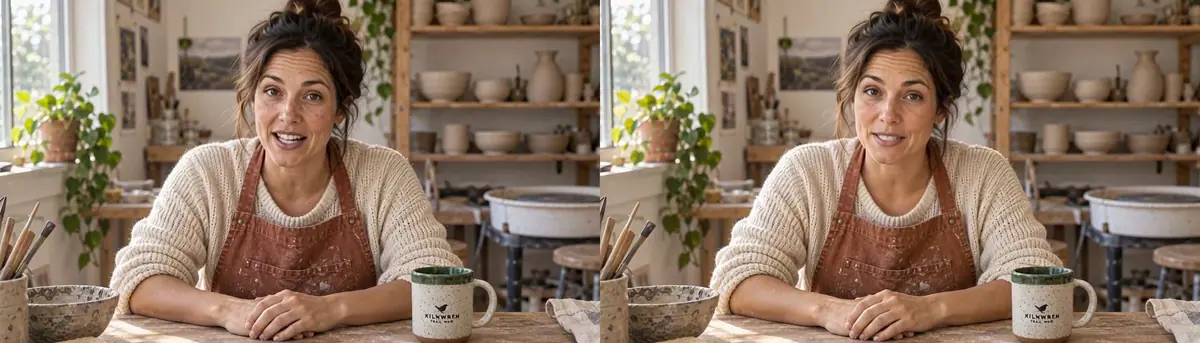
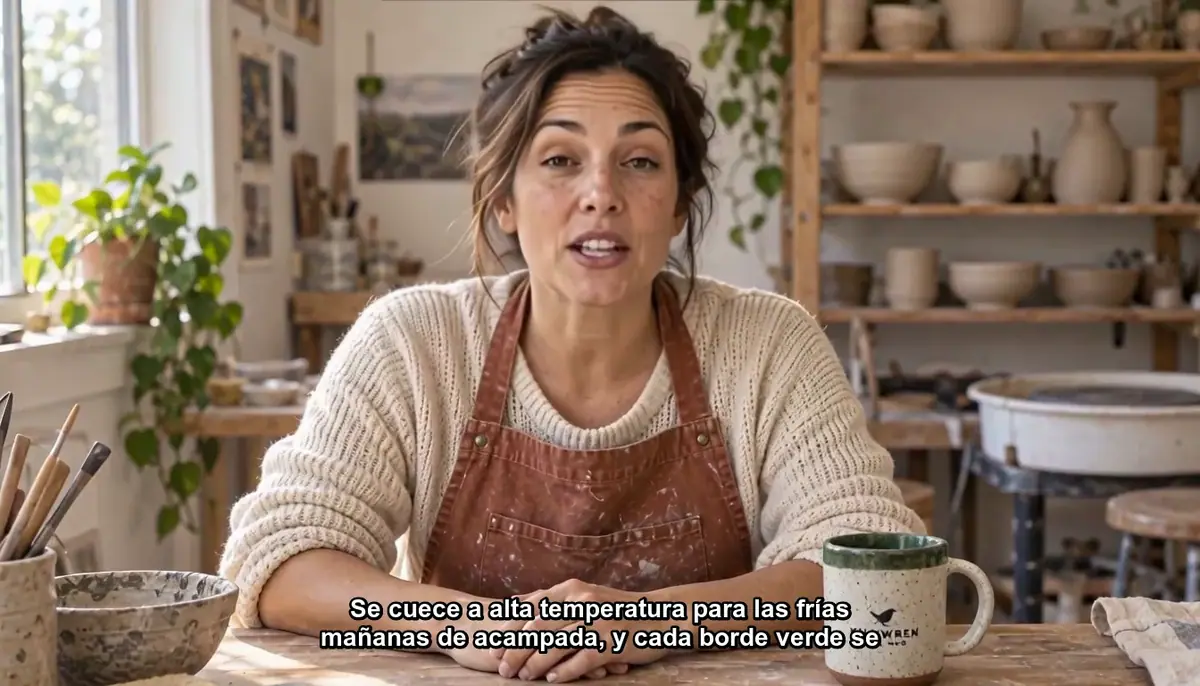 Rejected
Watch the video: https://ufgc0c9mhl4ueq76.public.blob.vercel-storage.com/academy/1e133df1b43e9cccaf0823159a93abb517cf2a422db2c49ea50ba7891fa10cfd.mp4
1Same portrait, same voice track, two lip-sync models. The brief keeps the host's face fixed and the mug label readable. Which take do you keep?
Answer: A. Movement is where labels and hands break. In Take B the lifted mug's label turned into pseudo-letters, and a ring and a smartwatch appeared.
2The voice track mispronounces the product name. The lip sync has not run yet. What do you do?
Answer: B. Fix words at the voice stage, where a new take is cheap. Once the word is baked into the video, it costs a full lip-sync run.
3Two burns of the Spanish subtitles on the same frame. Which one ships?
Answer: A. The brief says subtitles never cover the label or the face. Shorten the lines and move them in your burn script, then check one frame per line.
4The one-step translation sounds right, but its subtitle file spells the product "Kilnren". What do you do?
Answer: B. Models spell brand names as they hear them, so this is normal output. Subtitles are set in code from the corrected file, never trusted as generated.
Make it repeatable
- A host kit per presenter: approved portrait, voice id and settings, chosen lip sync model, and the prompt used. New scripts reuse all of it.
- A language sheet per video (Keep sources as data): language, approved text (from the model or from a translator), product names with their pronunciation, subtitle position, reviewer. Each row is one version.
- Build it as a workflow (Package it as a workflow or skill). In the Node Editor:
- The video. The approval stops the expensive step when the voice is wrong. An Image input (
Host portrait) and a Text input (Script); an Audio Generator on ElevenLabs v4 fed by the script; an Approval node after the audio (Approve only if every word is pronounced correctly.); a Video Generator on Minimax H3 Max Lip Sync with the portrait and the approved audio. - The languages. A Video input (
Source video), a Text input (Output language), a Video Generator on HeyGen Video Translate Precision, and an Approval node withApprove only after the transcript check and a native listen.Use a Loop over a list of languages to make all versions in one run.
- The video. The approval stops the expensive step when the voice is wrong. An Image input (
- Several portraits for variety. Generate two or three portraits of the same host from the first one as a reference (different framing or set), and approve them once.
- Check with code. A script that extracts frames and runs whisper on each new video.
- Subtitles stay in code. Keep the corrected subtitle files with the videos and burn them with one script, so font, size and safe area are identical in every language.
- Write names for the ear. For voice-first localization, respell brand names phonetically in the script (for example "Kiln-wren") and keep the correct spelling for the subtitles only.
Runs and time
Part 1: the presenter video
| Step | Model | Runs | Wait |
|---|---|---|---|
| Host portrait | GPT Image 2.5 Sunburst, high | 1 | about 40 s |
| Voice track, 13.3 s | ElevenLabs v4 | 1 | about 10 s |
| Lip sync, kept | Minimax H3 Max Lip Sync, 768P | 1 | about 35 s |
| Lip sync, comparison | Omni Human 1.5 | 1 | about 6 min |
The lip-sync runs carry most of the cost; once the model is chosen, each new script is one voice run plus one lip-sync run, and shorter scripts cost less.
Part 2: the Spanish version
| Step | Model | Runs | Wait |
|---|---|---|---|
| Spanish, one step | HeyGen Video Translate Precision | 1 | about 2.5 min |
| Spanish voice | ElevenLabs v4 | 1 | about 10 s |
| Lip sync to the voice | Sync-3 Lipsync, bounce | 1 | about 4.5 min |
| Transcripts, frames, subtitles | whisper, ffmpeg, ImageMagick, local | 4 | about 1 min |
The lip-sync run carries most of the cost of the second method; with the winning method, each extra language is one translation run. The price shows on the Generate button before you run; through the Scenario MCP, ask for a dry-run quote.
The English source video is from Part 1 and is not counted again.
Variations
- Learning: one host per course, one short video per lesson, with subtitles generated from the script. Localize each lesson video and keep the subtitles as a separate file as well, for accessibility.
- Product launches: put the product in the host's hands only if your chosen model keeps it still; otherwise leave it on a surface or show it in a cutaway shot.
- Social ads: translate the 15 second cut, not the long version; shorter sources mean cheaper and easier checks.
- Regulated wording: use the voice-first method so legal approves the exact text before any video is made.
- Games: an in-world character delivers patch notes; use a stylized portrait and test lip sync on it, since some models are tuned for photoreal faces. To localize a character trailer, go line by line; keep music and effects on a separate track and mix them back after the dub.
- Many languages: run the one-step method for all, then hold only the versions whose transcript check fails for a voice-first redo.
If it breaks
- The face drifts over the clip. Start from a sharper, front-facing portrait with the mouth closed and even light; avoid strong side shadows on the face.
- The product label garbles. The model moved the product. Use a calmer model, have the hands rest on a surface in the portrait, or leave the product out of the talking shot.
- Extra accessories appear. The model fills in what it expects of a person. Describe hands and wrists as bare in the portrait prompt and choose the model that kept them bare.
- Words are wrong or missing. Fix the voice track, not the video. Approve the audio before running the lip sync.
- The mouth moves out of sync at the end. The audio has silence or noise after the last word. Trim it before the lip sync step.
- The product name is wrong in the audio. For one-step translation, re-record the English source with clear pronunciation; for voice first, respell the name phonetically in the script.
- The product name is wrong in the subtitles. Expected: models spell names as they hear them. Correct the file before burning.
- The new version is longer than the source. Turn off dynamic duration in the translate model, or shorten the translated text and regenerate the voice.
- The mouth freezes near the end. The audio is longer than the video and the model is filling the gap. Trim silence or tighten the script so the audio fits.
- Subtitles cover the product or the face. Shorten lines and move them in your burn script; check one frame per line.