

Place a real product in lifestyle scenes
Put one real product into several believable scenes with matching light, while the wordmark and shape stay exact. Includes a failed angle and its fix.
- Playbook
Run it in ScenarioGPT Image 2.5 Sunburst
Four lifestyle images of the same real product, each in a different setting, with the wordmark readable and the shape unchanged. For e-commerce and brand teams who need scenes for product pages, social posts and ads without a location shoot.
The brief
| Field | Brief |
|---|---|
| Goal | Four lifestyle scenes for the product page and social posts |
| Product | The Vireo Apex, from the white packshot |
| Format | 3 landscape scenes at 1536x1024, 1 portrait at 1024x1536 |
| Fixed | Shape and proportions, molten orange knit upper with dark flecks, sculpted heel collar, white flat laces, the small VIREO wordmark on the outer heel, the thick translucent ribbed sole with the dark carbon stripe, outer side facing the camera |
| May vary | Setting, props, light, camera height |
| Accept when | VIREO reads letter for letter at 100 percent; the shoe's proportions match the packshot; the contact shadow agrees with the light; no readable text, logo or recognizable building anywhere else |
The white packshot from Clean packshots from a real product photo is the only product reference. The entryway image is the base of Edit one thing per campaign. The campaign master used in Ad variations and Formats from one master is a separate approved image of a runner on the same track at blue hour.
Approach
- 1PackshotThe only product reference
- 2Keep-listWritten once, pasted verbatim
- 3ScenesGPT Image 2.5 Sunburst, wordmark side to camera
- 4Check at 100%Wordmark, proportions, fingers, background
- 5File keepersCollection, edit base noted
Generate every scene from the packshot, never from a previous scene: a scene made from another inherits its drift, and drift compounds. See Decide what stays fixed. Write the prompt in two parts and keep the first identical every time:
- The keep-list (Write a keep-list), written once from the packshot: shape, upper, heel collar, laces, wordmark and where it sits, sole.
- The scene: place, props, light, camera, and two physical cues that seat the product in it (a contact shadow, a reflection, droplets).
The reference has one job, the product, and the prompt says so (Give references a role). Ask for the outer side with the wordmark facing the camera every time.
Models, as of October 2026:
- Model used: GPT Image 2.5 Sunburst at high quality, image to image with one reference. It held the wordmark in every scene where the outer side faced the camera.
- Cheaper for drafts: GPT Image 2.5 Flare; check its wordmarks closely.
- Exact product pixels: Pixelcut Product Photo with an image background, with less natural light.
Steps
-
Open the image panel. Create > Images, model GPT Image 2.5 Sunburst. Under Reference Images, choose Select from Library and pick the white packshot. Under Settings, set Image Count to 1, Dimensions to 1536x1024 and Quality to
high. -
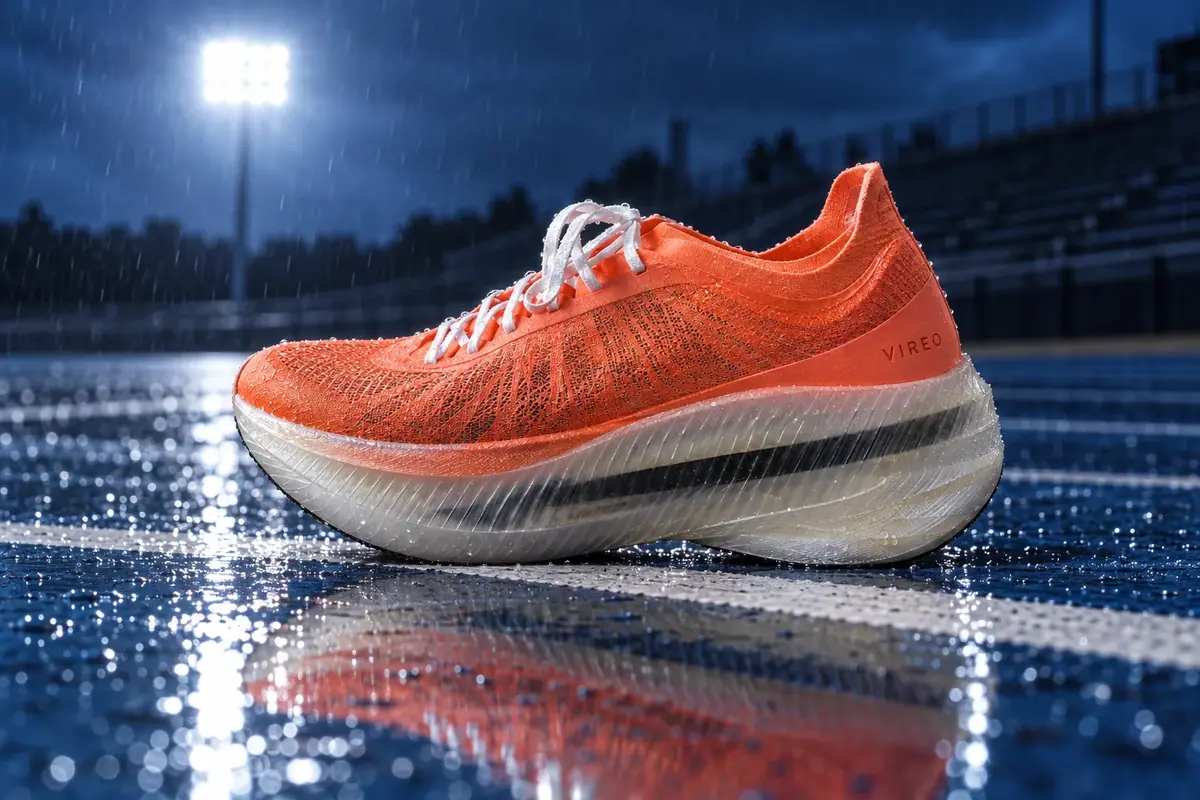
Generate the track scene.
PromptThe exact shoe from the reference image, with its shape and proportions, molten orange engineered mesh upper with fine dark fiber flecks, sculpted orange heel collar, white flat laces, the small spaced VIREO wordmark printed in darker orange on the outer side of the heel, and the thick translucent milky-white ribbed midsole with the black carbon plate showing through it as a dark stripe, unchanged, standing on the white lane line of a wet blue running track at blue hour. Rain droplets beaded on the track surface, a stadium floodlight glowing behind, out of focus, the empty bleachers dark. Low side view at shoe height, the outer side of the shoe with the VIREO wordmark facing the camera and sharp. Hard cool rim light from the floodlight, a crisp reflection of the shoe in the wet track, soft contact shadow under the sole. Style: global sportswear campaign photography: hard light, motion, deep shadow falloff, medium-format clarity. -
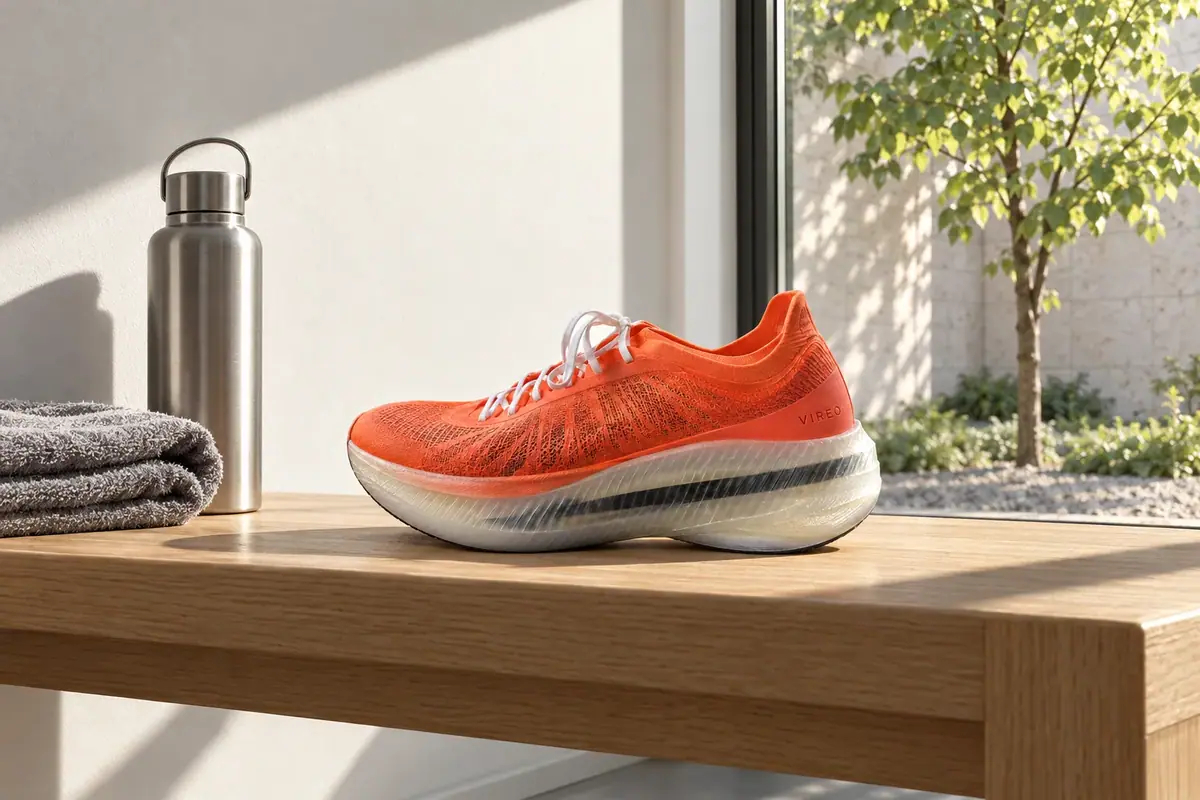
Generate the entryway scene (Batch from a template). Same reference and settings, new scene. The first version asked for "city rooftops and a clear sky" in the window and came back with a skyline whose tallest tower resembled a real landmark: rejected. The kept version names a courtyard and rules the skyline out:
Prompt[same keep-list sentence], standing on a long pale oak bench in a calm, minimal apartment entryway in the morning. A folded grey towel and a brushed steel water bottle sit on the bench to the left of the shoe. Behind the bench, a large plain window on the right half of the frame looks onto a quiet inner courtyard with one young linden tree in summer leaf and a pale stone wall; no buildings, no skyline. Low morning sun comes through the window from the right. Plain white wall on the left, nothing hanging on it. Side view at bench height, the outer side of the shoe with the VIREO wordmark facing the camera and sharp. Hard window light with deep shadow falloff, soft contact shadow under the sole on the oak. No text anywhere except the VIREO wordmark. Style: global sportswear campaign photography: hard light, deep shadow falloff, medium-format clarity. -
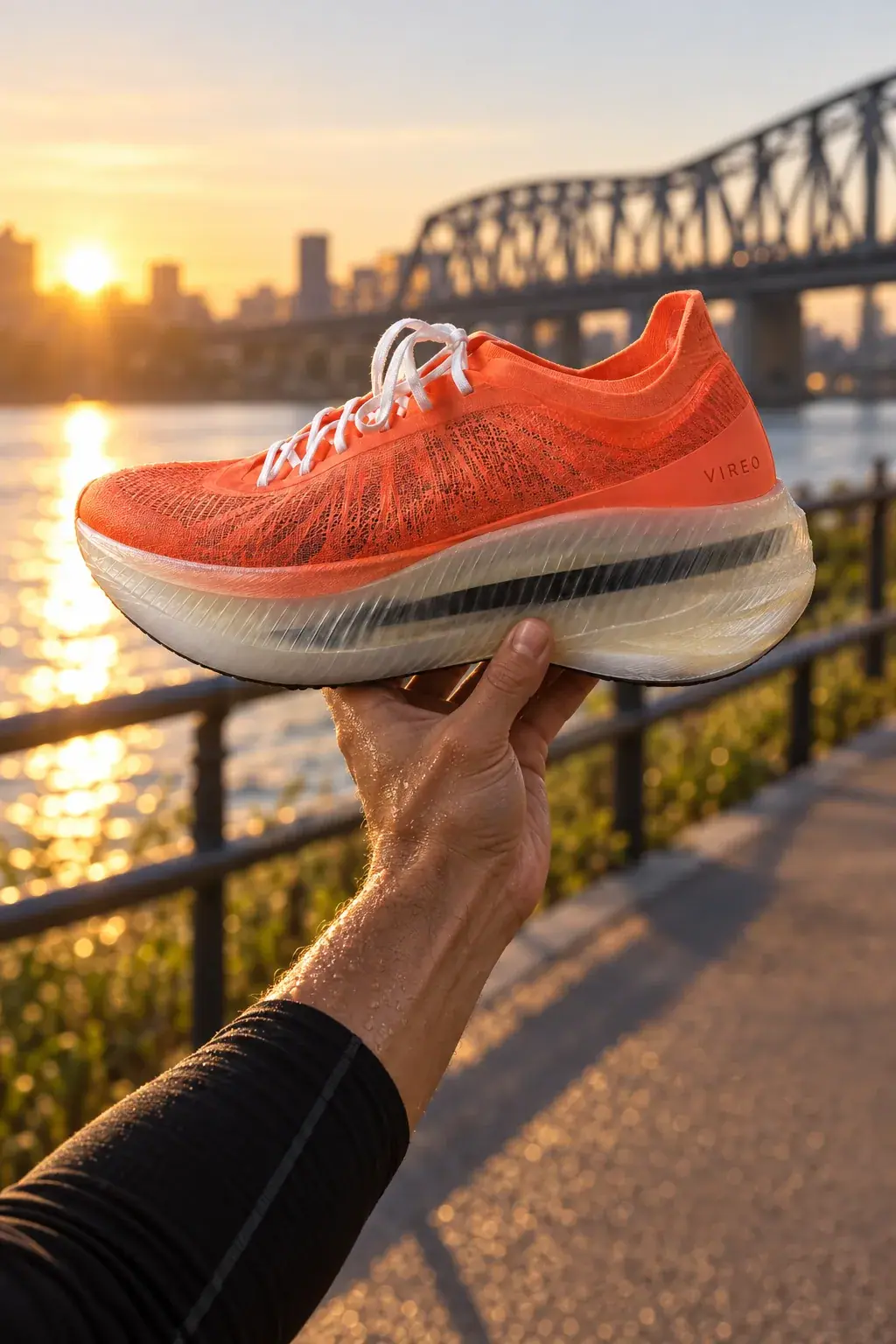
Generate the in-hand scene. Set Dimensions to 1024x1536 and ask for one specific grip, since hands are where generators slip:
Prompt[same keep-list sentence], held up in one hand by a runner on a riverside path at sunrise, the hand gripping the shoe from below at the midfoot, four fingers under the sole and the thumb on the inner side, the outer side with the VIREO wordmark facing the camera and sharp. Sweat on the forearm, a black running sleeve, a steel bridge and the river softly out of focus behind, low golden side light. No face visible. Style: global sportswear campaign photography: hard light, real skin and sweat, deep shadow falloff, medium-format clarity.The grip came out natural, but mirrored: the thumb sits on the outer side of the sole, below the wordmark, and the fingers wrap behind, where the prompt put the thumb on the inner side. The wordmark stays clear, so the take was kept.
-
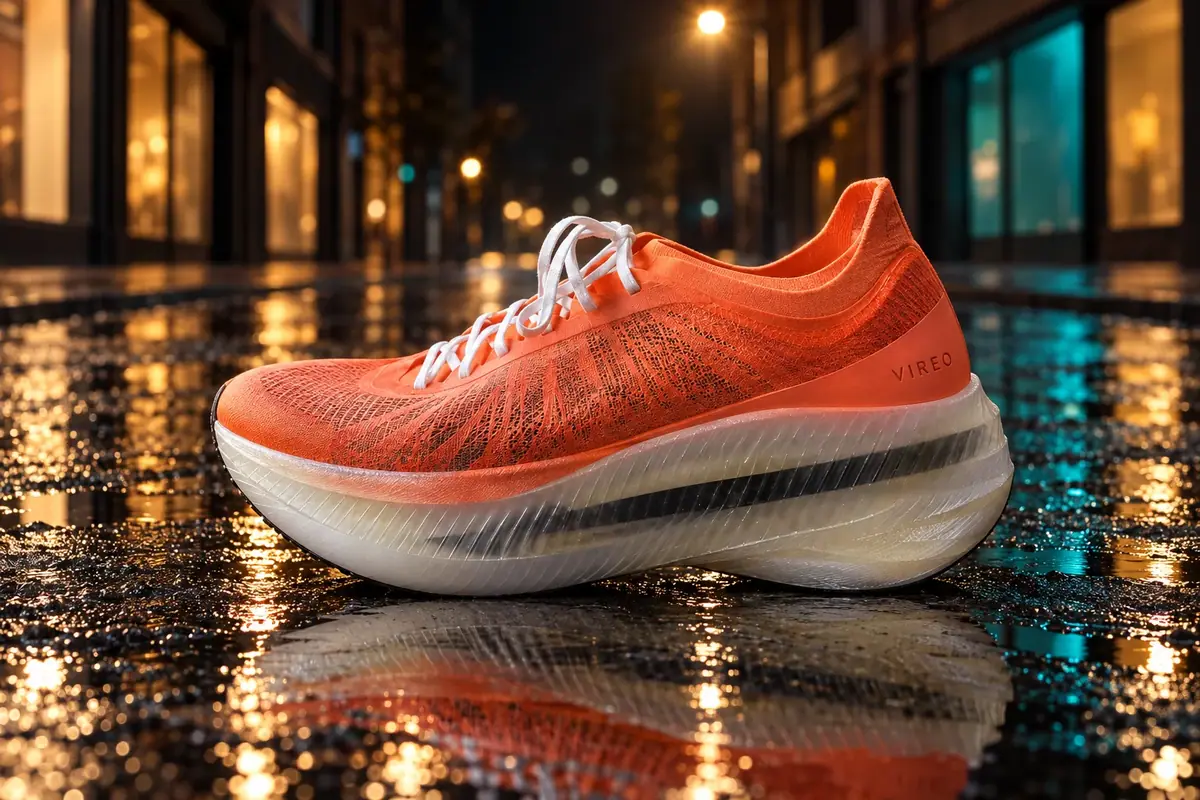
Generate the night scene, and read it closely. A first attempt with a steep top-down angle, the toe toward the camera and no keep-list failed (see below). The kept version keeps the keep-list, names the angle and rules out signs:
Prompt[same keep-list sentence], standing on wet black asphalt in a quiet city street at night. Camera low, slightly above the shoe at a gentle 15 degree angle, side view, the outer side with the VIREO wordmark facing the camera, fully visible and sharp. Blurred warm and teal light from unlit, plain shop windows reflected in the puddles, no readable signs, no letters anywhere except the VIREO wordmark on the shoe. Hard light from a street lamp above, crisp reflection in the wet asphalt, soft contact shadow under the sole. Style: global sportswear campaign photography: hard light, deep shadow falloff, medium-format clarity. -
Check each output at 100 percent before the next variant: read the wordmark, compare the sole's thickness and the heel shape with the packshot, count fingers on the in-hand shot, and scan the background for letters and familiar buildings.
-
File the keepers in the product's collection and note the edit base (here, the entryway scene).
With the Scenario MCP: model_run on model_openai-gpt-image-2-5-sunburst with referenceImages: ["<packshot asset id>"] (an array, even for one image), width, height and quality: "high".
Start the four scenes with wait: false and collect them with one jobs_wait.
Check the result
VIREO reads correctly at 1:1 on the outer heel; the shoe's proportions, sole thickness and heel collar match the packshot; the shadow falls away from the light; the background carries no readable text and no recognizable building.
the wordmark is hidden, turned away or misspelled; the sole got thinner or the toe longer; signs, books or boxes in the scene show letters; a skyline includes a tower or bridge that looks like a real landmark.
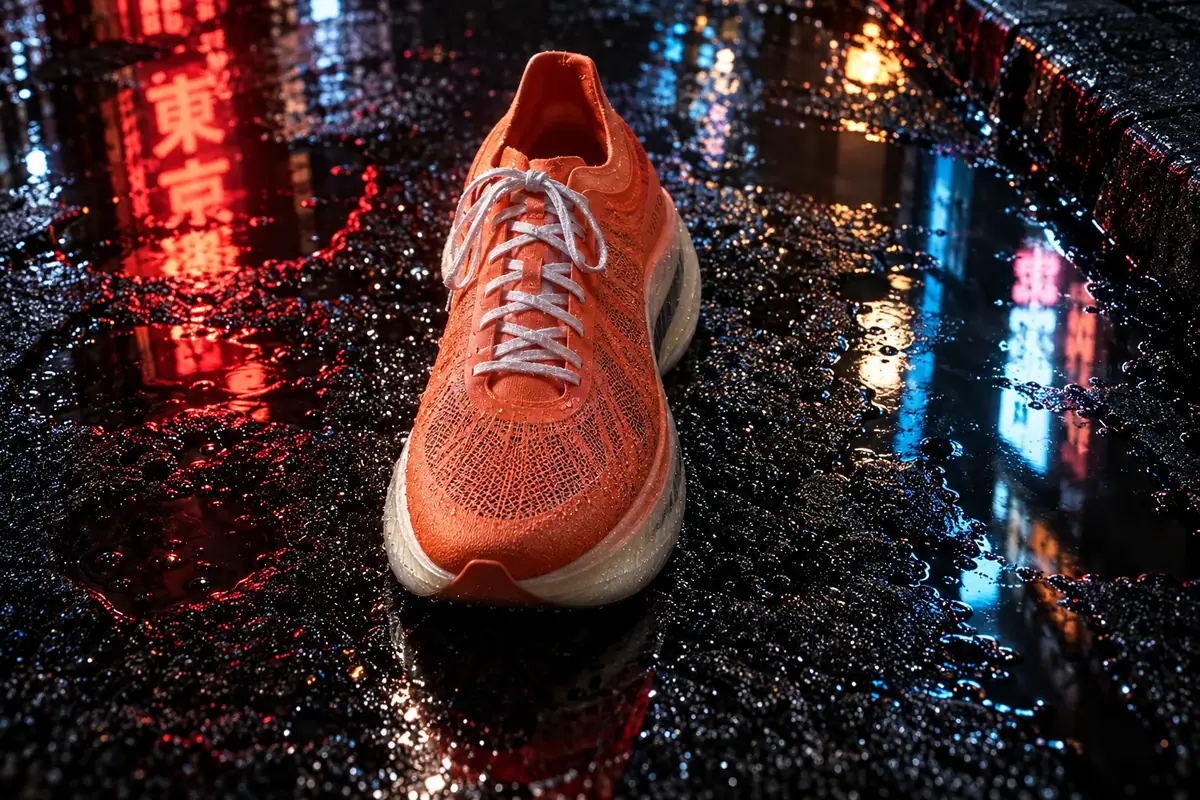
The rejected night scene combined three risks: a steep top-down angle, the toe toward the camera and no keep-list. The wordmark disappeared, the sole and its carbon stripe were barely visible, and the neon signs carried real, readable characters. The fix was a re-run from the packshot with the keep-list, a gentle angle, the outer side to the camera and "no readable signs" (Repair at the cheapest stage).
 Rejected
1Two night-street takes of the shoe for the product page. Which one ships?
Answer: B. Take B fails three ways: the wordmark is hidden, the sole is barely visible, and the signs carry readable characters. The fix was a rerun from the packshot with the keep-list and a gentle angle.
2An entryway scene comes back with the wordmark misspelled. What do you rerun it from?
Answer: A. Generate every scene from the packshot, never from a previous scene. A scene made from another inherits its drift.
Make it repeatable
- Save the keep-list as text in the product's collection description. Everyone pastes it; nobody rewrites it.
- Use the platform App for quick drafts. Product Studio (Workflows > Apps, Platform tab) takes a product photo and an optional setting and runs GPT Image 2.5 Sunburst with a fixed template. It has no keep-list or wordmark clause: check each result at 1:1. See Package a production process as an App.
- Build your own App with the keep-list inside (Package it as a workflow or skill). In the Node Editor: an Image input (
Product packshot), a Text input (Scene), a Prompt Builder that joins the fixed keep-list with the scene text, an Image Generator on GPT Image 2.5 Sunburst, and an Approval node withApprove only if the wordmark reads correctly and faces the camera. - Train only for volume: hundreds of scenes of one product. For a launch set, the packshot reference is faster and cheaper. See When to train a model.
Runs and time
| Step | Model | Runs or takes | Kept | Wait |
|---|---|---|---|---|
| Track at blue hour | GPT Image 2.5 Sunburst, high | 1 | 1 | about 40 s |
| Entryway with a city skyline | GPT Image 2.5 Sunburst, high | 1 | 0 (rejected) | about 35 s |
| Entryway with a courtyard | GPT Image 2.5 Sunburst, high | 1 | 1 | about 35 s |
| Riverside, in hand | GPT Image 2.5 Sunburst, high | 1 | 1 | about 35 s |
| Night street, steep angle | GPT Image 2.5 Sunburst, high | 1 | 0 (rejected) | about 40 s |
| Night street, fixed | GPT Image 2.5 Sunburst, high | 1 | 1 | about 40 s |
Six runs for four scenes; every scene costs about the same, so the two rejected takes are the only waste. The price shows on the Generate button before you run.
Variations
- Food and drink: put the cues that sell the product (condensation on a can, steam over coffee) in the scene part, never in the keep-list.
- Cosmetics: label facing the camera and cap on; open containers invite the model to invent the inside.
- Furniture and large goods: front and side packshots as two references, each with its role named.
- Seasonal pages: change only the season of an approved scene with a mask. See Edit one thing per campaign.
- Marketplaces that forbid generated scenes: use these for social and ads, the packshots for the listing.
If it breaks
- The wordmark is misspelled or blurred. Check that the keep-list spells it, says where it sits, and that the prompt has "facing the camera and sharp". Re-run from the packshot, not the failed image.
- The product changes proportions. Remove extreme camera angles and wide lenses; they give the model a reason to redraw the shape.
- Props or signs carry text. Name props as plain and add "no readable signs, no letters anywhere except the wordmark".
- A skyline shows a famous-looking building. Describe a closed setting (a courtyard, trees, low anonymous buildings) and add "no skyline".
- The product floats. Ask for a "soft contact shadow under the sole" and say what it stands on.
- Every scene looks the same. Change the light and camera height too, not only the location.