

Make sprite sheets and eight-direction sprites
Turn a pixel character into engine-ready sheets, a four-direction walk, a sword attack cut from a video clip, and all eight facings from one image, snapped to a pixel grid and cut in code.
- Playbook
Run it in ScenarioRetro Diffusion Animation GPT Image 2.5 Sunburst Wan 3.0 Kling V3 I2V Pro Pixel Snapper
See it made
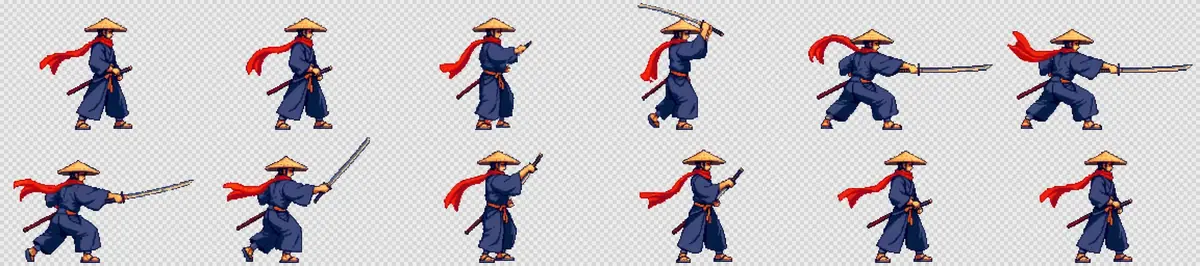
One pixel character, made engine-ready in two parts. Part 1 generates a four-direction walk directly as a sheet and cuts a 12-frame sword attack from a short video clip, pixelated back to the character's palette. Part 2 puts the same character in all eight facings for top-down and isometric games, with real pixels and the same baseline in every cell. Everything ends as transparent PNG sheets on a fixed grid that an engine slices without cleanup.
The brief
| Field | Part 1: walk and attack | Part 2: eight directions |
|---|---|---|
| Goal | A walk cycle (4 directions) and one attack for Starfall, a 2D action game | One idle frame per facing, 8 facings, for a top-down action prototype |
| Format | Walk: 48x48 pixel art, 4 frames per direction. Attack: 12 frames, 192x128 cells, the figure about 108 px tall, transparent PNG | 128x128 cells, transparent PNG, one row: S SE E NE N NW W SW |
| Fixed | Identity (wide straw hat, long red scarf, indigo robe, orange sash, katana in a dark red scabbard, straw sandals); the steel shoulder guard sits on his left shoulder; feet on one baseline; first frame = last frame | Pixel size, palette and outline of the approved sprite; identity; steel shoulder guard and katana on his left side only |
| May vary | Pose within the action | Small fold and scarf differences between facings |
| Accept when | Plays as a loop with no jitter, no clipped limbs or blade, no background pixels left in the cells, no colors outside the character's palette | Same baseline in all cells, one art pixel per image pixel, no background pixels, each diagonal reads as a diagonal, guard and katana on his left in every facing |
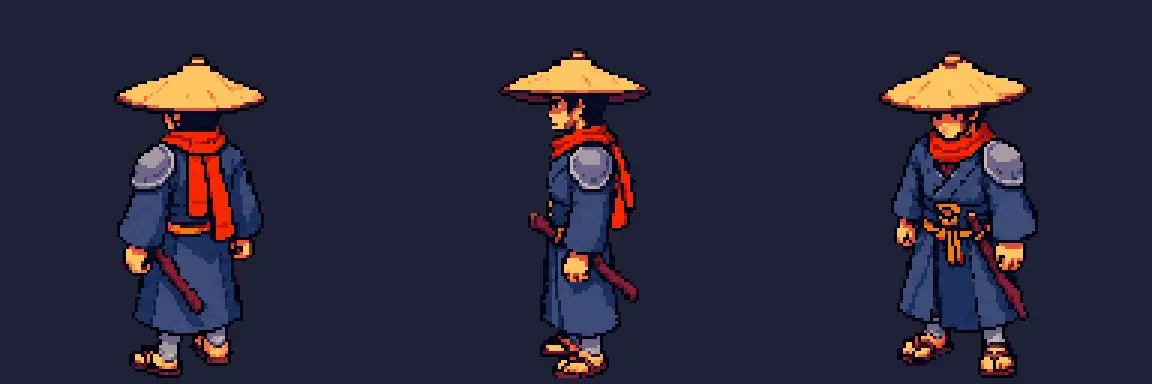
The character is the Starfall ronin, a 128 px pixel sprite with a three-view turnaround, both approved images made with Retro Diffusion Plus. See Build a character sheet and keep it consistent across scenes for how to approve a character before you derive anything from it. Both parts use the same sprite and the same figure height of about 108 px.
Approach
Part 1, walk and attack:
- 1Pixel walkRetro Diffusion Animation, 48 px, 4 directions
- 2Magenta plateGPT Image 2.5 Sunburst, side view
- 3Attack clipWan 3.0 and Kling V3 I2V Pro, plate as first and last frame
- 4Contact sheetEvery take, before any frame work
- 5Key, pixelate, packScript: key, one crop box, palette, grid
Part 2, eight directions:
- 1Five facingsGPT Image 2.5 Sunburst, flat magenta
- 2Eight facingsFive-facing row as style reference
- 3Snap pixelsPixel Snapper, 32 colors
- 4Cut and alignKey magenta, 128x128 cells
- 5Inspect1x and 3x, dark and light
Two routes for animation, by what the model can draw:
- Walks: generate the sheet directly. A dedicated sprite model returns a ready grid, exact by construction, and takes a reference image for identity.
- Attacks: animate a plate, then cut frames in code. Generate a side-view "plate" on flat #FF00FF magenta and animate it with the same image as first and last frame, so the clip loops back to the stance. Keying, cropping, pixelating and packing are deterministic, so code does them (Let code own what must be exact).
On the attack route:
- Say what the camera sees. In a side view facing right, the camera sees his right side. A detail on the far side (here the steel shoulder guard on his left shoulder) must be written as hidden, or the model paints it on the near side.
- The frame is the cell. Anything that leaves the video frame (a blade, a scarf) is cut off and cannot be recovered. Keep wide margins on the plate.
- Effects do not key well. Slash trails and glows are semi-transparent and mix with the magenta. Generate the body motion only, list "glowing halo, light spill, slash trail" in the negative prompt, and draw effects as separate sprites in the engine.
For eight facings, generating each separately gives eight slightly different characters. Generating them in one image keeps size, palette and outline together.
The common shortcut generates only five facings (down, down-right, right, up-right, up) and mirrors the other three in code. It works for symmetric designs. This ronin carries a steel guard on his left shoulder and a katana at his left hip, so mirroring moves both to his right side in NW, W and SW. The run below tried the shortcut, rejected it, and generated all eight with the five-facing row as the style reference.
The eight-direction pipeline:
- Generate a row of five facings on a flat magenta background, with the approved sprite and the turnaround as references. This row fixes how the 128-pixel sprite looks at full figure size.
- Generate all eight facings in one image, with that row as the style reference, and describe what the viewer sees in each facing, including where the one-sided details fall.
- Snap to a true pixel grid. Image models draw "pixel art" with soft, uneven pixels. Pixel Snapper rebuilds the image at one art pixel per image pixel with a limited palette.
- Cut and align in code. Key out the magenta, split each row into figures, bottom-align each in a 128x128 cell.
Models, as of October 2026:
- Walk: Retro Diffusion Animation, a dedicated sprite model.
- Attack clip:
recommendput Wan 3.0 first for first-and-last-frame clips and Kling V3 I2V Pro second; the attack shoot-out kept Wan 3.0 (First and last frame). - Plate and facings: GPT Image 2.5 Sunburst. It followed a numbered facing list and kept the sprite's palette and outline.
- Dedicated turnaround route tried: Retro Diffusion Plus with its
character_turnaroundstyle. It made the approved sprite, but was rejected for the eight facings (see Check the result). - Cardinal-only games: four facings (S, E, N, W) need no diagonals; the same prompt with four lines is enough.
Steps
Part 1: Walk and attack sheets
-
Generate the pixel walk sheet. In the model picker (Create, Images, click the model card, See all models), search for Retro Diffusion Animation. Attach the 128 px sprite as the reference image (the model drops transparency, so a plain background works best). Set the style to
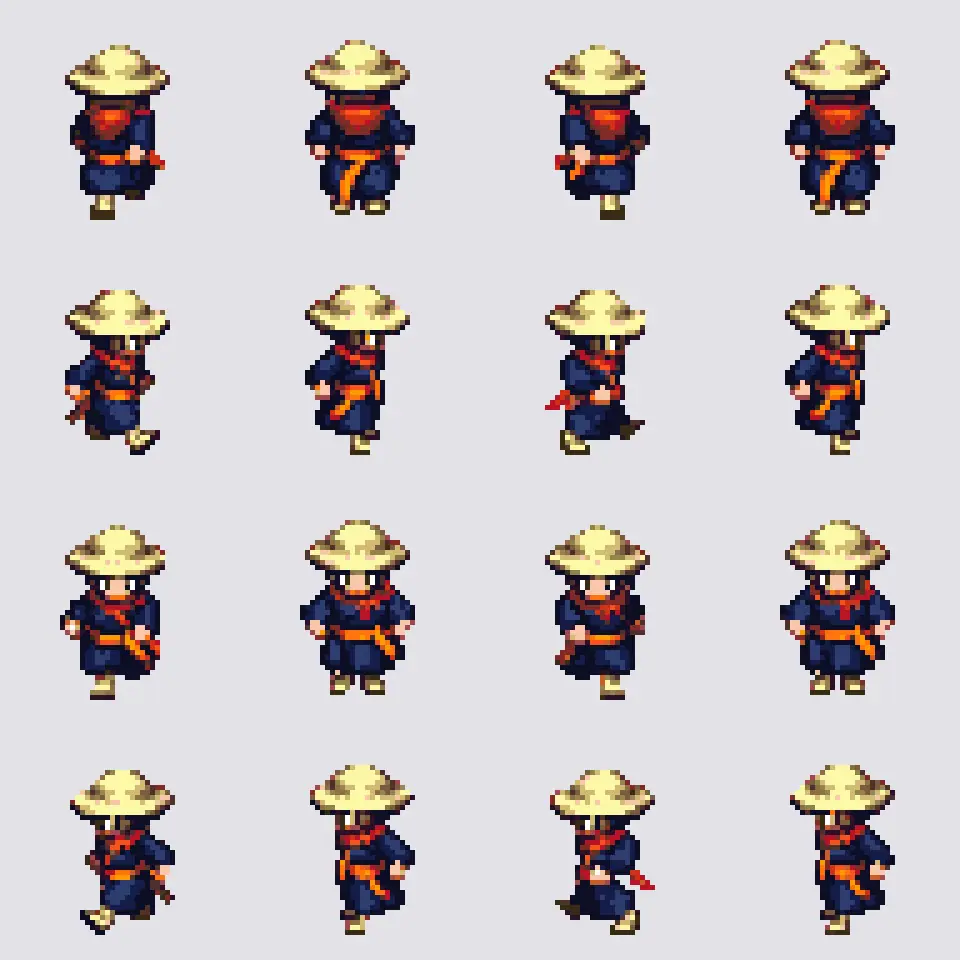
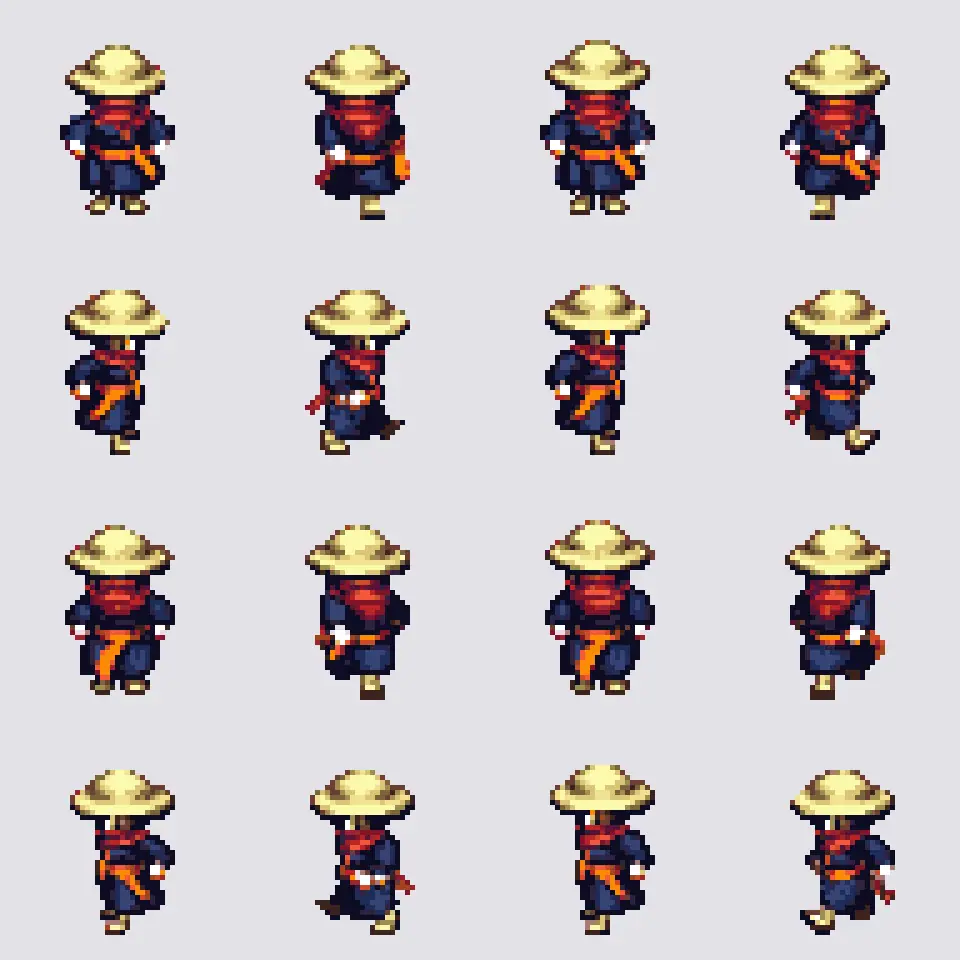
four_angle_walking, width and height to 48 (the only size the walking styles accept), turn on the spritesheet switch (off, the model returns an animated GIF) and set a seed (this run used 4127). Prompt: "Ronin swordsman, wide straw hat, long red scarf, dark indigo robe, orange sash, katana at the left hip, straw sandals". -
Read the sheet before using it. The result is a 192x192 PNG: four rows of four frames, ordered back, right, front, left. Inspect it upscaled 5 times with nearest-neighbor; never smooth pixel art.
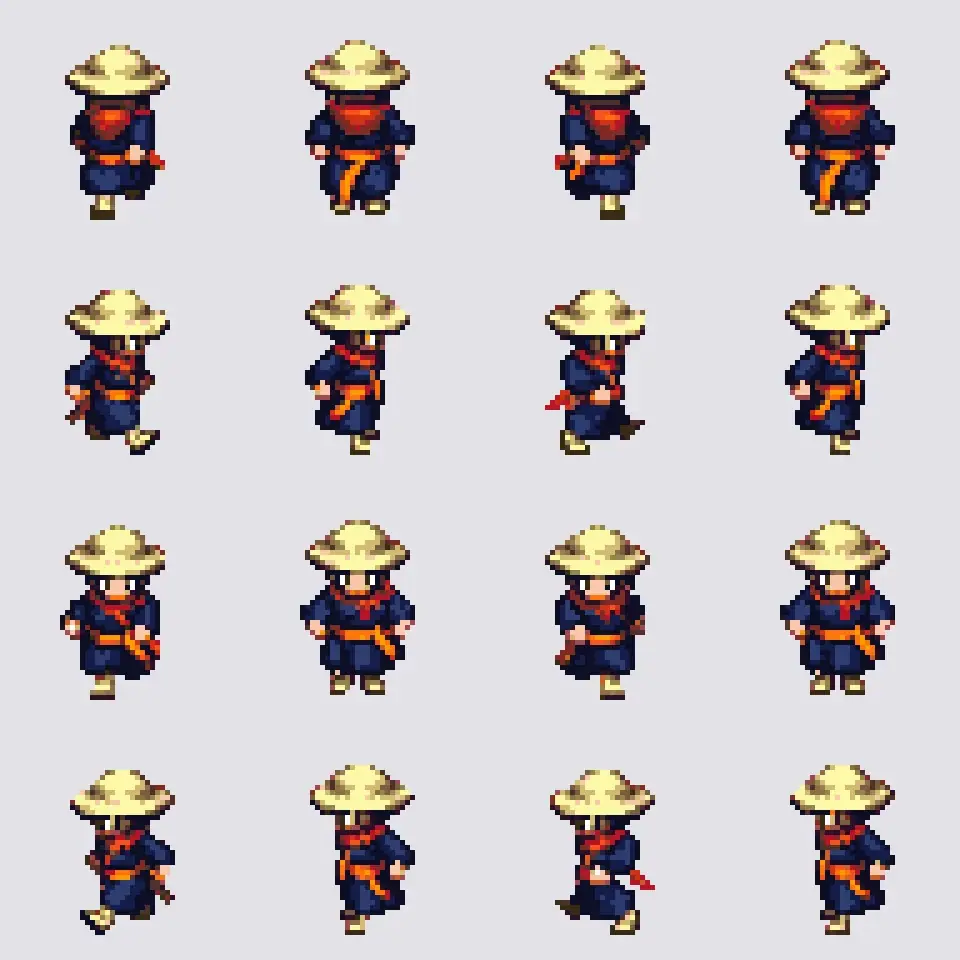
Kept: four-direction walk, 48 px frames, shown at 5x. -
Make the magenta plate. Open Images with GPT Image 2.5 Sunburst, attach the sprite and the turnaround, Dimensions 1:1 (1024x1024), Quality
high:TextReference 1 is the character's identity as a pixel sprite, reference 2 his turnaround. Game sprite plate: the same ronin, full body, strict side view facing RIGHT, standing in a low ready stance, left hand on the sheathed katana at his left hip, right hand resting on the hilt, feet on one level line. What the camera sees in this view: his RIGHT side. The steel shoulder guard is on his LEFT shoulder, the far side, so it is hidden behind his body; his near right shoulder shows only the indigo robe and the red scarf. He fills about 40 percent of the frame height, centered, with wide empty margins on every side. Keep his wide straw hat, long red scarf, dark indigo robe, orange sash, katana in a dark red scabbard and straw sandals. Premium pixel art, crisp single-pixel lines, limited 32-color palette (indigo night, warm lantern orange, steel), hard pixel edges, no anti-aliasing blur, no glow. Background: one single uniform flat pure magenta field, hex FF00FF, edge to edge, no ground, no shadow, no gradient, no vignette. No text.The first prompt only listed "steel shoulder guard" among the details; both takes put it on the near shoulder. The "what the camera sees" sentence fixed it on the next run.
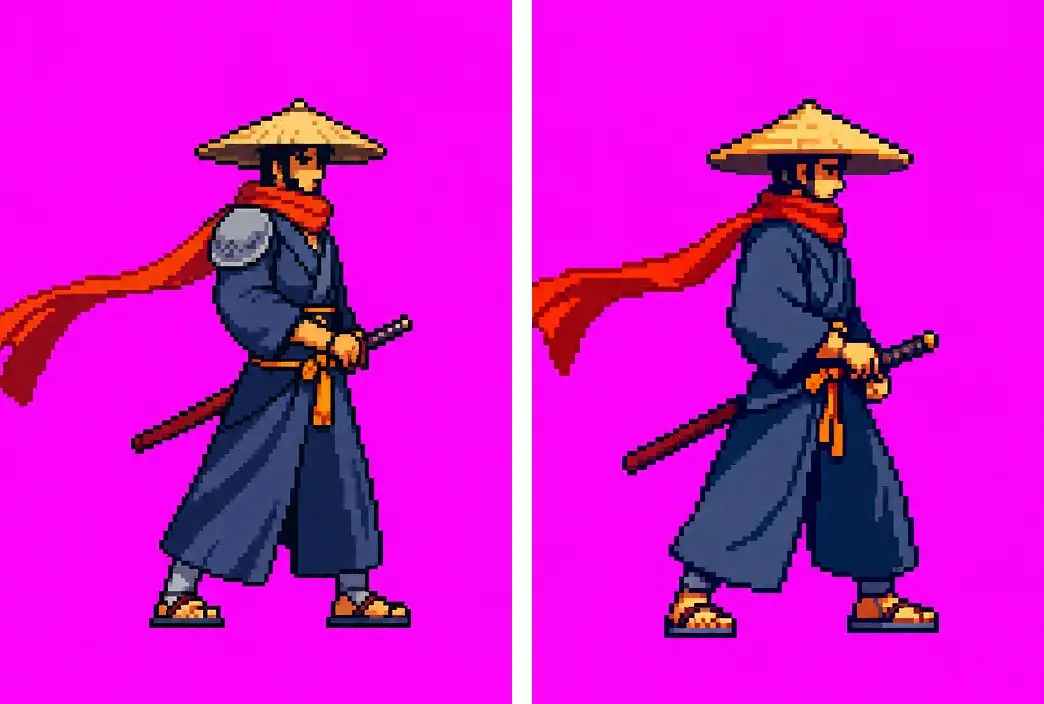
Rejected left, kept right: the far-side detail written as hidden. -
Animate the plate on two models (Pin the first and last frame). Open Create, Videos, and put the plate in both First Frame and Last Frame. Run Wan 3.0 at 480P with audio off, and Kling V3 I2V Pro at 1:1 with audio off and a negative prompt. Same prompt on both:
TextStrict side view, the camera is locked and does not move. The ronin performs one fast iaido draw: he snaps the katana out of the scabbard at his hip in a single horizontal slash to the right, holds the extended pose for a short beat, then slides the blade back into the scabbard and settles into the same ready stance he started in. He faces RIGHT the whole time and stays in place with both feet planted. What the camera sees: his right side, the red scarf trailing behind him to the left. Same pixel art look and colors as the first frame. The flat magenta background stays uniform the whole time. No glow, no slash trail, no light effects, no text.Negative prompt: "glowing halo, light spill, slash trail, glowing blade, sparks, motion blur, camera movement, zoom, turning around, second sword, extra arms, gradient background, shadow on the background".
-
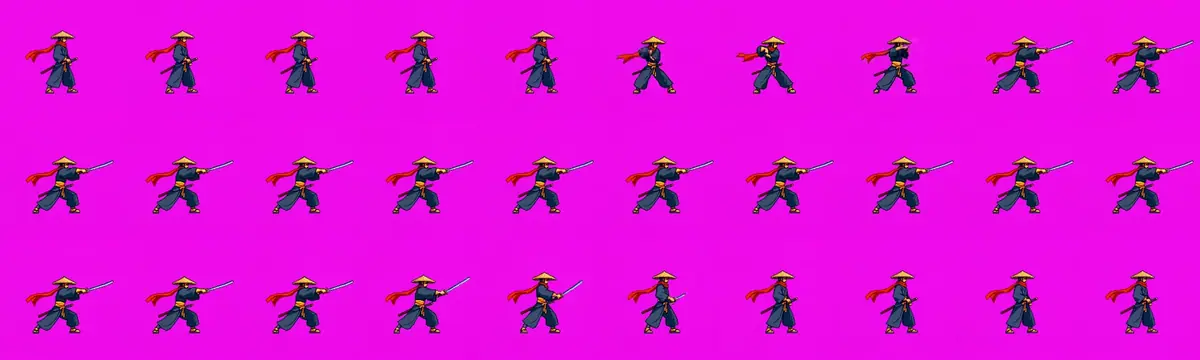
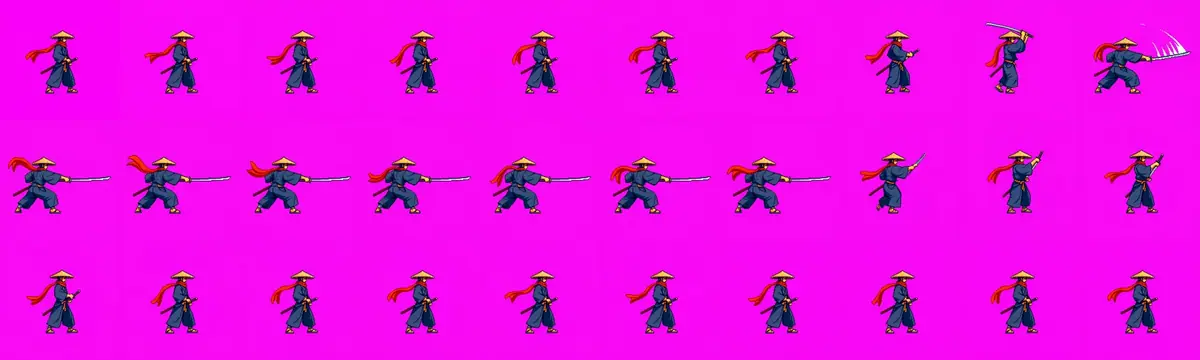
Contact-sheet both takes before any frame work. Tile frames from the whole clip into one image (with ffmpeg:
-vf "fps=6,scale=200:-1,tile=10x3") and check facing, props, clipping and background in one look, then zoom on the hands and the hips.:::compare
 :::
-
Key, crop, pixelate and pack in code (Cut out and key). Mark pixels where red and blue are both far above green as background and drop isolated specks. Crop every frame with one box, the union of all frames (never a per-frame box, or the feet jump). Pick 12 frames at equal steps of motion, so the fast draw gets as many frames as the slow hold. Scale so the stance is 108 px tall, set alpha to fully on or off, and map every pixel to the nearest of the 33 colors in the 128 px sprite. This run picked frames 0, 26, 36, 41, 46, 57, 81, 84, 89, 99, 120 and 149 of 150, with 0 magenta pixels left and the baseline at row 124 in the first and last cells.
-
Preview as a loop. Play the sheet at 12 frames per second next to the source clip and watch the feet, the blade and the outline.
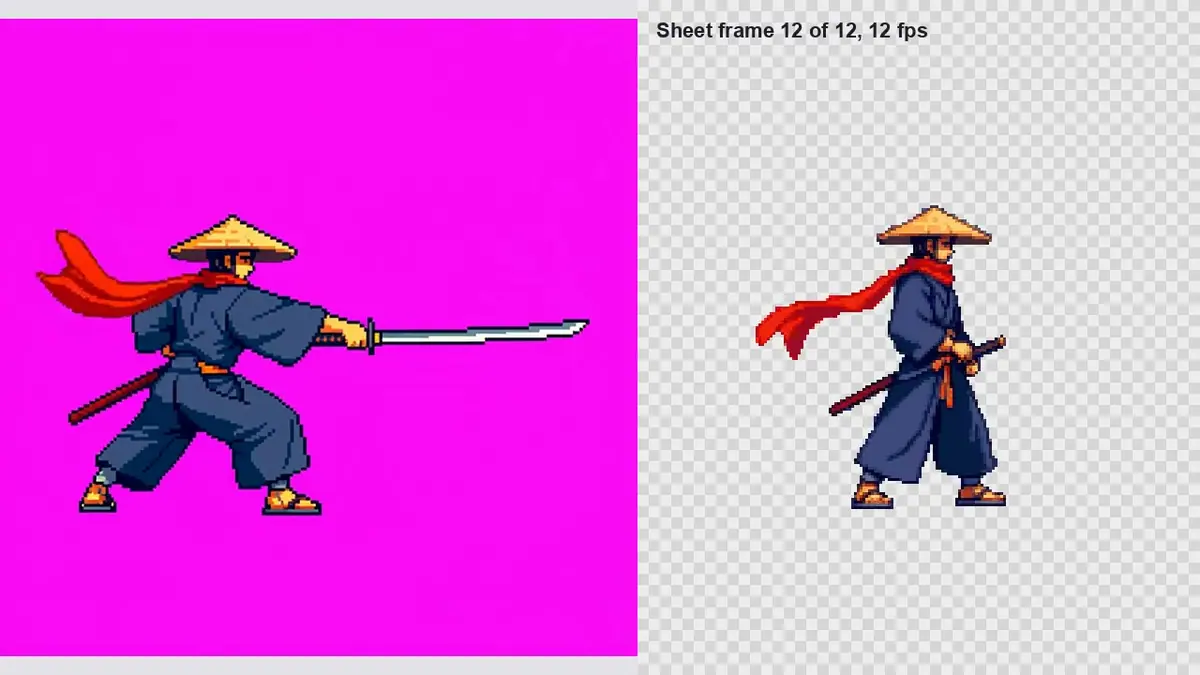
Watch the video: https://ufgc0c9mhl4ueq76.public.blob.vercel-storage.com/academy/870223f1edc57592060a648279e08af5a9c8dc54b36f8c707373214d89d5d7f7.mp4
With the Scenario MCP: run model_retrodiffusion-animation with style: "four_angle_walking", width: 48, height: 48, returnSpritesheet: true, seed: 4127 and image set to the sprite.
For the clips, run model_alibaba-wan-3-0 with image and endImage set to the plate, resolution: "480P", duration: 5, audio: false; and model_kling-v3-i2v-pro with startImage, endImage, duration: "5", aspectRatio: "1:1", generateAudio: false and negativePrompt. Quote them first with dry_run: true (see Quote before you run).
Part 2: Eight directions
-
Attach the two references (Give each reference a role). Open Create, choose Images, pick GPT Image 2.5 Sunburst. Under Reference Images, add the approved sprite first, then the turnaround. Set Quality to
high. This run set a custom 1536x512 (3:1) through the Scenario MCP; the web panel's Dimensions menu offers presets only, the widest being 21:9 (3360x1440), so in the panel use 21:9 and crop afterward. -
Prompt five facings by number, and say what the viewer sees. Models confuse "up-right" with "right" unless the prompt says what is visible. Name the one-sided details in a keep list.
TextReference 1 is the approved pixel-art sprite of the ronin: copy its pixel size, palette, dark outline and proportions exactly. Reference 2 is his turnaround: use it only for what the back and sides look like. Draw the same pixel-art ronin standing still, empty hands at his sides, in FIVE facings, one row, left to right, evenly spaced, same size, feet on one ground line: 1 facing down toward the viewer, we see his face under the straw hat and both shoulders; 2 facing down-right diagonal, three-quarter front, we see his face, his chest and his right side; 3 facing right in profile, we see only his right side and one eye; 4 facing up-right diagonal, three-quarter back, we see the back of his hat, his back and his right shoulder, no face; 5 facing up, back view, we see only his back and the scarf tails. Keep in every facing: wide straw kasa hat, red scarf whose two tails hang down his back, indigo kimono, steel shoulder guard on his LEFT shoulder only, orange obi sash, katana in a dark red scabbard at his LEFT hip, grey leg wraps, straw sandals. Top-down action RPG camera, about 30 degrees from above. Each figure about 56 art pixels tall. Hard pixel edges, no anti-aliasing, no glow, no halo, no light spill. Background: one flat pure magenta field, hex FF00FF, edge to edge, no shadow, no ground. No text, no numbers. Style: premium pixel art, crisp single-pixel lines, limited 32-color palette (indigo night, warm lantern orange, steel), no anti-aliasing blur, readable silhouettes.Click Generate. The price shows on the button before you run. The "no glow, no halo, no light spill" line keeps a soft rim off the outline, which would leave colored fringe after keying.
-
Check the row for one-sided details before you go further. Both takes put the steel guard on his near (right) shoulder in the right-facing profile, against the keep list. Mirrored, that cell would happen to look right, which is why a mirrored set needs checking cell by cell. Keep the better row as the style reference only.
-
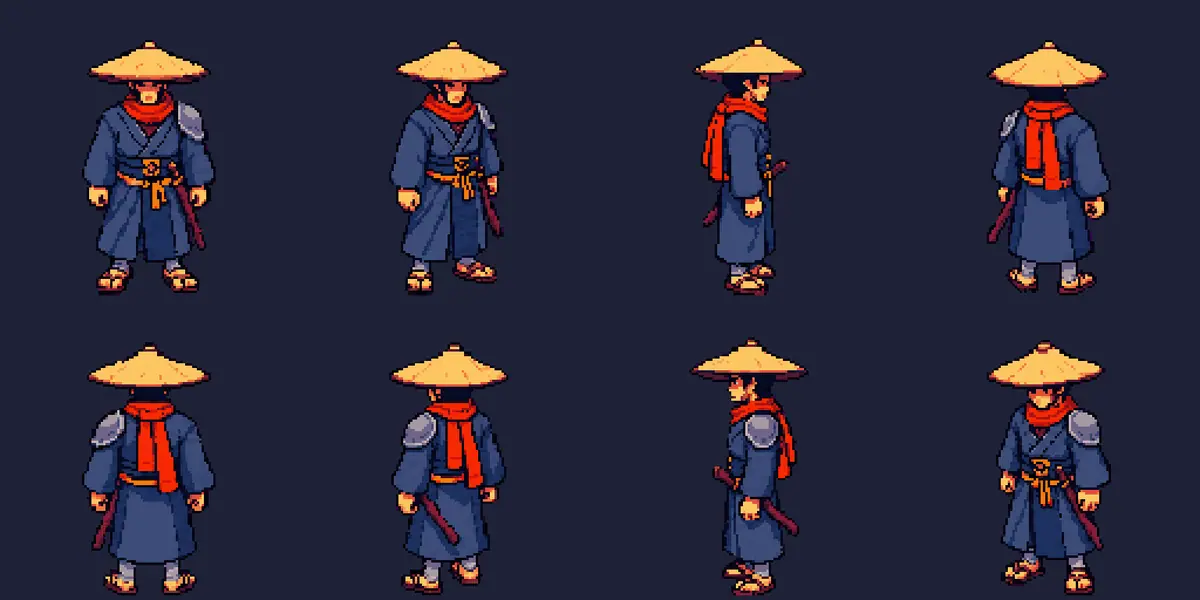
Generate all eight facings in one image. Reference 1 is now the approved five-facing row, Reference 2 the turnaround. Size 2048x1024, two rows of four. For each facing, say where the guard and katana fall from the viewer's side, and describe each diagonal as "turned 45 degrees" with the shoulder that shows almost in profile.
TextReference 1 is an approved row of the same pixel-art ronin: copy its pixel size, palette, outline, camera angle and figure height exactly. Reference 2 is his turnaround: use it only for what his back and sides look like. Draw the same ronin standing still, empty hands at his sides, in EIGHT facings, two rows of four, evenly spaced, all the same size, feet on one ground line per row. Top row, left to right: 1 facing down toward the viewer: face, both shoulders, steel guard on the viewer's right, katana hilt at the viewer's right hip. 2 facing down-right diagonal, turned 45 degrees: his face and chest point to the lower right, we see his right side clearly; the steel guard is on his far shoulder, only its edge shows. 3 facing right in profile: we see only his right side and one eye. The steel guard and the katana are on his far side: we never see the guard; only the katana hilt tip shows in front of his belly. 4 facing up-right diagonal, turned 45 degrees: a three-quarter back view, we see his back with the scarf tails and his right shoulder and right arm almost in profile on the right of the figure; no face; the steel guard shows only as a small grey rim on the far left edge. Bottom row, left to right: 5 facing up, back view: his back, scarf tails, steel guard on the viewer's left, katana on the viewer's left hip. 6 facing up-left diagonal, turned 45 degrees: a three-quarter back view, we see his back and his left shoulder with the steel guard, katana scabbard on the near hip, no face. 7 facing left in profile: we see only his left side: steel guard on the near shoulder, katana in its scabbard at the near hip. 8 facing down-left diagonal, turned 45 degrees: his face and chest point to the lower left, we see his left side, steel guard on the near shoulder, katana at the near hip. Keep in every facing: wide straw kasa hat, red scarf whose two tails hang down his back, indigo kimono, steel shoulder guard on his LEFT shoulder only, orange obi sash, katana in a dark red scabbard at his LEFT hip, grey leg wraps, straw sandals. Top-down action RPG camera, about 30 degrees from above. Hard pixel edges, no anti-aliasing, no glow, no halo, no light spill. Background: one flat pure magenta field, hex FF00FF, edge to edge, no shadow, no ground. No text, no numbers. Style: premium pixel art, crisp single-pixel lines, limited 32-color palette (indigo night, warm lantern orange, steel), no anti-aliasing blur, readable silhouettes. -
Snap the pixels. Open the better take and run Pixel Snapper on it from the model picker, with its color count set to 32 (the default is 16). The 2048x1024 take came back as 518x259 pixels: each figure 108 to 110 pixels tall, every pixel a real art pixel.
-
Cut and align in code (Do the exact part in code). A short script does the rest:
- mark magenta pixels (red and blue far above green) as transparent, including the purple fringe pixels between the magenta and the outline;
- split each row into figures by finding the empty columns between them;
- paste each figure into a 128x128 cell, bottom-aligned on the same baseline and centered horizontally;
- save one 1024x128 sheet in the order S, SE, E, NE, N, NW, W, SW.
-
Inspect at 1x and at 3x, on a dark and a light background, and count what code can count: purple pixels left (0 in this run), colors used (27), baseline row (the same in all eight cells).
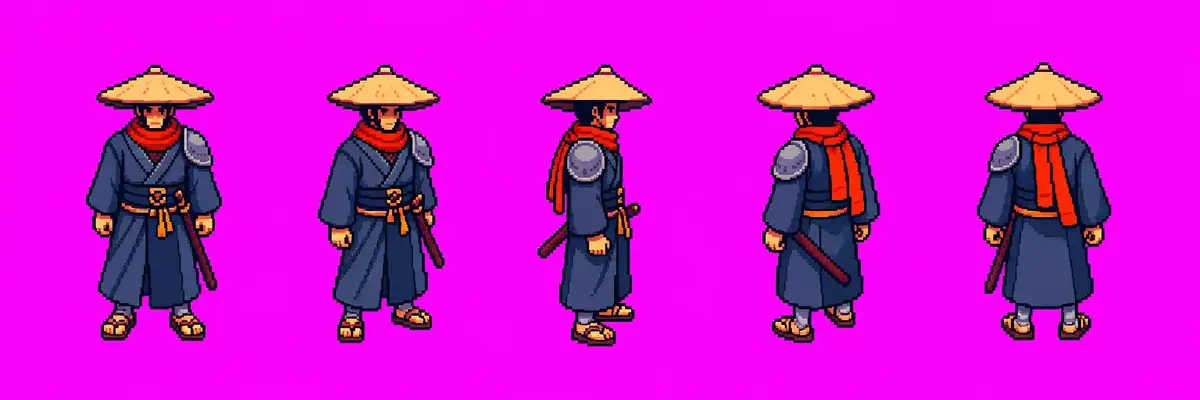
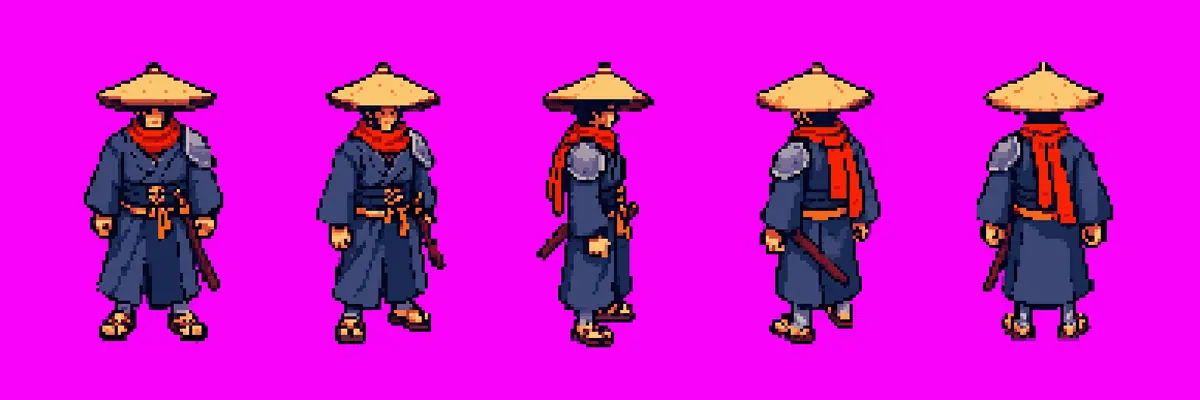
With the Scenario MCP: run model_openai-gpt-image-2-5-sunburst with referenceImages: [sprite, turnaround], width: 1536, height: 512, then again with referenceImages: [five_facing_row, turnaround], width: 2048, height: 1024, then model_pixel-snapper on the kept take.
The cut step is plain Python with Pillow and NumPy; no model is involved.

Check the result
Check the walk and attack
every frame shows the full character and blade inside the cell; props stay single (one sword, out or sheathed); the first and last frames match; the feet sit on one baseline; no magenta pixels remain; every color is in the character's palette.
the character turns away from the side view, a prop doubles or vanishes, a limb or blade touches the frame edge, the background shifts, or a far-side detail appears on the near side.
- Kling V3 I2V Pro, rejected. A clean draw and a long hold, but a hilt stays in the scabbard while the blade is in his hand: two swords.
- Wan 3.0, kept. Overhead raise, slash, hold and sheathe, with an empty scabbard while the blade is out. Two frames at the strike (44 and 45) carried a white slash smear despite "no slash trail"; they were dropped, so the strike reads as a snap from overhead to extended, the usual timing for a sprite attack. The slash effect becomes a separate sprite in the engine.
- 480P was enough. The frames end at 108 px tall, so the 640x640 clip holds more detail than the sheet keeps.
The walking_and_idle style (same seed) was rejected: its rows move as much as the walk rows (mean change between frames about 15 levels in every row of both sheets), and it has no front view.
Check the eight directions
all eight figures share one baseline; the diagonals read as diagonals (face visible on the down diagonals, no face and a turned shoulder on the up diagonals); no magenta or purple pixels remain; identity reads at 1x (straw hat, red scarf, indigo kimono); the guard and katana sit on his left in every facing.
a diagonal looks like a profile or a straight back view, figures differ in size, the palette drifts from the sprite, pixels are blurred, or a one-sided detail sits on the wrong side.
 Rejected
What was rejected on the way, and why:
- The mirror route. Five facings plus three mirrors is a sound default and the method used in the Iso Cycles exploration. Here it fails the brief: the mirrored NW and SW carry the guard and katana on his right.
- A first eight-facing prompt that said only "three-quarter back". Its up-right facing came back as a straight back view. Adding "turned 45 degrees" and naming the shoulder seen almost in profile fixed it.
- Patching two cells from a separate run. A two-facing fix run drew the figures smaller, so Pixel Snapper picked a different grid (figures 50 to 58 pixels tall against 108). The cells could not join the sheet without rescaling, which breaks the pixel grid. Regenerating the whole sheet was cheaper than repairing it.
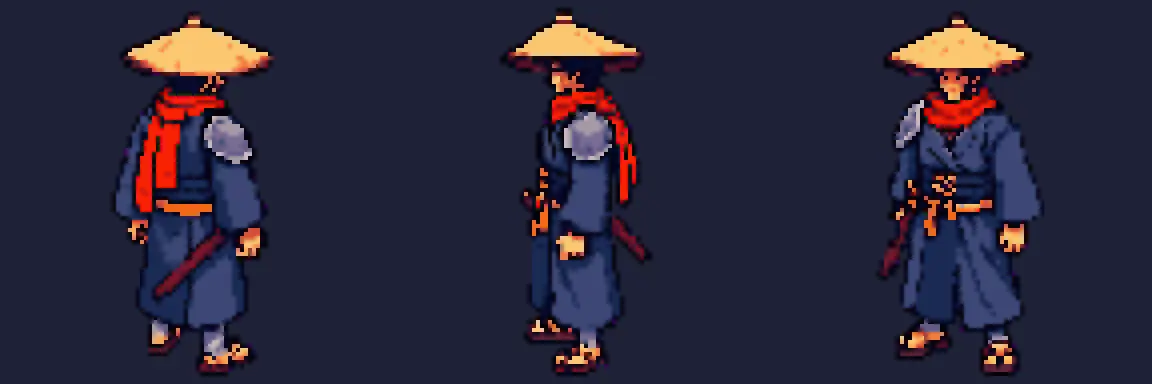
- Retro Diffusion Plus,
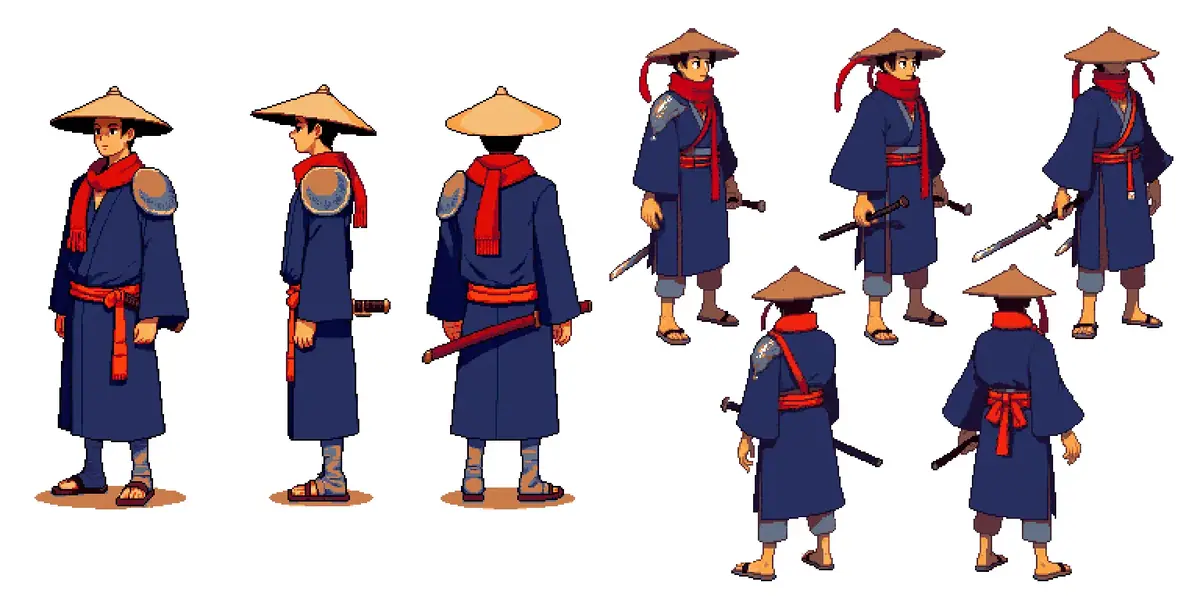
character_turnaroundstyle, 384x384, palette from the sprite. One take returned three eye-level views with no diagonals on white, the other five mismatched poses with drawn swords. Rejected for this job; the style is still how the approved three-view turnaround was made.
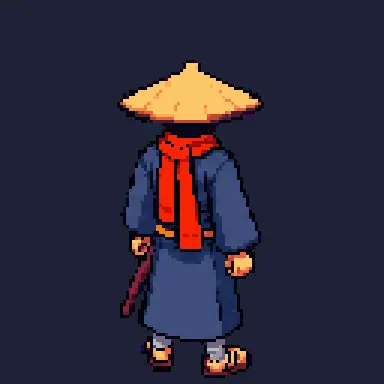
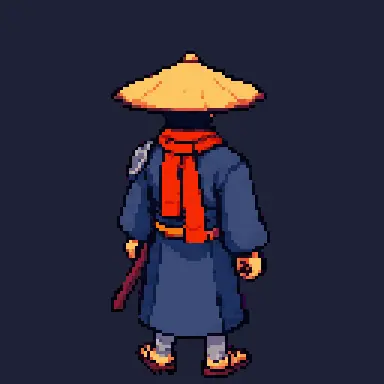


1Two takes of the attack, each paused with the blade drawn. Which one do you cut into frames?
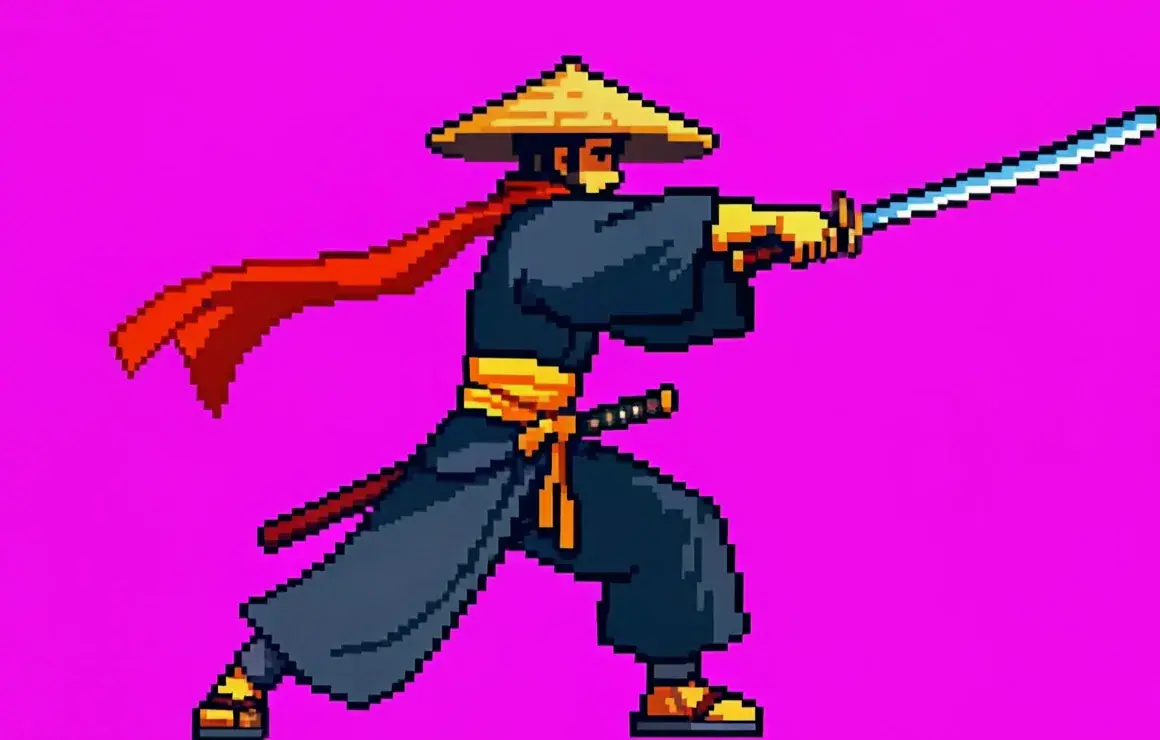
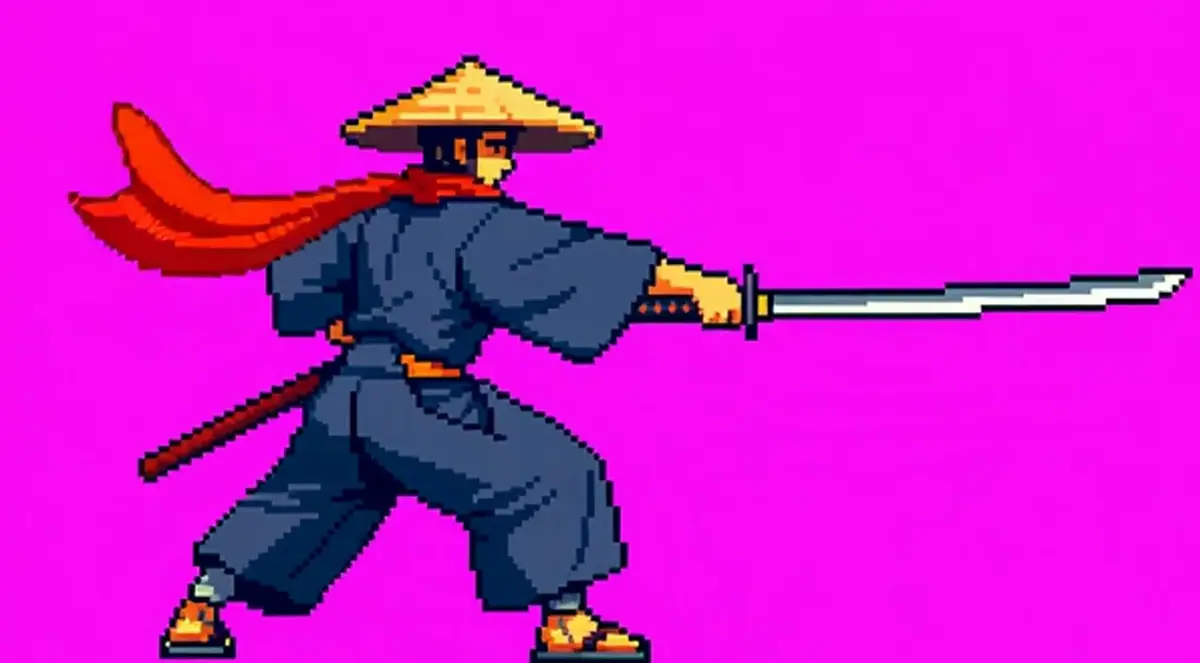
Answer: B. A prop that doubles rejects a take: fixing it frame by frame costs more than another run. Take A is the Kling V3 I2V Pro clip; Take B is the Wan 3.0 clip in the sheet.
2Two strike frames carry a white slash smear on magenta. What do you do?
Answer: C. Trails and glows mix with the magenta and key badly. This run dropped frames 44 and 45 and moved the slash to an engine sprite.
3Two eight-facing sheets for the ronin, whose brief fixes the steel guard and katana on his left side. Which one ships?

Answer: A. Sheet B mirrors three facings, so NW and SW carry the guard and katana on his right. Sheet A generated all eight and keeps them on his left.
4Two facings of your sheet are weak. You run a separate two-facing generation to replace them, and Pixel Snapper turns its figures into 55-pixel sprites while the sheet's are 108 pixels. What do you do?
Answer: B. Scaling breaks the one-art-pixel grid and pastes mismatched pixels next to real ones. One image for all eight keeps the grid; fix the prompt and run it again.
Make it repeatable
- Keep the scripts and the reference pair with the project. Key, crop box, frame picks, palette and packing are the same for every animation; only the clip and the frame list change. Every new character in the same game uses the same style reference, the same eight-facing prompt with the identity and keep list swapped, and the same cut script.
- Decide mirror or generate per character. Symmetric designs can use five facings plus three mirrors. Any design with a one-sided detail the brief fixes goes straight to eight generated facings.
- Workflows (Package it as a workflow or skill). In the Node Editor:
- Plates and clips: an Image input (sprite and turnaround) and an Image Generator for the plate (GPT Image 2.5 Sunburst with the magenta prompt); an Approval node; a Video Generator (Wan 3.0) whose first and last frame both come from the approved plate, and a Text input for the action line.
- Eight facings: two Image inputs (style row, turnaround), an Image Generator on GPT Image 2.5 Sunburst with the eight-facing prompt, then an Image Generator set to Pixel Snapper, and an Approval node before export. The cut step stays in code after download.
- Publish it so animators request an action in one sentence. See Build your first workflow.
- Platform Apps to compare. Under Workflows, Apps, the Action Sprite Studio and Character Run Cycle Spritesheet apps cover similar ground to Part 1, and the 8-Direction Sprite Generator produces eight directions from a character image. Run them on the same sprite and compare with these pipelines on your art style before standardizing.
Runs and time
Part 1, walk and attack:
| Step | Model | Runs | Kept | Wait |
|---|---|---|---|---|
| Four-direction pixel walk | Retro Diffusion Animation | 1 | 1 | about 29 s |
| Walking and idle | Retro Diffusion Animation | 1 | 0 (rejected) | about 35 s |
| Side-view plate on magenta, 2 takes per run | GPT Image 2.5 Sunburst | 2 | 1 (second run) | about 39 s and 34 s |
| Attack clip, 5 s | Wan 3.0 480P, Kling V3 I2V Pro | 2 | 1 (Wan 3.0) | about 84 s and 157 s |
| Keying, pixelating and packing | local script | 0 | n/a | seconds |
Six runs, about 6 minutes of wait. The two video takes are most of the cost; change the prompt between takes rather than re-rolling it.
Part 2, eight directions:
| Step | Model | Runs or takes | Kept | Wait |
|---|---|---|---|---|
| Five facings on magenta | GPT Image 2.5 Sunburst | 1 run, 2 takes | 1 (style reference) | about 29 s |
| Turnaround style | Retro Diffusion Plus | 1 run, 2 takes | 0 (rejected) | about 31 s |
| Pixel snapping, five facings | Pixel Snapper | 1 | 1 (mirror test, rejected) | about 10 s |
| Eight facings, first prompt | GPT Image 2.5 Sunburst | 1 run, 2 takes | 0 (runner-up) | about 39 s |
| Pixel snapping, first prompt | Pixel Snapper | 2 | 0 | about 10 s each |
| Two-facing fix row | GPT Image 2.5 Sunburst | 1 run, 2 takes | 0 (rejected, other grid) | about 25 s |
| Pixel snapping, fix row | Pixel Snapper | 2 | 0 | about 10 s each |
| Eight facings, "turned 45 degrees" | GPT Image 2.5 Sunburst | 1 run, 2 takes | 1 | about 34 s |
| Pixel snapping, 32 colors | Pixel Snapper | 1 | 1 | about 10 s |
| Key, cut, align | local script | 0 | n/a | seconds |
About 4 minutes of waiting. A clean run on a new character is three runs: the five-facing row, the eight-facing image and one Pixel Snapper pass. The cut is free because it runs in code.
The price shows on the Generate button before you run.
Variations
- Idle loop: same plate as first and last frame, prompt "breathes slowly, scarf moves slightly, no step", 5 s.
- Walk cycles in eight directions: repeat the Part 1 walk per facing, with the eight-direction sheet as the reference.
- Painted or non-pixel 2D sprites: skip the palette step and Pixel Snapper, key with a soft edge, and keep the keyed frames at full resolution. Everything else is the same.
- Snap to a pixel grid in the app: run the extracted frames through Pixelate or the Pixel Snapper tool with a fixed palette. See Vectors, pixel art and layers.
- Isometric games: ask for the same facings with "isometric camera, 2:1 projection" and match the cell baseline to your tile height. See Isometric tiles and buildings.
- Symmetric characters: generate five facings, snap, and mirror SE, E and NE into SW, W and NW in code. Check every mirrored cell against the keep list.
- Smaller sprites: at 48 or 64 pixels, ask for a smaller figure height in the prompt rather than scaling the snapped sheet down.
- Animation and motion design: the same plate method gives clean cut-out characters to key over any background.
- 3D route: for many actions on one character, a rigged 3D model with motion presets can be rendered to sprites. See Rigged 3D character.
If it breaks
- A far-side or one-sided detail appears on the wrong side. Write what the camera sees ("his RIGHT side; the guard on his LEFT shoulder is hidden"). For facings, write in the keep list which side it is on, then say where it falls from the viewer's side in each facing ("steel guard on the viewer's left").
- A prop doubles (a drawn sword and a sheathed hilt). Reject the take and try the other first-and-last-frame model; "second sword" in the negative prompt was not enough here.
- The character turns toward the camera or away. Write the facing in capitals ("faces RIGHT the whole time") and add "turning around" to the negative prompt.
- A blade or effect is cut at the edge. The clip cannot be fixed afterwards: make him smaller on the plate, then animate again.
- Feet slide or the sprite jitters. Use one crop box for all frames, the union of every frame's bounds.
- Figures come out at different sizes. Ask for "same size, feet on one ground line" and normalize in code by bottom-aligning, never by scaling individual figures.
- Diagonals look like profiles or straight back views. Describe what the viewer sees: "turned 45 degrees, his face and chest point to the lower right". Number the facings.
- Colors drift after scaling. Map every pixel to the sprite's own palette and set alpha fully on or off; never keep half-transparent edge pixels in pixel art.
- The palette drifts from the sprite. Put the style reference first and say "copy its pixel size, palette, outline and proportions exactly".
- Purple fringe after keying. Keep "no glow, no halo, no light spill" in the prompt, widen the key to catch pixels where red and blue are both well above green, then check the count of purple pixels is zero.
- Pixel Snapper merges small details. Raise the color count, then compare at 4x.