

Fashion try-on, colorways and model changes
Dress a model photo in a real garment from a flat-lay, change its color, then put it on a different model, while the print and the photo stay exact.
- Playbook
Run it in ScenarioGPT Image 2.5 Sunburst Nano Banana 2.1 P-Image Try-On
Run it in Scenario
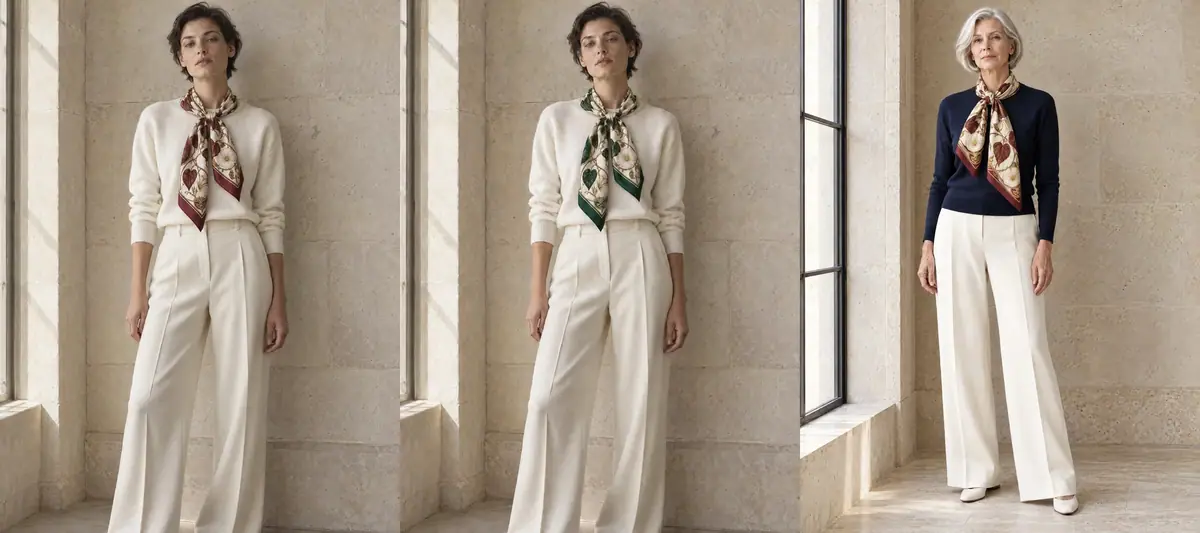
One silk scarf shown three ways: on a model, in a second colorway, and on a second model, with its print intact and the person unchanged. For apparel and accessories teams who need on-model images without a shoot per variant.
The brief
| Field | Brief |
|---|---|
| Goal | On-model catalog images for a new silk scarf |
| Inputs | One flat-lay of the scarf, one model photo (ivory knit, wide ivory trousers, limestone wall) |
| Variants | Oxblood on model A; bottle-green colorway on model A; oxblood on model B |
| Fixed | The person (face, hair, body, pose); the photo (wall, window light, framing); the scarf's ivory twill ground, oxblood border, bindweed leaves and ivory trumpet flowers on gold vines, center medallion, hand-rolled hem |
| May vary | How the scarf is knotted, folds and drape |
| Accept when | The print matches the flat-lay at 1:1 (leaves, flowers and vines all present, at the same scale); the face matches the model photo; only the asked change differs between variants |
The scarf is the 90 cm silk twill of Maison Liseron, an invented Paris leather house. The same house's images become a brand look in Give a whole team one brand look.
Approach
- 1InputsScarf flat-lay and model photo
- 2Try-onGPT Image 2.5 Sunburst, person then garment
- 3CompareNano Banana 2.1, P-Image Try-On, Virtual Try On App
- 4ColorwayEdit the approved try-on, color only
- 5Model changeSame prompt, second model photo
Treat try-on as an edit with two references, each with one job (Give references a role): image 1 is the person and the photo, image 2 is the garment.
The prompt lists what to keep from each, the way a product keep-list works (Decide what stays fixed). Then derive the variants by changing one thing at a time (Edit one thing):
- Colorway: edit the approved try-on image and change only the print's colors, naming every other part as fixed. Do not re-run the try-on with a recolored flat-lay: that re-rolls the knot, the drape and the face.
- Model change: run the same try-on prompt on a different model photo with the same garment reference.
Prints, patterns and small text are the hardest part of a garment. A model can keep the colors and the general idea while dropping a motif or rescaling the repeat, and that only shows when you compare with the flat-lay at full size. Compare on your own garment before choosing (Compare models on your brief).
Models, as of October 2026:
- Capability: image to image with two references, and prompt editing.
- Winner: GPT Image 2.5 Sunburst.
- Runner-up: Nano Banana 2.1, good drape and face, but the ivory flowers dropped out of the print.
- Dedicated try-on: P-Image Try-On refused this scarf twice ("garment isn't currently supported for try-on"). Test it on shirts, dresses and jackets, where it is fast and cheap.
- Platform App: Virtual Try On (inputs: a person image, an outfit image and a prompt) runs GPT Image 2.5 Sunburst with a one-line prompt and a fixed 9:16 output. See below for what that changed.
Steps
-
Prepare the two inputs. A flat-lay of the garment, top-down, whole and unwrinkled, on a plain background; and a model photo, front-facing, arms loose, plain wall. For this invented product both were generated; with a real garment, use your own photos.
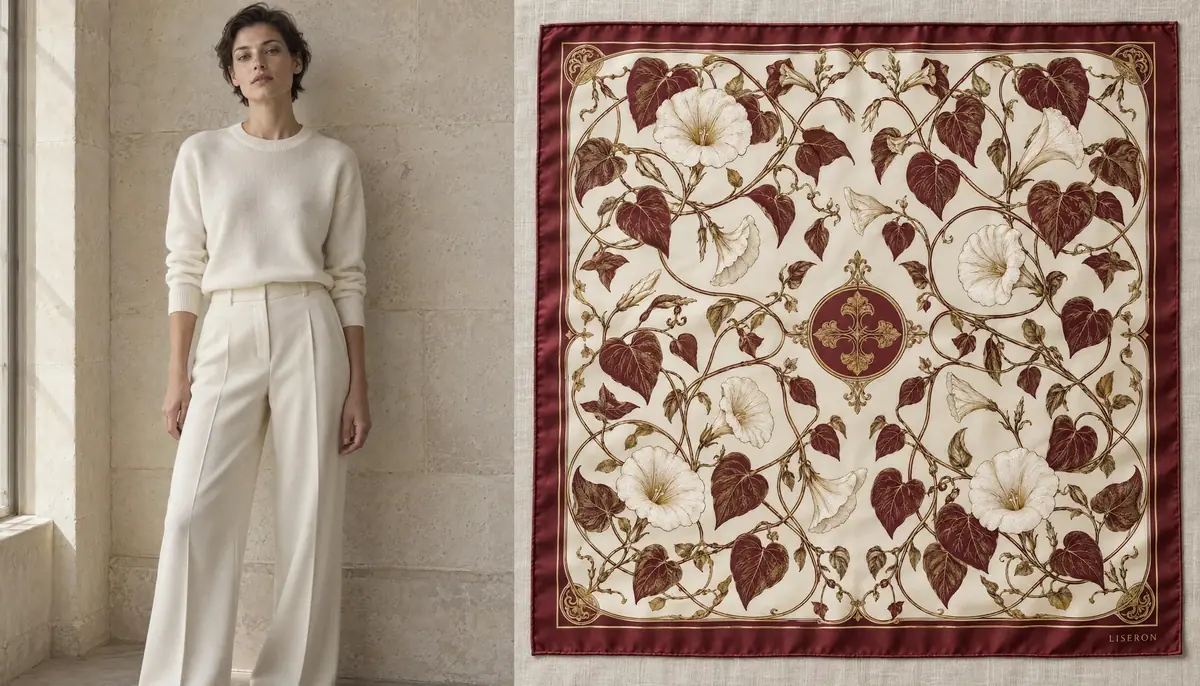
The inputs: model photo (image 1) and scarf flat-lay (image 2). -
Run the try-on (Give each reference a role). Create > Images, GPT Image 2.5 Sunburst. In Reference Images, add the model photo first and the flat-lay second. Image Count 2, Dimensions 1536x2048 (3:4, the model photo's shape), Quality
high:PromptImage 1 is the person and the photo: keep her face, short dark hair, skin tone, body, pose, ivory knit sweater, wide ivory trousers, the limestone wall, the window light and the framing exactly as they are. Image 2 is the garment: dress her in this exact silk scarf, folded into a band and tied loosely around her neck with one soft knot at the front, the two ends hanging over the sweater. Keep the scarf's ivory silk twill ground, the oxblood border, the oxblood and ivory bindweed leaves and trumpet flowers on gold vines, the oxblood center medallion and the hand-rolled hem exactly as in image 2. Natural drape and silk folds, realistic sheen and shadows. No other changes, no added text. Style: quiet luxury still life and editorial: window light, limestone and travertine, exquisite material detail, restraint. -
Compare on the same pair (Run a same-input shoot-out). Run the same prompt and references on Nano Banana 2.1 (3:4, 2K). Then try a dedicated model: Choose a Model, search for P-Image Try-On, set the model photo as the person and the flat-lay as the garment. On this scarf it failed twice, with and without a prompt describing the knot. A failed run still costs a little, so stop after two.
-
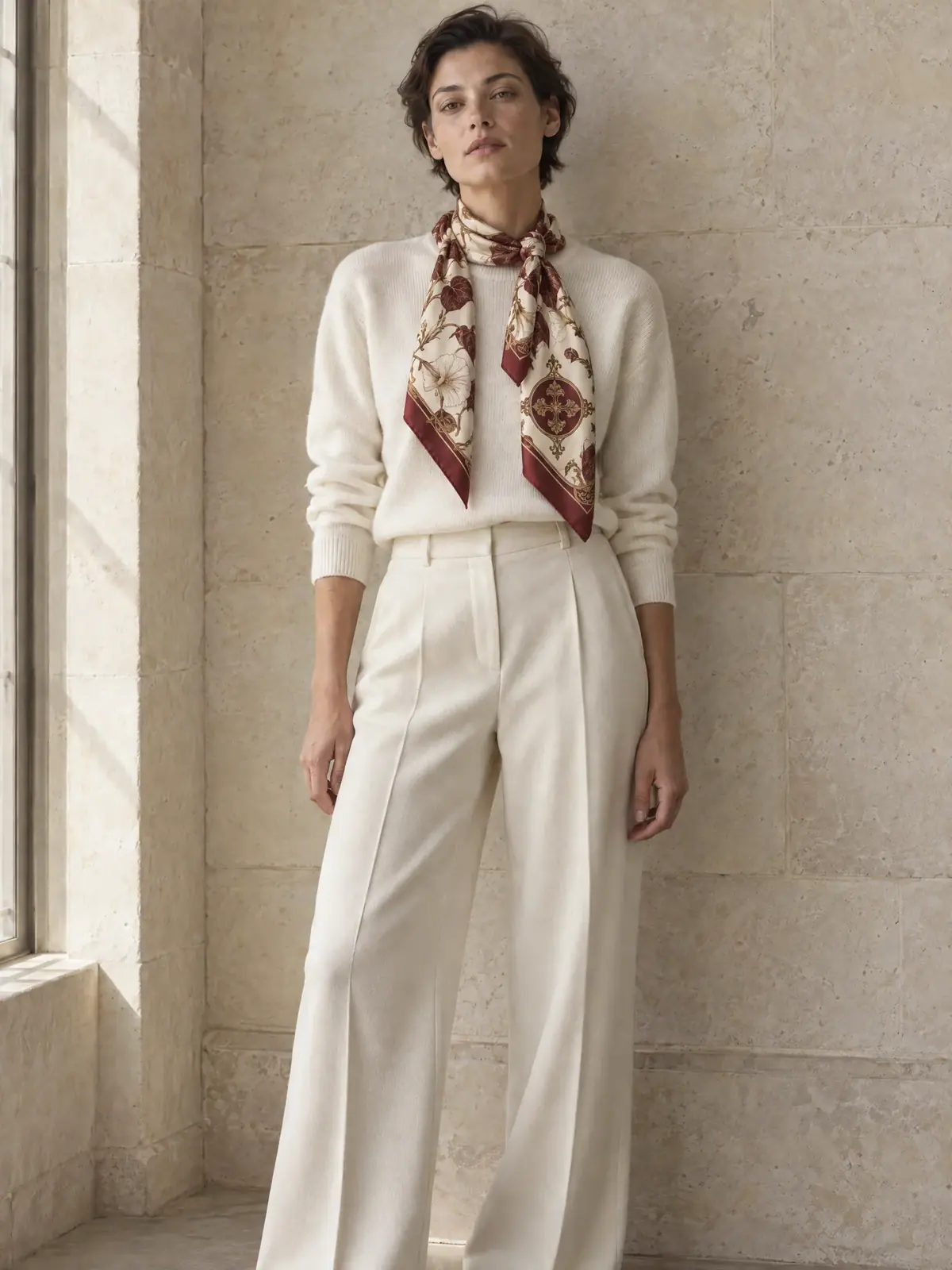
Choose a take, at 1:1. Put each result next to the flat-lay and check the print motif by motif, then compare the face with the model photo. Of the two Sunburst takes, take A hung the center medallion on one of the loose ends. Folded into a band, a square scarf shows its corners at the ends and hides its center at the neck, so that placement cannot exist on the real scarf. Take B is kept.
-
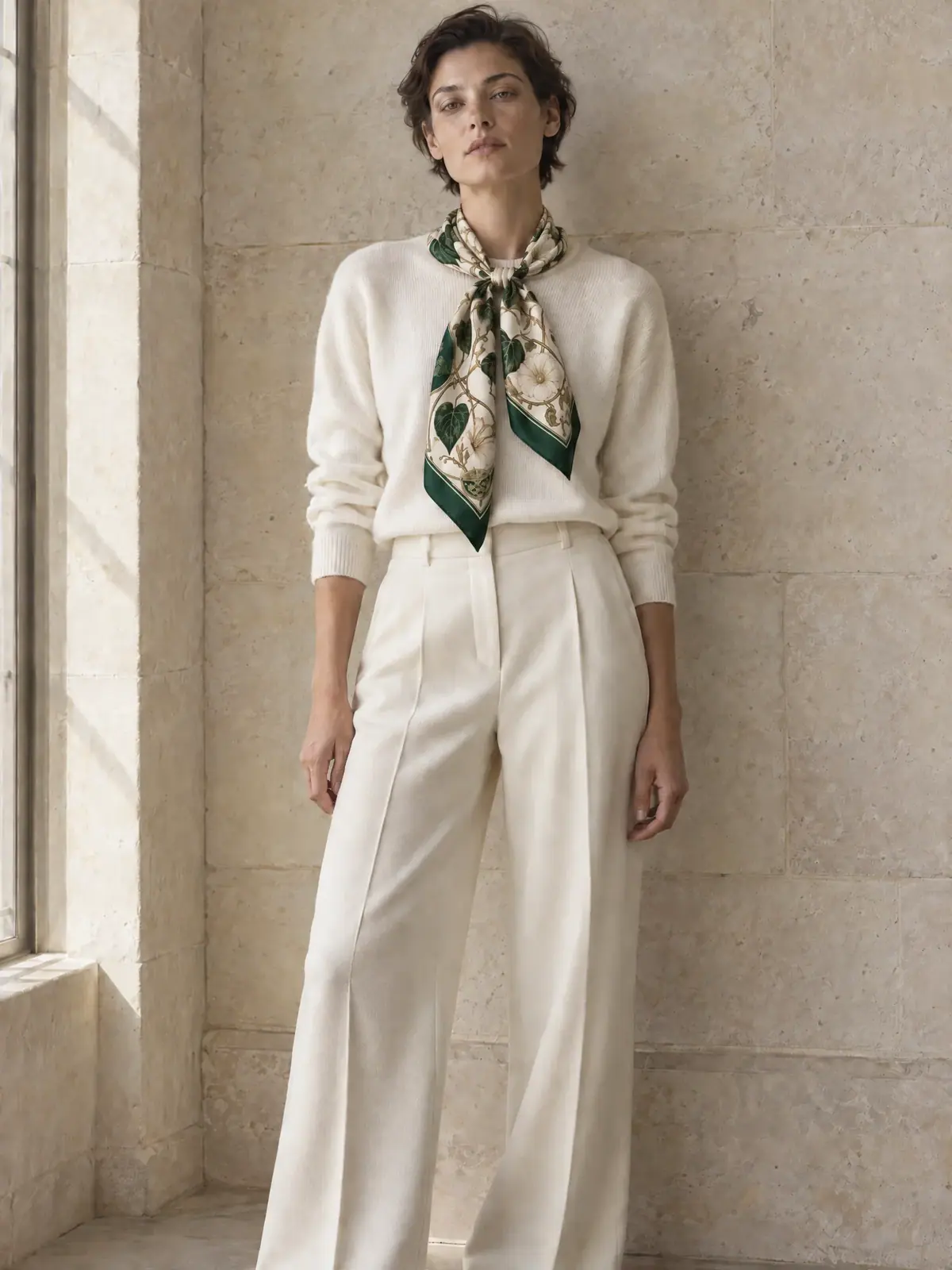
Make the colorway (Edit one thing). Same model, Reference Images: the approved try-on only, Image Count 1:
PromptChange only the colors of the silk scarf: every oxblood area (the border, the leaves, the center medallion) becomes a deep bottle green with the same silk sheen. Keep the ivory ground, the gold vines, the ivory trumpet flowers, the pattern, the knot, the folds and the hand-rolled hem exactly as they are. Keep everything else exactly as it is: the woman's face, short dark hair, pose, ivory knit sweater, wide ivory trousers, the limestone wall, the window light and the framing. No other changes. Style: quiet luxury still life and editorial: window light, limestone and travertine, exquisite material detail, restraint. -
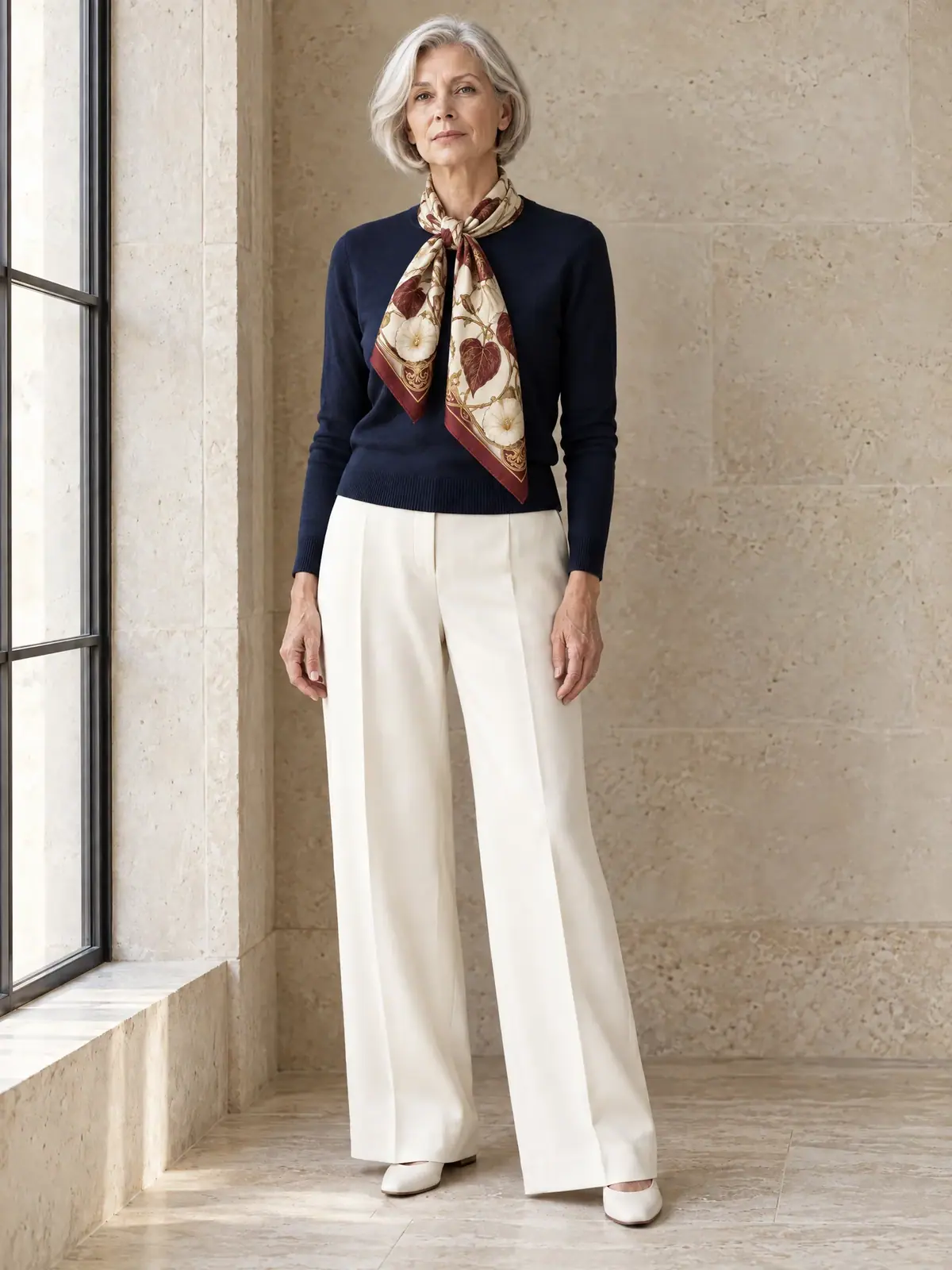
Change the model. Generate or pick a second model photo with the same wall, light and framing (this run generated one: a woman in her sixties with a short silver bob, in a navy crew-neck), then rerun step 2 with it as image 1, adapting the keep-list to that person ("keep her face, short silver bob, skin tone, body, pose, navy crew-neck sweater, wide ivory trousers, white shoes, the limestone wall, the window...").
With the Scenario MCP: model_run on model_openai-gpt-image-2-5-sunburst with referenceImages: ["<person id>", "<garment id>"], width: 1536, height: 2048, quality: "high"; or on model_pruna-p-image-try-on with personImage, referenceImages: ["<garment id>"] and preserveInputSize: true. A failed P-Image job returns a hint that names the reason. Colorways can run in parallel from the same approved try-on with wait: false.
Check the result
every motif of the flat-lay is present at the same scale (here: leaves, ivory flowers, gold vines, border); the print sits where it could sit on the real garment; the face, hair and body match the model photo; the colorway changed only the colors named; the garment drapes naturally.
a motif disappears or the repeat changes scale; a print element moves somewhere the real garment cannot show it (a center medallion on a loose end); the face changes; garment parts appear or vanish; the colorway also shifted the wall or the knot; the fit looks pasted on.
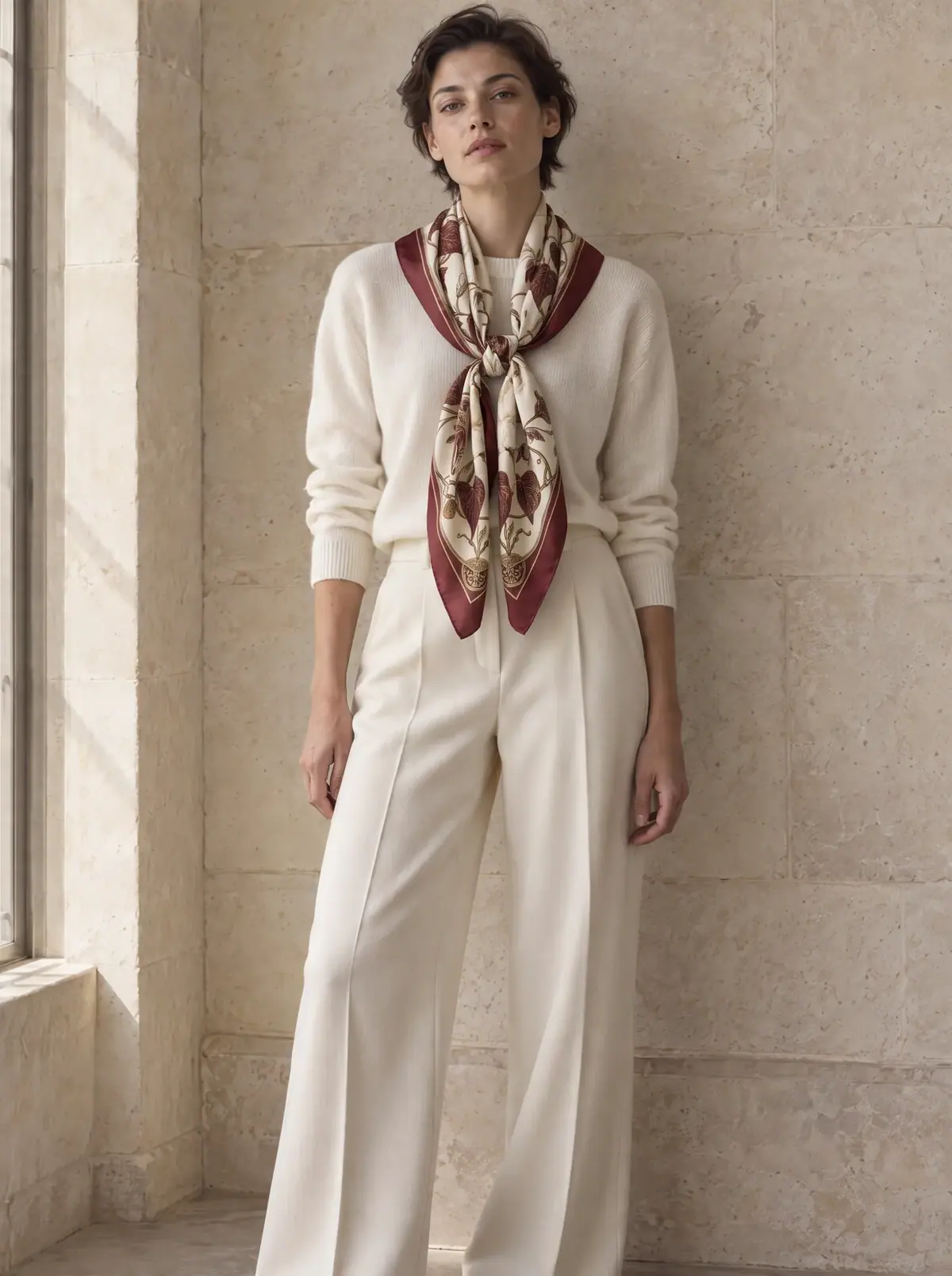
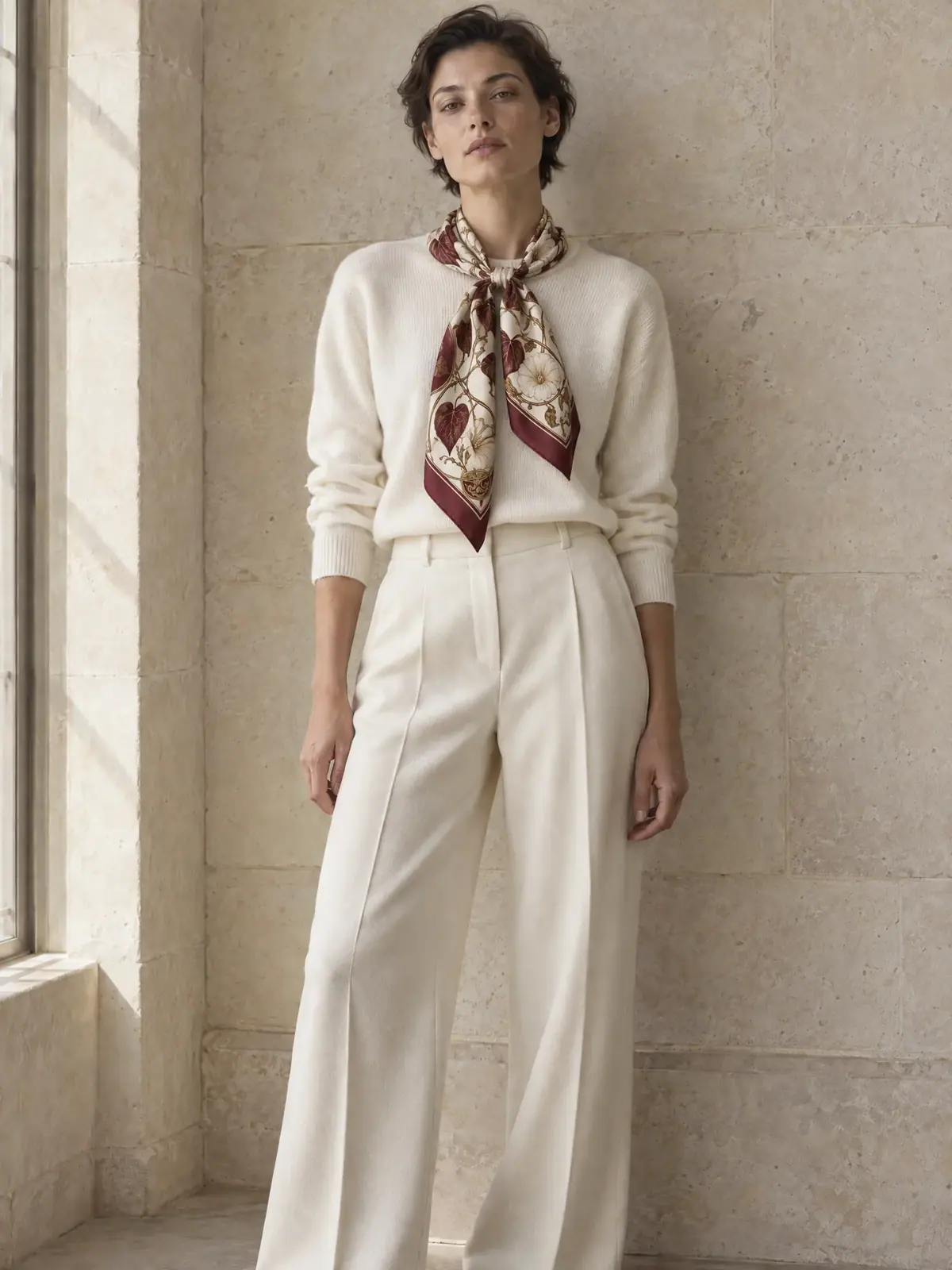
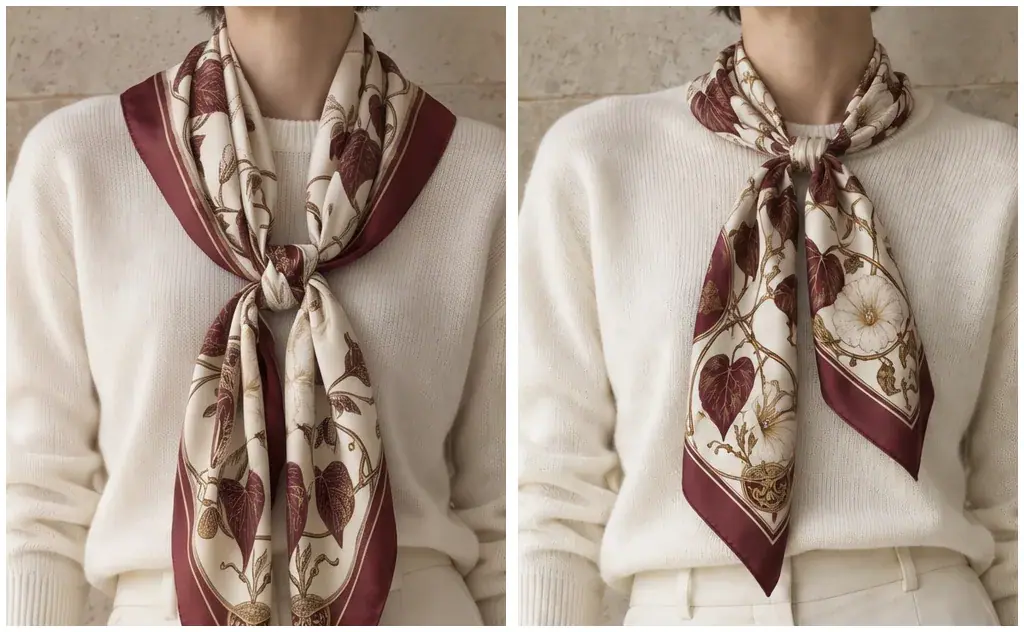
- The print is the product. At catalog size both takes read as "oxblood bindweed scarf". At 1:1, only one is this scarf.
- The platform App is a baseline, not the finish. Virtual Try On builds its prompt as "Dress the person from the first image in the clothes from the other image(s)" plus your line, with no keep-list, and outputs 2160x3840. On this pair it recropped the 3:4 photo to 9:16, tilted her head and drew a smaller scarf with a blurred print. Copy it and add the keep-list (see Make it repeatable).
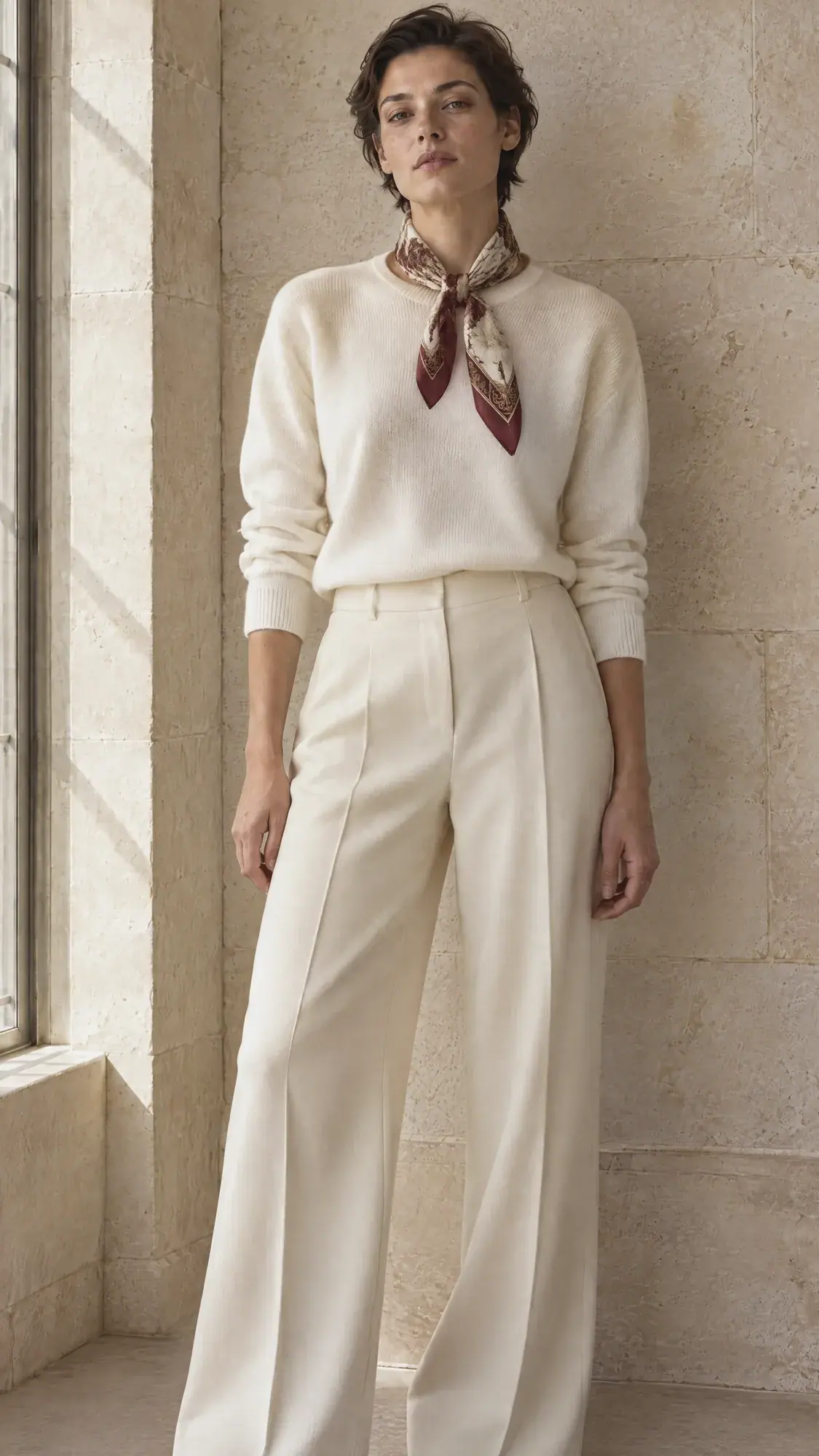
 Rejected
The colorway and the model change both held the print. The colorway kept the knot, every fold and the face; the model change kept her silver bob, navy sweater and white shoes. Both went into the collection without a retake.
1Two try-ons of the bindweed scarf on model A. The brief fixes the print: leaves, ivory flowers and gold vines. Which one ships?
Answer: C. Compare the print with the flat-lay at full size. Take A kept the leaves and the border but lost most of the ivory flowers, which fails the brief.
2A dedicated try-on model fails twice on your scarf with "garment isn't currently supported". What do you do?
Answer: B. If something fails twice the same way, change approach. Dedicated try-on models cover common garments; accessories like a folded scarf may be out of their scope.
Make it repeatable
- A garment sheet per product: flat-lay, keep-list sentence (ground, border, motifs, hardware or patch text), colorway names with their color descriptions, and the knot or fit the catalog uses.
- Build a try-on App (Package it as a workflow or skill). Start from a copy of the platform Virtual Try On App, which already has the person and outfit inputs. In the Node Editor:
- keep the Image input for the person and the multi-image input for the outfit, and add a Text input (
Garment keep-list); - change the Prompt Builder to join the fixed person sentence, the keep-list and the drape sentence;
- set the Image Generator dimensions to your catalog's shape (3:4 here) and Quality to
high; - add an Approval node with
Approve only if every motif of the print and the face are exact.
- keep the Image input for the person and the multi-image input for the outfit, and add a Text input (
- Colorways in a loop (Batch from a template). Add a Loop over a list of colorway descriptions, each feeding the colorway prompt with the approved try-on as the reference.
- A model bank. Keep approved model photos (same wall, light and framing) in one collection, so every garment can be shown on the same people across the catalog.
Runs and time
| Step | Model | Runs or takes | Kept | Wait |
|---|---|---|---|---|
| Model photo and flat-lay (invented product only) | GPT Image 2.5 Sunburst, high | 2 (Batch 1 masters) | 2 | about 40 s each |
| Try-on | GPT Image 2.5 Sunburst, high | 1 run, 2 takes | 1 | about 45 s |
| Try-on, comparison | Nano Banana 2.1, 2K | 1 | 0 (runner-up) | about 35 s |
| Try-on, comparison | P-Image Try-On | 2, both failed | 0 | about 35 s each |
| Try-on, comparison | Virtual Try On App | 1 | 0 | about 55 s |
| Bottle-green colorway | GPT Image 2.5 Sunburst, high | 1 | 1 | about 45 s |
| Second model photo | GPT Image 2.5 Sunburst, high | 1 | 1 | about 40 s |
| Model change | GPT Image 2.5 Sunburst, high | 1 | 1 | about 55 s |
Every Sunburst edit costs about the same; with your own photos, a try-on plus a colorway is two of them. The comparisons are the spend you skip once a model has proven itself on your garments. The price shows on the Generate button before you run.
Variations
- Common garments without prints: try a dedicated try-on model first; it is cheaper and fast.
- Bags and footwear: use a three-quarter packshot as the garment reference and name the hardware, stitching and engraving in the keep-list. Read engraved text at 1:1.
- Size inclusivity: run the same try-on on model photos across sizes; check that the garment's proportions scale instead of stretching. Like any try-on image, it shows a look, not a physical fit.
- Ways to wear: keep the person and the garment fixed and change only the knot or drape sentence (neck knot, headscarf, bag handle).
- Lifestyle shots: once the on-model image is approved, place it in a scene with the method from Product lifestyle scenes.
If it breaks
- A motif disappears or the print rescales. Name every motif in the keep-list, use a model that held it in your comparison, and check at 1:1 against the flat-lay.
- The print lands somewhere the garment cannot show it. Describe how the garment is worn in terms of its own parts ("the knot at the center, the corners hanging as the ends"), and reject takes that break that.
- The face changes or the photo is recropped. Put the person first in Reference Images, list the face, hair and framing as fixed, and set the output to the model photo's own shape.
- A dedicated try-on model refuses the garment. Its
hintnames the reason. After two failures, switch to a two-reference edit. - The colorway changes more than the color. Edit from the approved try-on, name the areas that change and every other part as fixed, and keep "No other changes."
- The fit looks pasted on. Ask for "natural drape and folds, realistic sheen and shadows", and start from a model photo whose pose suits the garment.